
Limited-Time Offer: Enjoy 50% Savings! Ends in 00h 00m 00s Coupon code: 50OFF
Skip to content

Free Adobe Experience Manager Sites Developer Professional AD0-E123 Exam Questions

Page: 1 / 9 Total 50 questions

Want more questions? Get Premium Access.

Question 1

A developer wants to write a Java service that will serve some data to the custom component.

Which one of the Maven modules is the place to create this service?

Correct Answer: C. core
Explanation:

A Java service, which is a backend Java class that encapsulates some business logic or functionality, should be placed in the core Maven module of an AEM project. This module is intended for the Java code that contains OSGi services, servlets, and other Java backend code. By creating the service in the core module, it can be properly compiled, packaged, and deployed as an OSGi bundle within AEM.

Question 2

A developer wants to overwrite an OSGi configuration via the codebase.

Which one of the Maven modules is the place to create this configuration on the codebase?

Correct Answer: B. ui.apps
Explanation:

In AEM, OSGi configurations are typically managed within the ui.apps Maven module. This module is responsible for the application code that comprises the components, templates, and OSGi configurations among other things. By placing OSGi configurations within the ui.apps module, a developer can ensure that these configurations are deployed to the JCR repository and become part of the application package.


Question 3

A developer wants to see debug logs for SAML. Which logger must be created for this purpose?

Correct Answer: C. com. adobe, granite.aulh.saml
Explanation:

The correct logger to be created for debugging SAML (Security Assertion Markup Language) within AEM (Adobe Experience Manager) is the one pertaining to the Granite platform, which is part of AEM's internal framework dealing with authentication. The Granite framework provides services that include user, group, and permission management, and is integral to AEM's SAML authentication process. Thus, the logger com.adobe.granite.auth.saml is the appropriate logger that should be created and configured to capture and display debug logs related to SAML authentication processes.


Question 4

A developer has created a custom workflow model. While using this custom workflow model on multiple assets/pages, an individual workflow instance is getting started for each asset/page.

Which property can be enabled to start a single workflow instance if multiple assets/pages have been selected7

Correct Answer: A. Multi Resource Support
Explanation:

The 'Multi Resource Support' property is used in custom workflow models in AEM to allow a single workflow instance to handle multiple resources, such as assets or pages. When this property is set to true, if multiple assets or pages are selected and the workflow is initiated, AEM will start only one workflow instance instead of individual instances for each item. This is useful for bulk processing of resources, improving efficiency, and managing workflows better.

Option B, 'Multi Resource Enable,' is not a standard AEM workflow property.

Option C, 'Transient Workflow,' refers to workflows that do not persist their data and are not related to handling multiple resources in a single instance.


Question 5

A developer must use print-314% in a webpage.

Assuming piValue = -3.14

Which HTL approach would be used?

Correct Answer: A. ${'-#.##%' @ format=plValue}
Explanation:

In HTL, the format option in the data-sly-use or data-sly-test attribute can be used to format values according to a pattern. The pattern '-#.##%' indicates that the number should be formatted as a percentage with up to two decimal places. The piValue variable would be the number to format, and in this example, it would convert -3.14 to -314%. The @ symbol is used to denote the use of an option with the variable in HTL.

Options B and C are incorrect because they do not use the correct syntax for the format option in HTL. The use of @ is to specify options and not part of the variable or pattern itself.


Question 6

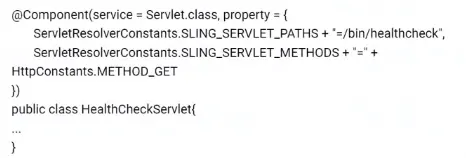
A content author has this OSGI component:

How can the content author use the Apache Felix Web OSGi console to disable the servlet?

Correct Answer: C. Select the Components tab > Check that the OSGi component is listed > Click disable Action button
Explanation:

In the Apache Felix Web Console, which is the OSGi management console of AEM, components are managed under the 'Components' tab. The provided OSGi component, a servlet in this case, can be disabled by navigating to the 'Components' tab, where all the active components are listed. Once the specific servlet is located, it can be disabled by clicking on the 'Disable' action button associated with that component. This does not remove the servlet from the system; it simply stops it from being active.

Option A is incorrect because the 'Bundle Resource Provider' tab does not deal with enabling or disabling of components.

Option B is also incorrect because the 'Services' tab provides information about services but does not provide a direct way to disable them.