Limited-Time Offer: Enjoy 50% Savings! Ends in 00h 00m 00s Coupon code: 50OFF
Skip to content

Free Adobe Experience Manager Sites Developer Exam AD0-E134 Exam Questions

Page: 1 / 9 Total 50 questions

Want more questions? Get Premium Access.

Question 1

An AEM development team is working on a new multi-country application using AEM as a Cloud Service. A developer has been assigned the task for building the integration with a third-party web service. A secret key is needed to connect with this web service. The website creators will provide this key. The key is different for each type of environment (dev, stage and production)

What is the recommended way to make the secret key available in the AEM application?

Question 2

AEM SPA integration provides various design models. In an application the developer chooses to use AEM as a headless CMS without using the SPA Editor SDK framework.

What would be an advantage for this design model?

Question 3

Which tool should a developer use to look up Adobe Identity Management System (IMS) users by email and return their IMS IDs?

Correct Answer: C. IMS Lookup Tool
Explanation:

The correct tool to use for looking up Adobe Identity Management System (IMS) users by email and returning their IMS IDs is the IMS Lookup Tool. This tool is specifically designed to interact with the Adobe Identity Management System (IMS) and provides functionality to search for user details using various criteria such as email addresses.

Steps to use the IMS Lookup Tool:

Access the IMS Lookup Tool: Navigate to the IMS Lookup Tool interface. This tool is typically available through the Adobe Admin Console or as a part of Adobe's suite of administrative tools.

Authenticate: Ensure that you have the necessary permissions to use the tool. Authentication may be required, often through your Adobe ID and associated admin privileges.

Search by Email: Enter the email address of the user you want to look up in the search field.

Retrieve IMS ID: The tool will return the IMS ID associated with the provided email address.

This tool is essential for managing user identities and integrating with various Adobe services that rely on IMS for authentication and authorization.


Adobe IMS Documentation

Adobe Admin Console

Question 4

An AEM Developer needs to build out a project. That contains only the required modules. Which most recent AEM Archetype module is optional?

Correct Answer: B. ui frontend
Explanation:

When building out a project using the most recent AEM Archetype, the ui.frontend module is optional. The ui.frontend module is typically used for integrating front-end build processes, such as those involving npm, Webpack, or other front-end tooling. If your project does not require such front-end tooling, you can omit this module.

Here is a breakdown of the archetype modules:

it.launcher: This module is used for integration tests and is required if you need to run automated tests as part of your build process.

ui.frontend: This module includes front-end tooling and build processes. It is optional and can be omitted if your project does not involve complex front-end development.

ui.tests: This module includes unit and integration tests for the UI part of your AEM project. It is often required for testing purposes.

ui.content: This module includes the content structures and initial content for your AEM project. It is generally required to set up the content for your project.


AEM Project Archetype

AEM Development Best Practices

Question 5

An AEM application development team is assigned a task to create an Event-Driven Data Layer implementation for an Analytics solution.

Which Adobe recommended best practice should the developer choose?

Question 6

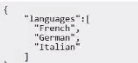
A developer needs to create an OSGI service that is able to read a list of spoken languages from the configuration of the service. The configuration file tanguageServicelmplefgjson' already exisls:

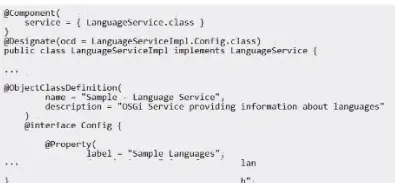
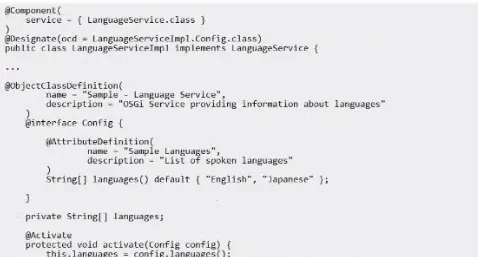
Which snippet should the developer use lo read the OSGi configurations?

A)

B)

Correct Answer: B. Option B
Explanation:

To read a list of spoken languages from the configuration of an OSGi service, the correct snippet to use is Option B. This snippet demonstrates how to define and read the configuration properties using the OSGi R7 annotations (@ObjectClassDefinition and @AttributeDefinition), which are the recommended way for defining OSGi configurations in modern AEM projects.

Here is the detailed explanation of the snippet:

Option B Snippet Explanation:

Component Definition:

@Component(

service = { LanguageService.class }

)

@Designate(ocd = LanguageServiceImpl.Config.class)

public class LanguageServiceImpl implements LanguageService {

This defines an OSGi component and designates a configuration class for it.

Configuration Interface:

@ObjectClassDefinition(

name = 'Sample - Language Service',

description = 'OSGi Service providing information about languages'

)

@interface Config {

@AttributeDefinition(

name = 'Sample Languages',

description = 'List of spoken languages'

)

String[] languages() default { 'English', 'Japanese' };

}

This defines the configuration interface with annotations to describe the configuration properties. The languages attribute is defined with a default value of {'English', 'Japanese'}.

Activate Method:

private String[] languages;

@Activate

protected void activate(Config config) {

this.languages = config.languages();

}

The activate method reads the configuration values and assigns them to the instance variable languages when the service is activated.

Here is the complete Option B code:

@Component(

service = { LanguageService.class }

)

@Designate(ocd = LanguageServiceImpl.Config.class)

public class LanguageServiceImpl implements LanguageService {

@ObjectClassDefinition(

name = 'Sample - Language Service',

description = 'OSGi Service providing information about languages'

)

@interface Config {

@AttributeDefinition(

name = 'Sample Languages',

description = 'List of spoken languages'

)

String[] languages() default { 'English', 'Japanese' };

}

private String[] languages;

@Activate

protected void activate(Config config) {

this.languages = config.languages();

}

// Additional methods to use the languages array

}

By using this approach, you ensure that your OSGi service can dynamically read and use the list of spoken languages specified in its configuration, making it adaptable to different environments and requirements.


OSGi R7 Annotations

Adobe Experience Manager - OSGi Configuration