
Limited-Time Offer: Enjoy 50% Savings! Ends in 00h 00m 00s Coupon code: 50OFF
Skip to content

Free Adobe Campaign Classic Business Practitioner - Certified Expert AD0-E327 Exam Questions

Page: 1 / 9 Total 50 questions

Want more questions? Get Premium Access.

Question 1

A business practitioner wants to create a cross delivery workflow in a campaign so that customers who are subscribed to a newsletter would receive a promo in an email, then in an SMS.
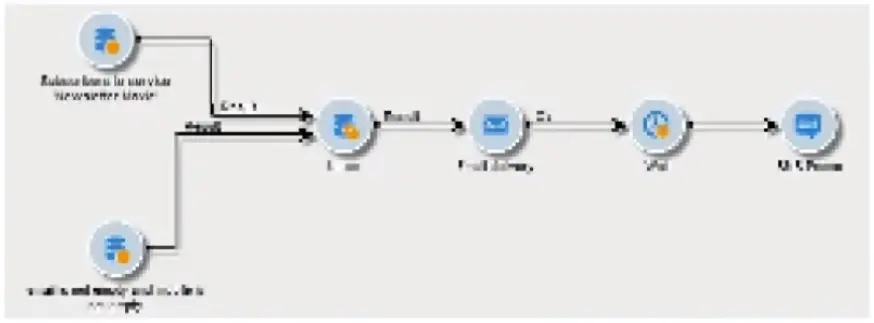
What should the business practitioner do to ensure that this workflow is cross delivery?

Correct Answer: C. Check 'Generate an outbound transition' in the workflow execution settings of the email delivery
Explanation:

To create a cross-delivery workflow where an email is followed by an SMS, it's important that the workflow can pass the target recipients from the email delivery to the SMS delivery. Checking the 'Generate an outbound transition' option in the workflow execution settings of the email delivery creates an output population that can be used as the input for the subsequent SMS delivery activity. This ensures that the recipients who received the email are then considered for the SMS, maintaining the flow of communication across the different delivery channels. Reference: This process aligns with cross-channel campaign management, where the flow of the recipient data from one delivery channel to another is managed within a campaign workflow.


Question 2

A workflow was returning unexpected results. The Operator used the pause functionality to put the workflow into a paused state to examine these results. They never cleared the pause state.

What two impacts will this have on the overall Campaign instance? (Choose two.)

Correct Answer: C. It will stop further iterations of the workflow from running; D. It will leave any temporary tables in place
Explanation:

Leaving a workflow in a paused state can have several impacts on the overall Campaign instance. Firstly, it will stop further iterations of the workflow from running, which means that any scheduled runs or events that are supposed to trigger the workflow will not execute until the pause is cleared. Secondly, it will leave any temporary tables in place. Adobe Campaign workflows often create temporary tables for processing data, and these tables are usually dropped at the end of the workflow. If the workflow is paused and not properly terminated, these temporary tables may persist, potentially using up system resources and storage space. Reference: The implications of paused workflows are based on the standard operation and management of workflows within Adobe Campaign Classic and how they interact with database resources.


Question 3

The data analytics team confirms that a CSV file of high-intent customers has been extracted from the Enterprise Data Warehouse and placed on the Adobe SFTP server ready for use in a trial campaign. The workflow consists of a file collector, data loading activity, and an enrichment to reconcile customers using recipient IDs. A business practitioner runs the workflow and an error occurs during the enrichment activity.

What could be causing the error?

Correct Answer: B. The Data loading activity has not been configured to format the recipient ID field in the file
Explanation:

During a workflow, if an error occurs during the enrichment activity, it often indicates a mismatch or configuration issue with the data being processed. If the data loading activity has not been configured correctly to format the recipient ID field according to the expected format in the Adobe Campaign database, the enrichment activity will fail to reconcile the customers. This is because the enrichment relies on matching the formatted recipient IDs in the workflow with those in the target schema. If there's a formatting discrepancy, the process cannot successfully match and enrich the data, leading to an error. Reference: This explanation is derived from general knowledge of data integration and workflow processes in systems like Adobe Campaign Classic, where data loading and enrichment activities are key components of campaign workflows.


Question 4

An Adobe business practitioner needs to export a report on user activities with various reporting tools within Adobe Campaign. The business practitioner would like to know how many times each report has been generated and how many unique users used it.

What is the best practice to accomplish this task?

Correct Answer: A. Use Audit features available under Administratlon\Audit folder
Explanation:

Adobe Campaign provides several reporting tools that can help analyze and represent data for different purposes. Some of these tools are:

Audit features: These features allow you to track and monitor user activities on various objects and folders in Adobe Campaign, such as deliveries, workflows, reports, etc. You can access them under Administration > Audit folder.

logins.log file: This file records all the login attempts to Adobe Campaign server, including successful and failed logins. You can access it in the nlserver syslogd module.

Delivery summary report: This report shows a summary of the delivery settings and statistics, such as target population, subject line, sender name, etc. You can access it in Adobe Creative Cloud.

This would allow you to export a report on user activities with various reporting tools within Adobe Campaign. You would be able to see how many times each report has been generated and how many unique users used it.


Question 5

A business practitioner is creating a workflow with a querying population of 100 records. At the end of the workflow, the email delivery has a success status of 98. When the business practitioner checks the delivery logs, there are 110 successfully delivered emails.

What is a reason for 110 successfully delivered emails?

Correct Answer: D. The delivery logs are counting the email deliveries plus the seed addresses
Explanation:

Adobe Campaign allows you to access and analyze the tracking logs of your deliveries.These logs contain information about the status, date, time, recipient and channel of each message sent2.You can also use reports and alerts to monitor your delivery performance and issues3.

One reason for 110 successfully delivered emails when the querying population is 100 records is thatthe delivery logs are counting the email deliveries plus the seed addresses. Seed addresses are additional email addresses that you can add to your delivery target for testing purposes. They are not part of your querying population but they are included in your delivery logs.


Question 6

Which functionality enables a business practitioner to display different variations of content to the recipients of the email delivery according to a predefined condition configured in the expression editor?

Correct Answer: B. Dynamic content
Explanation:

The functionality that enables a business practitioner to display different variations of content to the recipients of the email delivery according to a predefined condition configured in the expression editor is calledDynamic content.

Dynamic content functionality in email marketing platforms like Adobe Campaign allows business practitioners to create different content variations within an email that are displayed to different recipients based on predefined conditions. These conditions are typically configured in the expression editor, where practitioners can define the criteria that determine which content variation a recipient will see. This can be based on demographic information, past behavior, or any other data point collected on the recipient. Reference: The dynamic content functionality is a core feature of modern email marketing and campaign management systems designed to deliver personalized content to recipients.