
Limited-Time Offer: Enjoy 50% Savings! Ends in 00h 00m 00s Coupon code: 50OFF
Skip to content

Free Adobe Commerce Developer with Cloud Add-on AD0-E716 Exam Questions

Page: 1 / 7 Total 69 questions

Want more questions? Get Premium Access.

Question 1

A new customer registered on the Integration environment of an Adobe Commerce Cloud project but did not receive a welcome email What would be blocking the email from being sent?

Correct Answer: C. The Outgoing Emails setting is disabled into Environment Settings in the Project Web Interface.
Explanation:

The reason why the new customer did not receive a welcome email is that the Outgoing Emails setting is disabled in the Environment Settings in the Project Web Interface. This setting controls whether emails are sent from the application or not. By default, this setting is disabled for integration environments to prevent spamming or testing emails from being sent to real customers or recipients. The developer can enable this setting if they want to test email functionality on integration environments. Verified Reference: [Magento 2.4 DevDocs]



Question 2

An Adobe Commerce developer has created a before plugin for the save() function within the

Magento\Framework\App\cache\Proxy class. The purpose of this plugin is to add a prefix on all cache identifiers that fulfill certain criteria.

Why is the plugin not executing as expected?

Correct Answer: C. The target ClaSS implements Magento\Framework\ObjectManager\NoninterceptableInterface.
Explanation:

According to the Plugins (Interceptors) guide for Magento 2 developers, plugins are class methods that modify the behavior of public class methods by intercepting them and running code before, after, or around them. However, some classes in Magento 2 implement the NoninterceptableInterface interface, which prevents plugins from being generated for them. The Magento\Framework\App\cache\Proxy class is one of them, as it extends from Magento\Framework\ObjectManager\NoninterceptableInterface. Therefore, the plugin is not executing as expected because the target class implements NoninterceptableInterface. Verified Reference: https://devdocs.magento.com/guides/v2.3/extension-dev-guide/plugins.html


Question 3

An Adobe Commerce developer is about to deploy a critical feature to their Adobe Commerce Cloud (Pro Plan) production. They want to create a snapshot in order to be able to rollback if there is an issue with the feature.

How would they create the snapshot?

Correct Answer: A. Use the dedicated button on Project Web Interface.
Explanation:

The developer can create a snapshot before deploying a critical feature to their Adobe Commerce Cloud (Pro Plan) production by using the dedicated button on Project Web Interface. A snapshot is a backup of an entire environment, including code, data, media files, and configuration settings. A snapshot can be used to restore an environment to a previous state in case of any issues or errors during deployment or testing. The developer can create a snapshot by accessing the Project Web Interface, choosing an environment, and clicking Create Snapshot. Verified Reference: [Magento 2.4 DevDocs]


Question 4

For security reasons, merchant requested to a developer to change default admin url to a unique url for every branch/environment of their Adobe Commerce Cloud project.

Which CLI command would the developer use update the admin url?

Correct Answer: B. magento-cloud variable:set ADMIN_URL
Explanation:

The CLI command that the developer would use to update the admin url is magento-cloud variable:set ADMIN_URL. This command sets an environment variable called ADMIN_URL with a custom value for the admin url on a specific environment. Environment variables are configuration settings that affect the behavior of the Adobe Commerce Cloud application and services. By setting an environment variable for ADMIN_URL, the developer can change the default admin url to a unique url for every branch/environment of their Adobe Commerce Cloud project. Verified Reference: [Magento 2.4 DevDocs]

Question 5

An Adobe Commerce developer is developing a custom module. As part of their implementation they have decided that all instances of their Custom\Module\Model\Example class should receive a new instance of Magento\Filesystem\Adapter\Local.

How would the developer achieve this using di. xml?

A)

B)

C)

Correct Answer: B. Option B
Explanation:

The developer can achieve this by adding the following configuration to their di.xml file:

XML

<config>

<component name='Custom\Module\Model\Example' factory='Custom\Module\Model\ExampleFactory'>

</component>

</config>

This configuration will ensure that all instances of the Custom\Module\Model\Example class will receive a new instance of the Magento\Filesystem\Adapter\Local class.


Question 6

On an Adobe Commerce Cloud platform, what type of environment will be provisioned when launching the CLI for Commerce command magento-cloud environment:branch ?

Correct Answer: C. An integration environment with the code and database from the parent environment.
Explanation:

The type of environment that will be provisioned when launching the CLI for Commerce command magento-cloud environment:branch <environment-name> is an integration environment with the code and database from the parent environment. Integration environments are temporary environments that are used for testing and development purposes on the Adobe Commerce Cloud platform. They can be created from any branch of code and have their own dedicated database and services. When creating an integration environment using the CLI for Commerce command, the code and database from the parent environment are copied to the new integration environment, creating an exact replica of the parent environment. Verified Reference: [Magento 2.4 DevDocs]


Question 7

An Adobe Commerce developer is asked to change the tracking level on a custom module for free downloading of pdf and images.

The module contains following models:

Download class has a parameter for tracking_level.

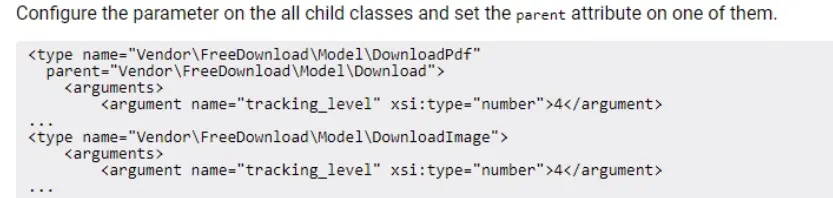
How will the developer configure the tracking_level parameter, in di.xml.to have a value of 4 for Download class and all classes that extend Download?

A)

B)

C)

Correct Answer: B. Option B
Explanation:

To configure the tracking_level parameter in di.xml to have a value of 4 for the Download class and all classes that extend Download, the developer would use the following code:

<config>

<global>

<models>

<Vendor\FreeDownload\Model\Download>

<setting name='tracking_level' value='4'/>

</Vendor\FreeDownload\Model\Download>

<Vendor\FreeDownload\Model\DownloadPdf>

<rewrite name='tracking_level' value='4'/>

</Vendor\FreeDownload\Model\DownloadPdf>

<Vendor\FreeDownload\Model\DownloadImage>

<rewrite name='tracking_level' value='4'/>

</Vendor\FreeDownload\Model\DownloadImage>

</models>

</global>

</config>

The setting element is used to set a configuration value for a specific model. The rewrite element is used to override the default configuration value for a specific model. In this case, the tracking_level parameter is set to 4 for all models that extend Download.


Question 8

An Adobe Commerce developer adds a new extension attribute to add an array of values to the invoices that are fetched through the APIs.

After a while, their technical manager reviews their work and notices something wrong with the extension_attributes. xml file that the developer created in their module:

What is the problem with this xml snippet?

Correct Answer: B. The extension attribute references the repository instead of the interface it implements (Magento\saies\Api\invoiceRepositorymterface).
Explanation:

The extension attribute is referencing the repository instead of the interface it implements. The correct XML snippet should be:

XML

<extension_attributes>

group='General'

translate='true'>

<description>This attribute stores an array of custom values for the invoice.</description>

<source_model>Magento\Sales\Api\Data\InvoiceInterface</source_model>

</extension_attributes>

The source_model attribute specifies the interface that the extension attribute is associated with. In this case, the extension attribute is associated with the Magento\Sales\Api\Data\InvoiceInterface interface.


Question 9

The developer is required to convert a modules database scripts from old install/upgrade setup files to a data patches format and does not want to apply database changes that were already done by install/upgrade scripts.

The current module version is 1.5.4.

What would be the recommended solution to skip changes that were already applied via old format (install/upgrade scripts)?

Question 10

A message queue currently has queue/consumer-wait-for-messages set to true, which allows the consumer process to run until a message is inserted into the queue. A piece of functionality is driven by data stored in the model

\Magento\variable\Model\variable and this value is only loaded once during the consumer run. If the variable is updated we want the consumer to restart so that the new value is loaded into memory without having to reload the variable on each message consumed.

The Adobe Commerce developer has created an after plugin on the \Magento\Variable\Model\variable:: save() function.

How would the developer use the plugin to trigger the consumer restart?