Limited-Time Offer: Enjoy 50% Savings! Ends in 00h 00m 00s Coupon code: 50OFF
Skip to content

Free Adobe Commerce Architect Master Exam AD0-E722 Exam Questions

Page: 1 / 9 Total 50 questions

Want more questions? Get Premium Access.

Question 1

An Adobe Commerce Architect is planning to create a new action that will add gift registry items to the customer's quote. What should the Architect do to guarantee that private content blocks are updated?

Correct Answer: C. Specify a new action in a sections.xml configuration file
Explanation:

Private content blocks are sections of the page that are specific to each customer and are not cached by the server. To update these blocks when a customer performs an action, such as adding a gift registry item to the quote, the Adobe Commerce Architect needs to specify the new action in a sections.xml configuration file. This file defines which blocks need to be updated for each action and how often they should be updated. By doing this, the Architect can ensure that the private content blocks are refreshed with the latest data from the server.Reference:

Private content | Magento 2 Developer Documentation

Configure private content | Magento 2 Developer Documentation


Question 2

An Adobe Commerce store owner sets up a custom customer attribute "my.attribute".

An Architect needs to display additional content on the home page, which should display only to Customers with "my.attribute" of a certain value and be the same content for all of them. The website is running Full Page Cache.

With simplicity in mind, which two steps should the Architect take to implement these requirements? (Choose two.)

Correct Answer: A. Add a new context value of 'my_attribute' to Magento\Framework\App\Http\Context; D. Add a dynamic block with the content to the Home Page
Explanation:

To display additional content on the home page based on a custom customer attribute, the Architect needs to do the following steps:

Add a new context value of ''my_attribute'' to Magento\Framework\App\Http\Context. This will allow the Full Page Cache to generate different versions of the page for customers with different values of ''my.attribute''. The context value can be set using a plugin on the Magento\Customer\Model\Context class.

Add a dynamic block with the content to the Home Page. A dynamic block is a type of content block that can be configured to display only to specific customer segments or conditions. The Architect can use the 'my.attribute' in the conditions of the dynamic block and assign it to the Home Page in the Content > Blocks section of the Admin Panel.Reference:

Private content | Magento 2 Developer Documentation

Dynamic Blocks | Adobe Commerce 2.3 User Guide - Magento


Question 3

An Adobe Commerce Architect needs to ensure zero downtime during the deployment process of Adobe Commerce on-premises. Which two steps should the Architect follow? (Choose two.)

Correct Answer: A. Enable Config flag Under deployement/blue_green/enabled; C. Run bin/magento setup:upgrade - -keep-generated to Upgrade database
Explanation:

Option A is correct because enabling the config flag under deployment/blue_green/enabled is one of the steps to ensure zero downtime during the deployment process of Magento 2 on-premises. This flag enables the blue-green deployment feature, which allows deploying a new version of the Magento application to a separate environment (blue) without affecting the current live environment (green).Once the new version is ready, the traffic can be switched from green to blue with minimal or no downtime1.

Option C is correct because running bin/magento setup:upgrade --keep-generated is another step to ensure zero downtime during the deployment process of Magento 2 on-premises. This command updates the database schema and data without deleting the generated code and static view files.This way, the Magento application can still serve requests from the cache while the database is being upgraded2.

Option B is incorrect because running bin/magento setup:upgrade --dry-run=true does not upgrade the database, but only checks if there are any errors or conflicts in the database schema or data.This command can be used for testing purposes, but it does not affect the deployment process or the downtime3.

Option D is incorrect because there is no such option as --convert-old-scripts-true for the bin/magento setup:upgrade command. This option does not exist in Magento 2 and does not have any effect on the deployment process or the downtime.

Option E is incorrect because there is no such config flag as developer/zero_down_time/enabled in Magento 2. This flag does not exist in Magento 2 and does not have any effect on the deployment process or the downtime.


1: Blue-green deployment | Adobe Commerce Developer Guide

2: Deploy Magento to production | Adobe Commerce Developer Guide

3: Command-line installation options | Adobe Commerce Developer Guide

Question 4

An Adobe Commerce Architect needs to scope a bespoke news section for a merchants Adobe Commerce storefront. The merchant's SEO agency requests that the following URL structure:

news/{date}/{article_url_key}, where {date} is the publication date of the article, and {article_url_key} is the URL key of the article.

The Architect scopes that a news entity type will be created. The date and URL key data will be stored against each record and autogenerated on save. The values will be able to be manually overridden.

Correct Answer: B. Create a standard controller route and mapping the internal URLs (such as news/article/view/id/i) to rewrites that are generated on save and then stored in the URL rewrites table.; C. Create a custom router that runs before the standard router and matches the news portion of the URL, then looks for and loads a news article by matching the date and URL key parts of the URL
Explanation:

These two options are both valid ways to manage routing for the bespoke news section and adhere to best practice. Option B leverages the existing URL rewrite functionality of Adobe Commerce, which allows creating custom URLs for any entity type and storing them in the database. This option requires creating a standard controller route for the news entity type, such as news/article/view/id/i, where i is the news article ID. Then, on saving each news article, a rewrite rule is generated that maps the internal URL to the desired SEO-friendly URL, such as news/{date}/{article_url_key}. The rewrite rule is stored in the url_rewrite table, which is used by the standard router to match and redirect requests.

Option C involves creating a custom router class that implements \Magento\Framework\App\RouterInterface and runs before the standard router in the routing process. The custom router class can match the news portion of the URL and extract the date and URL key parts from it. Then, it can look for and load a news article that matches those values using a model or repository class. If a match is found, it can set the request parameters accordingly and dispatch the request to a controller action that renders the news article page.


Routing | Adobe Commerce Developer Guide

URL Rewrites | Adobe Commerce Developer Guide

Custom Router | Adobe Commerce Developer Guide

Question 5

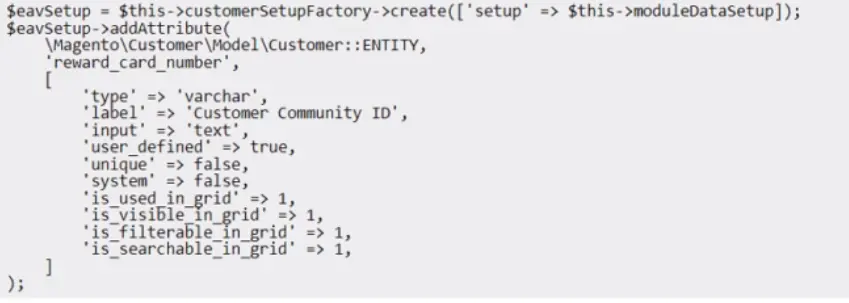
A merchant is utilizing an out-of-the-box Adobe Commerce application and asks to add a new reward card functionality for customers. During the code review, the Adobe Commerce Architect notices the reward_card_number attribute setup created for this functionality is causing the customer attribute to be unavailable in the My account/My rewards page template.

What should be added to set the customer attribute correctly?

Question 6

An Architect is investigating a merchant's Adobe Commerce production environment where all customer session data is randomly being lost. Customer session data has been configured to be persisted using Redis, as are all caches (except full page cache, which is handled via Varnish).

After an initial review, the Architect is able to replicate the loss of customer session data by flushing the Magento cache storage, either via the Adobe Commerce Admin Panel or running bin/magento cache: flush on the command line. Refreshing all the caches in the Adobe Commerce Admin Panel or running bin/magento cache: clean on the command line does not cause session data to be lost.

What should be the next step?