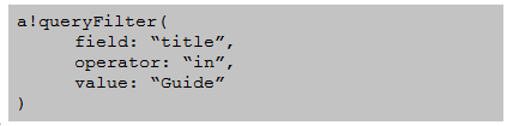
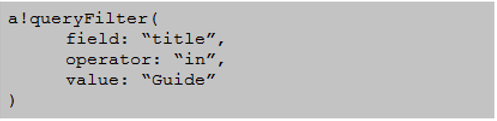
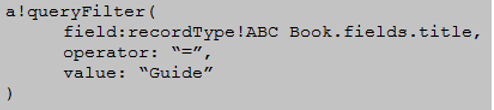
You have a Custom Data Type (CDT), ABC_book, with a constant that refers to its data store entity, ABC_DSE_BOOK.
You need to write a query filter for all ABC_book items whose title contains ''Guide''.
Which code snippet accomplishes this goal?
A)
B)
C)
Correct Answer:B. Option B
Question 2
Review the following expression rule:
ri!name is defined as "Maria".
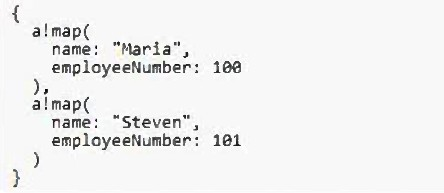
ri!directory is defined as the following:
What is the expected output?
Correct Answer:C. 1
Explanation:
Given that ri!name is defined as 'Maria' and ri!directory contains two a!map() structures, one of which includes the name 'Maria,' the expression wherecontains(ri!name, index(ri!directory, 'name')) will evaluate as follows: The index() function will return a list of values from ri!directory for the key 'name,' which will be {'Maria', 'Steven'}. The wherecontains() function will then check where 'Maria' is found within this list. Since 'Maria' is the first element, the function will return a list of indices where 'Maria' is found, in this case, {1}. Appian lists are 1-indexed, so the first position is represented by 1, not 0.
Reference: Appian Expression Language Documentation - Functions
Question 3
Which two scenarios are ideal for using Appian Portals? (Choose two.)
Correct Answer:B. A retail customer wants to conduct a public survey for their recently launched product.; C. An employee who does not have an account wants to register for their company's vehicle fleet a management system.
Explanation:
Appian Portals are designed for scenarios where users who do not have an Appian account need to interact with Appian applications. This makes them ideal for public-facing applications such as surveys (Option B) or for allowing external users to initiate processes like registrations (Option C). They are not intended for internal use by employees (Option A) or for scenarios requiring offline capabilities (Option D).
Reference
Appian Documentation: Appian Portals
Question 4
An interface references an expression rule.
What are the relationships between these objects?
Correct Answer:B. Dependents and Precedents
Explanation:
In Appian, when an interface references an expression rule, the interface is considered a dependent because it depends on the expression rule to function correctly. Conversely, the expression rule is a precedent because the interface relies on it.
Reference
Tries to match a value in a given array with a value at the same index in a replacement array and returns either the value at the same index or a default value if the value is not found.
What does this code snippet return?
Correct Answer:B. Medium
Explanation:
The displayvalue() function matches a given value with an array and returns the value at the same index from a replacement array or a default value if not found. In the snippet displayvalue(1, {0, 1, 2}, {'Low', 'Medium', 'High'}, 'Unknown'), the value 1 is matched in the array {0, 1, 2} at index 1. The function then returns the value at index 1 in the array {'Low', 'Medium', 'High'}, which is 'Medium'.
Reference: Appian Expression Language Documentation - Functions
Question 6
You built a grid field with the data source as a query entity.
You want to add a search box to the grid using Appian's out-of-the-box functionality. You set the parameter of showSearchBox to ''True'', but the search box is still not appearing.
Why is the search box NOT appearing?
Correct Answer:C. The showSearchBox parameter only applies when a record type is used as the source in the data.
Question 7
You want to calculate the deadline for a review, which is determined by applying a formula that takes the characteristics of the review into account. This formula for calculating a review deadline is standard across the organization according to policy.
An Appian object was used to apply the calculation on an existing interface 14 months ago.
What should you do to perform the same calculation on a new data collection form?
Correct Answer:B. Reuse the existing Appian object to perform the calculation after validating it works properly for your use case.
Reusing the object helps to enforce consistency with application of the formula across the application.
Question 8
You need to start a process using an email trigger.
How should you configure this process model using the Process Model Properties dialog?
Correct Answer:C. Go to File > Properties. Select the Public Events checkbox to allow anyone to fire triggers.
Question 9
You are configuring a local variable on an interface to store the date and time that the username field was last modified. The local variables are currently configured as follows:
Which a!refreshVariable configuration should be added so that local!usernameLastModified stores the correct timestamp?
The a!refreshVariable function should be configured to refresh when the local!username variable changes. This is achieved by setting the refreshOnVarChange parameter to local!username, which will update the local!usernameLastModified variable with the current timestamp whenever local!username is modified.
Reference
Appian Documentation: a!refreshVariable Function
Question 10
You created and published a new process model.
The process model has a start form with two synchronous subprocesses with 40 and 66 nodes each. All nodes are chained from the start node through the subprocesses to the end node. After the tasks and subprocesses, there is a second User Input Task in which the user can confirm the entries and add a comment.
When testing as a normal Acme business user, you see that the confirmation screen is not shown to you.
What might be the reason for this behavior?
Correct Answer:A. The maximum number of activity chained nodes is exceeded and breaks.
Explanation:
In Appian, there is a limitation on the number of activities that can be chained in a process, known as the 'chaining limit.' If a process model exceeds this limit, which includes synchronous subprocesses and their nodes, the process may break or not behave as expected. In this scenario, with two large subprocesses chained from start to end, the maximum number of activity chained nodes could be exceeded, resulting in the confirmation screen not being shown. Adjusting the process model to reduce chaining or using asynchronous patterns where possible can help mitigate this issue.
Reference: Appian Documentation - Process Model Best Practices