
Limited-Time Offer: Enjoy 50% Savings! Ends in 00h 00m 00s Coupon code: 50OFF
Skip to content

Free Atlassian Cloud Organization Admin Certification Exam ACP-520 Exam Questions

Page: 1 / 7 Total 65 questions

Want more questions? Get Premium Access.

Question 1

Which statement is false about Cloud organizations?

Correct Answer: A. An organization can have multiple identical site names.
Explanation:

Each site in an organization must have a unique name and URL. You cannot have two sites with the same name or URL in the same organization.

Reference Add a new product to your organizationUpdate a product URL to a new URL

Question 2

Alpha Corp. recently acquired one of its competitors, Beta Corp.

Each company had its own Atlassian Cloud organization.

You would like to manage users and groups from both corporations in a single location.

Identify the correct feature to use.

Question 3

Your organization has several products across several sites.

Ravi went to the People menu within one of the products and invited a teammate.

One or more access requests were generated.

Correct Answer: E. 2 access requests for 2 Confluence products
Explanation:

When Ravi invites a teammate to join a product, an access request is generated for that product only. If the teammate needs access to another product on the same site, they can request it themselves or Ravi can invite them again. Therefore, if Ravi wants his teammate to have access to both Confluence and Jira Software, he needs to send two invitations, resulting in two access requests.

Reference Invite users to your siteApprove or deny product access requests


Question 4

You are viewing a list of names under Directory > Users.

The status for Rolf shows as "Active".

Which statement is definitely true?

Question 5

You want to delete a group that is currently used throughout Jira.

Where is the group definitely NOT used?

Correct Answer: C. to restrict who can invite teammates to Jira
Explanation:

The statement that is true is that the group is definitely not used to restrict who can invite teammates to Jira. This is because inviting teammates to Jira is a site administration function that is controlled by the site admin role, not by any group. The other statements are false, as the group could be used for those purposes, depending on how the group is configured in the global permissions, the permission schemes, the issue security schemes, or the workflow conditions.


Question 6

You need strict control over the number of active licenses for Jira Software.

What can you do to gain stricter control?

Correct Answer: A. Remove the default group from the Jira Software User product role.
Explanation:

By removing the default group from the Jira Software User product role, you can prevent new users from automatically getting access to Jira Software when they join your site. This way, you can control who gets access to Jira Software and how many licenses are consumed.

Reference Manage product accessProduct roles and permissions


Question 7

Your organization has multiple products. You need a count of billable users only for Jira Software, which is on a monthly subscription of the Standard plan on your

site "acme.atlassian.net".

Where can you find this information?

Correct Answer: E. Billing > Jira Software 'acme.atlassian.net' > Users
Explanation:

The Billing page shows you the number of billable users for each product on your site, as well as the user tier and the monthly cost. You can filter by product and site to see the specific details for Jira Software on ''acme.atlassian.net''.


How to prepare for ACP-520: Atlassian Cloud Organization Admin Certification, section ''Manage product subscriptions & billing''

Manage your bill for Standard and Premium plans, subsection ''View your bill''

Question 8

You are the org admin. From time to time, you manually add new members to the "engineers" group.

Today, you noticed that the group has a lot more members than you have added manually.

Identify a direct cause.

Correct Answer: C. It is a default group for Jira Software product access.
Explanation:

A direct cause for the ''engineers'' group having a lot more members than you have added manually is that it is a default group for Jira Software product access. This means that any new user who joins your site and has access to Jira Software will automatically be added to the ''engineers'' group. You can check and change the default group for Jira Software by going to Products > Jira Software > Manage product > Product roles.

Reference= [Default groups and permissions] and [Manage role and product permissions]


Question 9

You went to the pricing page for one of the Cloud products and started a site with a Premium subscription trial to that product.

You used your work email address, "trainer@malamute.edu".

What was definitely created?

Correct Answer: A. 'site-admins' group
Explanation:

When you start a site with a Premium subscription trial to a Cloud product, you automatically create a ''site-admins'' group that contains your account as the only member. The ''site-admins'' group has the site admin role, which allows you to manage the site settings, products, users, and groups. You can also add other users to the ''site-admins'' group if you want to delegate some of the site administration tasks.

Reference=Create and update groupsandManage site-level permissions


Question 10

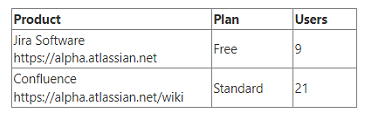
Your organization only has the following two products:

Which feature can you configure in your organization?