
Limited-Time Offer: Enjoy 50% Savings! Ends in 00h 00m 00s Coupon code: 50OFF
Skip to content

Free Cisco Certified Support Technician (CCST) Networking 100-150 Exam Questions

Page: 1 / 7 Total 40 questions

Want more questions? Get Premium Access.

Question 1

A user initiates a trouble ticket stating that an external web page is not loading. You determine that other resources both internal and external are still reachable.

Which command can you use to help locate where the issue is in the network path to the external web page?

Correct Answer: B. tracert
Explanation:

The tracert command is used to determine the route taken by packets across an IP network. When a user reports that an external web page is not loading, while other resources are accessible, it suggests there might be an issue at a certain point in the network path to the specific web page. The tracert command helps to diagnose where the breakdown occurs by displaying a list of routers that the packets pass through on their way to the destination. It can identify the network segment where the packets stop progressing, which is valuable for pinpointing where the connectivity issue lies. Reference := Cisco CCST Networking Certification FAQs -- CISCONET Training Solutions, Command Prompt (CMD): 10 network-related commands you should know, Network Troubleshooting Commands Guide: Windows, Mac & Linux - Comparitech, How to Use the Traceroute and Ping Commands to Troubleshoot Network, Network Troubleshooting Techniques: Ping, Traceroute, PathPing.

* tracert Command: This command is used to determine the path packets take to reach a destination. It lists all the hops (routers) along the way and can help identify where the delay or failure occurs.

* ping -t: This command sends continuous ping requests and is useful for determining if a host is reachable but does not provide path information.

* ipconfig /all: This command displays all current TCP/IP network configuration values and can be used to verify network settings but not to trace a network path.

* nslookup: This command queries the DNS to obtain domain name or IP address mapping, useful for DNS issues but not for tracing network paths.


* Microsoft tracert Command: tracert Command Guide

* Troubleshooting Network Issues with tracert: Network Troubleshooting Guide
Question 2

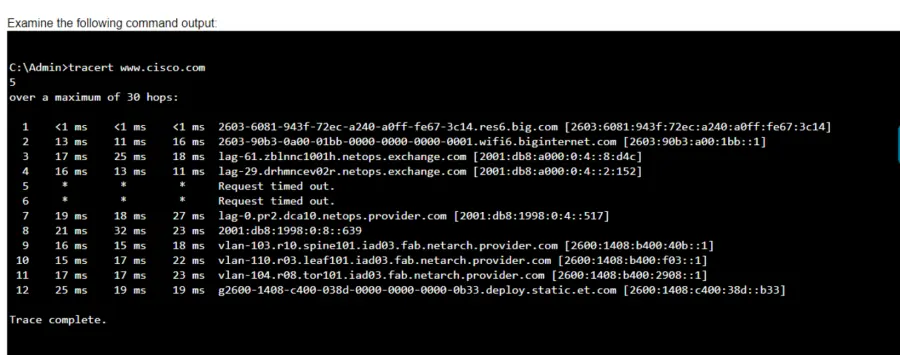
Examine the following output:

Which two conclusions can you make from the output of the tracert command? (Choose 2.)

Note: You will receive partial credit for each correct answer.

Correct Answer: A. The trace successfully reached the www.cisco.com server.; C. The IPv6 address associated with the www.cisco.com server is 2600:1408: c400: 38d: : b33.
Explanation:

* Statement A: 'The trace successfully reached the www.cisco.com server.' This is true as indicated by the 'Trace complete' message at the end, showing that the trace has reached its destination.

* Statement C: 'The IPv6 address associated with the www.cisco.com server is 2600:1408:c400:38d::b33.' This is true because the final hop in the trace, which is the destination, has this IPv6 address.

* Statement B: 'The trace failed after the fourth hop.' This is incorrect as the trace continues beyond the fourth hop, despite some intermediate timeouts.

* Statement D: 'The routers at hops 5 and 6 are offline.' This is not necessarily true. The routers might be configured to not respond to traceroute requests.

* Statement E: 'The device sending the trace has IPv6 address 2600:1408:c400:38d::b33.' This is incorrect; this address belongs to the destination server, not the sender.


* Understanding Traceroute: Traceroute Guide

Question 3

A local company requires two networks in two new buildings. The addresses used in these networks must be in the private network range.

Which two address ranges should the company use? (Choose 2.)

Note: You will receive partial credit for each correct selection.

Correct Answer: A. 172.16.0.0 to 172.31.255.255; D. 192.168.0.0 to 192.168.255.255
Explanation:

The private IP address ranges that are set aside specifically for use within private networks and not routable on the internet are as follows:

Class A: 10.0.0.0 to 10.255.255.255

Class B: 172.16.0.0 to 172.31.255.255

Class C: 192.168.0.0 to 192.168.255.255

These ranges are defined by the Internet Assigned Numbers Authority (IANA) and are used for local communications within a private network123.

Given the options: A. 172.16.0.0 to 172.31.255.255 falls within the Class B private range. B. 192.16.0.0 to 192.16.255.255 is not a recognized private IP range. C. 11.0.0.0 to 11.255.255.255 is not a recognized private IP range. D. 192.168.0.0 to 192.168.255.255 falls within the Class C private range.

Therefore, the correct selections that the company should use for their private networks are A and D.


Reserved IP addresses on Wikipedia

Private IP Addresses in Networking - GeeksforGeeks

Understanding Private IP Ranges, Uses, Benefits, and Warnings

Question 4

Which component of the AAA service security model provides identity verification?

Correct Answer: C. Authentication
Explanation:

The AAA service security model consists of three components: Authentication, Authorization, and Accounting.

* Authentication: This is the process of verifying the identity of a user or device. It ensures that only legitimate users can access the network or service.

* Authorization: This determines what an authenticated user is allowed to do or access within the network.

* Auditing/Accounting: This component tracks the actions of the user, including what resources they access and what changes they make.

Thus, the correct answer is C. Authentication.


* Cisco AAA Overview

* Understanding AAA (Authentication, Authorization, and Accounting)

Question 5

What is the most compressed valid format of the IPv6 address 2001 :0db8:0000:0016:0000:001b: 2000:0056?

Correct Answer: D. 2001:db8: 0:16: :1b: 2000:56
Explanation:

IPv6 addresses can be compressed by removing leading zeros and replacing consecutive groups of zeros with a double colon (::). Here's how to compress the address 2001:0db8:0000:0016:0000:001b:2000:0056:

Remove leading zeros from each segment:

2001:db8:0000:0016:0000:001b:2000:0056 becomes 2001:db8:0:16:0:1b:2000:56

Replace the longest sequence of consecutive zeros with a double colon (::). In this case, the two consecutive zeros between the 16 and 1b:

2001:db8:0:16::1b:2000:56

Thus, the most compressed valid format of the IPv6 address is 2001:db8:0:16::1b:2000:56.


Cisco Learning Network

IPv6 Addressing (Cisco)

Question 6

Which wireless security option uses a pre-shared key to authenticate clients?

Correct Answer: A. WPA2-Personal
Explanation:

WPA2-Personal, also known as WPA2-PSK (Pre-Shared Key), is the wireless security option that uses a pre-shared key to authenticate clients. This method is designed for home and small office networks and doesn't require an authentication server. Instead, every user on the network uses the same key or passphrase to connect1.


* What is a Wi-Fi Protected Access Pre-Shared Key (WPA-PSK)?

* Exploring WPA-PSK and WiFi Security

* WPA2-Personal: This wireless security option uses a pre-shared key (PSK) for authentication. Each client that connects to the network must use this key to gain access. It is designed for home and small office networks where simplicity and ease of use are important.

* WPA2-Enterprise: Unlike WPA2-Personal, WPA2-Enterprise uses 802.1x authentication with an authentication server (such as RADIUS) and does not rely on a pre-shared key.

* 802.1x: This is a network access control protocol for LANs, particularly wireless LANs. It provides an authentication mechanism to devices wishing to attach to a LAN or WLAN.

* 802.1q: This is a networking standard that supports VLAN tagging on Ethernet networks and is not related to wireless security.

* Cisco Documentation on WPA2 Security: Cisco WPA2

* Understanding Wireless Security: Wireless Security Guide