
Limited-Time Offer: Enjoy 50% Savings! Ends in 00h 00m 00s Coupon code: 50OFF
Skip to content

Free Cisco Implementing Cisco Collaboration Cloud Customer Experience v1.0 300-830 Exam Questions

Page: 1 / 6 Total 60 questions

Want more questions? Get Premium Access.

Question 1

A Webex Contact Center Administrator is trying to configure team-based call distribution. The requirement is to handle Sales Queue calls before Accounting Queue calls.

All Sales calls in the queue must be routed to agents before Accounting calls.

If an older Accounting call is in the queue and a Sales call is received by the system, the Sales call must get priority.

When no Sales call is in the queue, Accounting calls can be routed to agents.

How can this be achieved within team configuration?

Correct Answer: A. Configure queue ranking.
Explanation:

Queue ranking is the feature designed for this exact business rule. Cisco's Webex Contact Center team configuration documentation allows administrators to rank queues for a team by media type, with lower numerical rank having higher priority. Cisco's routing documentation explains that ranked queues take precedence over queues without the same priority and that queue ranking can be used across media types. In the scenario, Sales must always be handled before Accounting, even when an Accounting call has waited longer. This is not a normal first-in-first-out queue rule; it is a cross-queue prioritization requirement. Configuring capacity-based queues would change the queue operating model but would not impose Sales-before-Accounting precedence. Asking agents to ignore Accounting calls is not a system configuration and would produce inconsistent reporting and service levels. A Sales-only skill profile would prevent Accounting handling rather than defer it until Sales is empty. Queue ranking is the controlled team-based mechanism that satisfies the requirement. Reference: Cisco Help, Manage teams in Webex Contact Center; Understand Routing and Queueing in Webex Contact Center.
Question 2

A Webex Contact Center engineer is configuring a new chat digital channel for their organization. Chat digital channel interactions will be handled by Webex Contact Center agents.

Which two actions must be taken as part of the configuration? (Choose two.)

Correct Answer: A. Create a channel with Chat as a channel type.; D. Assign an asset to a channel.
Explanation:

A chat digital channel handled by Webex Contact Center agents needs a channel object of type Chat and an asset assigned to that channel. Cisco's digital channel setup model uses assets to represent external channel identities, such as a web chat asset, email asset, SMS asset, or social asset. The channel then connects that asset to Webex Contact Center routing so the conversation can be created, queued, and delivered to agents. Assigning a phone number is relevant to voice or SMS-style channel designs, not to a Web Chat asset. Creating an Email channel or Social Channel would build the wrong media type and would not make a chat widget route as chat. The two required steps therefore match the platform object model: create a channel with Chat as the channel type and assign the appropriate asset to that channel. Once that is done, flows and Queue Task nodes can route the chat to Webex Contact Center agents. Reference: Cisco Help, Set up digital channels in Webex Contact Center; Webex Connect Help, Livechat.


Question 3

Which API scope is required for a REST PUT request to /organization/{orgid}/v2/contact-service-queue/{id}?

Correct Answer: B. cjds:admin_org_write
Explanation:

A REST PUT request that modifies a contact-service queue is an administrative write operation. Cisco's Webex Contact Center API model uses scopes to separate read-only access from configuration changes. The endpoint /organization/{orgid}/v2/contact-service-queue/{id} updates an existing queue object, so the integration must hold the organization-level administrative write scope. The read scopes, such as cjp:config_read or cjds:admin_org_read, are appropriate when an application only retrieves configuration data. They do not authorize mutation of queue configuration. The cjp:user scope is also not sufficient because queue configuration is a tenant or organization-level administrative resource, not a simple user-context operation. The scope cjds:admin_org_write is therefore the correct scope for a PUT operation on contact-service-queue. This matches the principle used throughout Cisco's API documentation: write methods require write-capable scopes, especially for configuration entities. Reference: Webex Contact Center Developer API Reference, Contact Service Queues; Webex Developer, Contact Center Service Apps.


Question 4

An engineer is configuring outdial telephony for a new Cisco Webex Contact Center deployment.

Which two configurations are required? (Choose two.)

Correct Answer: B. default outdial Automatic Number Identification at the tenant level; E. Enable Outdial on a desktop profile.
Explanation:

Outdial calling in Webex Contact Center needs both a tenant or system caller-ID source and a desktop permission path that lets the agent place outbound calls. Cisco's Control Hub voice settings document the Default Outdial ANI field, which determines the default caller ID used for outdial behavior when a dial number is not otherwise mapped. Cisco's desktop profile documentation then controls whether an agent can actually use outdial from Agent Desktop. When Outdial is enabled on the desktop profile, the administrator selects the outdial entry point and, where applicable, the Outdial ANI list. Adding an agent to an outbound team is campaign-related and not a prerequisite for ordinary outdial. ANI in Flow Designer can influence call presentation in flows, but it is not the required administrative setup for agent outdial. A wrap-up reason for an outdial queue is useful for classification after a contact, not the base telephony enablement. Reference: Cisco Help, Set up voice settings for Webex Contact Center; Manage desktop profiles.


Question 5

An administrator is designing a flow in Webex Connect that includes a Scheduled Callback activity node.

Which two values must be provided to configure the Scheduled Callback node successfully? (Choose two.)

Correct Answer: A. schedule date in YYYY-MM-DD format; B. schedule timezone
Explanation:

A Scheduled Callback activity must know when the callback should occur and the timezone in which that schedule should be interpreted. Cisco's callback scheduling API and Webex Connect scheduling behavior use normalized date/time inputs so a callback is created at the expected customer time. The date format in the answer set is YYYY-MM-DD, which is the standard year-month-day format used by modern APIs and scheduling fields. The timezone is required because the same date and time can represent different UTC instants depending on the caller's or business's region. Customer name and phone ANI may be useful data in a broader callback workflow, but they are not the two key values asked here for configuring the Scheduled Callback node successfully. The YYYY-DD-MM format is not the accepted ordering and would create ambiguous or invalid schedules. The correct pair is therefore schedule date in YYYY-MM-DD format and schedule timezone. Reference: Webex Developer, Callback Schedule API; Webex Connect Help, Event Scheduler and scheduled flow activities.


Question 6

Which two domains must be allowed through the firewall or VPN of the organization to ensure that the WxCC Agent Desktop can connect and function correctly? (Choose two.)

Correct Answer: A. *.wbx.com:443; D. *.ciscoccservice.com:443
Explanation:

Agent Desktop connectivity depends on the Webex service domains and the Contact Center service domain being reachable over HTTPS. Cisco's security and network documentation for Webex Contact Center includes domain allow-listing so the browser desktop can load scripts, APIs, authentication paths, media-related services, and Contact Center application components. The official domain patterns include Webex domains such as *.wbx.com on port 443 and Contact Center service domains such as *.ciscoccservice.com on port 443. Blocking either can prevent the desktop from loading, authenticating, or communicating with Contact Center services. The ucce.com domain is associated with Unified Contact Center Enterprise naming, not Webex Contact Center Agent Desktop. The generic amazonaws.com domain may appear in some cloud service paths, but it is not one of the two direct required domain answers here. The wxcc.com option is also not the official service domain in the documented network requirement list. Reference: Cisco Help, Set up security for Webex Contact Center; System requirements for Webex Contact Center Desktop.


Question 7

Webex Contact Center agents cannot use WebRTC to make and receive calls.

What must be configured on their Desktop profile to enable this functionality?

Correct Answer: A. Desktop
Explanation:

WebRTC voice in Webex Contact Center is exposed to agents through the Desktop telephony option. Cisco's desktop profile documentation lists voice channel options, including Agent DN, Extension, and Desktop. The Desktop option allows the agent to sign in through the browser and use the Agent Desktop as the voice device rather than entering an external directory number or extension. Cisco's voice channel setup documentation also describes WebRTC-capable agents selecting Desktop under their telephony option so calls are routed to the Agent Desktop device. Browser is not a desktop profile voice option; it describes the client environment. Extension and Agent DN are traditional station credentials and would make the agent use a phone or configured number instead of browser-based WebRTC. Therefore, to enable agents to make and receive calls using WebRTC, the administrator must configure the Desktop option in the desktop profile. Reference: Cisco Help, Manage desktop profiles; Set up voice channels for Webex Contact Center.


Question 8

Which configuration action must be taken to enable the real-time transcripts AI Assistant feature?

Correct Answer: B. Add the Media Stream node in the flow before the call is sent to the queue or agent.
Explanation:

Real-time transcripts require the media stream to start before the conversation is sent to the queue or agent. Cisco's AI Assistant real-time transcription feature depends on capturing and streaming the call audio so the platform can produce transcript data for the agent and downstream AI features. If the Media Stream node is placed after the Agent Answered event, the transcript starts too late and misses the early customer interaction and queue/agent transition context. A Condition node can be useful for branching but does not enable transcription by itself. Configuring a Scripted AI Agent is unrelated to enabling AI Assistant real-time transcripts for a live-agent call. The correct flow action is to add the Media Stream node before the call reaches the queue or agent so the media is available for transcription at the right point in the call lifecycle. Reference: Cisco Help, Cisco AI Assistant for Webex Contact Center: Administrator's guide to configuring Real-Time Assist; AI Assistant reports in Analyzer.


Question 9

An administrator must connect a customer call to an external IVR service while retaining control of the call and later return it to the original flow.

Which node must the administrator use to make this happen?

Correct Answer: A. Bridged Transfer node
Explanation:

Bridged Transfer is the correct node because the requirement is not simply to send the caller away; the administrator must connect the caller to an external IVR while keeping Webex Contact Center call control and then resume the original flow. Cisco's Flow Designer documentation distinguishes Bridged Transfer from Blind Transfer. A blind transfer is terminal: once the call is transferred to the external number, the flow ends and the original flow logic no longer controls the interaction. A Bridged Transfer, by contrast, is designed for scenarios where the caller is temporarily connected to an external destination and then returned to the flow after the external interaction completes. An HTTP Request node is only for data exchange with an external service and cannot bridge media to an IVR. A GoTo node is internal flow navigation and cannot connect the caller to an external IVR. The call-control behavior in the scenario is therefore specifically the Bridged Transfer use case. Reference: Cisco Help, Build and manage flows with Flow Designer; Understand Routing and Queueing in Webex Contact Center.

Question 10

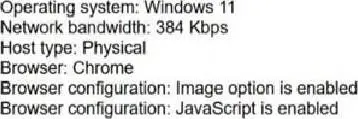
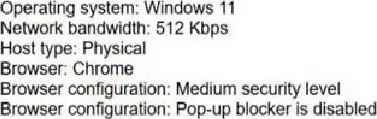
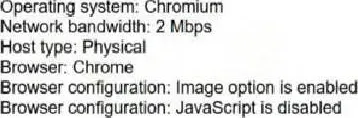
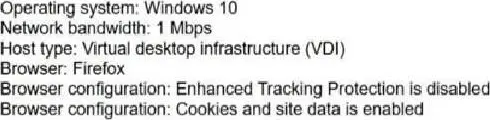
A user has the agent role and plans to sign in to Cisco Webex Contact Center desktop.

Which system meets the requirements for WebRTC as the agent phone device?

A)

B)

C)

D)

Correct Answer: B. Option B
Explanation:

Option B is the only system profile that aligns with the Webex Contact Center Desktop WebRTC requirements shown in the exhibit. Cisco's desktop system requirements identify supported browsers and agent device models for calling, including Webex Calling desktop/app computer audio and WebRTC handling from Agent Desktop. A practical WebRTC station must have sufficient bandwidth, a supported operating system and browser, and browser settings that do not block required desktop behavior. Option A is weak because the 384 Kbps bandwidth value is below the practical WebRTC threshold shown by the comparison choices. Option C explicitly disables JavaScript, which prevents the browser-based desktop and WebRTC interaction logic from functioning properly. Option D uses a virtual desktop infrastructure condition, which is not the straightforward supported physical workstation profile presented by the question. Option B provides Windows 11, Chrome, physical host type, adequate bandwidth, a medium security level, and disabled pop-up blocking, making it the compliant choice. Reference: Cisco Help, System requirements for Webex Contact Center Desktop; Set up voice channels for Webex Contact Center.