A user switches from Linux to Windows and tries to migrate data using an external USB drive. Windows prompts that the device must be formatted. It works fine on Linux. What should the user do?
Correct Answer:D. Update the file allocation system to exFAT
Explanation:
Windows doesn't natively support many Linux file systems (like ext4).Reformatting to exFATmakes the drive readable/writable on both Linux and Windows.
FromAll-in-One Exam Guide:
''For cross-platform compatibility, exFAT is recommended as it supports large files and is recognized by Windows, macOS, and Linux (with exFAT drivers).''
Question 2
A technician is troubleshooting an issue in which a service runs momentarily and stops at certain points in the process. The technician needs to determine the root cause of this issue. Which of the following tools should the technician use?
Correct Answer:A. Event Viewer
Explanation:
Event Viewer is the best tool to analyze the root cause of service failures in Windows. It provides detailed logs from system processes, including errors, warnings, and crash reports related to services and applications. When a service starts and stops unexpectedly, Event Viewer will often record the cause, such as dependency failures or access violations.
B . Task Manager shows active processes but doesn't retain logs or causes of failure.
C . Internet Options is used for configuring browser settings, not troubleshooting services.
D . Process Explorer is powerful but more suited for live monitoring and detailed process trees, not post-failure log analysis.
CompTIA A+ 220-1102 Objective 3.1: Given a scenario, troubleshoot common Windows OS problems.
Study Guide Section: Log file analysis using Event Viewer
Question 3
An application's performance is degrading over time. The application is slowing, but it never gives an error and does not crash. Which of the following tools should a technician use to start troubleshooting?
Correct Answer:C. Resource monitor
Explanation:
Resource Monitor provides real-time monitoring of system performance and resource usage, including CPU, memory, disk, and network usage. It helps technicians identify performance bottlenecks (e.g., high memory or CPU usage) that can cause slowdowns in applications over time without producing crash errors.
A . Reliability history logs application crashes or errors --- not helpful if the app doesn't crash.
B . Computer Management is a broad utility with limited real-time monitoring capability.
D . Disk is too vague --- tools like CHKDSK can help with disk errors but not general performance degradation.
CompTIA A+ 220-1102 Objective 3.2: Given a scenario, troubleshoot common personal computer issues.
Study Guide Section: System performance tools --- Resource Monitor, Task Manager
Question 4
A technician uses AI to draft a proposal about the benefits of new software. When reading the draft, the technician notices that the draft contains factually incorrect information. Which of the following best describes this scenario?
Correct Answer:B. Hallucinations
Explanation:
In the context of artificial intelligence, 'hallucinations' refer to instances where an AI system generates information that is plausible-sounding but factually incorrect or entirely fabricated. This is a known limitation of large language models, including generative AI tools.
A . Data privacy refers to the protection of personal or sensitive data, not content accuracy.
C . Appropriate use relates to ethical and policy-based concerns, not factual correctness.
D . Plagiarism involves presenting someone else's work as your own --- this situation is about accuracy, not ownership.
CompTIA A+ 220-1102 Objective 4.4: Identify basic concepts of scripting and automation.
Study Guide Section: AI tools and responsible usage --- hallucinations and fact-checking outputs
Question 5
An end user is unable to print to a network printer but can access everything else on the network. Other users have no issues printing. A technician opens the print queue on the user's computer and sees the job has failed. What is the next step to troubleshoot the issue?
Correct Answer:B. Restarting the print spooler from services
Explanation:
The correct answer is B. Restarting the print spooler from services, because the problem is isolated to one user and the print job is stuck or failed in the local print queue. This strongly indicates a print spooler service issue on the user's workstation.
According to the Quentin Docter -- CompTIA A+ Complete Study Guide, the print spooler manages print jobs sent from applications to printers. If the spooler service hangs or becomes unstable, print jobs may fail even though network connectivity and the printer itself are functioning correctly.
The Travis Everett & Andrew Hutz -- All-in-One Exam Guide explains that restarting the print spooler is a standard troubleshooting step when jobs remain in a failed or paused state. This clears the queue and reloads the service without requiring a full system reboot.
The Mike Meyers / Mark Soper Lab Manual reinforces that reinstalling printers should be done only after service-level troubleshooting has failed. Printing from another computer is unnecessary because other users are already printing successfully, confirming the printer and network are operational.
Because the failure is local to the user and visible in the queue, restarting the print spooler service is the most logical and efficient next step, making B the correct answer.
Question 6
An end user is unable to access the intranet. A technician needs to confirm whether the Windows web server is online and functioning. Which of the following default remote access technologies would the technician most likely use to remotely connect to the server?
Correct Answer:C. RDP
Explanation:
The correct answer is C. RDP (Remote Desktop Protocol), because RDP is the default remote access technology for Windows servers. It allows technicians to remotely connect to the graphical desktop environment of a Windows server to verify services, logs, and system status.
According to the Quentin Docter -- CompTIA A+ Complete Study Guide, RDP is built into Windows operating systems and is commonly used by administrators to manage Windows servers and workstations. It provides full access to the desktop, making it ideal for checking whether services such as IIS (Internet Information Services) are running properly.
The Travis Everett & Andrew Hutz -- All-in-One Exam Guide explains that while SSH is commonly used for Linux and network devices, Windows servers typically rely on RDP for administrative access. VNC is a third-party remote desktop solution and is not enabled by default on Windows systems.
The Mike Meyers / Mark Soper Lab Manual reinforces that SPICE is primarily used in virtualized environments and is not a standard Windows remote access tool.
Because the technician needs to verify a Windows web server's operational status using a built-in method, RDP is the most appropriate and likely technology, making C the correct answer.
Question 7
A technician needs to perform remote maintenance on devices across the network. The devices may be unattended or in use by employees. Cross-platform support and built-in security are required. Which of the following remote technologies best meets these requirements?
Correct Answer:D. SSH
Explanation:
The correct answer is D. SSH. Secure Shell is the best choice because it provides encrypted remote administrative access and is commonly supported across platforms, especially Linux, UNIX, macOS, network devices, and modern Windows systems. Quentin Docter's Complete Study Guide explains that SSH is commonly used for remote access through a text console, encrypts communication between the SSH client and server, and uses TCP port 22. It also supports authentication through public/private key pairs or username and password credentials. The Mike Meyers/Mark Soper material also identifies SSH as the secure modern replacement for Telnet and explains that the entire connection is encrypted to prevent eavesdropping. VNC is cross-platform, but it is not encrypted by default and often requires plug-ins for encryption. RDP is mainly associated with Windows graphical remote access, and VPN provides secure network connectivity but is not itself a remote maintenance shell or control tool.
Question 8
An administrator is investigating a technical outage. The management team wants information that includes the summary of the outage and actions taken. Which of the following documentation should the administrator provide?
Correct Answer:C. Incident report
Explanation:
Anincident reportsummarizes what happened during an outage, the timeline, the actions taken, and the resolution, which is exactly what management typically requests post-incident.
FromQuentin Docter -- CompTIA A+ Complete Study Guide:
''Incident reports document the events of an IT issue or outage, including detection, response, and resolution. They are crucial for post-incident review and management accountability.''
Question 9
An administrator is investigating a zero-day vulnerability. If left unpatched, it could severely impact business. The patch requires downtime. What should the administrator do?
Correct Answer:B. Implement an emergency change.
Explanation:
A zero-day vulnerability demands an emergency change to quickly secure the system, even if downtime is needed.
From Mike Meyers' Lab Manual:
''Emergency changes bypass standard scheduling to quickly address critical vulnerabilities that pose immediate risks.'' .
Question 10
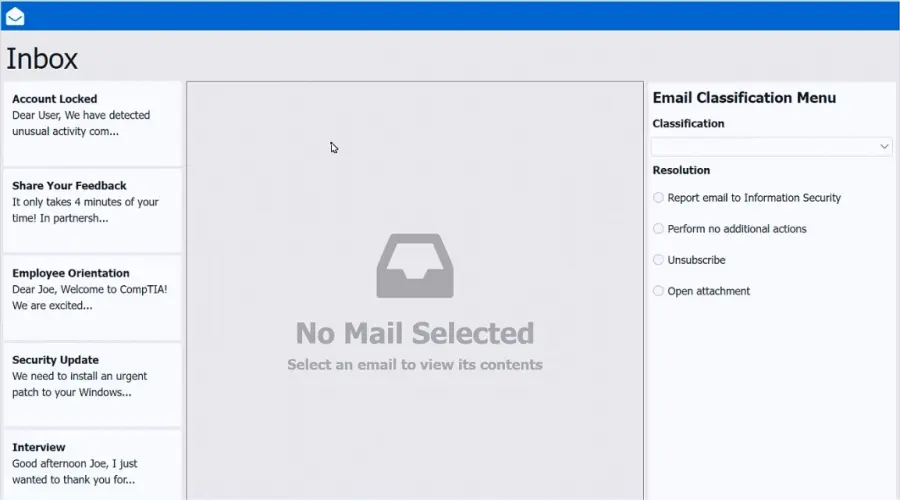
SIMULATION
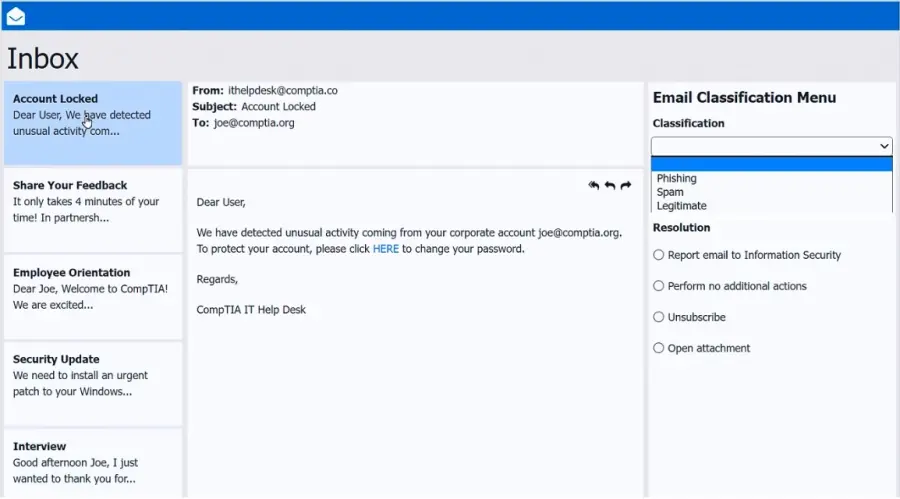
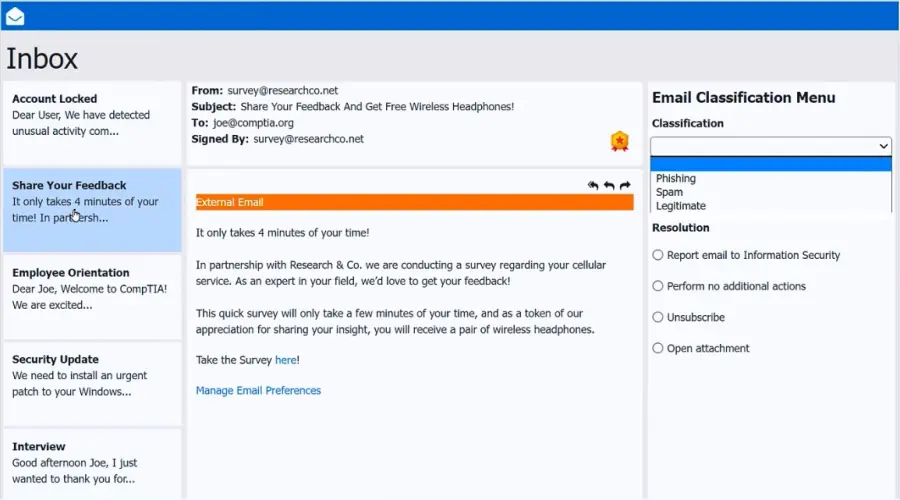
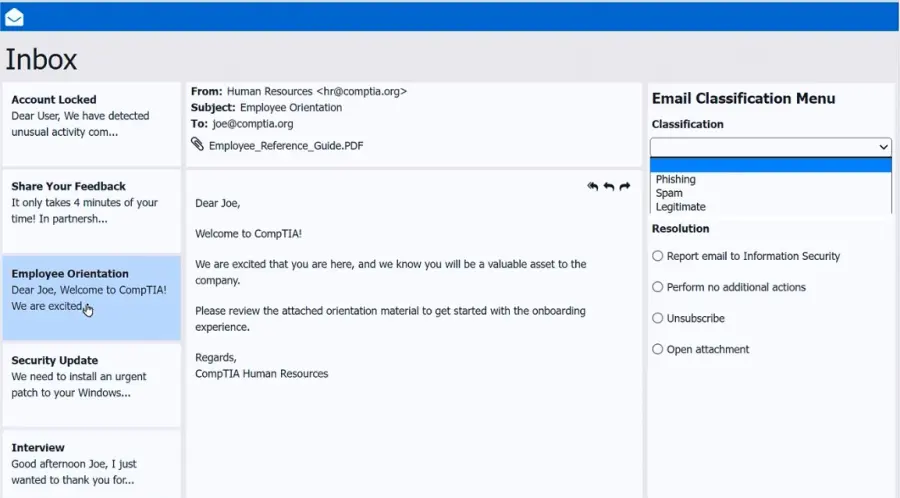
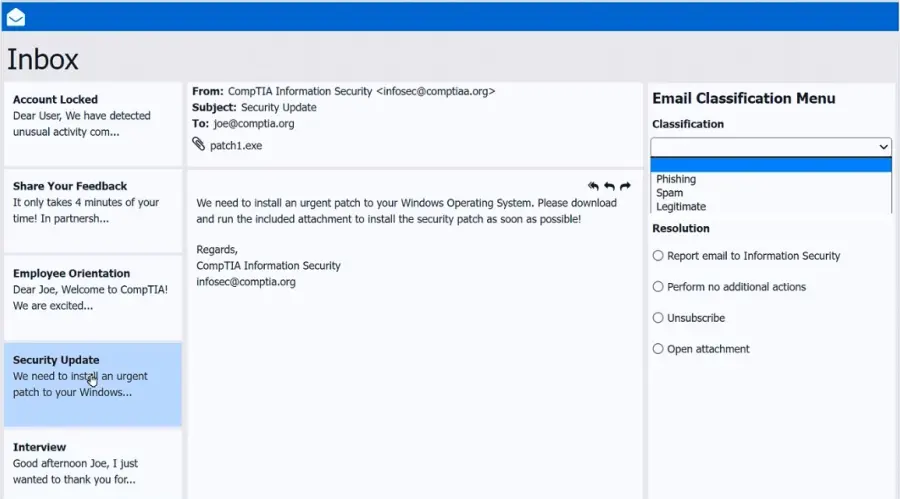
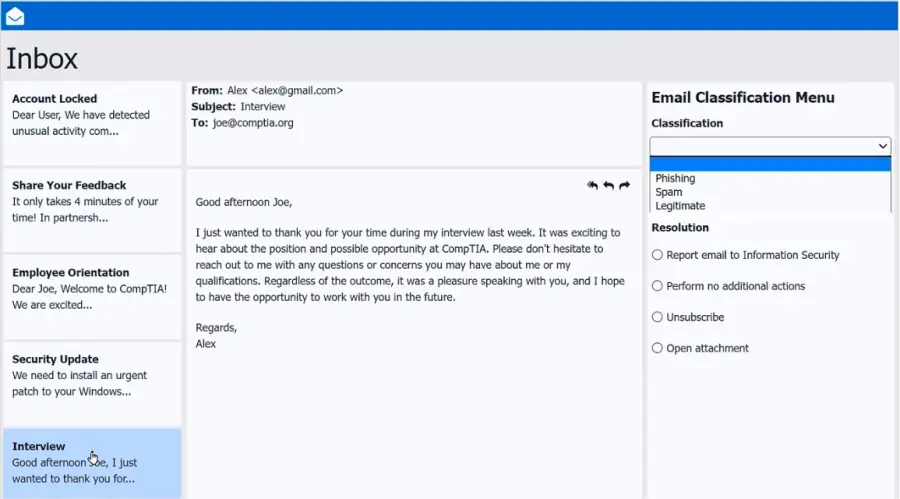
As a corporate technician, you are asked to evaluate several suspect email messages on a client's computer. Corporate policy requires the following:
>All phishing attempts must be reported.
>Future spam emails to users must be prevented.
INSTRUCTIONS
Review each email and perform the following within the email:
>Classify the emails
>Identify suspicious items, if applicable, in each email
>Select the appropriate resolution
If at any time you would like to bring back the initial state of the SIMULATION, please click the Reset All button.
Correct Answer:A. See explanation below
Explanation:
Inbox mail 1 -Account Locked- Phishing - Report email to Information Security
Inbox mail 2 -Share your feedback - Legitimate - Perform no additional actions
Inbox mail 3 --Employee orientation - Legitimate - Perform no additional actions
Inbox mail 4 --Security Update -- Spam - Report email to Information Security
Question 11
While working from home, the Chief Financial Officer (CFO) needs to open reports from accounting software. When the application opens, the CFO sees the error ''unable to connect to database.'' Which of the following should the CFO do first?
Correct Answer:D. Verify the VPN status
Explanation:
The first step the CFO should take is to verify the VPN status. When working remotely, access to internal resources such as databases, file servers, and accounting systems typically requires a secure Virtual Private Network (VPN) connection. Without an active VPN tunnel, the application cannot reach internal database servers, resulting in connection errors.
According to the Quentin Docter -- CompTIA A+ Complete Study Guide, database connectivity issues during remote work are most commonly caused by missing or disconnected VPN sessions. Internal applications are often restricted to private IP ranges that are inaccessible over the public internet.
The Travis Everett & Andrew Hutz -- All-in-One Exam Guide highlights that VPNs are designed to extend the corporate network securely to remote users. If the VPN is disconnected, authentication to internal services will fail even if the application itself launches correctly.
The Mike Meyers / Mark Soper Lab Manual further explains that restarting the PC or updating the application does not resolve network-path issues. Returning to the office is unnecessary if secure remote access is functioning as designed.
Because the error specifically indicates an inability to connect to a database---and not a corrupted application---the most logical and efficient first troubleshooting step is to confirm that the VPN is connected and authenticated.
Question 12
A user reports some single sign-on errors to a help desk technician. Currently, the user is able to sign in to the company's application portal but cannot access a specific SaaS-based tool. Which of the following would the technician most likely suggest as a next step?
Correct Answer:B. Use a private browsing window to avoid local session conflicts
Explanation:
SSO issues are often related to cached session data, cookies, or browser artifacts. The fact that the user can access the company portal but not one specific SaaS tool suggests a session or token problem. Using a private/incognito browsing window allows a clean session to be initiated, which often resolves SSO conflicts.
A . Reenrolling MFA is not related unless access issues stem from failed multifactor authentication.
C . Bypassing SSO may not be possible depending on the SaaS tool and company policies.
D . Factory resetting a device is a last resort and unnecessary in this case.
CompTIA A+ 220-1102 Objective 3.3: Troubleshoot common software, application, and OS security issues.
Study Guide Section: Troubleshooting login and authentication issues, especially with SSO services.
Question 13
Which of the following authentication methods is the best way to prevent users from frequently entering their credentials?
Correct Answer:B. Single sign-on
Explanation:
Single sign-on (SSO)allows users to authenticate once and gain access to multiple systems without re-entering credentials, which significantly enhances user convenience while maintaining security.
FromQuentin Docter -- CompTIA A+ Complete Study Guide:
''Single sign-on streamlines authentication by allowing users to log in once and access all authorized resources, reducing credential fatigue and improving security.''
Question 14
A technician uses AI to draft a document about new software benefits. Upon reading, the technician sees factually incorrect info. What term best describes this?
Correct Answer:B. Hallucinations
Explanation:
In AI terminology,hallucinationrefers to generated output that appears plausible but is factually incorrect.
FromQuentin Docter -- CompTIA A+ Complete Study Guide:
''AI hallucination describes output that is fluent and coherent but includes information that is entirely fabricated or inaccurate.''
Question 15
A small office reported a phishing attack that resulted in a malware infection. A technician is investigating the incident and has verified the following:
All endpoints are updated and have the newest EDR signatures.
Logs confirm that the malware was quarantined by EDR on one system.
The potentially infected machine was reimaged.
Which of the following actions should the technician take next?
Correct Answer:B. Discuss the cause of the issue and educate the end user about security hygiene
Explanation:
After containment and remediation, one of the final steps in incident response is user education. Since the root cause was a phishing attack, it is essential to educate users about identifying phishing attempts, safe browsing practices, and how to handle suspicious communications. This improves overall security posture and helps prevent future incidents.
A . Installing additional tools may be helpful but is a long-term step.
C . Flashing router firmware is not warranted unless the network hardware is known to be compromised.
D . Suggesting more advanced tools might be excessive given that the EDR successfully contained the incident.
CompTIA A+ 220-1102 Objective 2.5: Given a scenario, detect, remove, and prevent malware using appropriate tools and methods.
Study Guide Section: Incident response and user education after a security event