Limited-Time Offer: Enjoy 50% Savings! Ends in 00h 00m 00s Coupon code: 50OFF
Skip to content

Free Dell EMC Dell SONiC Deploy Exam D-SNC-DY-00 Exam Questions

Page: 1 / 8 Total 45 questions

Want more questions? Get Premium Access.

Question 1

SIMULATION

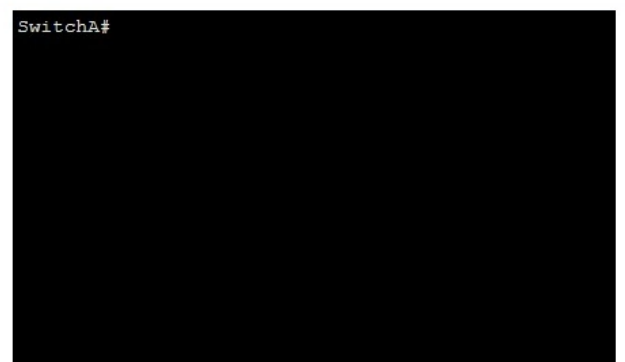
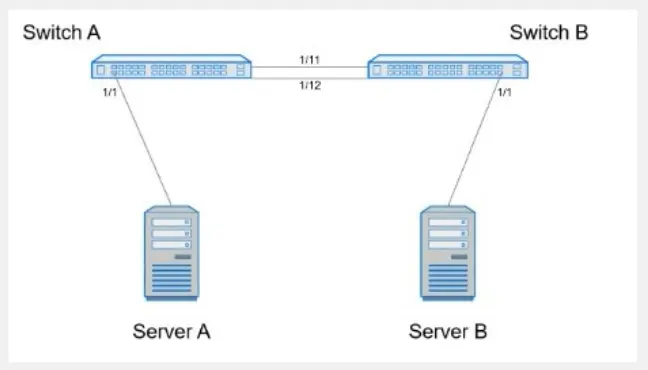
Create port channel 10 on interfaces Eth 1/11 and 1/12, so that it connects to an already configured switch. A server will be connected on Eth 1/1. Both the server and port channel need VLAN 1 untagged and only VLAN 10 tagged.

Complete the configuration on Switch A.
Correct Answer: A. see the explanation for all step by step solution with all explanation
Explanation:

Here are the steps to configure the required port channel and VLAN settings on Switch A:

Enter Configuration Mode:

SwitchA# configure terminal

Create Port Channel 10:

SwitchA(config)# interface port-channel 10

SwitchA(config-if-po10)# switchport mode trunk

SwitchA(config-if-po10)# switchport trunk native vlan 1

SwitchA(config-if-po10)# switchport trunk allowed vlan 1,10

Assign Interfaces Eth 1/11 and Eth 1/12 to Port Channel 10:

SwitchA(config)# interface ethernet 1/11

SwitchA(config-if-eth1/11)# channel-group 10 mode active

SwitchA(config-if-eth1/11)# exit

SwitchA(config)# interface ethernet 1/12

SwitchA(config-if-eth1/12)# channel-group 10 mode active

SwitchA(config-if-eth1/12)# exit

Configure Interface Eth 1/1 for Server Connection:

SwitchA(config)# interface ethernet 1/1

SwitchA(config-if-eth1/1)# switchport mode trunk

SwitchA(config-if-eth1/1)# switchport trunk native vlan 1

SwitchA(config-if-eth1/1)# switchport trunk allowed vlan 1,10

SwitchA(config-if-eth1/1)# end

Save Configuration:

SwitchA# write memory

Comprehensive Detailed Step by Step Explanation with Reference:

Enter Configuration Mode:

Start by entering the global configuration mode to make changes to the switch configuration.

Create Port Channel 10:

Enter the port channel interface configuration mode using interface port-channel 10.

Set the port channel to trunk mode with switchport mode trunk.

Specify VLAN 1 as the native VLAN (untagged) using switchport trunk native vlan 1.

Allow VLANs 1 and 10 on the trunk with switchport trunk allowed vlan 1,10.

Assign Interfaces Eth 1/11 and Eth 1/12 to Port Channel 10:

Enter interface configuration mode for ethernet 1/11 and ethernet 1/12.

Assign each interface to port channel 10 using the channel-group 10 mode active command.

Exit the interface configuration mode.

Configure Interface Eth 1/1 for Server Connection:

Enter interface configuration mode for ethernet 1/1.

Set the interface to trunk mode with switchport mode trunk.

Specify VLAN 1 as the native VLAN using switchport trunk native vlan 1.

Allow VLANs 1 and 10 on the trunk with switchport trunk allowed vlan 1,10.

Exit the configuration mode.

Save Configuration:

Ensure the configuration is saved so it persists after a reboot using the write memory command.


Dell Technologies Networking - SONiC

Dell Enterprise SONiC Deployment Guide

These steps provide a comprehensive guide to configure a port channel and VLAN settings on Switch A to meet the specified requirements for server and trunk connections.
Question 2

What is the purpose of the write erase boot command option?

Correct Answer: A. Delete the startup and enable zero touch provisioning.
Explanation:

The write erase boot command option deletes the startup configuration and enables zero touch provisioning (ZTP). This is used to reset the switch to its default state and prepare it for automated configuration through ZTP.


Dell Technologies SONiC Command Reference Guide

Switch Configuration Guide

Question 3

What does show interface breakout port slot/slot command display?

Correct Answer: B. The breakout modes available to that port
Explanation:

The show interface breakout port slot/slot command displays the breakout modes available for the specified port. Breakout modes determine how a single high-speed port can be split into multiple lower-speed ports, providing flexibility in network port configurations.


Dell Technologies SONiC Command Reference Guide

Port Breakout Configuration Guide

Question 4

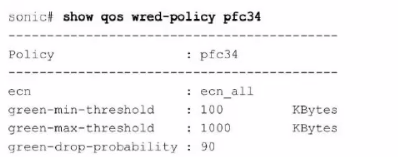
Refer to the exhibit.

What can be determined from this show command?

Correct Answer: B. ECN is enabled for all colors
Explanation:

The output of the command show qos wred-policy pfc34 shows the ECN (Explicit Congestion Notification) configuration for the policy pfc34. The line ecn: ecn_all indicates that ECN is enabled for all traffic classes (all DSCP values). Additionally, the green-min-threshold, green-max-threshold, and green-drop-probability settings are shown, but there is no indication of a 10% probability for marking traffic as congested. Therefore, the correct answer is B.


Dell Enterprise SONiC documentation

Dell Technologies InfoHub

Question 5

What does the show vian command display?

Correct Answer: A. All configured VLANs
Explanation:

The show vlan command displays all configured VLANs on the device, including their status, ports, and other relevant details. It does not limit the display to only active VLANs or all possible VLANs but shows those that are currently configured.


Dell Technologies SONiC Command Reference Guide

Dell Networking Configuration Guide

Question 6

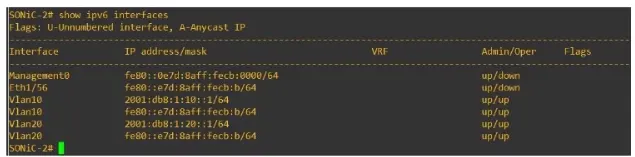
Refer to the exhibit.

Eth 1/1 of SONiC-1 and Eth1/56 of SONiC-2 should be a routed link connecting the two Enterprise SONiC switches. No traffic is passing between them.

What is the cause of the failure?

Correct Answer: A. An incorrect IPv6 address type was used for interface Eth1/56 of SONiC-2.
Explanation:

From the exhibit, it is evident that Eth1/56 on SONiC-2 is assigned a link-local IPv6 address (fe80::e7d:8aff:fecb

/64). Link-local addresses are not routable beyond the local network segment, which means they cannot be used to route traffic between SONiC-1 and SONiC-2. For routed links, global unicast addresses must be used.


Dell Technologies SONiC documentation

IPv6 Addressing Guide