Free F5 Networks BIG IP Local Traffic Manager LTM Specialist Maintain & Troubleshoot 301b Exam Questions
Page: 1 / 14Total 210 questions
Want more questions? Get Premium Access.
Question 1
-- Exhibit --
-- Exhibit --
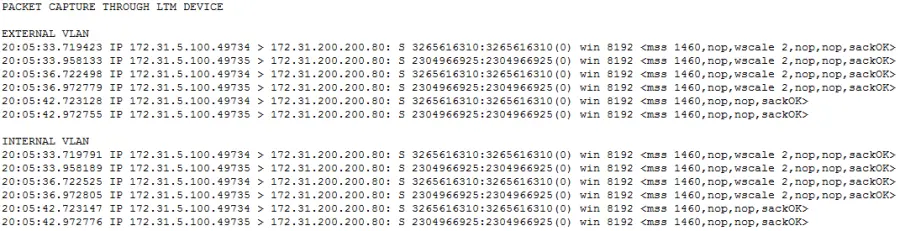
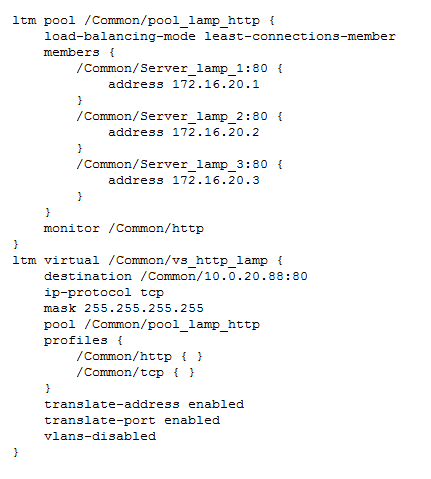
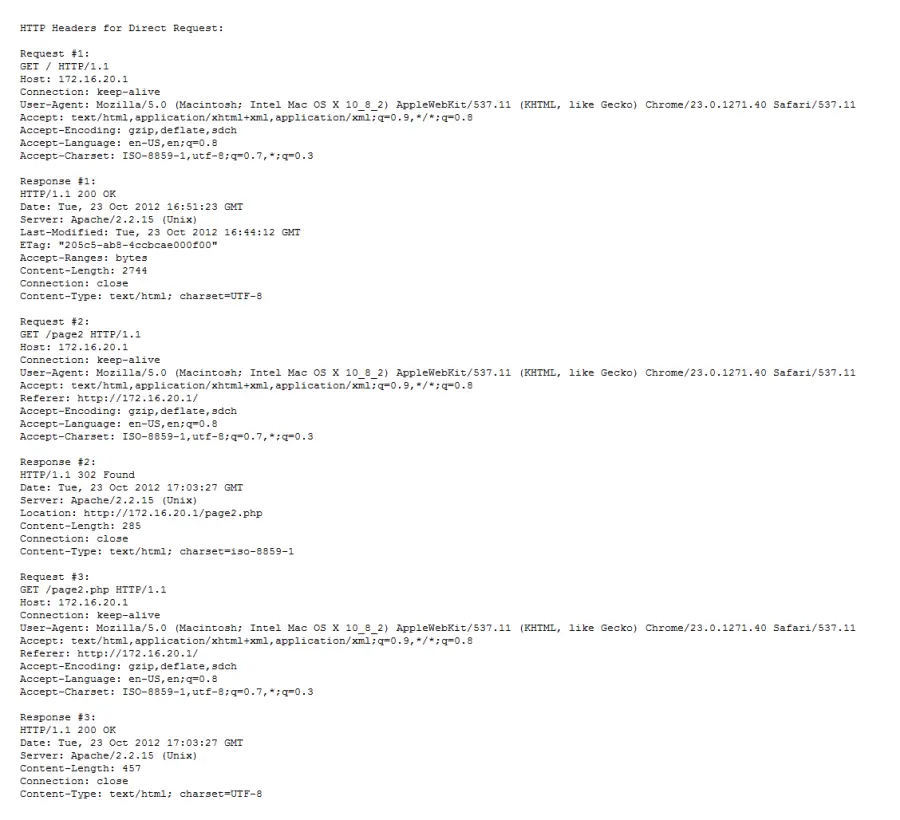
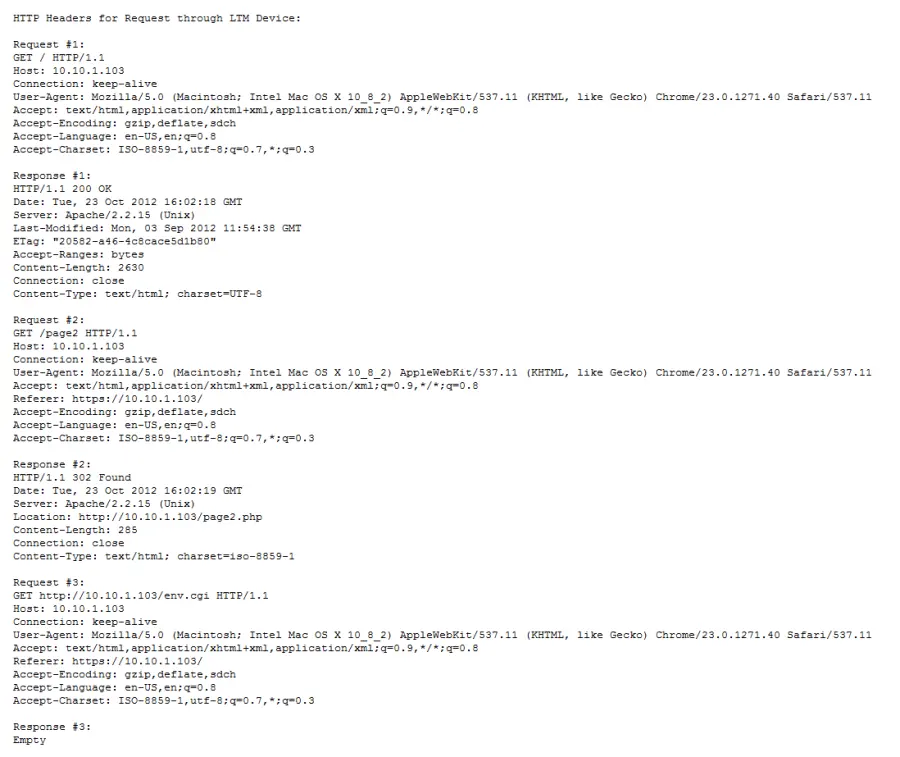
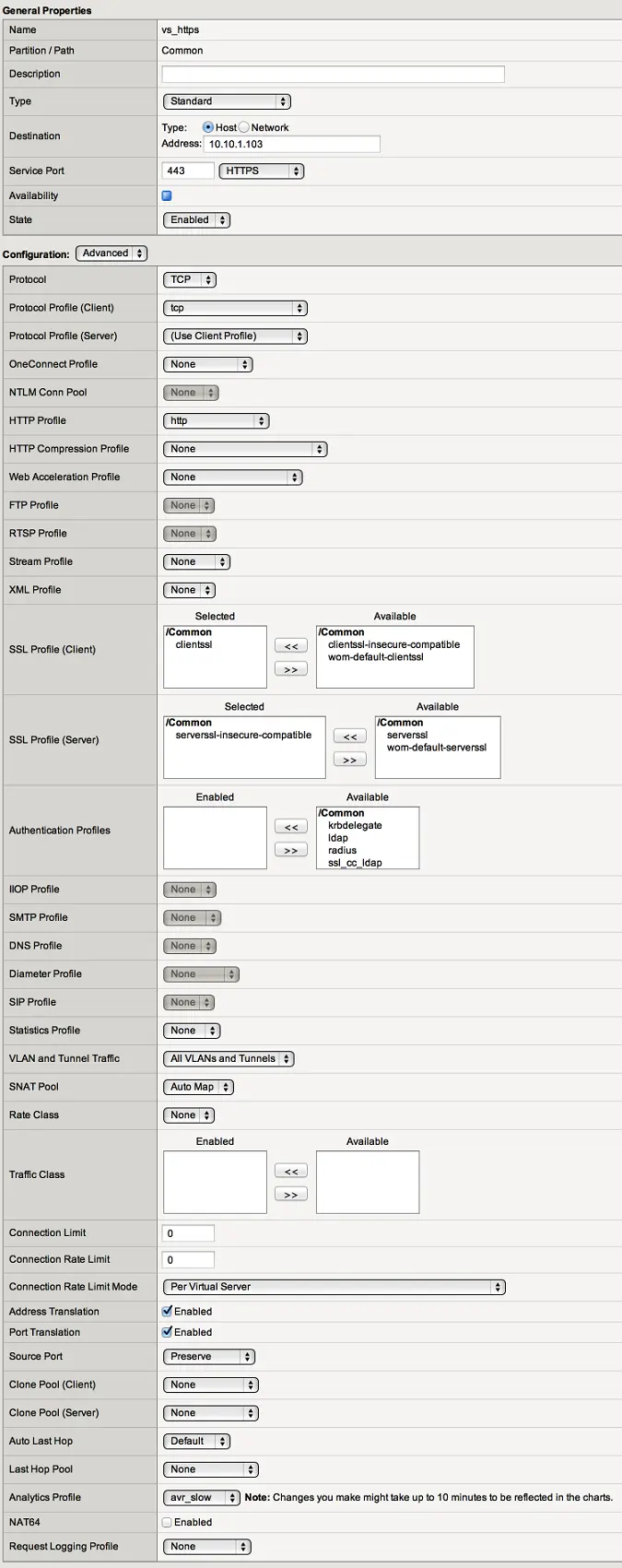
Refer to the exhibits.
Users are able to access the application when connecting directly to the web server but are unsuccessful when connecting to the virtual server.
What is the cause of the application access problem?
Correct Answer:C. The virtual server has address translation disabled.
Question 2
An LTM Specialist is tasked with ensuring that the syslogs for the LTM device are sent to a remote syslog server.
The following is an extract from the config file detailing the node and monitor that the LTM device is using for the
remote syslog server:
monitor
Syslog_15002 {
defaults from udp
dest *:15002
}
node 91.223.45.231 {
monitor Syslog_15002
screen RemoteSYSLOG
}
There seem to be problems communicating with the remote syslog server. However, the pool monitor shows that the remote server is up.
The network department has confirmed that there are no firewall rules or networking issues preventing the LTM device from
communicating with the syslog server. The department responsible for the remote syslog server indicates that there may
be problems with the syslog server. The LTM Specialist checks the BIG-IP LTM logs for errors relating to the remote syslog
server. None are found. The LTM Specialist does a tcpdump:
tcpdump -nn port 15002, with the following results:
21:28:36.395543 IP 192.168.100.100.44772 > 91.223.45.231.15002: UDP, length 19
21:28:36.429073 IP 192.168.100.100.39499 > 91.223.45.231.15002: UDP, length 169
21:28:36.430714 IP 192.168.100.100.39499 > 91.223.45.231.15002: UDP, length 181
21:28:36.840524 IP 192.168.100.100.39499 > 91.223.45.231.15002: UDP, length 169
21:28:36.846547 IP 192.168.100.100.39499 > 91.223.45.231.15002: UDP, length 181
21:28:39.886343 IP 192.168.100.100.39499 > 91.223.45.231.15002: UDP, length 144
NotE. 192.168.100.100 is the self IP of the LTM device.
Why are there no errors for the remote syslog server in the log files?
Correct Answer:B. The monitor type used is inappropriate.
Question 3
An LTM Specialist notices the following error on the stdout console:
mcpd[2395]: 01070608:0: License is not operational(expired or digital signature does not match contents)
Which command should be executed to verify the LTM device license?
Correct Answer:B. tmsh show /sys license
Question 4
-- Exhibit --
-- Exhibit --
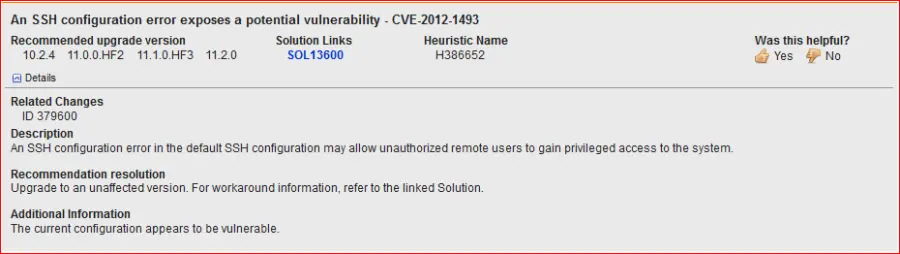
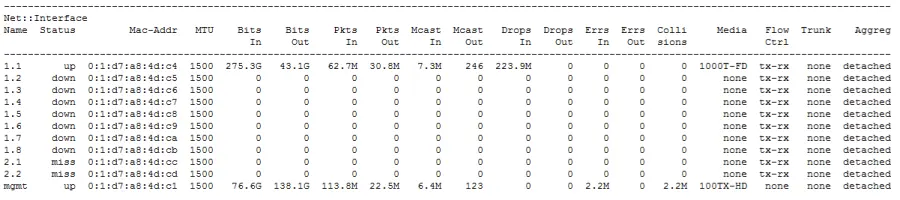
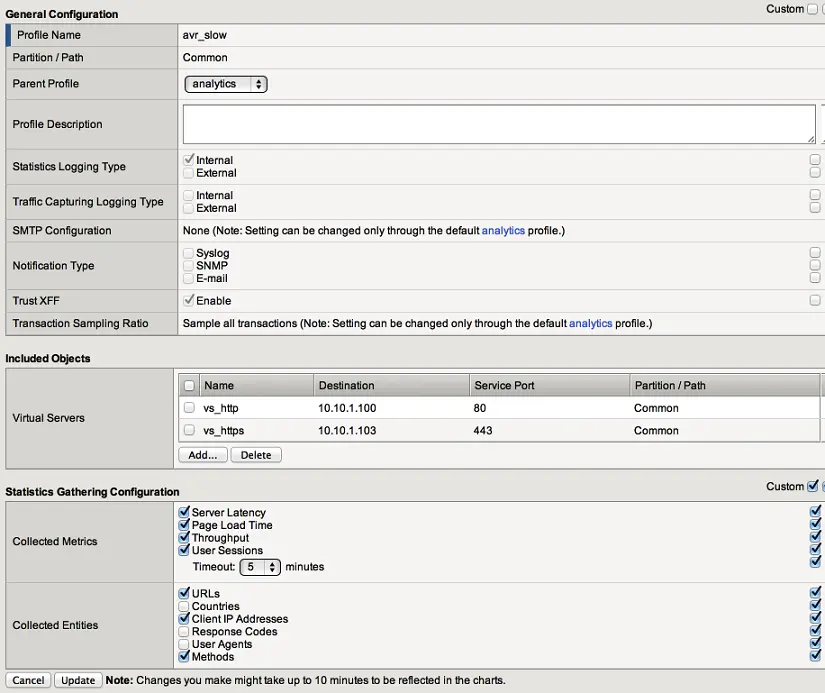
Refer to the exhibit.
An LTM Specialist is working on an LTM 11.0.0 installation and has identified a security vulnerability as shown in the exhibit. The LTM Specialist is tasked with applying the latest available hotfix to resolve the problem.
Which procedure resolves the problem?
Correct Answer:B. Browse to System > Software Management > Hotfix List.
Import 11.1.0.HF3 to the available hotfix images.
Select the imported hotfix image and installation location and click Install.
Question 5
An LTM Specialist is troubleshooting an HTTP monitor. The pool member is accessible directly through a browser, but the HTTP monitor is marking the pool member as down.
GET / HTTP/1.1
HTTP/1.1 400 Bad Request
DatE. Tue, 23 Oct 2012 21:39:07 GTM
Server: Apache/2.2.22 (FreeBSD) PHP/5.4.4
mod_ssl/2.2.22 OpenSSL/0.9.8q DAV/2
Content-LengtH. 226
Connection: close
Content-TypE. text/html; charset=iso-8859-1
Which issue is the pool member having?
Correct Answer:B. The pool member is rejecting the request because it is invalid.
Question 6
-- Exhibit --
-- Exhibit --
Refer to the exhibit.
Users report that a web application works incorrectly. Sometimes contextual data displayed on the web pages is accurate; other times it is inaccurate.
The LTM administrator looks at the connection table with a filter on one of the client IP addresses currently connected using the command "tmsh show sys connection cs-client-addr 10.0.20.1"
Correct Answer:C. Set up an HTTP cookie insert profile in the virtual server.
Question 7
-- Exhibit --
-- Exhibit --
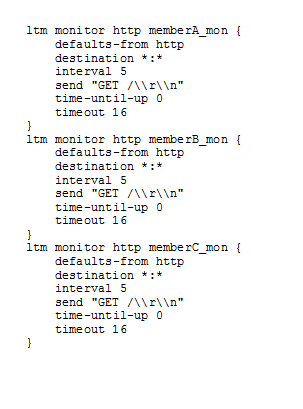
Refer to the exhibit.
An LTM Specialist is troubleshooting an HTTP monitor that is marking a pool member as down. Connecting to the pool member directly through a browser shows the application is up and functioning correctly.
How should the send string be modified to correct this issue?
Correct Answer:B. GET / HTTP/1.0\r\n\r\n
Question 8
Internet clients connecting to a virtual server to download a file are experiencing about 150 ms of latency and no packet loss.
Which built-in client-side TCP profile provides the highest throughput?
Correct Answer:D. tcp-wan-optimized
Question 9
An LTM Specialist realizes that a datacenter engineer has changed the console baud rate.
Which command determines the current baud rate via the command line interface?
Correct Answer:B. tmsh show /sys console
Question 10
An LTM Specialist configures an HTTP monitor as follows: