
Limited-Time Offer: Enjoy 50% Savings! Ends in 00h 00m 00s Coupon code: 50OFF
Skip to content

Free F5 Networks BIG-IP Administration Data Plane Configuration F5CAB3 Exam Questions

Page: 1 / 9 Total 86 questions

Want more questions? Get Premium Access.

Question 1

Users report that traffic is negatively affected every time a BIG-IP device fails over. The traffic becomes stabilized after a few minutes. What should the BIG-IP Administrator do to reduce the impact of future failovers?

Correct Answer: C. Configure MAC Masquerade
Explanation:

When a failover occurs in a standard BIG-IP High Availability (HA) pair, the newly active device takes over the floating IP addresses (Virtual Servers, Self IPs). By default, the new active device sends Gratuitous ARP (GARP) messages to the local network switch to inform it that these IP addresses are now associated with its own physical MAC addresses. However, network switches and intermediate routers often have ARP aging timers or security features that may delay the updating of their ARP tables, leading to 'black-holed' traffic or dropped packets for several seconds or minutes until the network infrastructure correctly relearns the new path.

To eliminate this delay and ensure a seamless transition, a BIG-IP Administrator should Configure MAC Masquerade. MAC Masquerade allows the administrator to assign a unique, 'virtual' MAC address to a specific traffic group. Instead of using the hardware-burned MAC address of the individual appliance, the active device uses this shared virtual MAC address for all communication involving floating IPs. When a failover occurs, the standby device assumes control of the traffic group and begins using the exact same virtual MAC address. Because the MAC address associated with the VIPs never changes from the switch's perspective, there is no need for the switch to update its MAC address table or for the surrounding infrastructure to update its ARP caches. This effectively eliminates the 'stabilization period' reported by users, as the data plane transition happens almost instantaneously at Layer 2, maintaining continuous traffic flow without being hindered by external network re-convergence times.

Question 2

Which of the following has iApp configured objects?

Correct Answer: A. ltm virtual /Common/vmware_test.app/vmware_test_proxy_https {app-service /Common/vmware_test.app/vmware_testcreation-time 2024-04-12:08:49:12destination /Common/10.155.47.199:443ip-protocol tcplast-modified-time 2024-04-12:08:49:12mask 255.255.255.255profiles {/Common/ppp {}/Common/rba {}/Common/vdi {}/Common/vmware_test.app/vmware_test {}/Common/vmware_test.app/vmware_test_client_ssl {context clientside}/Common/vmware_test.app/vmware_test_connect {context clientside}/Common/vmware_test.app/vmware_test_http {}/Common/vmware_test.app/vmware_test_lan_optimized_tcp {context serverside}/Common/vmware_test.app/vmware_test_server_ssl {context serverside}/Common/vmware_test.app/vmware_test_wan_optimized_tcp {context clientside}/Common/websso {}}serverssl-use-sni disabledsource 0.0.0.0/0source-address-translation {type automap}translate-address enabledtranslate-port enabled}
Explanation:

An F5 iApp is a template-driven system used to deploy complex applications by grouping all necessary BIG-IP objects (Virtual Servers, Pools, Profiles) into a single management entity. Objects created by an iApp are distinguished by their naming convention and metadata. In the provided exhibit, the Virtual Server configuration in Option A is clearly identified as an iApp-managed object through two primary indicators. First, the object resides within a sub-directory or partition ending in .app (/Common/vmware_test.app/). Second, the configuration explicitly includes the attribute app-service /Common/vmware_test.app/vmware_test, which serves as the system's internal pointer linking the LTM object back to the parent iApp Application Service. Furthermore, several profiles associated with this virtual server also reside within the same .app container, such as /Common/vmware_test.app/vmware_test_http.

In contrast, Options B, C, and D represent standard, manually created Virtual Servers. While they may have complex configurations (such as the APM profiles in app2_vs and app1_vs), they lack the folder-based naming hierarchy and the app-service metadata attribute that denotes iApp ownership. Standard objects like app1_vs are managed individually, whereas the objects within vmware_test.app are typically protected by 'Strict Updates.' This means their configuration is controlled by the iApp's template logic; any manual attempt to modify these specific parameters directly via the Virtual Server menu would result in an error message stating the service must be updated via the application management interface. Identifying these objects is a critical procedural step for administrators to determine whether a configuration should be edited through the standard LTM menus or through the iApp's 'Reconfigure' tab to ensure consistency and prevent manual changes from being overwritten by the template.


Question 3

A BIG-IP Administrator uses backend servers to host multiple services per server. There are multiple virtual servers and pools defined, referencing the same backend servers. Which load balancing algorithm is most appropriate to have an equal number of connections on each backend server?

Correct Answer: B. Least Connections (node)
Explanation:

This question addresses the critical architectural distinction between 'member-based' and 'node-based' load balancing in environments where servers are multi-homed or host multiple virtualized services. On a BIG-IP, a node represents the underlying IP address of a physical or virtual server, while a pool member represents a specific combination of that IP and a service port (e.g., 10.1.1.10:80).

When multiple pools reference the same IP address across different ports or Virtual Servers, using Least Connections (member) (Option D) only balances connections relative to that specific pool. For example, if Pool_A and Pool_B both use Server_X, and Pool_A has 100 connections while Pool_B has only 5, a member-based algorithm for Pool_B only sees the 5 connections and may continue to send traffic there even if Server_X is CPU-saturated by Pool_A.

The Least Connections (node) algorithm (Option B) solves this by tracking the aggregate total of all active connections directed to that specific node (IP address) across every pool on the system. By selecting the node with the absolute lowest total connection count, the BIG-IP ensures a more equitable distribution of work at the hardware resource level. Predictive methods (Options A and C) use a ranking system based on the trend of connection counts over time, but for the specific requirement of maintaining an equal number of current connections on multi-service servers, the direct Least Connections (node) calculation is the standard and most effective procedural choice.


Question 4

A BIG-IP Administrator needs to apply a health monitor for a pool of database servers named DB_Pool that uses TCP port 1521. Where should the BIG-IP Administrator apply this monitor?

Correct Answer: B. Local Traffic > Pools > DB.Pool > Properties
Explanation:

In BIG-IP configuration, health monitors can be applied at three distinct levels: the node, the pool, or the individual pool member. To ensure that a specific application service---in this case, a database service on port 1521---is functioning correctly for the entire pool, the administrator should apply the monitor at the pool level. Navigating to Local Traffic > Pools > DB.Pool > Properties allows the administrator to select one or more monitors from the 'Available' list and move them to the 'Active' list.

Applying a monitor at the pool property level ensures that the BIG-IP checks the health of every member assigned to that pool using the same logic. If a database-specific monitor (such as a TCP handshake or an Oracle/SQL check) fails for a specific member, the BIG-IP marks that member as 'offline' for that specific pool, preventing new connections from being sent to it. While monitors can be applied to Pool Members (Option D) to give different members unique monitoring logic, it is more administratively efficient to apply it to the pool properties when all servers are expected to behave identically. Applying it to Nodes (Option C) would only verify that the IP address is up (typically via ICMP), which does not guarantee that the database service on port 1521 is actually responding. Finally, Profiles (Option A) are used to define how traffic is handled once it is accepted by a Virtual Server, not for the proactive health checking of backend resources. Therefore, the pool properties page is the standard location for configuring service-specific availability requirements.


Question 5

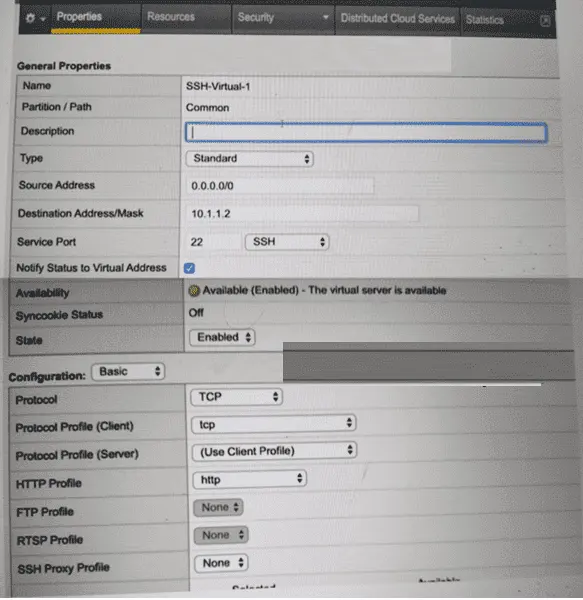
Refer to the exhibit.

A BIG-IP Administrator creates a new Virtual Server to load balance SSH traffic. Users are unable to log on to the servers.

What should the BIG-IP Administrator do to resolve the issue? (Choose one answer)

Correct Answer: D. Set HTTP Profile to None
Explanation:

SSH is a Layer 4 TCP-based protocol that operates on TCP port 22 and does not use HTTP in any capacity. In the exhibit, the Virtual Server is configured with an HTTP Profile applied, which is inappropriate for SSH traffic and causes connection failures.

According to the BIG-IP Administration: Data Plane Configuration documentation:

An HTTP profile must only be applied to Virtual Servers handling HTTP or HTTPS traffic.

When an HTTP profile is attached, BIG-IP expects HTTP headers and attempts to parse application-layer data.

Non-HTTP protocols such as SSH, FTP (control), SMTP, and other raw TCP services will fail if an HTTP profile is enabled.

Why the other options are incorrect:

A . Set Protocol to UDPSSH uses TCP, not UDP. Changing the protocol would break SSH entirely.

B . Set Source Address to 10.1.1.2The source address setting controls client access restrictions and is unrelated to protocol parsing issues.

C . Set Destination Address/Mask to 0.0.0.0/0The destination address is already valid for a specific SSH service and does not impact protocol handling.

Correct Resolution:

The BIG-IP Administrator should remove the HTTP Profile (set it to None) so the Virtual Server functions as a pure Layer 4 TCP service, allowing SSH connections to pass through successfully.


Question 6

Application administrators are reporting that nodes different from those configured in the pool are selected. The use of an iRule is suspected. How can the BIG-IP Administrator check if an iRule is used for this traffic? (Pick the 2 correct responses below)

Correct Answer: B. Via TMSH with the list /ltm virtual <virtual_server> command.; D. Via the GUI at the Resources tab for the virtual server.
Explanation:

To determine if an iRule is influencing traffic for a specific Virtual Server, the administrator must verify the association between the Virtual Server object and any applied scripts. In the BIG-IP Configuration Utility (GUI), this association is found under the Resources tab of the specific Virtual Server. While there is an 'iRules' sub-menu under Local Traffic, checking the Virtual Server's Resources tab is the definitive way to see which specific rules are currently active and in what order they are being processed for that particular traffic flow.

From the Command Line Interface (CLI), the tmsh list /ltm virtual <virtual_server> command provides a full text-based output of the virtual server's configuration. If iRules are applied, they will appear within a 'rules { ... }' block in the command output. This is more effective than Option A, which only lists the contents of the iRule itself but does not show if or where it is applied. Option C is a common misconception; while some versions of the GUI have reorganized menus, the standard location for managing the association of profiles, policies, and iRules to a Virtual Server remains the 'Resources' section. By identifying the applied iRule, an administrator can then review the script logic---often containing commands like pool or node---to see if it is overriding the default pool selection based on specific HTTP headers, URI paths, or client IP addresses.


Question 7

A Standard Virtual Server for a web application is configured with Automap for Source Address Translation. The original client IP must be known by backend servers.

What should the BIG-IP Administrator configure?

Correct Answer: B. HTTP profile to insert X-Forwarded-For
Explanation:

The X-Forwarded-For header preserves the original client IP when SNAT is enabled.


Question 8

A Standard Virtual Server reports poor network performance for Internet-based clients.

What configuration should be applied?

Correct Answer: A. Client TCP: f5-tcp-wan / Server TCP: f5-tcp-lan
Explanation:

WAN TCP profiles are optimized for high latency and packet loss typical of Internet clients, while LAN profiles are ideal for backend servers.


Question 9

An organization reports slow performance accessing an Intranet website. All employees use a single proxy IP.

What should the BIG-IP Administrator do?

Correct Answer: D. Change Default Persistence to cookie
Explanation:

When many users share one source IP, source-address persistence fails. Cookie persistence uniquely identifies clients at Layer 7.


Question 10

The BIG-IP Administrator has configured an HTTP health monitor applied to a Pool of HTTP web servers hosting www.f5.com, but all Pool Members show a DOWN status. The web server is returning a response of '400 Bad Request'. What would be the correct monitor Send string?

Correct Answer: C. GET /healthmonitor.html HTTP/1.1 \r\nHost: www.f5.com\r\nConnection: Close\r\n\r\n
Explanation:

A 400 Bad Request response from an HTTP/1.1 web server is a definitive indicator that the HTTP request sent by the health monitor is missing a required Host header. In HTTP/1.1, the Host header is mandatory per RFC 7230. Web servers --- particularly those hosting named virtual hosts such as www.f5.com --- will reject any HTTP/1.1 request that omits the Host header, returning a 400 error, which the BIG-IP monitor interprets as a failed health check, marking all members DOWN.

The correct Send string must include:

The GET request line with HTTP/1.1 protocol declaration

A \r\n (carriage return + line feed) after the request line

The Host: www.f5.com header to satisfy HTTP/1.1 requirements

A \r\n after the Host header

Connection: Close header to instruct the server to close the connection after responding

A final \r\n\r\n to properly terminate the HTTP request headers

Only option C satisfies all these requirements with the correct syntax and Host header inclusion.

Option D (the current configured string) omits the Host header entirely --- the root cause of the 400 error. Options A and B are structurally incomplete or syntactically malformed.