
Limited-Time Offer: Enjoy 50% Savings! Ends in 00h 00m 00s Coupon code: 50OFF
Skip to content

Free F5 Networks BIG-IP Administration Support and Troubleshooting F5CAB5 Exam Questions

Page: 1 / 7 Total 65 questions

Want more questions? Get Premium Access.

Question 1

What information is required for a BIG-IP Administrator to open an F5 Support ticket?

Correct Answer: D. Serial number of the device, qkview, problem description, contact info
Explanation:

To ensure a support case is processed and routed efficiently, F5 specifies a mandatory set of baseline information.

Serial Number: Required to verify the support contract and entitlement level for the hardware or virtual edition.

QKView: This is described as the 'first and most important thing to have when opening a case'. It provides the F5 Support Engineer with the necessary diagnostic data to understand the system's current state and resource utilization.

Problem Description: A precise description of the issue, including symptoms, when the problem started, and the business impact, is critical for routing the case to the correct technical team.

Contact Info: Accurate contact information for the individual who will be working on the ticket with F5.

Comparison: While packet captures (Option A) or UCS files (Option B) are often useful, they are not strictly required for the initial opening of all support tickets; however, a QKView is considered a primary prerequisite for technical analysis.

Question 2

Pool /Common/testpool member /Common/10.120.0.5:8090 monitor status down. [ /Common/http: up, /Common/http2: down; last error: ] [ was up for lhr:0min:43sec ]

Why is this pool member being marked down?

Correct Answer: C. The pool member is currently only serving HTTP traffic.
Explanation:

This log entry indicates that multiple monitors are assigned to the pool member, and the member is failing one of them.

Understanding Monitor Logic: By default, if multiple monitors are assigned to a pool or pool member without a 'Minimum To Up' (Availability Requirement) setting, the system requires all monitors to pass for the member to be marked 'Up'.

Analyzing the Log: The log clearly states: [ /Common/http: up, /Common/http2: down; ... ]. This means the standard HTTP monitor is successful, indicating the member is serving HTTP traffic, but the http2 monitor has failed.

Conclusion: Since the http monitor is 'up' but the member as a whole is 'down,' we can conclude the member is successfully responding to standard HTTP requests but not HTTP2 requests. Therefore, the member is currently only serving standard HTTP traffic.


Question 3

Due to a change in application requirements, a BIG-IP Administrator needs to modify the configuration of a Virtual Server to include a Fallback Persistence Profile. Which persistence profile type should the BIG-IP Administrator use for this purpose?

Correct Answer: D. Source Address Affinity
Explanation:

Comprehensive and Detailed Explanation From BIG-IP Administration S73upport and Troubleshooting documents: Persistence is critical for ensuring that a client's session remains with the same pool member throughout its duration. If primary persistence (like Cookie Persistence) fails---for instance, because the client has disabled cookies---load balancing will not work as expected, and the session may be broken. A 'Fallback Persistence Profile' provides a backup method75. The most common and reliable fallback method is 'Source Address Affinity'76. This method tracks the client's IP address in the BIG-IP's persistence table and ensures that any subsequent requests from that IP are routed to the same pool member, even if the primary persistence token is missing. Troubleshooting session drops often involves checking if a fallback method is configured to handle scenarios where the primary method is unsupported by the client's browser or environment. Without a fallback, the BIG-IP would revert to standard load balancing, potentially sending the client to a different server that lacks their session data.


Question 4

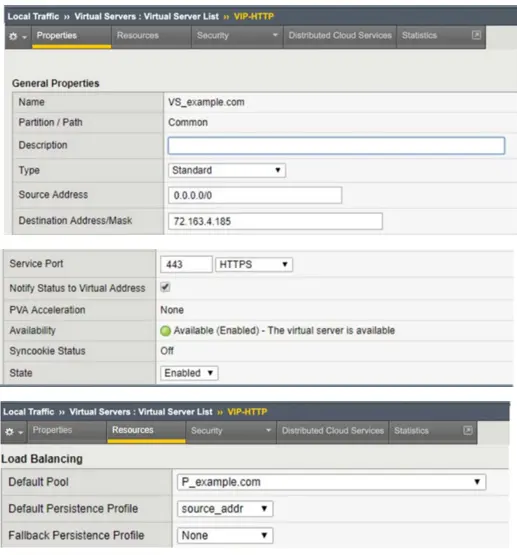
Refer to Exhibit:

An organization is reporting slow performance accessing their Intranet website, hosted in a public cloud. All employees use a single Proxy Server with the public IP of 104.219.110.168 to connect to the Internet. What should the BIG-IP Administrator of the Intranet website do to fix this issue?

Correct Answer: D. Change Default Persistence Profile to cookie
Explanation:

This scenario describes a classic network performance issue known as the 'Mega-Proxy' problem. When an organization routes all employee traffic through a single proxy server, the BIG-IP sees thousands of unique users as having the exact same source IP address. If the administrator has configured 'Source Address Affinity' persistence, the BIG-IP will correctly follow the rule but incorrectly route all users to the same single backend pool member. This creates a severe load imbalance where one server is overwhelmed while others remain idle, leading to poor application response times. To resolve this, the administrator must change the persistence profile to 'HTTP Cookie'. Cookie-based persistence allows the BIG-IP to place a unique identifier in each user's browser, allowing the system to distinguish between individual sessions even if they share the same source IP. This fix ensures that traffic is distributed evenly across the pool members, restoring4 the expect5ed load balancing functionality and resolving the slow performance reported by users behind the corporate proxy.


Question 5

A BIG-IP Administrator disabled a virtual server with a pool that has a working health monitor. How does the status icon look for this virtual server?

Correct Answer: A. Black circle
Explanation:

BIG-IP status icons provide immediate visual feedback regarding the state of an object based on its availability and enabled/disabled status.

Color (Black): The color black indicates that an object has been manually Disabled by an administrator.

Shape (Circle): The circular shape indicates that the object is Available (i.e., its health monitors are passing).

Scenario Result: Since the virtual server is manually disabled (Black) but its associated pool has a working health monitor that is currently passing (Circle), the resulting icon is a Black Circle.


Question 6

A pool member is exhibiting frequent up-and-down state changes, leading the BIG-IP Administrator to suspect a health monitor issue. Which specific log file should the BIG-IP Administrator review to diagnose the problem?

Correct Answer: B. /var/log/ltm
Explanation:

The Local Traffic Manager (LTM) log file is the primary repository for all events related to load balancing objects, including virtual servers, pools, and nodes.

Monitor Logging: When a health monitor marks a pool member as 'UP' or 'DOWN,' the system generates a log entry in /var/log/ltm.

Diagnosing Flaps: To troubleshoot 'flapping' (frequent state changes), an administrator would look for messages like 01010028:3: Pool /Common/http_pool member /Common/10.10.1.1:80 monitor status down followed quickly by an 'up' status. This log provides the timestamp and the specific monitor that triggered the state change.


Question 7

A gateway_icmp health monitor is configured on a pool. The BIG-IP Administrator is investigating why the pool is reported as down while the server is online. Other pools with servers in the same subnet are correctly monitored.

What can cause this behavior? (Choose one answer)

Correct Answer: C. The host-based firewall is active on the server.
Explanation:

A gateway_icmp monitor checks basic network reachability by sending ICMP echo requests (pings) to the pool member or its gateway. If the pool is markedDOWNwhile the server is confirmed to be online, the most likely cause is thatICMP traffic is being blocked.

Ahost-based firewall active on the server (Option C)can block ICMP echo requests or replies, preventing BIG-IP from receiving a successful response to the health check. This results in the monitor failing and the pool member being marked down, even though the server and application are otherwise functioning normally. This explanation is consistent with the scenario where other servers in the same subnet work correctly, indicating that routing and BIG-IP configuration are not the issue.

The other options are unrelated to ICMP monitoring. Logged-in users (Option A), missing patches (Option B), and stopped HTTP services (Option D) do not affect a gateway_icmp monitor. BIG-IP troubleshooting best practices recommend verifying ICMP reachability and firewall policies when diagnosing ICMP-based monitor failures.


Question 8

In the BIG-IP Configuration Utility, a user requests a single screen view to determine the status of all Virtual Servers and associated pool members, as well as any iRules in use. Where should the BIG-IP Administrator instruct the user to find this view?32

Correct Answer: C. Local Traffic > Network Map
Explanation:

Comprehensive and Detailed Explanation From BIG-IP A41dministration Support and Troubleshooting documents:To confirm functionality across a complex environment, the 'Network Map' is the most efficient troubleshooting tool in the Configuration Utility43. It provides a hierarchical, visual representation of the traffic management objects44. A single glance allows the administrator to see the status of a Virtual Server (Green/Red/Yellow), the status of its associated pool, the health of individual pool members, and which iRules are currently attached45. This view is superior to the standard 'Virtual Server List' for troubleshooting because it maps the dependencies between objects46. For example, if a Virtual Server is 'Red,' the Network Map will show if that status is inherited from a failed pool or a specific monitor failing on a pool member. Reviewing these basic stats in the Network Map helps the administrator quickly isolate whether a failure is at the service level (Virtual Server), the logic level (iRule), or the hardware level (Pool Member).


Question 9

Users are unable to reach an application. The BIG-IP Administrator checks the Configuration Utility and observes that the Virtual Server has a red diamond in front of the status. What is causing this issue?

Correct Answer: A. All pool members are down.
Explanation:

In the BIG-IP Configuration Utility, the status icon (shape and color) provides immediate feedback on why a virtual server is not working as expected81. A 'Red Diamond' indicates that the object is 'Offline' and unavailable to process traffic82. For a virtual server, this specific status typically means it has inherited an offline state from its mandatory backend resources8383. If all pool members associated with the virtual server have failed their health monitors, the virtual server will transition to a red diamond status because it has no healthy destination for incoming requests. This is distinct from a 'Black Circle,' which would indicate the virtual server has been manually 'Disabled' by an administrator85858585. To troubleshoot a red diamond, the administrator must examine the associated pool and its members to determine why the health monitors are failing (e.g., server crashes, network path failures, or incorrect monitor strings). Resolving the health check failures on the pool members will return the virtual server to an 'Available' (Green) status.


Question 10

A user needs to determine known security vulnerabilities on an existing BIG-IP appliance and how to remediate these vulnerabilities. Which action should the BIG-IP Administrator recommend?

Correct Answer: B. Generate a qkview and upload to iHealth
Explanation:

F5 recommends using the iHealth diagnostic tool to identify security vulnerabilities and receive specific remediation guidance.

QKView and iHealth: A QKView file is a comprehensive diagnostic snapshot of the BIG-IP system. When this file is uploaded to the F5 iHealth portal, it is automatically parsed against a database of known issues and security advisories.

Vulnerability Diagnosis: The iHealth platform includes automated checks specifically designed to surface security gaps and 'Heuristics' that match the system's current configuration and software version to known CVEs (Common Vulnerabilities and Exposures).

Remediation Guidance: For every identified vulnerability, iHealth provides direct links to the relevant F5 Security Advisory (K-article), which contains detailed remediation steps, such as specific software versions that contain a fix or temporary mitigation commands.

UCS vs. QKView: While a UCS (User Configuration Set) file is a backup of the system configuration, it is not the format used by the iHealth diagnostic engine for automated vulnerability scanning; the QKView is the required format for this process.