
Limited-Time Offer: Enjoy 50% Savings! Ends in 00h 00m 00s Coupon code: 50OFF
Skip to content

Free Forescout Certified Professional FSCP Exam Questions

Page: 1 / 8 Total 80 questions

Want more questions? Get Premium Access.

Question 1

Which of the following is the SMB protocol version required to manage Windows XP or Windows Vista endpoints?

Correct Answer: B. SMB V1.0
Explanation:

Comprehensive and Detailed Explanation From Exact Extract of Forescout Platform Administration and Deployment:

According to theForescout HPS Inspection Engine Configuration GuideandMicrosoft SMB Protocol documentation, the SMB protocol version required to manageWindows XP or Windows Vista endpoints is SMB V1.0.

SMB Version Timeline:

According to the Microsoft documentation and Forescout requirements:

Windows Version

SMB Support

Windows XP

SMB 1.0 only

Windows Vista

SMB 1.0 and SMB 2.0

Windows 7

SMB 1.0, SMB 2.0, and SMB 2.1

Windows 8/Server 2012

SMB 2.0, SMB 2.1, and SMB 3.0

Windows 10

SMB 2.1 and SMB 3.x

Windows XP and Vista SMB Requirements:

According to Forescout documentation:

The documentation explicitly states:

'When you require SMB signing, Remote Inspection can no longer be used to manage endpoints that cannot work with SMB signing, for example:Old Windows XP/Server 2003 systems'

This indicates that Windows XP requires SMB support, specificallySMB 1.0, which doesn't support modern SMB signing requirements.

SMB Version Negotiation:

According to the official documentation:

When a Forescout CounterACT appliance connects to an endpoint:

Highest Common Version Selected- The highest version supported by BOTH is used

Fallback Behavior- If SMB 2.0 is available on Vista but not supported by CounterACT, it falls back to SMB 1.0

ForWindows XP(SMB 1.0 only) andWindows Vista(SMB 1.0/2.0):

Minimum Required: SMB 1.0

Maximum Supported: SMB 2.0 (Vista only)

Port Requirements for SMB 1.0:

According to the Forescout documentation:

For Windows XP and Vista endpoints using SMB 1.0:

text

Port 139/TCP must be available

(Port 445/TCP is used for Windows 7 and above)

Historical Context:

According to the documentation:

SMB 1.0 was the original protocol used by Windows 2000, NT, and earlier versions

Windows Vista SP1 and Windows Server 2008 introduced SMB 2.0

SMB 1.0 is considered legacy and insecure (no encryption, subject to security vulnerabilities)

Microsoft recommends disabling SMB 1.0 in modern networks

However, for legacy Windows XP and early Vista systems, SMB 1.0 is the only option.

Why Other Options Are Incorrect:

A . SMB V3.1.1- This is the latest version, introduced with Windows Server 2016 and Windows 10; not supported on XP or Vista

C . SMB is not required for XP or Vista- Incorrect; SMB is essential for Windows manageability and script execution

D . SMB V2.0- While Vista supports SMB 2.0, Windows XP does NOT; only SMB 1.0 works on both

E . SMB V3.0- This requires Windows 8/Server 2012 or later; not supported on XP or Vista

Legacy Endpoint Management Considerations:

According to the documentation:

For legacy endpoints requiring SMB 1.0:

Cannot require SMB signing (not supported in SMB 1.0)

Must allow unencrypted SMB communication

Should be isolated on network segments with security controls

Represents security risk due to SMB 1.0 vulnerabilities

Referenced Documentation:

Forescout HPS Inspection Engine - About SMB documentation

Operational Requirements - Port requirements

Microsoft - SMB Protocol Versions and Requirements

Microsoft - Detect, Enable, and Disable SMBv1, SMBv2, and SMBv3 in Windows

Question 2

Which of the following plugins assists in classification for computer endpoints? (Choose two)

Correct Answer: B. HPS Inspection Engine; D. Advanced Tools
Explanation:

Comprehensive and Detailed Explanation From Exact Extract of Forescout Platform Administration and Deployment:

According to theForescout Administration Guide and Base Modules documentation, the plugins that assist in classification for computer endpoints areHPS Inspection Engine (B) and Advanced Tools (D).

HPS Inspection Engine Classification:

According to the HPS Inspection Engine Configuration Guide:

'The HPS Inspection Engine powers CounterACT tools used for classifying endpoints. These tools include the classification engine that is part of HPS Inspection Engine, the Primary Classification, Asset Classification and Mobile Classification templates, the Classify actions, and Classification/Classification (Advanced) properties.'

The HPS Inspection Engine provides:

Classification Engine- Determines the Network Function property

Primary Classification Template- Classifies endpoints into categories

Asset Classification Template- For asset-level classification

Mobile Classification Template- For mobile device classification

Multiple Classification Methods- Including NMAP, HTTP banner scanning, SMB analysis, passive TCP/IP fingerprinting

Advanced Tools Plugin Classification:

According to the Advanced Tools Plugin documentation:

'The Advanced Tools Plugin is used to classify endpoints based on characteristics such as operating system, hardware vendor, and application software.'

The Advanced Tools Plugin provides:

Endpoint Classification- Based on OS, vendor, and applications

Device Property Resolution- Resolves device characteristics

Fingerprinting- Identifies endpoints based on behavioral patterns

Why Other Options Are Incorrect:

A . Switch- The Switch Plugin manages network devices (switches) and provides VLAN/access control, not endpoint classification

C . Linux Plugin- The Linux Plugin is a platform-specific module for managing Linux endpoints, not a general classification tool

E . DNS Client- The DNS Client Plugin resolves DNS queries but does not assist with endpoint classification

Classification Workflow:

According to the documentation:

When classifying computer endpoints, Forescout uses:

HPS Inspection Engine- Primary classification tool analyzing:

HTTP banners from web services

SMB protocol information

NMAP scans and service detection

Passive TCP/IP fingerprinting

Domain credentials analysis

Advanced Tools Plugin- Secondary classification providing:

Application detection

Operating system identification

Hardware characteristics

Together, these plugins provide comprehensive endpoint classification for computer systems.

Classification Properties Resolved:

According to the Base Modules documentation:

The HPS Inspection Engine and Advanced Tools plugins resolve:

Function (Workstation, Printer, Server, Router, etc.)

Operating System (Windows, Linux, macOS, etc.)

Network Function (specific device role)

Application information

Referenced Documentation:

CounterACT Endpoint Module HPS Inspection Engine Configuration Guide v10.8

Forescout Platform Base Modules

About the Forescout Advanced Tools Plugin


Question 3

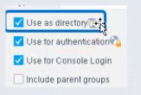
What is true of the "Use as directory" selection configured below?

Select one:

Correct Answer: A. It allows resolution of User information via LDAP
Explanation:

According to theForescout User Directory Plugin Configuration Guideand theRADIUS Plugin Configuration Guide Version 4.3, the'Use as directory' selection allows resolution of user information via LDAP. The documentation explicitly states:

'Use as directory: Select this option to use the server as a directory to retrieve user information.This option is not available for RADIUS and TACACS servers.'

What 'Use as directory' Does:

According to the User Directory Plugin documentation:

When 'Use as directory' is selected on a User Directory server configuration:

LDAP Query Capability- The server can be queried via LDAP to retrieve user information

User Resolution- User details are resolved by querying the LDAP directory

Directory Lookups- User properties (group membership, attributes, contact info) are retrieved from the directory

Policy Matching- Users can be matched in policies based on directory group membership

Supported Server Types for 'Use as directory':

According to the configuration guide:

The 'Use as directory' option is available for:

Microsoft Active Directory(via LDAP protocol)

OpenLDAP(via LDAP protocol)

Other LDAP-compatible directory servers

The 'Use as directory' option isNOT availablefor:

RADIUS servers- Cannot be used as a directory

TACACS servers- Cannot be used as a directory

Why RADIUS/TACACS Cannot Be Directories:

According to the documentation:

RADIUS and TACACSare authentication and authorization protocols, NOT directory protocols

They do not support directory-style lookups and user attribute queries

They only provide authentication (username/password verification) and authorization (what the user can do)

They cannot provide the rich user information that LDAP directories can provide

LDAP as a Directory Protocol:

According to the documentation:

LDAP (Lightweight Directory Access Protocol) provides:

User Information Storage- Stores user objects with multiple attributes

Directory Queries- Can query for specific users and their properties

Group Membership- Can retrieve LDAP group information

Attribute Resolution- Can access user attributes for policy conditions

Three Critical Checkboxes:

According to the RADIUS Plugin Configuration Guide:

'Make sure thatboththeUse as directory option and the Use for authentication option are enabled.'

This indicates that a single User Directory server can have multiple roles:

Use as directory- For LDAP queries and user information resolution

Use for authentication- For user login authentication

Use for Console Login- For access to the Forescout Console

Example Configuration:

According to the documentation:

When you have an Active Directory server:

'Use as directory'is CHECKED - Enables LDAP queries for user info and group membership

'Use for authentication'is CHECKED - Allows users to authenticate with their AD credentials

'Use for Console Login'is CHECKED - Allows administrators to log into Forescout Console with AD credentials

Why Other Options Are Incorrect:

B . It allows resolution of user information via TACACS- Explicitly NOT available for TACACS; TACACS cannot function as a directory

C . It allows for Guest Registration when Approvals are required- This is a separate User Directory feature unrelated to 'Use as directory'

D . It enables HTTP authentication and resolves HTTP login status- This is not related to directory usage; HTTP authentication is a separate feature


Question 4

Which setting is NOT available when initially adding a server to the User Directory Plugin?

Correct Answer: E. Replica
Explanation:

Comprehensive and Detailed Explanation From Exact Extract of Forescout Platform Administration and Deployment:

According to theForescout User Directory Plugin Configuration Guideand supported integration documentation,Replica is NOT available when initially adding a server to the User Directory Plugin. Replicas are configuredafterthe initial server setup is complete.

User Directory Server Initial Setup Process:

When initially adding a User Directory server, the following settings are available:

Server Name- The name to identify the server in Forescout

Address- The IP address or FQDN of the User Directory server

Port- The port number (typically 389 for LDAP, 636 for secure LDAP)

Domain- The domain name associated with the User Directory

Test- Option to test the connection and credentials

Advanced- Advanced configuration options

Replica Configuration - Post-Initial Setup:

According to the documentation:

'After configuring server settings, you can configure server tests and replicas.'

The Replica settings areNOT available during the initial server addition. Instead, replicas are configured as aseparate step after the primary server configuration is complete.

Replica Setup Workflow:

According to the User Directory Plugin configuration process:

Step 1: Add Server- Configure the primary server with Name, Address, Port, Domain

Step 2: Test Connection- Use the Test option to verify connectivity

Step 3: Configure Replicas- After the primary server is fully configured, then add replica servers

The documentation explicitly states:

'Refer to the following sections for server configuration details.After configuring server settings, you can configure server tests and replicas.'

Why Other Options Are Available Initially:

A . Test- Available initially; allows testing of server credentials and connectivity before completion

B . Domain- Available initially; domain name is required during server setup

C . Domain Aliases- Available initially; additional domain aliases can be specified for the server

D . Advanced- Available initially; advanced options like authentication types, TLS, etc. are available during setup

Replica Purpose:

Replicas are used to provide redundancy and failover capability. According to the documentation:

When replica servers are configured:

If the primary User Directory server becomes unavailable, the Forescout platform can failover to a replica server

Multiple replicas can be specified for increased fault tolerance

Referenced Documentation:

Forescout User Directory Plugin Configuration - Server Setup documentation

Configure server settings - After configuring server settings section

User Directory Plugin configuration videos and tutorials showing initial setup flow


Question 5

When troubleshooting a SecureConnector management issue for a Windows host, how would you determine if SecureConnector management packets are reaching CounterACT successfully?

Correct Answer: E. Use the tcpdump command and filter for tcp port 10003 traffic from the host IP address reaching the management port
Explanation:

Comprehensive and Detailed Explanation From Exact Extract of Forescout Platform Administration and Deployment:

According to theForescout Quick Installation Guideand official port configuration documentation,SecureConnector for Windows uses TCP port 10003, and the management packets should be captured from the host IP address reaching themanagement port(not the monitor port). Therefore, the correct command would usetcpdump filtering for tcp port 10003 traffic reaching the management port.

SecureConnector Port Assignments:

According to the official documentation:

SecureConnector Type

Port

Protocol

Function

Windows

10003/TCP

TLS (encrypted)

Allows SecureConnector to create a secure encrypted TLS connection to the Appliance from Windows machines

OS X

10005/TCP

TLS (encrypted)

Allows SecureConnector to create a secure encrypted TLS connection to the Appliance from OS X machines

Linux

10006/TCP

TLS 1.2 (encrypted)

Allows SecureConnector to create a secure connection over TLS 1.2 to the Appliance from Linux machines

Port 2200 is for Legacy Linux SecureConnector (older versions using SSH encryption), not for Windows.

Forescout Appliance Interface Types:

Management Port- Used for administrative access and SecureConnector connections

Monitor Port- Used for monitoring and analyzing network traffic

Response Port- Used for policy actions and responses

SecureConnector connections reach themanagement port, not the monitor port.

Troubleshooting SecureConnector Connectivity:

To verify that SecureConnector management packets from a Windows host are successfully reaching CounterACT, use the following tcpdump command:

bash

tcpdump -i [management_interface] -nn 'tcp port 10003 and src [windows_host_ip]'

This command:

Monitors the management interface

Filters for TCP port 10003 traffic

Captures packets from the Windows host IP address reaching the management port

Verifies bidirectional TLS communication

Why Other Options Are Incorrect:

A . tcp port 10005 from host IP reaching monitor port- Port 10005 is for OS X, not Windows; should reach management port, not monitor port

B . tcp port 2200 reaching management port- Port 2200 is for legacy Linux SecureConnector with SSH, not Windows

C . tcp port 10003 reaching monitor port- Port 10003 is correct for Windows, but should reach management port, not monitor port

D . tcp port 2200 reaching management port- Port 2200 is for legacy Linux SecureConnector, not Windows

SecureConnector Connection Process:

According to the documentation:

SecureConnector on the Windows endpoint initiates a connection to port 10003

Connection is established to the Appliance's management port

When SecureConnector connects to an Appliance or Enterprise Manager, it is redirected to the Appliance to which its host is assigned

Ensure port 10003 is open to all Appliances and Enterprise Manager for transparent mobility

Referenced Documentation:

Forescout Quick Installation Guide v8.2

Forescout Quick Installation Guide v8.1

Port configuration section: SecureConnector for Windows


Question 6

Which of the following are endpoint attributes learned from the Switch plugin?

Correct Answer: C. Mac address, Host name, Port VLAN, Port Description, Switch OS, Switch Version
Explanation:

Comprehensive and Detailed Explanation From Exact Extract of Forescout Platform Administration and Deployment:

According to theForescout Switch Plugin documentation and Switch Properties, the endpoint attributes learned from the Switch plugin are:Mac address, Host name, Port VLAN, Port Description, Switch OS, and Switch Version.

Switch Plugin Endpoint Properties:

According to the Switch Properties documentation:

The Switch plugin learns and populates the following endpoint attributes:

Mac address- MAC address of the endpoint

Host name- Device hostname from switch ARP table

Port VLAN- VLAN ID assigned to the switch port

Port Description- Switch port alias/description

Switch OS- Operating system of the switch

Switch Version- Software version of the switch

Why Other Options Are Incorrect:

A . Includes 'Mac table' and 'Host Table'- These are switch resources, not endpoint attributes

B . Lists 'ARP Table' and duplicates 'Switch Version'- ARP table is not an endpoint attribute

D . Includes 'ARP Table'- ARP table is a switch resource, not an endpoint attribute

**E. 'Switch IP and Port name' - 'Switch IP' is not an endpoint attribute; should be 'Port VLAN'

Distinction: Switch Resources vs. Endpoint Attributes:

According to the documentation:

Endpoint Attributes(learned about the endpoint):

Mac address

Host name

Port VLAN

Port Description

Switch OS

Switch Version

Switch Resources(infrastructure information):

Mac table

ARP table

Host table

Referenced Documentation:

Switch Properties - v8.4.4

Switch Properties - v8.16.h

Switch Properties - v8.1.x


Question 7

Proper policy flow should consist of...

Correct Answer: B. Modify as little as possible in discovery, each classify sub-rule should flow to an assess policy, IoT classify policies typically test manageability, IT classify usually indicates ownership.
Explanation:

Comprehensive and Detailed Explanation From Exact Extract of Forescout Platform Administration and Deployment:

According to theForescout IoT Security solutions documentation and policy best practices, proper policy flow should consist of:'Modify as little as possible in discovery, each classify sub-rule should flow to an assess policy, IoT classify policies typically test manageability, IT classify usually indicates ownership'.

Policy Flow Architecture:

According to the Forescout IoT Security documentation:

text

Discovery Phase (Passive)

Classification Phase (Determine device type)

IoT Classify - Test MANAGEABILITY

IT Classify - Indicate OWNERSHIP

Assessment Phase (Evaluate compliance)

Control Phase (Apply actions)

Discovery Phase - Minimal Modification:

According to the documentation:

'Modify as little as possible in discovery. Discovery should remain passive and non-invasive, using only network traffic analysis and passive profiling to gain device visibility.'

This approach prevents operational disruption and maintains passive-only visibility.

Classification Phase:

According to the Forescout solution brief:

IT Device Classification Policies:

Typically indicateOWNERSHIP(corporate vs. BYOD)

Determine if device is managed or unmanaged

Establish if device belongs to organization

IoT Device Classification Policies:

Typically testMANAGEABILITY(can it be managed)

Determine if device can support agents or management

Assess remote accessibility capabilities

Assessment Phase Flow:

According to the documentation:

'Each classify sub-rule should flow to an assess policy. This hierarchical flow ensures that assessment policies evaluate endpoints based on their classification, not before.'

The workflow is:

text

Classify Sub-Rule Assessment Policy

If device matches classifier criteria

Then assessment policy evaluates compliance

Why Other Options Are Incorrect:

A . IoT classify policies typically test ownership- Incorrect; IT classify policies test ownership, IoT policies test manageability

C . Each sub-rule should flow to assess- Missing the critical 'from classify' part; sub-rules flow from classify to assess

D . Discovery should include customized sub-rules- Incorrect; discovery should be minimal; sub-rules are for classify/assess phases

E . Each discovery sub-rule should flow to classify policy- Incorrect terminology; discovery doesn't have sub-rules that flow forward

Referenced Documentation:

Forescout IoT Security Solution Brief

Internet of Things (IoT) Platform Overview

Forescout IoT Security - Total Device Visibility


Question 8

When an admission event is seen, how are main rules and sub-rules processed?

Correct Answer: A. Main rules process concurrently, sub-rules process sequentially.
Explanation:

Comprehensive and Detailed Explanation From Exact Extract of Forescout Platform Administration and Deployment:

According to theForescout Administration Guide - Policy Processing, when an admission event occurs,'Main rules process concurrently, sub-rules process sequentially'.

Policy Processing Flow:

According to the Main Rule Advanced Options documentation:

When an admission event triggers policy evaluation:

Main Rules- Processconcurrently/in parallel

All main rules are evaluated simultaneously

No ordering or sequencing

Each main rule evaluates independently

Sub-Rules- Processsequentially/in order

Sub-rules within each main rule execute one after another

First match wins - stops evaluating subsequent sub-rules

Order matters for sub-rule execution

Main Rule Concurrent Processing:

According to the documentation:

'Main rules are evaluated independently and concurrently. Multiple main rules can be processed simultaneously for the same endpoint.'

Sub-Rule Sequential Processing:

According to the Defining Policy Sub-Rules documentation:

'Sub-rules are evaluated sequentially in the order defined. When an endpoint matches a sub-rule, that sub-rule's actions are taken and subsequent sub-rules are not evaluated.'

Example Processing:

When admission event triggers:

text

CONCURRENT (Main Rules):

Main Rule 1 evaluation Sub-rule processing (sequential)

Main Rule 2 evaluation Sub-rule processing (sequential)

Main Rule 3 evaluation Sub-rule processing (sequential)

(All main rules evaluate at the same time)

Why Other Options Are Incorrect:

B . Parallel/Concurrently- 'Concurrent' and 'parallel' mean the same thing; sub-rules don't process concurrently

C . Concurrent/Parallel- Sub-rules don't process in parallel; they're sequential

D . Sequential/Concurrently- Main rules don't process sequentially; they're concurrent

E . Sequential/Parallel- Main rules don't process sequentially; they're concurrent

Referenced Documentation:

Main Rule Advanced Options

Defining Policy Sub-Rules


Question 9

What should you do first when preparing for an upgrade to a new CounterACT version?

Correct Answer: D. Consult the CounterACT Release Notes for the appropriate version
Explanation:

Comprehensive and Detailed Explanation From Exact Extract of Forescout Platform Administration and Deployment:

According to theForescout Upgrade Guidesfor multiple versions, the first thing you should do when preparing for an upgrade to a new CounterACT version isconsult the CounterACT Release Notes for the appropriate version.

Release Notes as First Step:

According to the official documentation:

'Review the Forescout Release Notes for important information before performing any upgrade.'

The documentation emphasizes this as a critical first step before any other upgrade activities.

What Release Notes Contain:

According to the upgrade guidance:

The Release Notes provide essential information including:

Upgrade Paths- Which versions you can upgrade from and to

Pre-Upgrade Requirements- System requirements and prerequisites

End-of-Life Products- Products that must be uninstalled before upgrade

Non-Supported Products- Products not compatible with the new version

Module/Plugin Dependencies- Version compatibility requirements

Known Issues- Potential problems and workarounds

Upgrade Procedures- Step-by-step instructions

Rollback Information- How to revert if needed

Critical Pre-Upgrade Information:

According to the Release Notes guidance:

'The upgrade process does not continue when end-of-life products are detected.'

Release Notes list:

End-of-Life (EOL) Products- Must be uninstalled before upgrade

Non-Supported Products- Must be uninstalled before upgrade

Plugin Version Compatibility- Which plugin versions work with the new Forescout version

Upgrade Order vs. Release Notes Review:

According to the documentation:

While the order of upgrade (EM first, then Appliances) is important, consulting Release Notes comes FIRST because it determines what needs to be done before any upgrade attempts.

The Release Notes tell you:

Whether you can upgrade at all

What must be uninstalled

System requirements

Compatibility information

Only AFTER reviewing Release Notes do you proceed with the actual upgrade sequence.

Why Other Options Are Incorrect:

A . Upgrade the members first before upgrading the EM- This is the OPPOSITE of correct order; EM (Enterprise Manager) should be upgraded first

B . Upgrading an appliance is done through Options/Modules- This is not the upgrade path; upgrades are done through Tools > Options > CounterACT Devices

C . From the appliance CLI, fstool upgrade /tmp/counteract-v8.0.1.fsp- This is ONE possible upgrade method, but not the first step; downloading and reviewing Release Notes comes first

E . Upgrade only the modules compatible with the version you are installing- This is a consideration found IN the Release Notes, not the first step itself

Correct Upgrade Sequence:

According to the comprehensive upgrade documentation:

text

1. FIRST: Review Release Notes (determine what's needed)

2. Second: Check system requirements

3. Third: Uninstall EOL/non-supported products

4. Fourth: Back up Enterprise Manager and Appliances

5. Fifth: Upgrade Enterprise Manager

6. Sixth: Upgrade Appliances

Referenced Documentation:

Before You Upgrade the Forescout Platform - v8.3

Before You Upgrade the Forescout Platform - v9.1.2

Forescout 8.1.3 Release Notes

Installation Guide v8.0 - Upgrade section


Question 10

What is required for CounterAct to parse DHCP traffic?

Correct Answer: D. DHCP classifier must be running
Explanation:

Comprehensive and Detailed Explanation From Exact Extract of Forescout Platform Administration and Deployment:

According to theForescout DHCP Classifier Plugin Configuration Guide Version 2.1,the DHCP Classifier Plugin must be runningfor CounterACT to parse DHCP traffic. The documentation explicitly states:

'For endpoint DHCP classification, the DHCP Classifier Plugin must be running on a CounterACT device capable of receiving the DHCP client requests.'

DHCP Classifier Plugin Function:

TheDHCP Classifier Plugin is a component of the Forescout Core Extensions Module. According to the official documentation:

'The DHCP Classifier Plugin extracts host information from DHCP messages. Hosts communicate with DHCP servers to acquire and maintain their network addresses. CounterACT extracts host information from DHCP message packets, and uses DHCP fingerprinting to determine the operating system and other host configuration information.'

How the DHCP Classifier Plugin Works:

According to the configuration guide:

Plugin is Passive- 'The plugin is passive, and does not intervene with the underlying DHCP exchange'

Inspects Client Requests- 'It inspects the client request messages (DHCP fingerprint) to propagate DHCP information about the connected client to CounterACT'

Extracts Properties- Extracts properties like:

Operating system fingerprint

Device hostname

Other host configuration data

DHCP Traffic Detection Methods:

The DHCP Classifier Plugin can detect DHCP traffic through multiple methods:

Direct Monitoring- The CounterACT device monitors DHCP broadcast messages from the same IP subnet

Mirrored Traffic- Receives mirrored traffic from DHCP directly

Replicated Messages- Receives DHCP requests forwarded/replicated from network devices

DHCP Relay Configuration- Receives explicitly relayed DHCP requests from DHCP relays

Plugin Requirements:

According to the documentation:

'No plugin configuration is required.'

However, the pluginmust be runningon at least one CounterACT device for DHCP parsing to occur.

Why Other Options Are Incorrect:

A . Must see symmetrical traffic- While symmetrical network monitoring helps, it's not the requirement; the specific requirement is that the DHCP Classifier Plugin must be running

B . The enterprise manager must see DHCP traffic- Any CounterACT device capable of receiving DHCP traffic can parse it, not just the Enterprise Manager

C . DNS client must be running- DNS services are not required for DHCP parsing; they are separate services

E . Plugin located in Network module- The DHCP Classifier Plugin is part of theCore Extensions Module, not the Network module

DHCP Classifier Plugin as Part of Core Extensions Module:

According to the documentation:

'DHCP Classifier Plugin: Extracts host information from DHCP messages.'

The DHCP Classifier Plugin is installed with and part of theForescout Core Extensions Module, which includes multiple components:

Advanced Tools Plugin

CEF Plugin

DHCP Classifier Plugin

DNS Client Plugin

Device Classification Engine

And others

Referenced Documentation:

Forescout DHCP Classifier Plugin Configuration Guide Version 2.1

About the DHCP Classifier Plugin documentation

Port Mirroring Information Based on Specific Protocols

Forescout Platform Base Modules