
Limited-Time Offer: Enjoy 50% Savings! Ends in 00h 00m 00s Coupon code: 50OFF
Skip to content

Free Fortinet NSE 5 - FortiAnalyzer 7.6 Analyst FCP_FAZ_AN-7.6 Exam Questions

Page: 1 / 8 Total 79 questions

Want more questions? Get Premium Access.

Question 1

Refer to the exhibit with partial output:
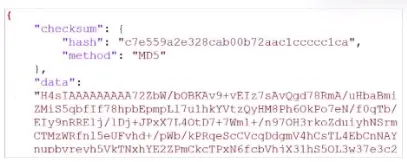
Your colleague exported a playbook and has sent it to you for review. You open the file in a text editor and observer the output as shown in the exhibit.

Which statement about the export is true?

Correct Answer: A. The export data type is zipped.
Explanation:

Study Guide p.217: zipped/base64 encoded JSON is one of the playbook export data types.

Technical Deep Dive: The correct answer is A. The exhibit shows encoded data rather than readable plain-text JSON, which indicates the playbook was exported in the zipped/base64 encoded format. That does not mean the playbook is misconfigured. It also does not prove connectors were excluded; connector inclusion is a separate export option. There is no indication of password protection. The key visual clue is that the export contains encoded data plus integrity information instead of a readable JSON playbook structure.
Question 2

Which statement correctly describes one Difference between templates and reports?

Correct Answer: A. Reports provide more configuration options than templates
Explanation:

Study Guide p.168-p.172: templates define layout, while reports include report settings and more configuration.

Technical Deep Dive: The correct answer is A. Reports provide more configuration options because they include the layout/template plus operational settings such as time period, target devices, scheduling, filters, output behavior, and advanced settings. Templates contain the Editor-tab layout elements and do not include basic or advanced report settings. Option B is wrong because both reports and templates can be cloned. Option C is wrong because templates can include macros. Option D is wrong because templates are not mapped to device groups as stated.


Question 3

After generating a report, you notice the information you were expecting to see is not included in it. However, you confirm that the logs are there:

Which two actions should you perform? (Choose two.)

Correct Answer: A. Check the time frame covered by the report.; D. Test the dataset.
Explanation:

Study Guide p.189: for missing report data, check the report time frame and test the dataset.

Technical Deep Dive: The correct answers are A and D. If the logs exist but the generated report lacks expected information, the first checks are whether the report time frame includes those logs and whether the dataset query returns the expected rows. Reports are only as accurate as their time filter and SQL dataset. Disabling auto-cache is not the normal fix; cache improves performance and scheduled reports use it. Increasing a quota does not correct a wrong time range or broken SQL query unless the report fails for resource reasons, which is not the scenario described.


Question 4

In firmware version 7.6, how does on-premises FortiAnalyzer store logs? (Choose one answer)

Correct Answer: A. Uses ClickHouse database
Explanation:

Official Fortinet 7.6 documentation: historical logs migrate from PSQL to ClickHouse, and real-time logs insert into ClickHouse.

Technical Deep Dive: The correct answer is A. FortiAnalyzer 7.6 uses ClickHouse as the backend log database for on-premises log analytics. This change supports faster analytical queries and scalable handling of large log datasets. MySQL and Elasticsearch are not the FortiAnalyzer 7.6 log database. PostgreSQL was used in previous versions for log tables, but Fortinet's 7.6 documentation states that historical logs are migrated from PSQL to ClickHouse and new real-time logs are inserted into ClickHouse.


Question 5

You are trying to configure a task in the playbook editor to run a report.

However, when you try to select the desired playbook, you do to see it listed.

What is the reason?

Correct Answer: A. The report does not have auto-cache and extended log filtering enabled.
Explanation:

Study Guide p.208: to run a report as a playbook task, the report must already exist and have auto-cache and extended log filtering enabled.

Technical Deep Dive: The correct answer is A. If the report is not visible as an available report task target, the usual reason is that it does not meet the report-task prerequisites. FortiAnalyzer requires the report to exist already and to have both auto-cache and extended log filtering enabled. Option B is irrelevant because a running playbook does not hide a report definition. Option C is wrong because the trigger starts the playbook, not the report listing. Option D is wrong because report results are not the prerequisite for listing the report as a task target.


Question 6

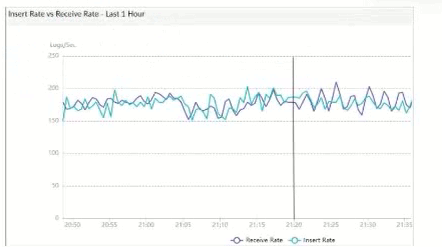
Refer to Exhibit:

What does the data point at 21:20 indicate?

Correct Answer: A. FortiAnalyzer is indexing logs faster than logs are being received.
Explanation:

Study Guide p.141: Insert Rate is the rate logs are indexed; Receive Rate is the rate raw logs reach FortiAnalyzer.

Technical Deep Dive: The correct answer is A. At the indicated time, the insert-rate value is higher than the receive-rate value, which means FortiAnalyzer is indexing logs faster than new logs are arriving. This can happen when the database is catching up with previously received logs. Option B is too literal and unsupported; the graph shows rates, not a one-log daemon lead. Option C is wrong because a rebuild is not indicated by a single favorable rate point. Option D would apply when received logs are waiting because indexing is behind, which is the reverse condition.


Question 7

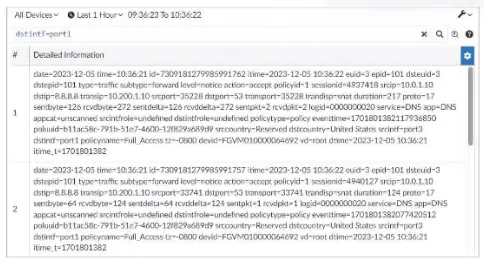
Exhibit.

What can you conclude about these search results? (Choose two.)

Correct Answer: A. They can be downloaded to a file.; D. They were searched by using text mode.
Explanation:

Study Guide p.58: Log View search results can be downloaded, and raw/text filtering helps with exact field syntax.

Technical Deep Dive: The correct answers are A and D. FortiAnalyzer Log View allows administrators to download filtered logs as text or CSV, so the displayed search results can be exported to a file. The exhibit also indicates a text-mode search/filter rather than a purely GUI-built filter. Option B would be true for formatted log tables in general, but the question asks what can be concluded from the displayed search results. Option C is not supported; whether FortiView can analyze related data depends on whether the logs are analytics logs, not merely on the search display.


Question 8

Which statement describes archive logs on FortiAnalyzer?

Correct Answer: C. Logs compressed and saved in files with the .gz extension
Explanation:

Study Guide p.39: rolled log files are compressed, receive the .gz extension, and are known as archive logs.

Technical Deep Dive: The correct answer is C. FortiAnalyzer stores received logs first as log files and also indexes them for analytics. When the log file rolls over, FortiAnalyzer renames it, timestamps it, and compresses it into a .gz file. That compressed offline file is the archive log. Option A describes analytics logs in the SQL database. Option B is wrong because FortiView uses analytics logs, not archive logs. Option D confuses archive status with device availability; a log is archived because of the storage workflow, not because the source device is offline.


Question 9

What are two effects of enabling auto-cache in a FortiAnalyzer report? (Choose two.)

Correct Answer: A. The generation time for reports is decreased.; B. When new logs are received, the hard-cache data is updated automatically.
Explanation:

Study Guide p.182: auto-cache reduces report generation time and updates hcache automatically when new logs arrive.

Technical Deep Dive: The correct answers are A and B. Auto-cache improves report performance by maintaining the report hard-cache data so FortiAnalyzer does not have to build it from scratch at report-generation time. The guide explicitly states that enabling auto-cache updates hcache when new logs arrive and new log tables are generated. Option C is inaccurate because hcache stores precompiled SQL data, not the generated report files themselves. Option D is wrong because auto-cache improves processing time, not the final report size.


Question 10

Which statement about sending notifications with incident updates is true?

Correct Answer: A. Each connector used can have different notification settings
Explanation:

Study Guide p.107: more than one Fabric connector can be configured, with the same or different notification settings.

Technical Deep Dive: The correct answer is A. FortiAnalyzer can send incident status-change notifications through external platform connectors, and each connector can have its own settings. That flexibility lets a SOC notify Teams, ticketing, or other platforms differently depending on the connector and activity type. Option B is wrong because the guide permits multiple connectors. Option C confuses report output profiles with incident notifications. Option D is too narrow because notifications are not limited only to created or deleted incidents.