Limited-Time Offer: Enjoy 50% Savings! Ends in 00h 00m 00s Coupon code: 50OFF
Skip to content

Free Fortinet NSE 4 - FortiOS 7.6 Administrator NSE4_FGT_AD-7.6 Exam Questions

Page: 1 / 10 Total 93 questions

Want more questions? Get Premium Access.

Question 1

When configuring firewall policies which of the following is true regarding the policy ID? (Choose two.)

Correct Answer: B. A policy ID cannot be modified once a policy is created.; C. You can create a policy in CLI with policy ID 0
Explanation:

According to the FortiOS 7.6 Administration Guide, the firewall policy ID is a unique numerical identifier assigned to each policy for internal database tracking and management purposes. It is important to distinguish the policy ID from the policy sequence. While the FortiGate processes traffic based on a top-down approach (the sequence), the policy ID itself does not determine the order of execution (Statement A is incorrect).

In FortiOS, once a policy is committed to the configuration, the policy ID cannot be modified (Statement B). If an administrator needs to change a policy ID, they must either delete and recreate the policy or use the clone command in the CLI to copy the settings to a new ID.

Furthermore, the CLI provides a specific shortcut for policy creation: you can create a policy with ID 0 (Statement C). When the command edit 0 is used within the config firewall policy context, the FortiOS kernel automatically assigns the next available integer as the policy ID. This is a standard practice for efficient configuration via the command line. Statement D is incorrect because, while every policy must have an ID, the GUI automatically generates this value without requiring the user to manually provide or even see it during the initial creation process.
Question 2

Refer to the exhibit.

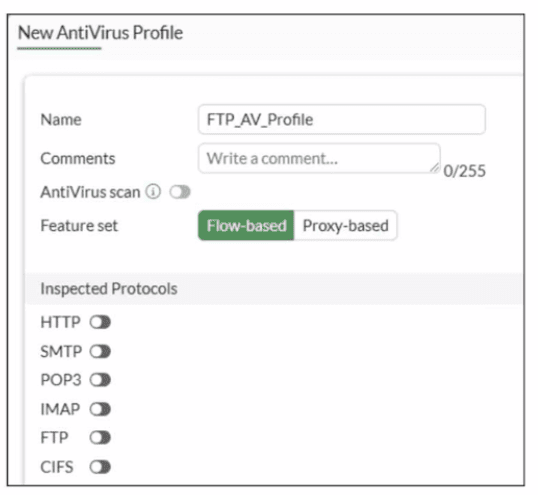
Why is the Antivirus scan switch grayed out when you are creating a new antivirus profile for FTP?

Correct Answer: B. None of the inspected protocols are active in this profile.
Explanation:

In FortiOS 7.6, the Antivirus scan master switch in an antivirus profile becomes available only after at least one supported protocol is enabled for inspection.

What the exhibit shows

A new antivirus profile named FTP_AV_Profile

Feature set: Flow-based

Antivirus scan switch is grayed out

All Inspected Protocols (HTTP, SMTP, POP3, IMAP, FTP, CIFS) are currently disabled

Why the Antivirus scan switch is grayed out

In FortiOS antivirus profiles:

The Antivirus scan toggle is a dependent control

It cannot be enabled unless at least one inspected protocol is selected

This prevents enabling AV scanning when there is no traffic type to scan

This behavior is documented in the FortiOS 7.6 Antivirus Profile configuration section.

Once you enable a protocol (for example, FTP), the Antivirus scan switch becomes active and configurable.

Why option B is correct

B . None of the inspected protocols are active in this profile.

All protocol toggles are OFF

Therefore, FortiGate disables (grays out) the Antivirus scan option

This is expected and correct behavior

Why the other options are incorrect

A . Antivirus scan is disabled under Feature visibilityIncorrect. Feature Visibility controls whether Antivirus appears in the GUI, not whether the scan switch is enabled inside a profile.

C . Feature set must be Proxy-basedIncorrect. Antivirus scanning is supported in both flow-based and proxy-based modes.

D . Less than 2 GB RAM does not support Antivirus scanIncorrect. Memory size affects performance and offloading, not basic AV scan availability.


Question 3

Refer to the exhibits.

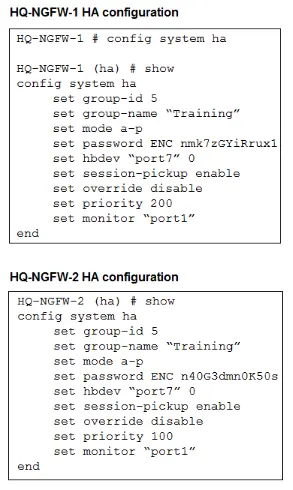
An administrator configured both members of an HA cluster at the same time. After one week of monitoring, the administrator wants to verify the HA failover performance. How can the administrator force a failover? (Choose one answer)

Correct Answer: A. The administrator must reset the HA uptime on HQ-NGFW-1.
Explanation:

''This slide shows the order when the HA override setting is disabled, which is the default behavior.''

''1. The cluster compares the number of monitored interfaces that have a status of up. The member with the most available monitored interfaces becomes the primary.

2. The cluster compares the HA uptime of each member. The member with the highest HA uptime, by at least five minutes, becomes the primary.

3. The member with the highest priority becomes the primary.''

''When HA override is disabled, the HA uptime has precedence over the priority setting. This means that if you must manually fail over to a secondary device, you can do so by reducing the HA uptime of the primary FortiGate. You can do this by running the diagnose sys ha reset-uptime command on the primary FortiGate, which resets its HA uptime to 0.''

Technical Deep Dive:

The correct answer is A.

Both HA members are configured with set override disable, so FGCP does not prefer the higher-priority unit first. With override disabled, the election order is based on monitored interfaces, then HA uptime, then priority, and finally serial number. Since the cluster has been running for one week, the secondary unit will have a much higher HA uptime than a unit whose uptime is reset to zero. Therefore, if the administrator runs diagnose sys ha reset-uptime on the current primary HQ-NGFW-1, FGCP re-evaluates election and the other member can take over.

Option B is wrong because enabling override only on HQ-NGFW-2 does not by itself force an immediate clean failover in this scenario and also changes election behavior rather than performing the documented manual failover action. Option C is wrong because with override disabled, priority does not beat HA uptime. Option D can simulate a link failover, but the study guide's documented manual failover method for this exact override-disabled condition is to reset the primary's HA uptime.

Relevant CLI:

diagnose sys ha reset-uptime

get system ha status

diagnose sys ha status

This is the clean exam-aligned method to trigger a controlled HA role change.


Question 4

Refer to the exhibit.

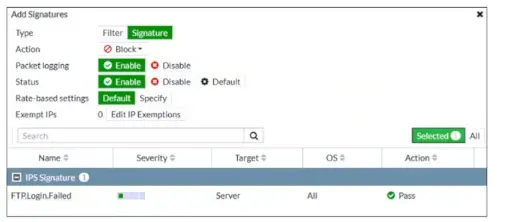
An intrusion prevention system (IPS) profile signature setting is shown.

What can you conclude about the signature when adding the FTP.Login.Failed signature to the IPS Sensor profile?

Correct Answer: C. FortiGate stores a local copy of the packet that matches the signature.
Explanation:

''When you create a new entry to add signatures or filters, you can select the action by clicking Action.''

''When you enable Packet logging, FortiGate stores a local copy of the packet that matches the signature. This enhances the view of erroneous or suspicious packets.''

''You can configure IP exemptions on individual signatures only.''

Technical Deep Dive:

The correct answer is C.

The exhibit shows an IPS entry being added with:

Type = Signature

Action = Block

Packet logging = Enable

Rate-based settings = Default

The most certain conclusion from that configuration is that packet logging is enabled, and the study guide explicitly states that this causes FortiGate to store a local copy of the matching packet.

Why the others are wrong:

A is wrong because the exhibit shows Rate-based settings = Default, not a custom threshold.

B is wrong because the configured action is Block, not allow/monitor.

D is wrong because the entry type is Signature, meaning an individual signature is being added, not a signature group.

A useful operational note: packet logging is powerful for IPS investigation and false-positive analysis, but it consumes more storage and processing resources. It should be enabled selectively on signatures where deeper forensic visibility is needed.


Question 5

Refer to the exhibit.

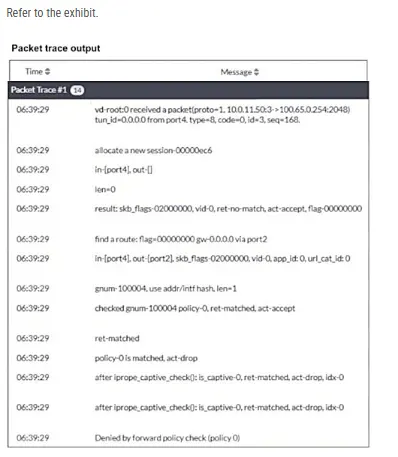
Why did the FortiGate device drop the packet?

Correct Answer: A. It matched the default implicit firewall policy.
Explanation:

''FortiGate looks for the matching firewall policy from top-to-bottom and, if a match is found, the traffic is processed based on the firewall policy. If no match is found, the traffic is dropped by the default implicit deny firewall policy.''

Technical Deep Dive:

The debug flow output clearly points to the implicit deny:

ret-no-match

policy-0 is matched, act-drop

Denied by forward policy check (policy 0)

On FortiGate, policy 0 is the internal representation of the default implicit deny firewall policy. That means the packet did not match any user-defined forward firewall policy, so FortiGate dropped it automatically.

Why the other options are wrong:

B is wrong because an RPF failure would show a reverse-path-related drop reason, not Denied by forward policy check (policy 0).

C is wrong because the trace does not show a matched explicit policy ID with deny action; it shows policy 0, which is the implicit rule.

D is wrong because the trace actually shows a route lookup result: find a route: ... gw-0.0.0.0 via port2. So this is not a next-hop reachability failure.

In packet-flow troubleshooting, this pattern is one of the most important to recognize. If you see policy 0 in FortiGate debug flow, the first things to verify are:

diagnose debug flow filter addr <src_or_dst_ip>

diagnose debug flow show function-name enable

diagnose debug enable

Then review whether a firewall policy exists with the correct incoming interface, outgoing interface, source, destination, schedule, and service. If any one of those does not match, FortiGate falls through to policy 0 and drops the session.


Question 6

Which two components are part of the secure internet access (SIA) agent-based mode on FortiSASE? (Choose two.)

Correct Answer: A. FortiSASE Firewall-as-a-Service (FWaaS); C. VPN policies
Explanation:

In FortiSASE Secure Internet Access (SIA) agent-based mode, traffic steering and security enforcement rely on components integrated with the FortiClient agent.

Components used in SIA agent-based mode

A . FortiSASE Firewall-as-a-Service (FWaaS)

Correct.

FWaaS is a core security component of FortiSASE.

It enforces firewall policies, security inspection, and access control for agent-based users.

All user traffic tunneled by the agent is inspected by FWaaS.

C . VPN policies

Correct.

In agent-based mode, the FortiClient establishes a secure tunnel to FortiSASE.

VPN policies define:

Authentication

Access control

Traffic steering

These policies are fundamental to agent-based connectivity.

Why the other options are incorrect

B . Proxy auto-configuration (PAC) filePAC files are used in agentless or proxy-based modes, not agent-based SIA.

D . FortiExtenderFortiExtender is a WAN extension device and is unrelated to FortiSASE SIA agent-based architecture.


Question 7

Refer to the exhibits.

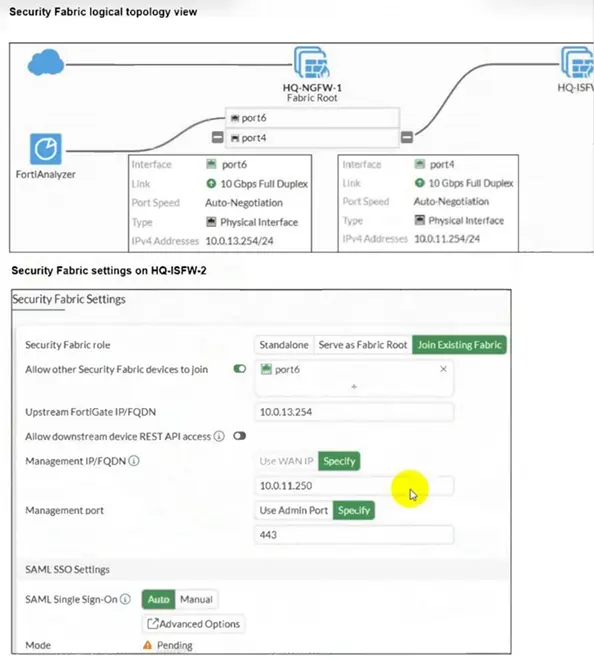
An administrator wants to add HQ-ISFW-2 in the Security Fabric. HQ-ISFW-2 is in the same subnet as HQ-ISFW. After configuring the Security Fabric settings on HQ-ISFW-2, the status stays Pending. What can be the two possible reasons? (Choose two answers)

Correct Answer: A. Upstream FortiGate IP must be set to 10.0.11.254.; C. HQ-ISFW-2 must be authorized on HQ-ISFW.
Explanation:

According to the FortiOS 7.6 Security Fabric documentation and Study Guide, several conditions must be met for a downstream FortiGate to successfully join a Security Fabric.

First, the Upstream FortiGate IP/FQDN configured on the downstream device must point to the IP address of the interface on the upstream device that is listening for fabric connections. In the provided logical topology, the Fabric Root (HQ-NGFW-1) uses port4 with the IP 10.0.11.254 to connect to the internal segmentation firewalls (ISFWs). Since HQ-ISFW-2 is in the same subnet as HQ-ISFW, it is physically and logically connected to the network segment serviced by port4. Therefore, the current configuration of 10.0.13.254 (which is port6, likely the WAN side) is incorrect, and it must be set to 10.0.11.254 (Statement A).

Second, once the downstream device successfully reaches the upstream device, it enters a Pending state. For security purposes, FortiOS does not allow devices to join the fabric automatically; the administrator of the upstream device (in this case, HQ-ISFW or the root) must manually authorize the new device (Statement C) in the Fabric Management console. Until this authorization is granted, the status will remain 'Pending' and no fabric data will be synchronized. Statements B and D are incorrect as SAML settings do not block the initial fabric join, and the management IP should be the local device's IP, not the upstream's IP.


Question 8

Refer to the exhibit.

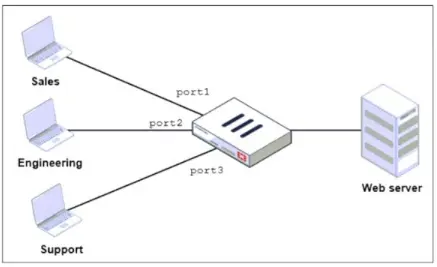
FortiGate has two separate firewall policies for Sales and Engineering to access the same web server with the same security profiles.

Which action must the administrator perform to consolidate the two policies into one?

Correct Answer: D. Enable Multiple Interface Policies to select port1 and port2 in the same firewall policy.
Explanation:

''By default, you can select only a single interface as the incoming interface and a single interface as the outgoing interface. This is because the option to select multiple interfaces, or any interface in a firewall policy, is disabled on the GUI. However, you can enable the Multiple Interface Policies option on the Feature Visibility page to disable the single interface restriction.''

''You can also specify multiple interfaces, or use the any option, if you configure a firewall policy on the CLI, regardless of the default GUI setting.''

Technical Deep Dive:

The correct answer is D.

The policies are identical except for the incoming interface: one is for Sales and one is for Engineering. FortiGate GUI policy creation normally restricts you to one incoming interface per policy. To consolidate both into a single GUI policy, the administrator must enable Multiple Interface Policies so both port1 and port2 can be selected in the same rule.

Why the others are wrong:

A is not enough, because policy matching also includes the incoming interface, not just the source subnets.

B changes the network design and is unnecessary.

C would work too broadly by matching traffic from any interface, which is not the intended controlled consolidation.

A matching CLI-style concept would be:

config firewall policy

edit <id>

set srcintf 'port1' 'port2'

set dstintf '<server-interface>'

set srcaddr 'Sales_Subnet' 'Engineering_Subnet'

set dstaddr '<web-server>'

set service 'HTTP' 'HTTPS'

set action accept

next

end

That preserves a single policy while still being specific about which interfaces are allowed.


Question 9

Which two statements about equal-cost multi-path (ECMP) configuration on FortiGate are true? (Choose two answers)

Correct Answer: A. If SD-WAN is enabled, you control the load balancing algorithm with the parameter load-balance-mode.; D. If SD-WAN is disabled, you configure the load balancing algorithm in config system settings.
Explanation:

''If SD-WAN is disabled, you can change the ECMP load balancing algorithm on the FortiGate CLI using the commands shown on this slide.''

''When SD-WAN is enabled, FortiOS hides the v4-ecmp-mode setting and replaces it with the load-balance-mode setting under config system sdwan. That is, when you enable SD-WAN, you control the ECMP algorithm with the load-balance-mode setting.''

''There are some differences between the two settings. The main difference is that load-balance-mode supports the volume algorithm, and v4-ecmp-mode does not.''

''These routes are called equal cost multipath (ECMP) routes...''

Technical Deep Dive:

The correct answers are A and D.

A is correct because when SD-WAN is enabled, FortiOS no longer uses v4-ecmp-mode; it uses load-balance-mode under config system sdwan. That is the explicit SD-WAN control point for ECMP behavior.

D is correct because when SD-WAN is disabled, ECMP configuration is done in the regular system routing settings, not under SD-WAN. The study guide states that you change the ECMP algorithm on the FortiGate CLI when SD-WAN is disabled, which corresponds to the classic config system settings ECMP controls.

Why the others are wrong:

B is wrong because the guide explicitly says load-balance-mode supports volume, while v4-ecmp-mode does not. So you cannot set v4-ecmp-mode to volume-based.

C is wrong because ECMP requires equal-cost routes. If distance or priority differ, they are no longer ECMP candidates; FortiGate selects the preferred route instead. The concept of ECMP itself requires equal route cost attributes.

From an implementation standpoint, the common CLI patterns are:

config system settings

set v4-ecmp-mode source-ip-based

end

and, with SD-WAN enabled:

config system sdwan

set load-balance-mode source-ip-based

end

On hardware platforms, ECMP still affects session distribution at the routing decision stage before later security services are applied. NP offload can accelerate forwarding after route selection, but the ECMP decision itself is a FortiOS control-plane routing function.


Question 10

When configuring a FortiGate in a multi-WAN setup, why would an administrator enable session preservation on an interface? (Choose one answer)

Correct Answer: D. To ensure that existing SSL VPN connections remain on the same interface even if route changes occur
Explanation:

A closely related routing principle from the guide is:

''For each session, FortiGate performs two route lookups... After completing these two lookups, FortiGate writes the routing information to its session table. Subsequent packets are routed according to the session table, not the routing table.''

Also, the guide notes an HA limitation that helps explain the same design principle for FortiGate-terminated sessions:

''Enabling session pickup allows active sessions to be seamlessly handed picked up by the new primary in the event of an HA failover... Note that there are some limitations to this -- for example, any sessions that terminate at the FortiGate itself (e.g. SSL VPN, proxy sessions) cannot be handed off to another FortiGate and must be restarted on the new primary.''

Technical Deep Dive:

The correct answer is D.

In multi-WAN environments, session preservation is used so that traffic for sessions that are tightly bound to the FortiGate interface they terminate on---most notably SSL VPN and other FortiGate-terminated flows---does not suddenly switch to another egress interface just because the routing table changes. Those sessions are sensitive to interface consistency. If replies start leaving through a different WAN after a route recalculation, the remote peer may see an address/interface mismatch and the session can break.

That means:

A is the opposite of session preservation. Preservation is meant to avoid moving active sessions around.

B is not the purpose of the feature.

C is unrelated.

D correctly describes why an administrator would enable it.

Operationally, this matters most for SSL VPN, management-plane flows, and other sessions that terminate on the FortiGate itself, not just ordinary transit traffic. Transit sessions are generally tracked in the session table and can often survive normal routing behavior more gracefully, but FortiGate-terminated sessions are much more sensitive to WAN/interface changes.