Limited-Time Offer: Enjoy 50% Savings! Ends in 00h 00m 00s Coupon code: 50OFF
Skip to content

Free Fortinet NSE 5 - FortiWeb 8.0 Administrator NSE5_FWB_AD-8.0 Exam Questions

Page: 1 / 6 Total 36 questions

Want more questions? Get Premium Access.

Question 1

You are reviewing SSL-related issues on FortiWeb. An administrator reports that they receive a certificate warning when they access the FortiWeb GUI over HTTPS. Separately, your FortiWeb device also makes outbound HTTPS requests to a back-end API server.

In which two situations would FortiWeb use its own certificates to establish or secure the connection? (Choose two.)

Correct Answer: C. When an administrator connects to the FortiWeb GUI using HTTPS in a browser.; D. When FortiWeb connects to a back-end server over HTTPS as a client.
Explanation:

The correct answers are C and D. FortiWeb uses its own built-in/self-signed or configured server certificate when an administrator connects to the FortiWeb GUI over HTTPS. FortiWeb can also authenticate as a client when it connects to protected back-end servers over HTTPS, and it may present its own certificate for client PKI authentication. Option A is wrong because transparent inspection mode does not make FortiWeb the SSL endpoint in the same way; it inspects traffic without acting as the primary TLS termination point. Option B is also wrong because simply routing HTTPS without decryption does not require FortiWeb to present its own certificate. FortiWeb certificates matter when FortiWeb is an HTTPS endpoint or an authenticated HTTPS client.
Question 2

You need to monitor and respond to repeated suspicious activity from individual users who are accessing your web application.

Your goal is to evaluate each action the user takes and apply a response when their behavior becomes risky.

What can you configure on FortiWeb to track user behavior and respond automatically when risky activity continues?

Correct Answer: D. Set up scoring in the protection profile to track request behavior over time.
Explanation:

The requirement is to track user behavior over time and respond when cumulative activity becomes risky. FortiWeb client management and threat scoring are built for that purpose. When enabled in the protection profile, FortiWeb can associate activity with a client, assign threat weights to suspicious behavior, and apply actions such as alerting, denying, or period blocking after a defined score threshold is exceeded. Rate limiting is useful for traffic volume, but it does not evaluate a user's full behavior pattern. A custom signature blocks a specific pattern immediately, not cumulative behavior. Cookie security protects session cookies but does not calculate behavioral risk. The correct configuration is scoring in the protection profile to track and respond to repeated risky actions.


Question 3

A FortiWeb administrator wants to create a machine learning (ML)-based bot detection system.

Which three actions must the administrator take to build and activate this ML model? (Choose three.)

Correct Answer: A. Collect traffic samples for training.; D. Build the detection model using collected data.; E. Run the model in the live environment.
Explanation:

FortiWeb machine learning protection depends on observed application traffic. The administrator must first collect traffic samples so FortiWeb can learn normal behavior and create a useful baseline. After sample collection, FortiWeb uses the collected data to build the detection model. Once the model is built, it must be enabled or run in the live environment so FortiWeb can evaluate production requests and detect abnormal or bot-like behavior. Manual verification on test data only is not enough to activate the model for real traffic. Bayesian analysis is not the FortiWeb configuration step shown for this process; the platform handles model logic internally. The practical workflow is collection, model building, and live enforcement or detection.


Question 4

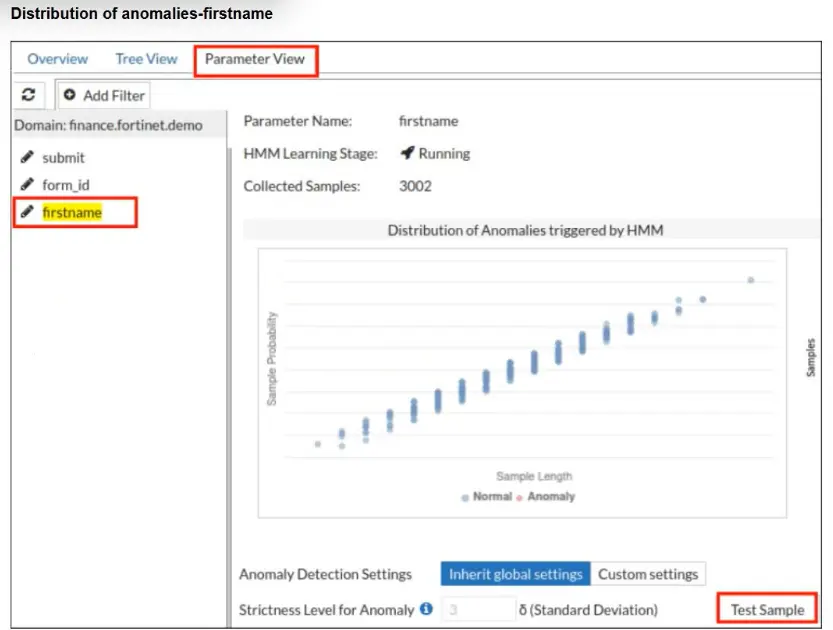
Refer to the exhibit.

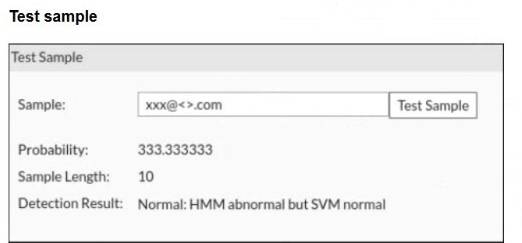
A FortiWeb administrator tests a new form input value after training the machine learning (ML) anomaly detection system.

The hidden Markov model (HMM) flags the input as abnormal, while the support vector machine (SVM) model classifies it as normal. FortiWeb allows the request.

What does this result indicate about the FortiWeb ML anomaly detection behavior?

Correct Answer: C. FortiWeb is correctly allowing an unusual but non-malicious input based on combined HMM and SVM evaluation.
Explanation:

FortiWeb machine learning uses layered detection rather than treating every unusual value as malicious. The HMM layer models normal parameter behavior and can flag a value as abnormal when it falls outside the learned distribution. However, abnormal does not automatically mean hostile. FortiWeb then uses additional ML classification logic, including SVM-based evaluation, to determine whether the anomaly resembles an actual attack or simply a legitimate unusual input. In this case, HMM noticed that the value was uncommon, but SVM classified it as normal, so FortiWeb allowed the request. That is expected behavior. Raising thresholds, disabling models, or assuming FortiWeb failed would misunderstand the two-stage ML decision process.


Question 5

Refer to the exhibit.

What does the exhibit show?

Correct Answer: D. An API schema file.
Explanation:

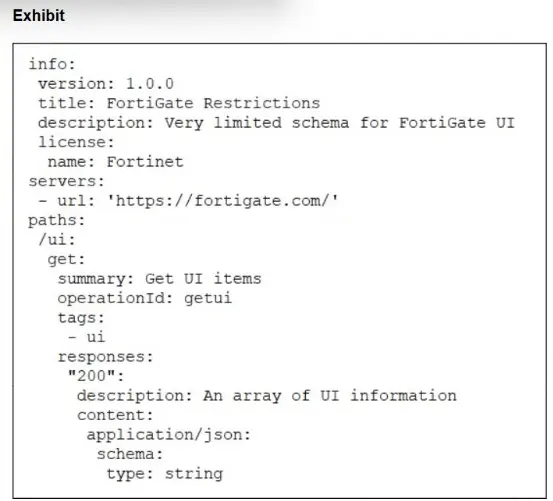
The exhibit is written in structured OpenAPI/YAML-style format. It includes fields such as info, version, title, servers, paths, HTTP method get, operationId, responses, content type application/json, and a schema definition. That is not HTML and it is not a live API response. It is also not CLI output from FortiWeb. FortiWeb OpenAPI validation uses OpenAPI description files in YAML or JSON to define API structure, endpoints, parameters, and expected data types. FortiWeb then uses that uploaded schema as a baseline to validate API requests and block requests that do not conform. So the exhibit is best identified as an API schema file


Question 6

Refer to the exhibit.

You have deployed FortiWeb behind a FortiGate that is configured as a reverse proxy and inserts the X-Forwarded-For HTTP header when forwarding HTTP and HTTPS traffic.

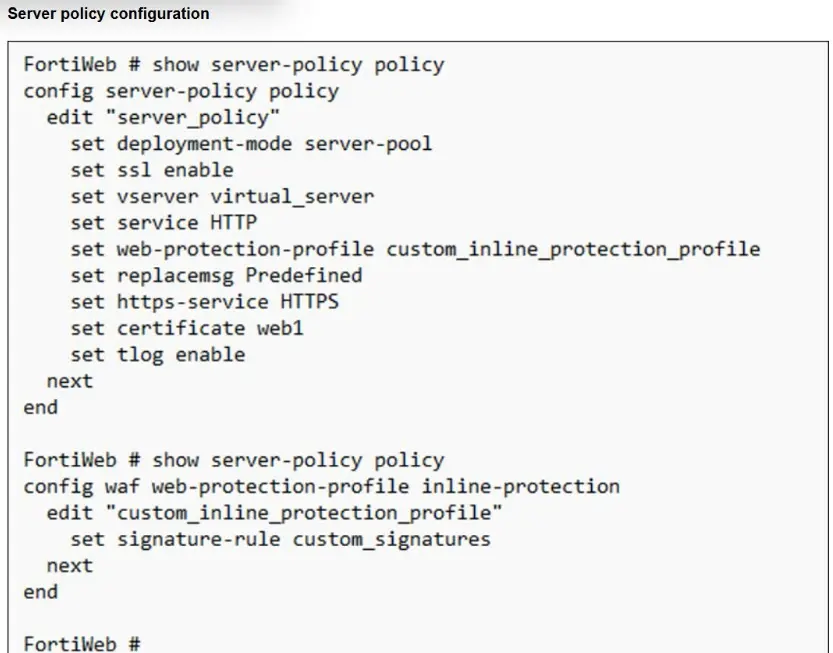
FortiWeb is using a custom inline protection profile, and logging is enabled, as shown in the exhibit.

You notice that FortiWeb is blocking legitimate users, and all requests in the attack logs appear to come from the FortiGate IP address, not the original client IP address.

Which action should you take to fix this issue?

Correct Answer: D. Modify the protection profile to use the X-Forwarded-For header for client IP address detection.
Explanation:

The FortiGate is acting as an upstream reverse proxy, so FortiWeb sees the FortiGate address as the direct source IP unless it is configured to read the original client IP from the inserted HTTP header. Since FortiGate already inserts X-Forwarded-For, the proper fix is to modify the FortiWeb protection profile or related client-IP configuration so FortiWeb uses that header for client IP detection. This restores accurate logging, rate limiting, reputation checks, and IP-based enforcement. Changing to one-arm proxy is unnecessary and disruptive. Disabling IP-based detection weakens protection instead of fixing attribution. Recreating the policy with a predefined profile does not address the missing client IP mapping. The correct adjustment is to trust and use X-Forwarded-For.