
Limited-Time Offer: Enjoy 50% Savings! Ends in 00h 00m 00s Coupon code: 50OFF
Skip to content

Free Fortinet NSE 5 - FortiSASE and SD-WAN 7.6 Core Administrator NSE5_SSE_AD-7.6 Exam Questions

Page: 1 / 9 Total 50 questions

Want more questions? Get Premium Access.

Question 1

Refer to the exhibit, which shows the SD-WAN rule status and configuration.
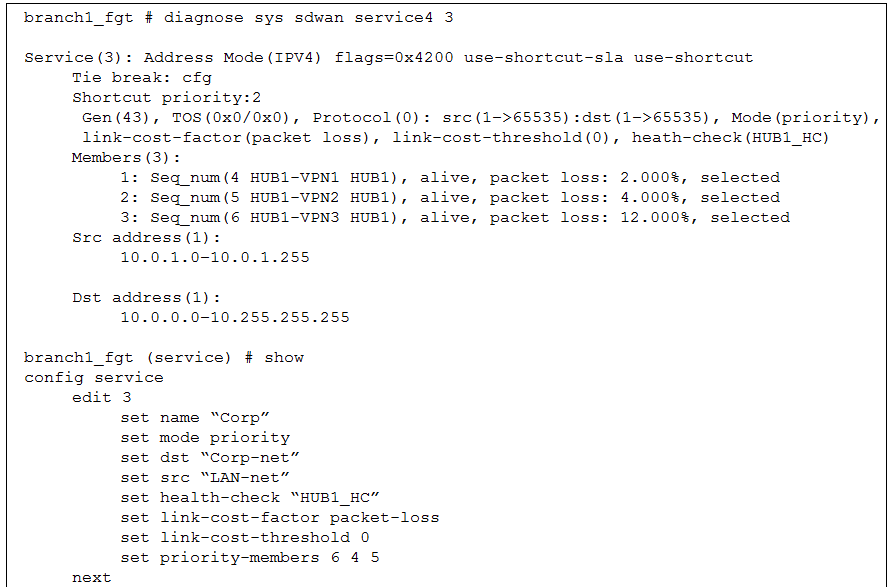
Based on the exhibit, which change in the measured packet loss will make HUB1-VPN3 the new preferred member? (Choose one answer)

Correct Answer: A. When all three members have the same packet loss
Explanation:

According to the SD-WAN 7.6 Core Administrator study guide and the FortiOS 7.6 Administration Guide, the selection process for the Best Quality (priority) strategy depends on two primary factors: the measured link quality metric and the configured member priority order.

Based on the provided exhibit (image_b40dfc.png), we can determine the following:

Strategy and Metric: The rule is in Mode(priority) (Best Quality) using link-cost-factor(packet loss).

Strict Comparison: The link-cost-threshold is set to 0. This means there is no 'advantage' given to the current preferred link; the FortiGate performs a strict comparison where the link with the objectively best metric is chosen.

Tie-Breaker Logic: When multiple links have the same packet loss, the FortiGate uses the Member Priority Order defined in the rule (set priority-members 6 4 5) as the tie-breaker.

Member 6 (HUB1-VPN3) is the highest priority.

Member 4 (HUB1-VPN1) is the second priority.

Member 5 (HUB1-VPN2) is the lowest priority.

Current State: HUB1-VPN1 is currently selected because its packet loss (2.000%) is lower than HUB1-VPN2 (4.000%) and HUB1-VPN3 (12.000%). Even though HUB1-VPN3 has a higher configuration priority, its significantly higher packet loss prevents it from being chosen.

Evaluation of Options:

Option A (Verified): If all three members have the same packet loss (e.g., they all show 2%), the quality metrics are equal. The SD-WAN engine then refers to the priority-members list. Since HUB1-VPN3 (Seq 6) is the first member in that list, it will immediately become the new preferred member.

Option B: If HUB1-VPN1 reaches 4%, it matches HUB1-VPN2 (4%). HUB1-VPN3 remains at 12%. The system will choose between VPN1 and VPN2. Since VPN1 (Seq 4) is higher in the priority list than VPN2 (Seq 5), HUB1-VPN1 stays preferred.

Option C: If HUB1-VPN1 reaches 12%, it matches HUB1-VPN3. However, HUB1-VPN2 is still better at 4.000%. Therefore, HUB1-VPN2 would become the new preferred member, not HUB1-VPN3.

Option D: If HUB1-VPN3 drops to 4%, it matches HUB1-VPN2. However, HUB1-VPN1 is still the best link at 2.000%, so it remains selected.
Question 2

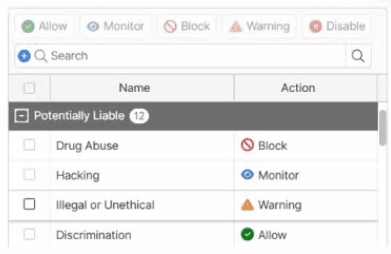
Refer to the exhibit.

Which web filter category will be denied access and display a replacement message to the user?

Correct Answer: A. Drug Abuse
Explanation:

The correct answer is A. Drug Abuse. In the exhibit, the Drug Abuse FortiGuard web-filter category is configured with the Block action. FortiSASE applies the configured action according to the FortiGuard category assigned to the requested website. The FortiSASE Administrator Study Guide explicitly defines Block as an action that denies access to URLs belonging to the configured category and displays a replacement message.

The other displayed categories use different behaviors. Hacking is set to Monitor, which processes traffic similarly to Allow but generates a log entry whenever matching traffic is detected; therefore, the user is not denied access. Illegal or Unethical is configured as Warning, which displays a warning page but permits the user to continue if they choose. Discrimination is configured as Allow, so traffic continues through the remaining inspection engines and is not blocked.

The exhibit therefore directly maps the requested behavior---deny access and display a replacement message---to the Block action, and Drug Abuse is the only listed category configured that way.

Study Guide Reference: Security and Endpoint Profiles > Web Filter With Inline-CASB > FortiGuard Category Filter, page 118.


Question 3

Which two statements about configuring a steering bypass destination in FortiSASE are correct? (Choose two.)

Correct Answer: B. Apply condition allows split tunneling destinations to ae applied to On-net. off-net. or both types of endpoints; C. You can select from four destination types: Infrastructure, FQDN, Local Application, or Subnet
Explanation:

According to the FortiSASE 7.6 Feature Administration Guide, steering bypass destinations (also known as split tunneling) allow administrators to optimize bandwidth by redirecting specific trusted traffic away from the SASE tunnel to the endpoint's local physical interface.

Destination Types (Option C): When creating a bypass destination, administrators can select from four distinct types: Infrastructure (pre-defined apps like Zoom/O365), FQDN (specific domains), Local Application (identifying processes on the laptop), or Subnet (specific IP ranges).

Apply Condition (Option B): The 'Apply' condition is a flexible setting that allows the administrator to choose when the bypass is active. It can be applied to endpoints that are On-net (inside the office), Off-net (remote), or Both. This ensures that if a user is in the office, they don't use the SASE tunnel for local resources, but if they are home, they might still bypass high-bandwidth sites like YouTube to preserve tunnel capacity.

Why other options are incorrect:

Option A: Subnet is one of four types and is not the only type supporting these conditions.

Option D: The system explicitly supports 'Both' to ensure consistency across network transitions.


Question 4

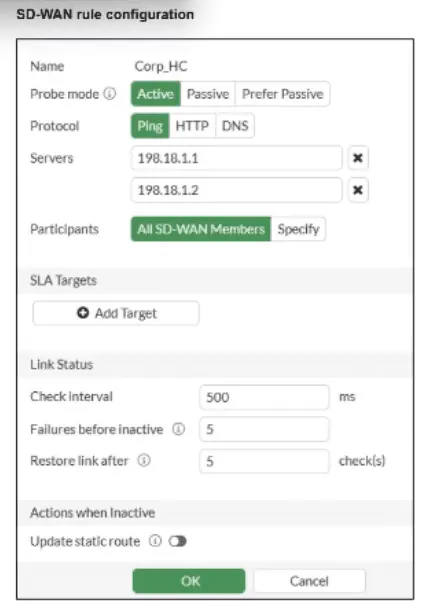
Refer to the exhibit.

You want the performance service-level agreement (SLA) to measure the jitter of each member. Which configuration change must you make to achieve this result?

Correct Answer: A. No change is required.
Explanation:

According to the SD-WAN 7.6 Core Administrator study guide and FortiOS 7.6 Administration Guide, no configuration change is required to simply measure jitter.

Implicit Measurement: In FortiOS, once a Performance SLA (Health Check) is configured with an Active probe mode (as seen in the exhibit with Ping selected), the FortiGate automatically begins calculating three key quality metrics for every member interface: Latency, Jitter, and Packet Loss.

Visibility: Even without an SLA Target defined, these real-time measurements are visible in the SD-WAN Monitor and via the CLI command diagnose sys virtual-wan-link health-check <SLA_Name>.

Active Probes: Because the probe mode is set to Active using the Ping protocol, the FortiGate sends synthetic packets at the defined Check interval (500ms in the exhibit). It calculates jitter by measuring the variation in the round-trip time (RTT) between these consecutive probes.

Why other options are incorrect:

Option B: Adding an SLA target and defining a jitter threshold is only necessary if you want the SD-WAN engine to make steering decisions based on that metric (e.g., 'remove this link from the pool if jitter exceeds 50ms'). It is not required just to measure the jitter.

Option C: While you can specify participants, the current setting is 'All SD-WAN Members,' which means it is already measuring jitter for every member.

Option D: HTTP is an alternative probe protocol, but Ping (ICMP) is perfectly capable of measuring jitter and is often preferred for its lower overhead.


Question 5

How is the Geofencing feature used in FortiSASE? (Choose one answer)

Correct Answer: A. To allow or block remote user connections to FortiSASE POPs from specific countries.
Explanation:

According to the FortiSASE 7.6 Administration Guide and the FCP - FortiSASE 24/25 Administrator study materials, the Geofencing feature is a security measure implemented at the edge of the FortiSASE cloud to control ingress connectivity based on the physical location of the user.

Access Control by Location (Option A): Geofencing allows administrators to allow or block remote user connections to the FortiSASE Points of Presence (PoPs) based on the source country, region, or specific network infrastructure (e.g., AWS, Azure, GCP).

Scope of Application: This feature is universal across all SASE connectivity methods. It applies to Agent-based users (FortiClient), Agentless users (SWG/PAC file), and Edge devices (FortiExtender/FortiAP). If a user attempts to connect from a blacklisted country, the connection is dropped at the PoP level before the user can even attempt to authenticate.

Use Case Example: An organization operating exclusively in North America might configure geofencing to block all connections originating from outside the US and Canada. This significantly reduces the attack surface by preventing brute-force or unauthorized access attempts from high-risk regions or countries where the organization has no legitimate employees.

Configuration Path: In the FortiSASE portal, this is managed under Configuration > Geofencing. From there, administrators can create an 'Allow' or 'Deny' list and select the relevant countries from a standardized global database.

Why other options are incorrect:

Option B: While FortiSASE supports Time-based schedules for firewall policies, geofencing is specifically an IP-to-Geography mapping tool for connection admission, not a time-of-day restriction tool.

Option C: Encryption of data at rest on mobile devices is a function of an MDM (Mobile Device Management) solution or local OS features (like FileVault or BitLocker), not a SASE network geofencing feature.

Option D: Monitoring web behavior and blocking non-work content is the role of the Web Filter and Application Control profiles, which operate on the traffic after the connection is allowed by geofencing.


Question 6

Which secure internet access (SIA) use case minimizes individual endpoint configuration? (Choose one answer)

Correct Answer: C. Site-based remote user internet access
Explanation:

According to the FortiSASE 7.6 Architecture Guide and Administration Guide, the Site-based remote user internet access use case is the only deployment model that completely eliminates the need for individual endpoint configuration.

Centralized Enforcement: In a site-based deployment, a 'thin edge' device (such as a FortiExtender or a FortiGate in LAN extension mode) is installed at the remote site. This device establishes a secure tunnel to the FortiSASE Point of Presence (PoP).

Zero Endpoint Configuration: Because the traffic redirection happens at the network gateway level, individual devices (laptops, IoT devices, mobile phones) behind the site-based device do not require any specialized software or settings. They simply connect to the local network as they would normally, and their traffic is automatically secured by the SASE cloud.

Comparison with Other Modes:

Agent-based (Option B): Requires the installation and maintenance of FortiClient software on every device, often managed via MDM tools.

Agentless (Option A): While it doesn't need an agent, it typically requires the configuration of Explicit Web Proxy settings or the distribution of a PAC (Proxy Auto-Configuration) file via GPO or SCCM to each device's browser.

ZTNA (Option D): Generally requires an endpoint agent (FortiClient) to perform posture checks and identity verification, involving significant endpoint-level configuration.

Why other options are incorrect:

Option A: Agentless mode is often confused with being 'configuration-free,' but it still requires endpoints to be pointed toward the FortiSASE proxy.

Option B: This is the most configuration-intensive mode, requiring full software lifecycles for every endpoint.

Option D: ZTNA is an access methodology that adds configuration complexity (tags, certificates, posture checks) rather than minimizing it.