
Limited-Time Offer: Enjoy 50% Savings! Ends in 00h 00m 00s Coupon code: 50OFF
Skip to content

Free Fortinet NSE 6 - FortiEDR 7.0 Administrator NSE6_EDR_AD-7.0 Exam Questions

Page: 1 / 6 Total 33 questions

Want more questions? Get Premium Access.

Question 1

Refer to the Exhibit:
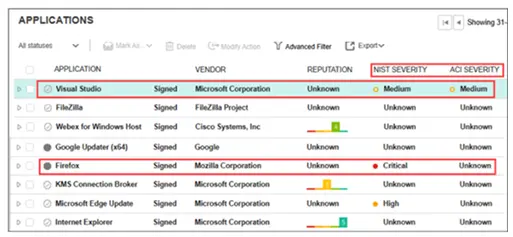
A FortiEDR analyst is prioritizing response efforts. One application has a vulnerability score of Critical but an Unknown ACI rating, while another has a Medium vulnerability score with active ACI evidence of adversary targeting. Which application must be addressed first? (Choose one answer)

Correct Answer: D. The application with the Medium vulnerability score and ACI evidence should be addressed first.
Explanation:

The correct answer is D.

The FortiEDR 7.0.0 Administration Guide explains that FortiEDR displays two severity ratings for applications: NIST Severity and ACI Severity. NIST Severity is based on FortiEDR's vulnerability scoring system using the NIST Cybersecurity Framework. ACI Severity, however, is Adversary Centric Intelligence provided by FortiRecon and FortiGuard Threat Analysts, covering dark web, open-source, and technical threat intelligence, including threat actor insights. This helps administrators proactively assess risk, respond faster to incidents, understand attackers, and protect assets.

The guide also states that FortiEDR helps analysts prioritize alerts and incidents using risk factors such as severity of vulnerabilities, relevance of threat intelligence feeds, and severity of affected endpoints, so effort is focused on the most significant organizational risks.

Therefore, the application with Medium NIST severity but active ACI evidence of adversary targeting should be prioritized over an application with Critical NIST severity but Unknown ACI rating, because active adversary-centric intelligence indicates current attacker interest or exploitation relevance. In plain terms: a theoretical critical vulnerability matters, but an actively targeted vulnerability is the fire you put out first.

Option B is tempting but incomplete because it relies only on NIST/CVSS severity. FortiEDR's ACI rating exists specifically to add adversary context to prioritization. Option A is wrong because FortiEDR does not treat all vulnerable applications equally. Option C is wrong because asset criticality can matter, but the guide does not say prioritization depends only on asset criticality.
Question 2

You are asked to configure a query to run every 15 minutes, automatically searching for specific registry modifications across all endpoints. Which FortiEDR feature must you configure? (Choose one answer)

Correct Answer: C. A scheduled query defined within a threat hunting profile
Explanation:

The correct answer is C.

The FortiEDR guide explains that Threat Hunting searches across endpoint activity events, including registry activity. It states that Threat Hunting can search based on attributes of files, registry keys and values, network, processes, event log, and activity event types. This fits the requirement to search for specific registry modifications across endpoints.

The guide also explains that after filtering activity events, the query can be saved and defined as a Scheduled Query. It says: ''Scheduled Query: Mark this option to automate the process of detecting threats so that this query is run automatically according to the schedule that you define.'' It also states that a security event is automatically created in the Incidents tab when matches are detected, and notifications can be sent through email, Syslog, and other configured methods.

The guide further states that the Repeat Every/On options define the frequency and schedule when the query runs. Therefore, a 15-minute recurring query is handled through the Scheduled Query capability in Threat Hunting, not Communication Control, policy override, or a manual Playbook trigger.

Strictly speaking, the guide calls this a scheduled query under Threat Hunting saved queries, not a ''communication control rule'' or ''manual query.'' Option C is the intended answer.


Question 3

Refer to the exhibits.

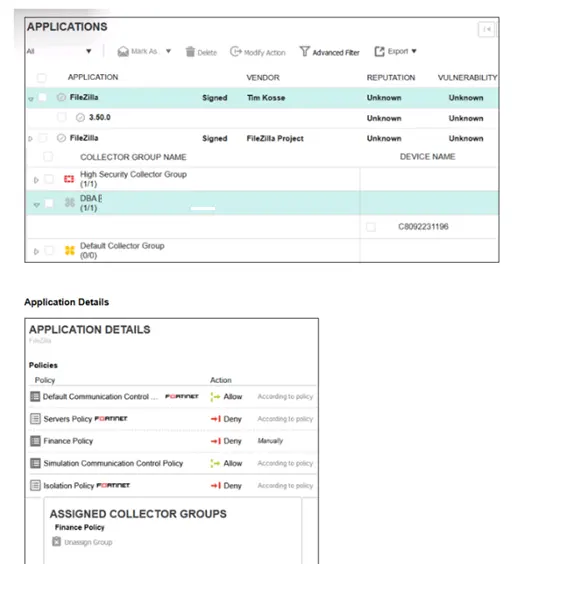
The application policy logs and application details are shown. Collector C8092231196 is a member of the Finance group. In this scenario, what must you do to block the FileZilla application? (Choose one answer)

Correct Answer: B. Deny the application in the Finance policy.
Explanation:

The correct answer is B. Deny the application in the Finance policy.

The FortiEDR 7.0.0 Administration Guide states that Communication Control policies define the actions to be taken for a given application or application version. It also states that each Communication Control policy applies to specific Collector Groups, and all devices that belong to those Collector Groups follow that policy. A Collector Group can be assigned to only one Communication Control policy.

In the exhibit, the Collector C8092231196 is stated to be a member of the Finance group. Therefore, to block FileZilla for that Collector, the application action must be set to Deny under the Finance policy, because that is the policy context that applies to the Collector's group.

The guide also explains that you can modify a policy action for an application/version so that the selected application is explicitly set to Allow or Deny for the relevant policy. When modified this way, the Application/Version Details area shows the action as manually changed and excluded from the original policy action.

Option A is wrong because assigning a Simulation Communication Control Policy to the DBA group does not affect a Collector in the Finance group. Option C is wrong because assigning the Finance policy to the DBA group would affect DBA Collectors, not the Finance Collector in the scenario. Option D is wrong because assigning the Finance policy to a broader group such as Default Collector Group is unnecessary and could over-broaden the policy impact. The precise action is to deny FileZilla in the policy that applies to the Collector's own group: Finance policy.


Question 4

Which two Python commands are supported when using FortiEDR Connect to directly access a protected device shell? (Choose two answers)

Correct Answer: A. %upload_file; B. %ipconfig_all
Explanation:

The correct answers are A. %upload_file and B. %ipconfig_all.

The FortiEDR 7.0.0 Administration Guide states that FortiEDR Connect opens a console that provides direct access to a FortiEDR-protected device through a remote shell connection. This allows administrators to respond to incidents, run commands and scripts, collect and download forensic data, and remediate threats. The guide also states that the FortiEDR Connect terminal has a prompt where commands can be typed, and the Help button displays the supported commands and their parameters.

The guide further confirms that FortiEDR Connect supports FortiEDR-specific commands, Windows command-line access through %cmd, and Python commands.

For the exact command list, Fortinet's official FortiEDR Connect technical tip lists the supported commands. In that list, %ipconfig_all is explicitly described as returning extended IP information, and %upload_file is explicitly described as uploading a file to the specified path. (Fortinet Community)

Options C. %psexec and D. %timestamp are not listed as supported FortiEDR Connect commands in the official Fortinet command list. Therefore, they must not be selected.


Question 5

Refer to the exhibits.

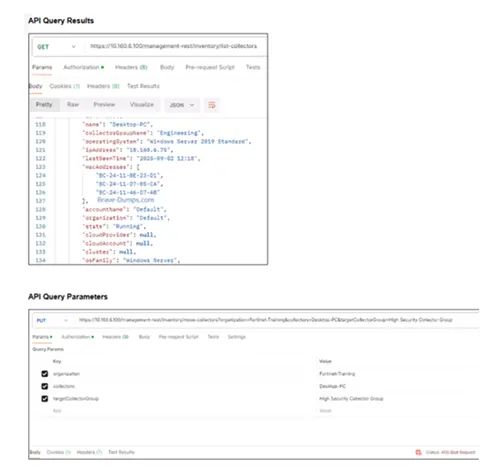
You are attempting to move a collector into the High Security Collector Group for isolation but encounter an error in the API request as shown in the exhibit. To successfully isolate the collector, which API parameter must you correct? (Choose one answer)

Correct Answer: A. Set the organization parameter to Default.
Explanation:

The correct answer is A. Set the organization parameter to Default.

From the first exhibit, the API query result for the Collector shows:

Collector name: Desktop-PC

Collector group name: Engineering

Organization: Default

State: Running

But in the second exhibit, the API request is using:

organization = Fortinet-Training

collectors = Desktop-PC

targetCollectorGroup = High Security Collector Group

That organization value is wrong. The Collector belongs to the Default organization, so the API request must reference the Collector's actual organization. Otherwise FortiEDR cannot locate or move that Collector under the organization specified in the request.

The FortiEDR guide confirms that Collector Groups are used to assign different FortiEDR policies to different Collectors, and that Collectors can be moved between groups/organizations in the Inventory workflow. In Hoster view, FortiEDR shows Collectors from all organizations and allows moving Collectors between organizations, but the organization context must match the Collector being managed.

Option B is wrong because the exhibit shows the API request is authorized; the failure is a 400 Bad Request, not an authentication failure. Option C is wrong because the endpoint shown is already a move/update operation using PUT, and the issue is not the HTTP method. Option D is wrong because Engineering is the current Collector Group. The goal is to move the Collector to High Security Collector Group, so changing the target back to Engineering would not isolate or harden the Collector.


Question 6

Refer to the exhibit.

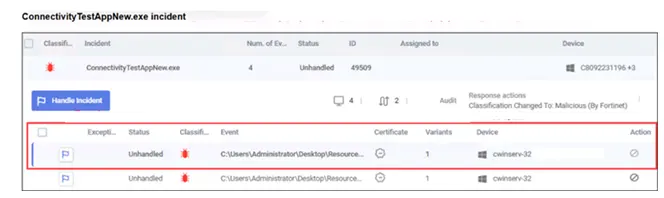
What observation can you make about the ConnectivityTestAppNew.exe incident? (Choose one answer)

Correct Answer: B. The incident has not been handled by a console administrator.
Explanation:

The correct answer is B.

In the exhibit, the incident status clearly shows Unhandled at the incident level and also on the event rows. The FortiEDR guide explains that every detected security event is initially marked as unread and unhandled, and these statuses help multiple FortiEDR Central Manager users track whether anyone has read and handled the message.

The guide also states that when a FortiEDR Central Manager user marks a security event as Handled, all users see it as handled. The process is performed by selecting the event and clicking Handle Incident or the flag icon, then saving the incident handling details.

So the valid observation from the exhibit is that the incident has not been handled by a console administrator.

Option A is not supported by the exhibit. There is no visible evidence that the policy is in Simulation mode. Option C is wrong because the incident is still visible, not archived or deleted. Option D is wrong because the status is explicitly Unhandled; it was not handled automatically by a Communication Control policy.