Limited-Time Offer: Enjoy 50% Savings! Ends in 00h 00m 00s Coupon code: 50OFF
Skip to content

Free Fortinet NSE 6 - FortiManager 7.6 Administrator NSE6_FMG_AD-7.6 Exam Questions

Page: 1 / 7 Total 65 questions

Want more questions? Get Premium Access.

Question 1

Refer to the exhibit.
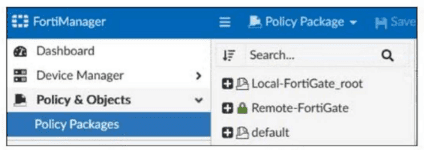
Which two statements about the configuration shown in the exhibit are true? Choose two answers.

Correct Answer: A. An administrator can lock the Local-FortiGate_root policy package.; C. The FortiManager ADOM workspace mode is set to normal.
Explanation:

The exhibit shows Remote-FortiGate with a green closed lock icon, which indicates a locked policy package. The FortiManager 7.6 Administrator Study Guide states: ''Policy locking is available in workspace normal and per-ADOM modes'' and ''Policy locking allows administrators to work on and lock a single policy package instead of locking the whole ADOM.'' This confirms that a package such as Local-FortiGate_root can also be locked, so A is correct.

B is incorrect because the study guide and lab guide describe snapshots as ADOM revisions, not policy package snapshots: ''An ADOM revision creates a snapshot of the policy and object configuration for the ADOM.''

D is incorrect because in workflow mode, sessions and approval are required before installation. The exhibit shows a normal save/lock state, not a workflow session state.


Question 2

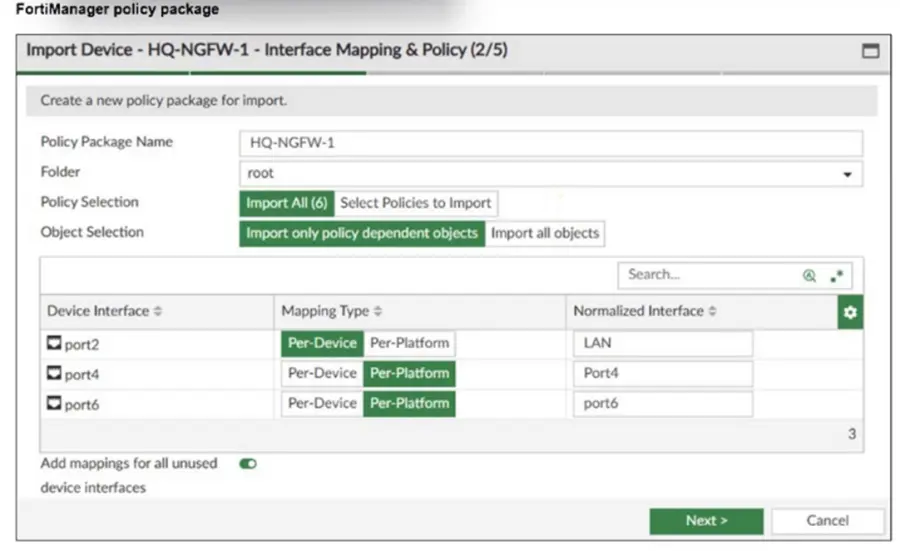
Refer to the exhibit.

An administrator added a FortiGate device to FortiManager with the default object settings at the ADOM layer.

What can you conclude from the import policy package process of the HQ-NGFW- 1 device?

Correct Answer: C. FortiManager will create LAN, port4, and port6 as normalized interfaces at the ADOM layer.
Explanation:

The import process shows that FortiManager will create normalized interfaces named LAN, port4, and port6 at the ADOM layer, mapping them to the corresponding device interfaces based on the import settings.


Question 3

Which output is displayed right after moving the ISFW device from one ADOM to another?

A)

B)

C)

D)

Correct Answer: C. Option C
Explanation:

Right after moving the ISFW device to a new ADOM, the status typically shows the policy package as never-installed, indicating that the device has been assigned to the new ADOM but no policy package has yet been installed in that ADOM.


Question 4

What are two expected results when both FortiManager and FortiGate are behind network address translation NAT devices? Choose two answers

Correct Answer: A. FortiGate is discovered by FortiManager through the FortiGate NATed IP address.; B. During discovery, the FortiManager NATed IP address is not set by default on FortiGate.
Explanation:

The FortiManager 7.6 Administrator Study Guide is explicit for the scenario where both FortiManager and FortiGate are behind NAT. It states that FortiManager can discover FortiGate through the FortiGate NATed IP address, which makes A correct. It also explains that in this scenario, the FortiManager NATed IP address is not configured on FortiGate by default under central management, which makes B correct.

C is incorrect because FortiGate must use the FortiManager NATed IP address, not the non-NATed IP, if it needs to announce itself or reestablish the FGFM tunnel. D is also incorrect because in this NAT scenario, if the tunnel is torn down, only FortiGate attempts to reestablish the connection; FortiManager does not automatically do so.


Question 5

Push updates are failing on a FortiGate device located behind a network address translation (NAT) device?

Which two settings should the administrator check to correct this problem? (Choose two.)

Correct Answer: A. Make sure the NAT device IP address and the correct ports are configured on FortiManager.; C. Make sure the virtual IP address and the correct ports are configured on the NAT device.
Explanation:

FortiManager must have the NAT device's IP address and correct ports configured to communicate properly with the FortiGate behind NAT.

The NAT device must have the correct virtual IP address and ports configured to allow push updates to reach the FortiGate device.


Question 6

Refer to the exhibit.

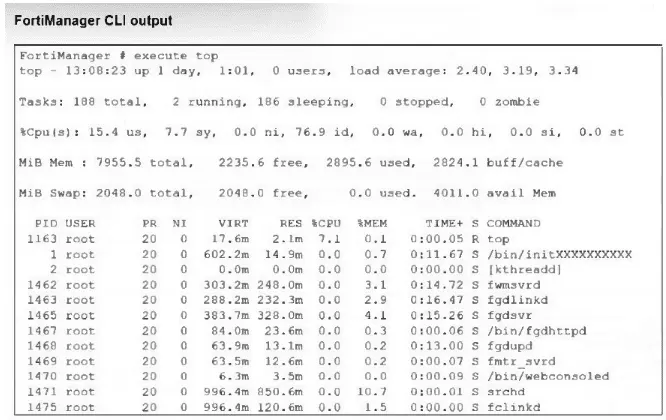
What percentage of the available RAM is being used by the process in charge of downloading the web and email filter databases from the public FortiGuard servers?

Correct Answer: D. 2.9
Explanation:

The correct answer is D. The FortiManager 7.6 Administrator Study Guide gives the exact extract under Web Filter and Email Filter: ''fgdlinkd --- Responsible for downloading web filter and email filter databases''. The same study guide section explains that the execute top command displays real-time CPU and RAM usage, and the %MEM column shows the memory percentage used by each process.

In the exhibit, the line for fgdlinkd shows %MEM 2.9. Therefore, the process responsible for downloading the web and email filter databases is using 2.9% of RAM. That matches option D exactly. The other values belong to different processes, such as fgdsvr and other FortiGuard-related daemons, but not the downloader process identified in the study guide.


Question 7

Refer to Exhibits:

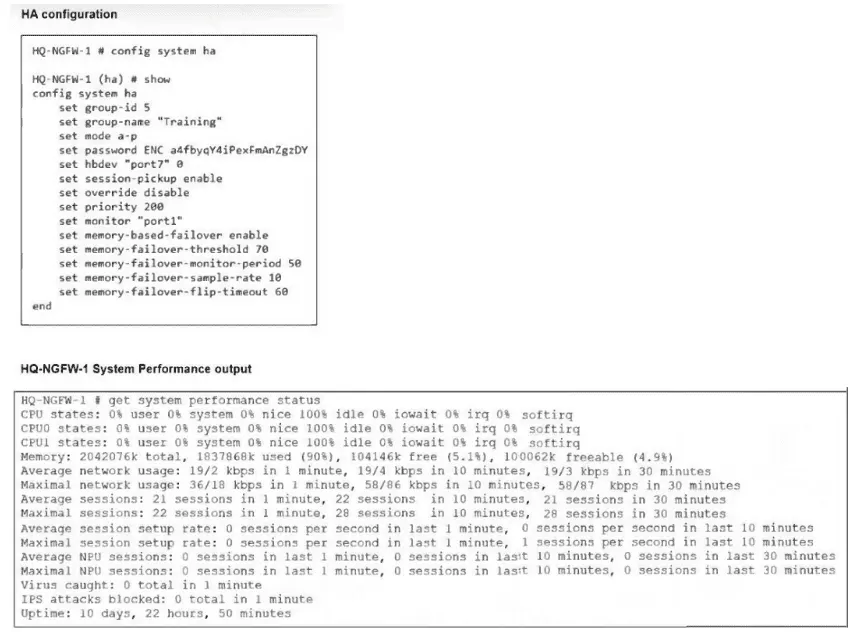
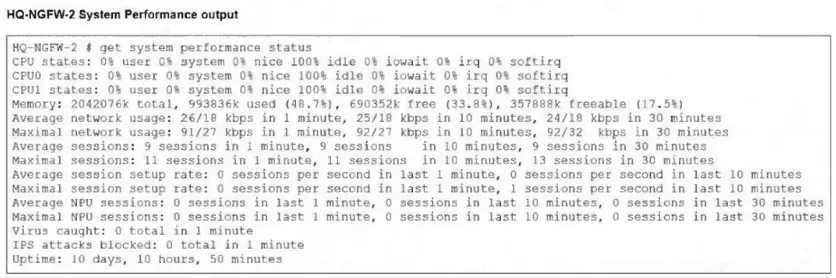
An administrator has observed the performance status outputs on an HA cluster for 55 seconds.

Which FortiGate is the primary?

Correct Answer: A. HQ-NGFW-2 with the parameter memory-failover-threshold setting
Explanation:

The correct answer is A. This conclusion comes from the HA settings shown in the exhibit plus Fortinet's HA behavior. In the exhibit, HQ-NGFW-1 has memory-based-failover enabled, memory-failover-threshold 70, memory-failover-monitor-period 50, and its memory usage is about 90%, while HQ-NGFW-2 is about 48.7%. Fortinet's official documentation states that memory-failover-threshold is the memory percentage that triggers failover, and memory-failover-monitor-period is the duration high memory must persist before failover occurs. It also states that if utilization stays above the threshold for the entire monitor period, a failover is triggered, and the peer becomes primary. (Fortinet Document Library)

Because the condition was observed for 55 seconds, which is longer than the configured 50-second monitor period, the cluster would fail over from HQ-NGFW-1 to HQ-NGFW-2 due to the memory-failover-threshold condition. The priority setting does not explain this result here, because override is disabled, and flip-timeout governs subsequent memory-based failovers, not the initial trigger. (Fortinet Document Library)


Question 8

What is the purpose of ADOM revisions?

Correct Answer: D. ADOM revisions save the current state of all policy packages and objects for an ADOM.
Explanation:

ADOM revisions save the current state of all policy packages and objects within an ADOM, allowing administrators to track changes over time and revert to previous configurations if needed.


Question 9

An administrator configures a new BGP peer in the FortiManager device-level database of FortiGate. They reinstall the policy package to the managed FortiGate device without any errors. However, when the administrator logs in to FortiGate, they do not see the BGP configuration changes.

What is the most likely reason why FortiManager did not push the BGP peer changes to FortiGate?

Correct Answer: B. Fortigate has a BGP template assigned on the FortiManager database.
Explanation:

If a BGP template is assigned to the FortiGate device on FortiManager, device-level BGP configurations made directly in the device-level database are overridden by the template settings, so the changes do not get pushed to the device.


Question 10

Refer to the exhibits.

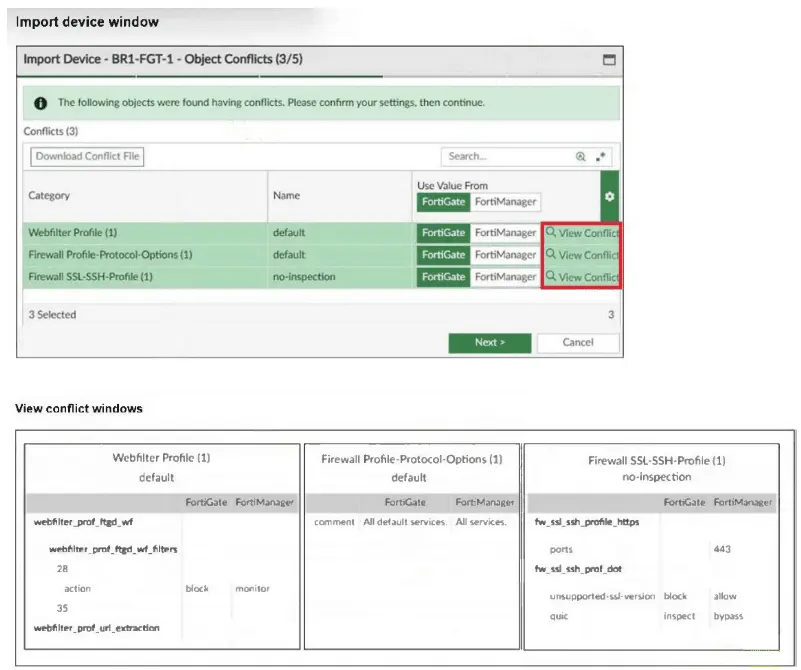
An administrator added BR1-FGT-1 to FortiManager and started importing the policy package. During the process, they saw that they need to choose values from FortiGate or FortiManager.

Which conclusion is most clearly supported by the exhibits?

Correct Answer: C. The default Firewall Profile-Protocol-Options object is the only profile that does not significantly affect any configuration changes on either FortiManager or FortiGate.
Explanation:

The exhibits are directly supported by the lab guide's troubleshooting section. It states: ''The only profile that can be replaced is the Firewall Profile-Protocol-Options profile, because the only difference is a change in the comment field.'' It then explains that for the other two profiles, ''Whether you accept the value from BR1-FGT-1 or FortiManager, it will cause changes on different devices.''

That exactly matches C. The conflict window is not primarily showing a firmware mismatch, and the guide does not say BR1-FGT-1 lacks HTTPS 443 support. It also does not describe this as a FortiGuard database mismatch for QUIC. Instead, the key point is that only the default Firewall Profile-Protocol-Options conflict is minor enough to safely take from FortiManager because the difference is only in the comment field. The web filter and SSL/SSH profiles would cause real configuration differences if replaced.