
Limited-Time Offer: Enjoy 50% Savings! Ends in 00h 00m 00s Coupon code: 50OFF
Skip to content

Free Fortinet NSE 6 - FortiNAC-F 7.6 Administrator NSE6_FNC_AD-7.6 Exam Questions

Page: 1 / 6 Total 60 questions

Want more questions? Get Premium Access.

Question 1

Where should you configure MAC notification traps on a supported switch?

Correct Answer: D. On all ports except uplink ports
Explanation:

In FortiNAC-F,MAC notification traps(also known as MAC Move or MAC Change traps) are essential for achieving real-time visibility of endpoint connections and disconnections. When a device connects to a switch port, the switch generates an SNMP trap that informs FortiNAC-F of the new MAC address on that specific interface. This allows FortiNAC-F to immediately initiate the profiling and policy evaluation process without waiting for the next scheduled L2 poll.

According to theFortiNAC-F Administration GuideandSwitch Integrationdocumentation, MAC notification traps should be configured onall ports except uplink ports. Uplink ports are the interfaces that connect one switch to another or to the core network. Because these ports see the MAC addresses of every device on the downstream switches, enabling MAC notification on uplinks would cause the switch to send a massive volume of redundant traps to FortiNAC-F every time any device anywhere in the downstream branch moves or reconnects. This can overwhelm the FortiNAC-F process queue and degrade system performance.

By only enabling these traps on 'edge' or 'access' ports---where individual endpoints like PCs, printers, and VoIP phones connect---FortiNAC-F receives precise data regarding exactly where a device is physically located. Uplinks should be identified in the FortiNAC-F inventory as 'Uplink' or 'Learned Uplink,' which tells the system to ignore MAC data seen on those specific ports.

'To ensure accurate host tracking and optimal system performance, SNMP MAC notification traps must be enabled on all access (downlink) ports.Do not enable MAC notification traps on uplink ports, as this will result in excessive and unnecessary trap processing. Uplink ports should be excluded to prevent the system from attempting to map multiple downstream MAC addresses to a single infrastructure interface.' ---FortiNAC-F Administration Guide: SNMP Configuration for Network Devices.
Question 2

Refer to the exhibits.

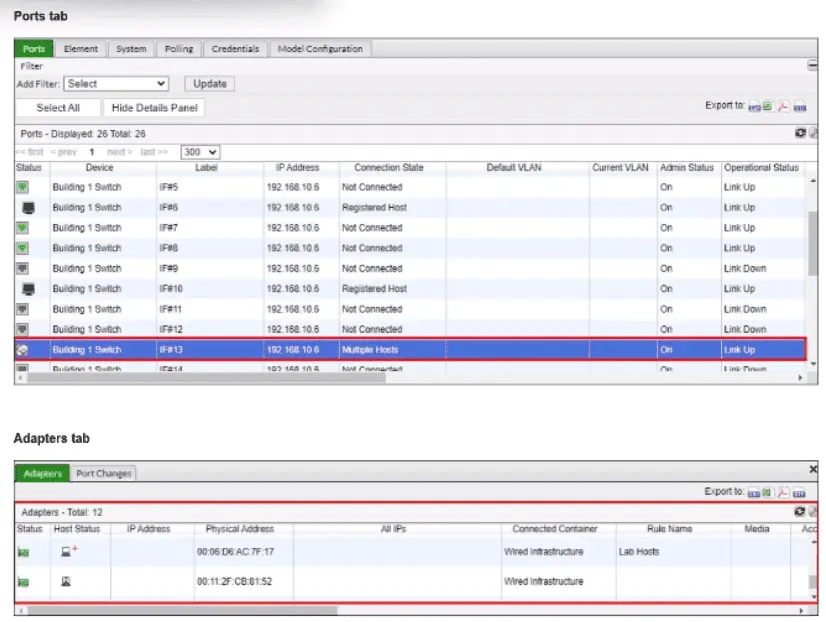
What would happen if the highlighted port with connected hosts was placed in both the Forced Registration and Forced Remediation port groups?

Correct Answer: A. Both types of enforcement would be applied
Explanation:

A FortiNAC-F port can belong to both Forced Registration and Forced Remediation system groups. These enforcement groups are not mutually exclusive and are not evaluated according to a ranking between the groups. Instead, FortiNAC-F determines the applicable enforcement according to the state of each host connected through that point of connection.

The Study Guide explicitly demonstrates overlapping enforcement membership: all Building 1 ports are members of Forced Registration, while second- and third-floor ports are additionally members of Forced Remediation.

FortiNAC-F then applies state-specific logic:

A rogue/unregistered host on the port satisfies Forced Registration and is moved to the Registration isolation network.

An at-risk host on the same port satisfies Forced Remediation and is moved to the Quarantine/Remediation isolation network.

The exhibit is particularly relevant because the highlighted port shows Multiple Hosts connected. Each host is evaluated independently according to its state, so different enforcement mechanisms can apply to different endpoints sharing that port.

Therefore, placing the port in both groups enables both types of enforcement, depending on the state of the connected hosts.

Study Guide Reference: State-Based Control System Groups; Logic to Determine Isolation; Non-Normal Status Device Evaluation, pp. 212--214.

Top of Form

Bottom of Form


Question 3

How can an administrator configure FortiNAC-F to normalize incoming syslog event levels across vendors?

Correct Answer: A. Configure severity mappings.
Explanation:

FortiNAC-F serves as a central manager for security events originating from a diverse ecosystem of third-party security appliances, such as FortiGate, Check Point, and Cisco. Each vendor utilizes its own internal scale forseverity levelswithin syslog messages (e.g., Check Point uses a 1--5 scale, while others may use 0--7). To provide a consistent response regardless of the source, FortiNAC-F usesSeverity Mappingsto normalize these incoming values.

According to theFortiNAC-F Administration Guide, severity mappings allow the administrator to translate vendor-specific threat levels into standardizedFortiNAC Security Levels(such as High, Medium, or Low Violation). When a syslog message arrives, the parser extracts the vendor's severity code, and the system immediately references theSecurity Event Severity Level Mappingstable to determine how that event should be categorized internally. This normalization is vital because it allows a singleSecurity Alarmto be configured to respond to any 'High Violation' event, whether it was reported as a 'Critical' by one vendor or a 'Level 5' by another. Without these mappings, the administrator would have to create separate, redundant security rules for every vendor to account for their different naming conventions and numerical scales.

'Each vendor defines its own severity levels for syslog messages. The following table shows the equivalent FortiNAC security level... To normalize these events, configure theSeverity Level Mappingsfound in the device integration guides. This allows FortiNAC to generate a consistent security event that can then trigger an alarm regardless of the reporting vendor's specific terminology.' ---FortiNAC-F Administration Guide: Vendor Severity Levels and Syslog Management.


Question 4

Refer to the exhibit.

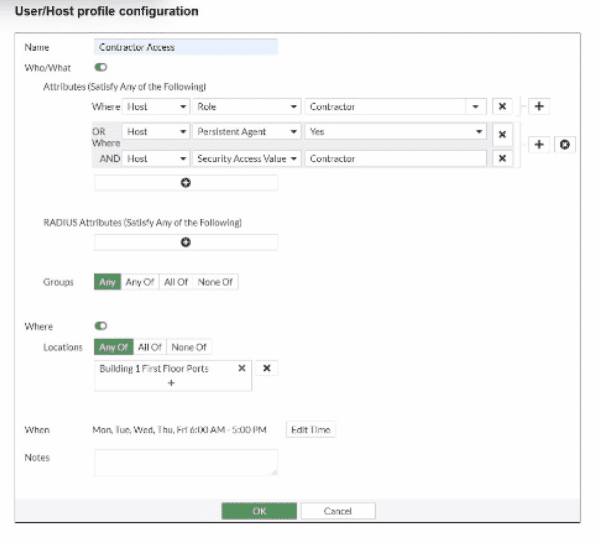
If a host is connected to a port in the Building 1 First Floor Ports group, what must also be true to match this user/host profile?

Correct Answer: D. The host must have a role value of contractor or an installed persistent agent and a security access value of contractor, and be connected between 6 AM and 5 PM.
Explanation:

TheUser/Host Profilein FortiNAC-F is the fundamental logic engine used to categorize endpoints for policy assignment. As seen in the exhibit, the configuration uses a combination of Boolean logic operators (ORandAND) to define the 'Who/What' attributes.

According to theFortiNAC-F Administrator Guide, attributes grouped together within the same bracket or connected by anORoperator require only one of those conditions to be met. In the exhibit, the first two attributes are 'Host Role = Contractor'OR'Host Persistent Agent = Yes'. This forms a single logical block. This block is then joined to the third attribute ('Host Security Access Value = Contractor') by anANDoperator. Consequently, a host must satisfyat least oneof the first two conditionsANDsatisfy the third condition to match the 'Who/What' section.

Furthermore, the profile includesLocationandWhen(time) constraints. The exhibit shows the location is restricted to the 'Building 1 First Floor Ports' group. The 'When' schedule is explicitly set toMon-Fri 6:00 AM - 5:00 PM. For a profile to match,allenabled sections (Who/What, Locations, and When) must be satisfied simultaneously. Therefore, the host must meet the conditional contractor/agent criteria, possess the specific security access value, and connect during the defined 6 AM to 5 PM window.

'User/Host Profiles use a combination of attributes to identify a match. Attributes joined byORrequire any one to be true, while attributes joined byANDmust all be true. If aSchedule(When) is applied, the host must also connect within the specified timeframe for the profile to be considered a match. All criteria in the Who/What, Where, and When sections are cumulative.' ---FortiNAC-F Administration Guide: User/Host Profile Configuration.


Question 5

When managing multiple FortiNAC-F CAs with a FortiNAC-F Manager, how is endpoint information updated in the FortiNAC-F Manager database?

Correct Answer: A. Endpoint information is pulled from the managed CAs by the FortiNAC-F Manager at a set interval.
Explanation:

The correct answer is A. FortiNAC-F Manager provides global visibility by collecting user and endpoint visibility information from the FortiNAC-F devices it manages, creating a centralized repository of users, hosts, and adapters. The study guide describes this as a global visibility function where endpoint information received by the Manager includes the local FortiNAC-F device from which the information came, allowing administrators to search and filter endpoint records across managed systems.

The key point is that this is not a real-time host-status trigger. Fortinet's FortiNAC-F Manager documentation states that FortiNAC Manager controls host and user record replication between managed FortiNAC CA servers and initiates synchronization every five minutes between servers. It also states that global object synchronization uses an interval-based process, not an administrator manually synchronizing each CA for endpoint visibility.

Option B is wrong because host status changes are not treated as immediate real-time updates to every managed FortiNAC-F database. Option C is wrong because manual synchronization applies to global/shared configuration objects, not routine endpoint visibility updates. Option D is wrong because the mechanism is not a CA-side scheduled push to the Manager; the Manager-controlled synchronization/collection process is what maintains the shared endpoint view.


Question 6

When creating a device profiling rule, what is an advantage of modeling the endpoint as a device in the inventory view?

Correct Answer: B. The devices can have scheduled connection status polling.
Explanation:

The correct answer is B. When a device profiling rule classifies an endpoint, the Register as setting can place the device in the host view, the topology/inventory view, or both. The study guide explains that if the profiled endpoint is registered into the topology view, the administrator must select a topology container.

The advantage of modeling the endpoint as a device in the inventory view is that it can be treated as a pingable device, where FortiNAC-F can use Contact Status settings. The guide explains that a modeled pingable device has contact status controls that allow polling to be enabled or disabled, the polling interval to be set, and the last successful and last attempted poll to be displayed.

Option A and option C are not the best answers because connection logs are associated with host connection tracking, not the key advantage of placing a profiled endpoint into inventory as a modeled device. Option D is wrong because user association applies more naturally to hosts or BYOD ownership workflows; it is not the main benefit of inventory modeling. The tested benefit is scheduled reachability monitoring through contact status polling.


Question 7

An administrator wants FortiNAC-F to pass firewall tags to FortiGate to leverage dynamic address groups used in firewall policies. On FortiNAC-F, what determines the values that are passed?

Correct Answer: A. Model configuration
Explanation:

The correct answer is A. FortiNAC-F passes firewall tags to FortiGate through Security Fabric integration so FortiGate can use those values as dynamic address groups in firewall policies. The study guide explains that firewall tags are administrator-defined string values and that FortiNAC-F dynamically assigns them based on a security policy or logical network. More specifically for network access enforcement, it states that the network access configuration defines the logical network, and the logical network defines the firewall tag through the device model configuration.

This is the same mechanism used in VPN and Fabric workflows: the FortiGate device model contains the mappings of logical networks to the actual tags or groups that FortiNAC-F sends to FortiGate. The guide states that FortiNAC-F network access policies and logical networks determine the group or tag information, while the FortiGate model configuration contains the mappings used for the values sent.

Option B is not the best answer because a device profiling rule can classify a device and may cause it to match a policy, but it does not directly define the FortiGate tag value sent for policy enforcement. Option C can apply firewall tags in security automation scenarios, but the standard FortiGate dynamic address group mapping is defined in model configuration. Option D is unrelated; RADIUS attributes are used in RADIUS access responses, not FortiGate Fabric tag propagation.


Question 8

While discovering network infrastructure devices, a switch appears in the inventory topology with a question mark (?) on the icon. What would cause this?

Correct Answer: B. The SNMP ObjectlD is not recognized by FortiNAC-F.
Explanation:

In FortiNAC-F, theInventory topologyuses specific icons to represent the status and model of discovered network infrastructure. When a switch or other network device is discovered via SNMP, FortiNAC-F retrieves itsSystem ObjectID (sysObjectID)to identify the specific make and model. This OID is then compared against the internal database of supported device mappings.

Aquestion mark (?)icon appearing on a discovered switch indicates that while the discovery process successfully communicated with the device (meaning SNMP credentials were correct), theSNMP ObjectID is not recognizedor mapped in the current version of FortiNAC-F. This essentially means the device is 'unsupported' by the current software out-of-the-box. Because the OID is unknown, FortiNAC-F does not know which CLI or SNMP command set to use for critical functions like L2 polling (host visibility) or VLAN switching (enforcement). To resolve this, an administrator can manually 'Set Device Mapping' to a similar existing model or a 'Generic SNMP Device' if only basic L3 visibility is required.

'Discovered devices displaying a'?' iconindicate the currently running version does not have a mapping for that device'sSystem OID(device is not supported). Device mappings are used to manage the device by performing functions such as L2/L3 Polling, Reading, and Switching VLANs.' ---Fortinet Technical Tip: Options for devices unable to be modeled in Inventory.


Question 9

An administrator wants FortiNAC-F to return a group of user-defined RADIUS attributes in RADIUS responses.

Which condition must be true to achieve this?

Correct Answer: B. Inbound RADIUS requests must contain the Calling-Station-ID attribute.
Explanation:

In FortiNAC-F, theRADIUS Attribute Groupsfeature allows administrators to return customized RADIUS attributes (such as specific VLAN IDs, filter IDs, or vendor-specific attributes) in anAccess-Acceptpacket sent back to a network device. This is particularly useful for supporting 'Generic RADIUS' devices that are not natively supported but can be managed using standard AVPairs.

According to theFortiNAC-F Generic RADIUS Wired Cookbookand theRADIUS Attribute Groups sectionof the Administration Guide, there is one critical prerequisite for this feature to function: theinbound RADIUS request must contain the Calling-Station-ID attribute. The Calling-Station-ID typically contains theMAC addressof the connecting endpoint. Because FortiNAC-F is a host-centric system, it uses the MAC address as the unique identifier to look up the host record, evaluate the associated Network Access Policy, and determine which Logical Network (and thus which Attribute Group) should be applied. If the incoming request lacks this attribute, FortiNAC-F cannot reliably identify the host and, as a safety mechanism, willnot include any user-defined RADIUS attributesin the response. This ensures that unauthorized or unidentifiable devices do not receive privileged access through misapplied attributes.

'Configure a set of attributes that must be included in the RADIUS Access-Accept packet returned by FortiNAC...Requirement: Inbound RADIUS request must contain Calling-Station-Id. Otherwise, FortiNAC will not include the RADIUS attributes.This attribute is used to identify the host and its current state within the FortiNAC database.' ---FortiNAC-F 7.6.0 Generic RADIUS Wired Cookbook: Configure RADIUS Attribute Groups.


Question 10

An organization has FortiNAC-F deployed and is using Layer 3 isolation networks across multiple sites with firewalls. At a minimum, which three protocols must be allowed between the isolation networks and FortiNAC-F? (Choose three.)

Correct Answer: C. HTTP/HTTPS; D. DNS; E. DHCP
Explanation:

The correct answers are C, D, and E. In a Layer 3 captive or isolation network design, FortiNAC-F port2 acts as the captive network service interface. The study guide states that Layer 3 captive networks require DHCP traffic to be relayed to port2 from the captive networks, and that the FortiNAC-F interface provides DHCP, DNS, and captive portal services to hosts assigned to any captive network.

That means the firewall path between the isolation VLANs and FortiNAC-F must allow DHCP, so isolated endpoints can receive an IP address from the FortiNAC-F captive network scope; DNS, so the isolated endpoint uses FortiNAC-F as its DNS server and gets redirected correctly; and HTTP/HTTPS, so the endpoint can load the FortiNAC-F captive portal page. The guide's browser-redirection flow confirms this sequence: the host is moved to the isolation VLAN, requests DHCP, receives FortiNAC-F as the DNS server, performs DNS lookup, and then Apache/Tomcat services present the portal content.

Option A, DDNS, is not required for captive portal operation. Option B, NTP, may be useful for endpoint time accuracy or certificate-related workflows, but it is not part of the minimum traffic required for FortiNAC-F isolation network operation.