Limited-Time Offer: Enjoy 50% Savings! Ends in 00h 00m 00s Coupon code: 50OFF
Skip to content

Free Fortinet NSE 6 - FortiSIEM 7.4 Analyst NSE6_FSM_AN-7.4 Exam Questions

Page: 1 / 8 Total 48 questions

Want more questions? Get Premium Access.

Question 1

Refer to the exhibit.
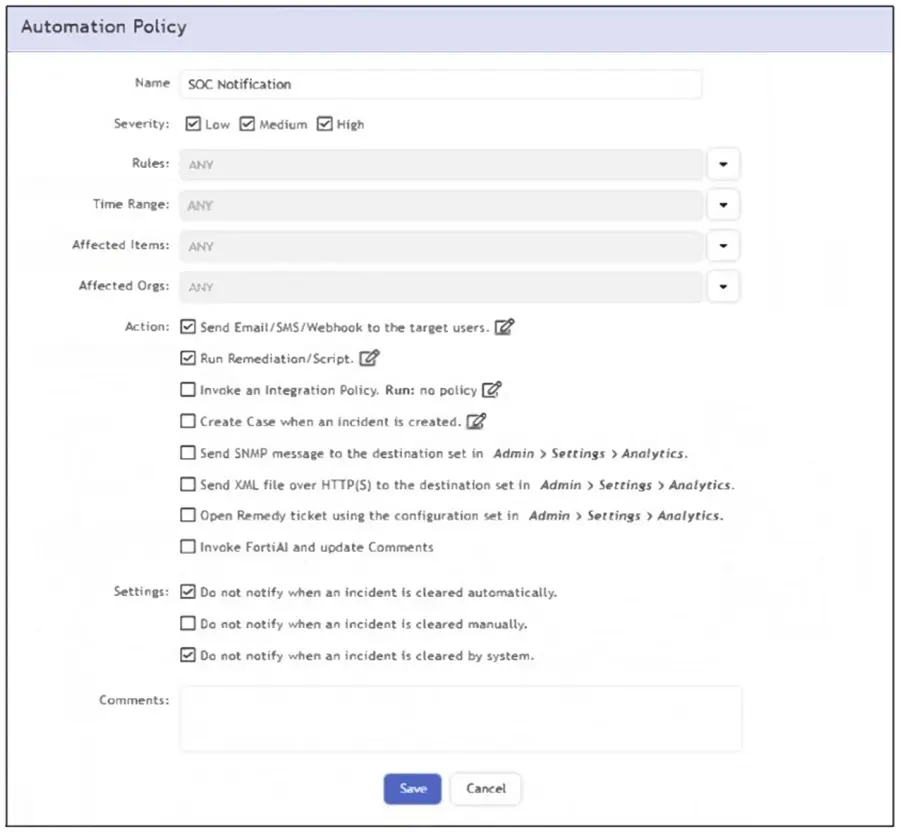
What happens when an analyst clears an incident generated by a rule containing the automation policy shown in the exhibit?

Correct Answer: B. An email is sent to the SOC manager.
Explanation:

The correct answer is B because the automation policy shown has the email/SMS/webhook notification action enabled, and the setting that suppresses notification for manual incident clearing is not selected. The FortiSIEM Study Guide explains that automation policies define actions taken when incident-related policy criteria match. It states that notification policies are defined by criteria such as severity, associated rules, time range, affected items, and actions. The guide also states that FortiSIEM can send email notifications and SMS messages to individuals or groups as part of an automation policy. In the exhibit, the options Do not notify when an incident is cleared automatically and Do not notify when an incident is cleared by system are selected, but Do not notify when an incident is cleared manually is not selected. Because the analyst clears the incident manually, the suppression condition does not apply. Therefore, FortiSIEM sends the configured email notification to the target user, identified in the question as the SOC manager.
Question 2

Refer to the exhibit.

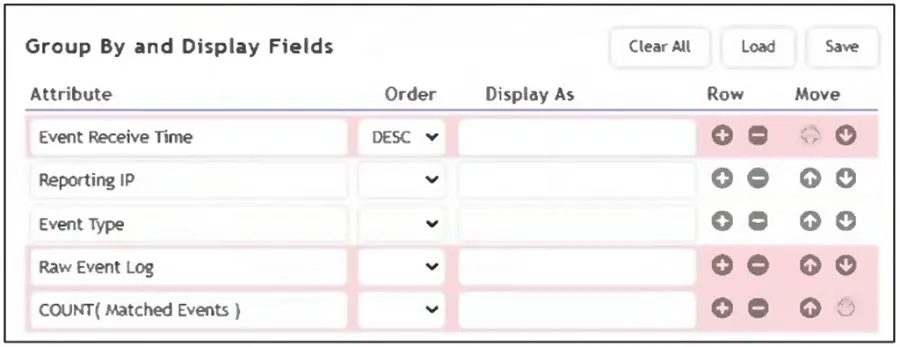
As shown in the exhibit, why are some of the fields highlighted in red?

Correct Answer: A. Unique values cannot be grouped
Explanation:

The fields are highlighted in red because unique values such as Event Receive Time and Raw Event Log cannot be used in group-by operations. Grouping requires aggregatable or consistent values across events, while these fields are unique to each event, making them incompatible for grouping.

The correct answer is A because the highlighted fields are not valid for that grouped/aggregated display configuration. The FortiSIEM 7.4 User Guide notes that some event attributes, functions, and queries are not supported in specific analytics result-filter and display contexts. It lists date fields, including examples such as Event Receive Time, and also lists Raw Event Log and Binary Raw Event Log among unsupported fields for that context. The reason is practical: grouping requires stable values that can combine multiple events into meaningful grouped rows. Attributes such as Event Receive Time and Raw Event Log are highly specific to individual events. If every event has its own receive timestamp or unique raw log content, grouping by those fields defeats aggregation and can create one row per event rather than meaningful grouped output. COUNT(Matched Events) itself is a valid aggregate expression when used correctly. Event Receive Time is available in logs, but it is not appropriate as a grouped field in the configuration shown. Therefore, the red highlighting indicates invalid grouped fields caused by unique/non-groupable values.


Question 3

Refer to the exhibit.

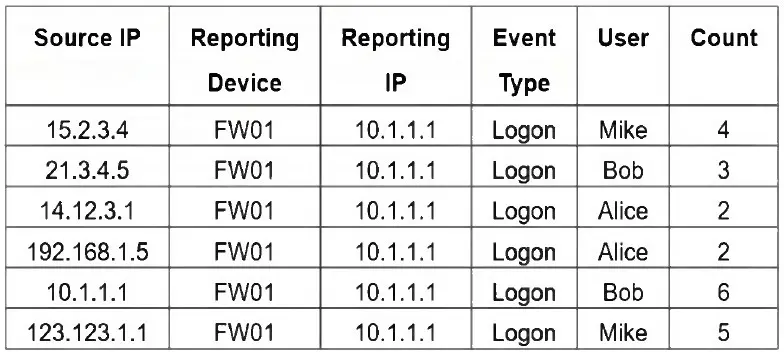
If you group the events by User, Source IP, and Count attributes, how many results will FortiSIEM display?

Correct Answer: B. Six
Explanation:

Grouping by User, Source IP, and Count means that each unique combination of those three attributes will be treated as a separate result. In the table, all six rows have distinct combinations of User, Source IP, and Count - so FortiSIEM will display 6 results.

Six because grouping by User, Source IP, and Count creates a separate result for every unique combination of those three selected attributes. The FortiSIEM Study Guide explains this grouping behavior in the single-subpattern rule example: ''If multiple VPN login failure events have the same source IP address, reporting device, reporting IP address, and user, they are grouped together in one row, and the count column tracks the number of events for each of those rows.'' Applying that rule here, FortiSIEM compares all selected Group By fields together. In the exhibit, every row has a unique Source IP address, even where the same user appears more than once. For example, Mike appears twice, but the Source IP and Count values are different. Alice appears twice with Count 2, but the Source IP values are different. Bob appears twice, but both Source IP and Count are different. Since no row has the same User, Source IP, and Count combination as another row, FortiSIEM displays all six rows.


Question 4

Refer to the exhibit.

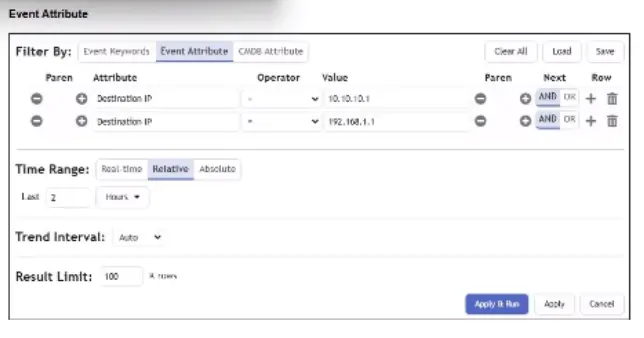
A FortiSIEM analyst is investigating an issue by examining events to two destination IP addresses. However, the analyst is not getting any results from the search.

Based on the selected filter shown in the exhibit, why is the search returning no results?

Correct Answer: B. The wrong Boolean operator is selected in the Next column.
Explanation:

The correct answer is B because the analyst is searching for events to either of two destination IP addresses, but the filter uses the wrong Boolean relationship. The FortiSIEM Study Guide explains structured searches with multiple conditions and states that ''when you use multiple conditions, you must specify the next logical operator between conditions.'' It gives a direct example: when searching for events from two specific devices, the first condition is one IP address, the second condition is another IP address, and ''the next logical operator between the two conditions is an OR operator, because the search is for events from condition 1 OR condition 2.'' The same logic applies here. A single event cannot usually have Destination IP equal to 10.10.1.1 and Destination IP equal to 192.168.1.1 at the same time. Using AND requires both conditions to be true simultaneously, so no results are returned. The correct operator between the two Destination IP conditions is OR.


Question 5

Refer to the exhibits.

You are troubleshooting why the rule shown in the exhibit is generating incidents for successful Remote Desktop Protocol (RDP) connections with correct logins. It should only be triggering when a person fails to log in three or more times to the target device when connecting with RDP.

What is causing the rule to be triggered by correct login events? (Choose one answer)

Correct Answer: B. The Boolean between the subpatterns is incorrect.
Explanation:

The rule is triggering on successful RDP connection events because the Next operator between the two subpatterns is set to OR. The FortiSIEM Study Guide explains that multiple subpattern rules are used when patterns must occur within a specific time period or when one of several patterns proves that an incident condition exists. It lists the OR operator as: ''Subpattern X OR Subpattern Y occurred within the Time Window.'' The same Study Guide further explains that if multiple patterns are used, FortiSIEM requires a next operator, and in the OR example, ''an event that matches either'' subpattern will trigger. It also states that because the next operator is OR, the constraint between the two subpatterns is not enforced.

In the exhibit, Subpattern 1 matches RDP traffic on TCP/UDP port 3389 from FortiGate traffic-forward events, while Subpattern 2 matches logon failure events with COUNT(Matched Events) >= 3. Because the rule uses OR, FortiSIEM can trigger when only the RDP connection subpattern matches, even if the failed-logon subpattern does not match. The correct logic should require both subpatterns to match with the intended relationship constraints, not either subpattern independently.


Question 6

Refer to the exhibit.

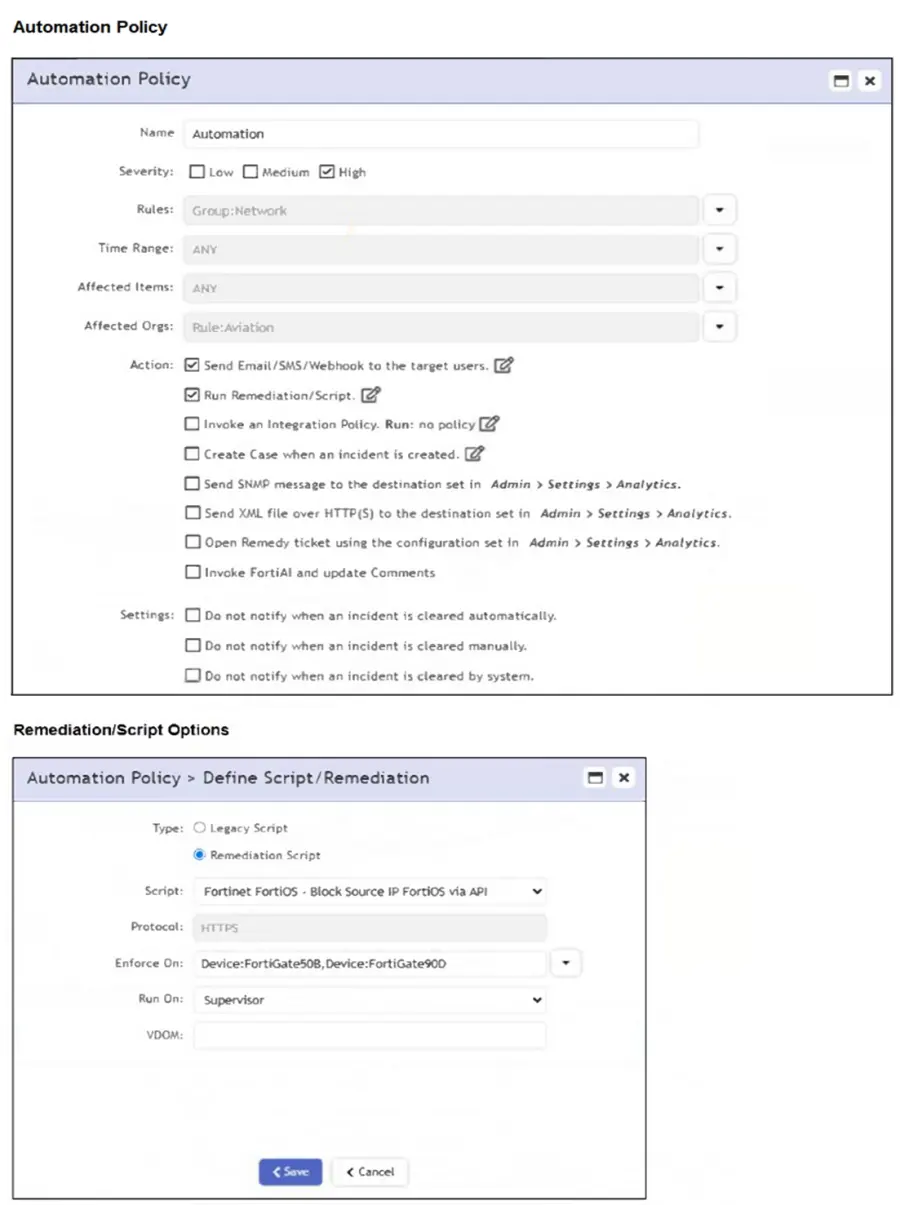
If a rule containing the automation policy shown in the exhibit triggers, what will happen?

Correct Answer: D. Associated source IP addresses will be blocked on two FortiGate firewalls.
Explanation:

The automation policy is configured to run a remediation script named 'Fortinet FortiOS - Block Source IP FortiOS via API'. It specifies enforcement on two FortiGate devices: FortiGate508 and FortiGate90D. Therefore, associated source IP addresses will be blocked on those two FortiGate firewalls only.

The correct answer is D because the remediation configuration defines specific enforcement targets. The FortiSIEM Study Guide explains that automation policies can run remediation scripts automatically when an incident occurs. It also explains the remediation options: Enforce On determines which devices the script runs against, while Run On identifies whether the script is launched from the supervisor or a collector. The Study Guide further states that mitigation scripts can block an IP address in a firewall or disable a user in Active Directory, and recommends specifying the Enforce On value because it controls the target device used by the remediation script. In the exhibit, the selected script is a Fortinet FortiOS block-source-IP remediation script, and the Enforce On field lists two FortiGate devices. That means the block action is targeted only at those two named FortiGate firewalls. The Aviation organization limits the automation policy context, but it does not mean every device in the organization receives the block. It is also not all FortiGate firewalls or the whole Network CMDB group.