
Limited-Time Offer: Enjoy 50% Savings! Ends in 00h 00m 00s Coupon code: 50OFF
Skip to content

Free Fortinet NSE 7 - Public Cloud Security 7.6.4 Architect NSE7_CDS_AR-7.6 Exam Questions

Page: 1 / 6 Total 54 questions

Want more questions? Get Premium Access.

Question 1

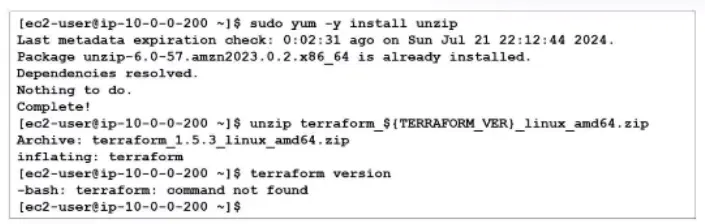
Exhibit.

You are tasked with deploying FortiGate using Terraform. When you run the terraform version command during the Terraform installation, you get an error message.

What could you do to resolve the command not found error?

Correct Answer: A. You must move the binary file to the bin directory.
Explanation:

https://github.com/fortinet/fortigate-terraform-deploy

According to the Terraform documentation for installing Terraform on Linux, you need to download a zip archive that contains a single binary file called terraform. You need to unzip the archive and move the binary file to a directory that is included in your system's PATH environment variable, such as /usr/local/bin. This way, you can run the terraform command from any directory without specifying the full path. If you do not move the binary file to the bin directory, you will get a command not found error when you try to run the terraform version command, as shown in the screenshot. To fix this error, you need to move the binary file to the bin directory or specify the full path of the binary file when running the command.
Question 2

You have deployed a FortiGate HA cluster in Azure using a gateway load balancer for traffic inspection. However, traffic is not being routed correctly through the firewalls.

What can be the cause of the issue?

Correct Answer: A. The FortiNet VMs have IP forwarding disabled, which is required for traffic inspection.
Explanation:

According to the FortiOS 7.6 Azure Administration Guide and the Cloud Security 7.4 Public Cloud Study Guide, the integration of FortiGate-VMs with an Azure Gateway Load Balancer (GWLB) requires specific network configurations to ensure packet transit:

IP Forwarding Requirement (Option A): By default, Azure Network Interfaces (NICs) drop any traffic that does not originate from or is not destined for the IP address assigned to that NIC. For a FortiGate to act as a 'bump-in-the-wire' or transparent inspector, it must receive traffic destined for other IPs and forward it. This requires the IP Forwarding setting to be explicitly enabled on the FortiGate's network interfaces within the Azure portal. If this is disabled, the Azure fabric will discard the traffic being steered through the FortiGate HA cluster by the GWLB.

VXLAN Encapsulation: The Azure GWLB uses VXLAN to encapsulate traffic (adding a VXLAN header with a specific VNI) before sending it to the FortiGate. The FortiGate must terminate this VXLAN tunnel. While the VXLAN configuration is crucial, the underlying infrastructure check for IP Forwarding is the most common cause of traffic being blocked at the NIC level before the FortiOS stack can process the packet.

Why other options are incorrect:

Option B: If health probes fail, the GWLB will typically stop sending traffic to that specific instance. While this affects the HA cluster's availability, the question states traffic is not being routed correctly through the firewalls (implying an active flow issue), and the primary mechanism for allowing a VM to process third-party traffic in Azure is IP Forwarding.

Option C: NSGs are typically applied to the NIC or Subnet. While incorrect NSG rules can block traffic, 'IP Forwarding' is a specific requirement for the FortiGate to function as a network appliance (NVA) regardless of the NSG state.

Option D: Azure GWLB supports cross-subscription and cross-tenant chaining. The consumer (protected VMs) and the provider (FortiGate HA cluster) do not need to be in the same subscription, provided the GWLB endpoint is correctly mapped.


Question 3

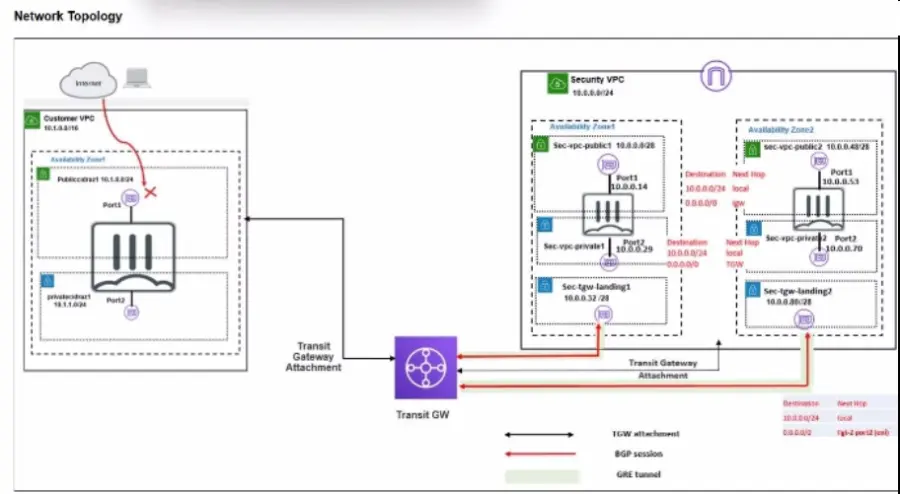
Refer to the exhibit.

In your Amazon Web Services (AWS), you must allow inbound HTTPS access to the Customer VPC FortiGate VM from the internet. However, your HTTPS connection to the FortiGate VM in the Customer VPC is not successful.

Also, you must ensure that the Customer VPC FortiGate VM sends all the outbound Internet traffic through the Security VPC.

How do you correct this issue with minimal configuration changes? (Choose three.)

Correct Answer: B. Add a route with your local internet public IP address as the destination and the transit gateway as the target.; C. Add a route to the destination 0.0.0.0/0 with the transit gateway as the target.; E. Deploy an internet gateway, attach it to the Customer VPC, and then associate an EIP with the port1 of the FortiGate in the Customer VPC.

Question 4

You are using Ansible to modify the configuration of several FortiGate VMs. What is the minimum number of files you need to create, and in which file should you configure the target FortiGate IP addresses?

Correct Answer: D. One text file for all target devices, and one playbook file.
Explanation:

Comprehensive and Detailed Explanation From FortiOS 7.6, FortiWeb 7.4 Exact Extract study guide:

Based on the FortiOS 7.6 Automation Guide and the provided documentation for Ansible workflows, the following structure is required for managing multiple FortiGate nodes:

Inventory File (The Target List): The inventory is a single file that defines the list of managed nodes. It specifies critical information such as hostnames, connection details, and specifically the IP addresses of the target devices. According to the study guide, this inventory is a text file that lists all the systems you want to manage.

Playbook File (The Task List): You create and edit a separate file that acts as the playbook. This file is written in YAML format and contains the series of tasks that Ansible performs on the managed nodes to reach a desired state.

Minimum File Count: A basic Ansible workflow consists of exactly two files: one inventory file (text) and one playbook file (YAML). By listing the target IP address (e.g., 10.0.206.131) within the inventory text file, the administrator can manage the FortiGate device without needing individual files for every target.

Why other options are incorrect:

Option A & C: Creating a separate playbook or inventory file for each target is inefficient and contradicts the core Ansible workflow, which uses a single inventory to manage multiple hosts.

Option B: While the playbook is a .yaml file, the study guide specifically defines the inventory (where IP addresses are configured) as a text file in the context of the basic workflow.


Question 5

Your administrator instructed you to deploy an Azure vWAN solution to create a connection between the main company site and branch sites to the other company VNETs. What is the best connection solution available between your company headquarters, branch sites, and the Azure vWAN hub? (Choose one answer)

Correct Answer: D. ExpressRoute
Explanation:

Comprehensive and Detailed Explanation From FortiOS 7.6, FortiWeb 7.4 Exact Extract study guide:

According to the FortiOS 7.6 Azure Administration Guide and the Fortinet 7.4 Public Cloud Security documentation regarding Azure Virtual WAN (vWAN) architectures, the choice of connectivity depends on the required performance, security, and scale:

ExpressRoute (Option D): For a large-scale enterprise deployment involving a company headquarters and multiple branch sites, ExpressRoute is the 'best' and most robust solution. It provides a private, dedicated, and high-throughput connection (up to 100 Gbps) that bypasses the public internet entirely. This ensures predictable low latency and higher reliability compared to internet-based tunnels.

Virtual WAN Integration: Azure vWAN Standard SKU explicitly supports ExpressRoute gateways as a primary connectivity method for on-premises sites. This allows the vWAN hub to act as a global transit point, seamlessly connecting the ExpressRoute-linked headquarters to other branch sites and VNET spokes.

Scalability for Headquarters: While site-to-site IPsec VPNs are common for smaller branches, the 'main company site' or headquarters typically requires the high bandwidth and SLA guarantees provided by ExpressRoute.

Why other options are incorrect:

Option A & B: L2TP and SSL VPN are primarily used for remote user access (Point-to-Site) rather than permanent site-to-hub infrastructure connections. vWAN uses OpenVPN or IKEv2 for user VPNs, not L2TP.

Option C: While GRE tunnels are used in some networking scenarios, they are not a native, primary gateway connectivity option for the Azure vWAN hub compared to the standardized Site-to-Site VPN (IPsec) and ExpressRoute.


Question 6

Your DevOps team is evaluating different Infrastructure as Code (IaC) solutions for deploying complex Azure environments.

What is an advantage of choosing Azure Bicep over other IaC tools available?

Correct Answer: B. Azure Bicep provides immediate support for all Azure services, including those in preview.

Question 7

What is the main advantage of using SD-WAN Transit Gateway Connect over traditional SD-WAN?

Correct Answer: D. You can use GRE-based tunnel attachments.

Question 8

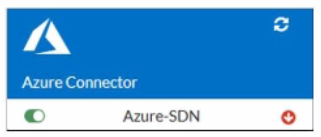
Refer to the exhibit.

You are troubleshooting a Microsoft Azure SDN connector issue on your FortiGate VM in Azure.

Which command can you use to examine details about API calls sent by the connector?

Correct Answer: C. diag debug application azd -1

Question 9

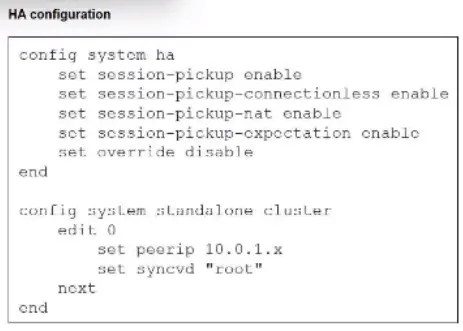
Refer to the exhibit.

You deployed an HA active-active load balance sandwich with two FortiGate VMs in Microsoft Azure.

After the deployment, you prefer to use FGSP to synchronize sessions, and allow asymmetric return traffic. In the environment, FortiGate port 1 and port 2 are facing external and internal load balancers respectively.

What IP address must you use in the peerip configuration?

Correct Answer: D. The opposite FortiGate port 1 IP address.

Question 10

An administrator is relying on an Azure Bicep linter to find possible issues in Bicep files.

Which problem can the administrator expect to find?

Correct Answer: B. Some resources are missing dependsOn statements.