Limited-Time Offer: Enjoy 50% Savings! Ends in 00h 00m 00s Coupon code: 50OFF
Skip to content

Free Fortinet NSE 7 - Secure Networking 7.6 Architect NSE7_FSN_AR-7.6 Exam Questions

Page: 1 / 15 Total 146 questions

Want more questions? Get Premium Access.

Question 1

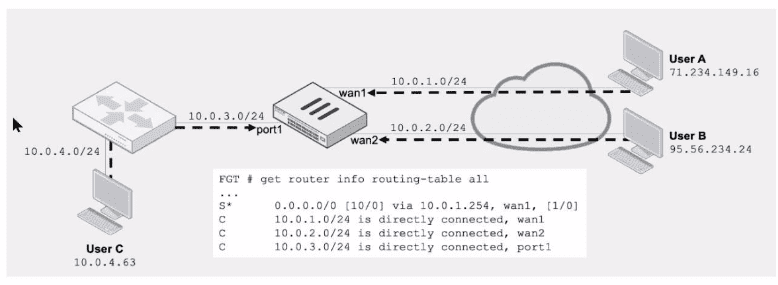
Refer to the exhibit.

Assuming a default configuration, which three statements are true? (Choose three.)

Correct Answer: B. User B: Fail. There is no route to 95.56.234.24 .; C. User A: Pass. The default static route through wan1 passes the RPF check regardless of the source IP address.; E. User C: Fail. There is no route to 10.0.4.63 using port1 in the touting table.
Explanation:

Fortinet Technical Note: RPF Default Configuration and Routing Table Matching

FortiGate Administration Guide: Routing and Asymmetric Routing Controls

Community Knowledgebase: Route Lookups and RPF Enforcement on FortiOS

Question 2

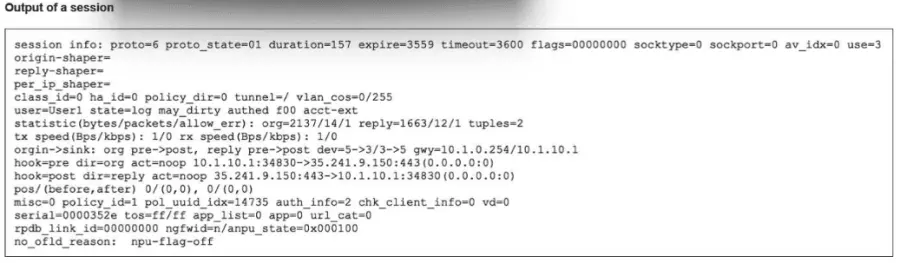
Refer to the exhibit.

The exhibit shows the output of a session. Which two statements are correct? (Choose two.)

Correct Answer: C. The session was initiated from an authenticated user.; D. The TCP session has been successfully established.
Explanation:

The correct answers are C and D.

For D, the session output shows proto=6, which means TCP, and proto_state=01. The study guide explains that for TCP sessions, ''the first number (from left to right) is related to the server-side state and is 0 when the session is not subject to any inspection (flow or proxy). ... The second digit is the client-side state.'' It also shows that value 1 = ESTABLISHED

So proto_state=01 means:

first digit 0 = no inspection

second digit 1 = ESTABLISHED

That confirms the TCP session has been successfully established.

For C, the study guide section ''Session for an Authenticated User'' states: ''Any session for traffic coming from an authenticated user contains the authed flag. Additionally, the username is added to the session information.''

In the exhibit, the session contains user=User1 and an authentication state flag (authd), which indicates the session is associated with an authenticated user.

Why the other options are wrong:

A is wrong because the session did match a firewall policy. The study guide says the session output includes ''The ID of the matching policy'' In the exhibit, the session shows policy_id=1, so a firewall policy was matched.

B is wrong because the study guide explains the gwy field as:

first value = gateway to destination

second value = gateway to source The exhibit shows gwy=10.1.0.254/10.1.10.1, so:

gateway to destination = 10.1.0.254

gateway to source = 10.1.10.1

So the verified answers are: C, D.


Question 3

Which three common FortiGate-to-collector-agent connectivity issues can you identify using the FSSO real-time debug? (Choose three.)

Correct Answer: B. The connection was refused. There may be a mismatch of the TCP port.; C. FortiGate cannot reach the IP address of the collector agent.; D. The pro-shared key does not match
Explanation:

The diagnose debug authd fsso server command is the primary tool for troubleshooting communication between the FortiGate and the FSSO Collector Agent. This debug output reveals the status of the connection and the reasons for failure. The three most common connectivity issues identified by this debug are:

FortiGate cannot reach the IP address of the collector agent (Option C): The debug will show connection timeouts or 'host unreachable' errors if the Layer 3 connectivity is missing.

The connection was refused / Port mismatch (Option B): If the FortiGate can reach the IP but the Collector Agent is not listening on the specified port (default 8000), the debug will display 'Connection refused.' This often happens if the port configured on the FortiGate does not match the listening port on the agent.

The pre-shared key does not match (Option D): If the IP and Port are correct, the next step is authentication. If the password configured on the FortiGate does not match the one on the Collector Agent, the debug will explicitly show an 'Authentication failed' or 'password mismatch' error during the handshake.

Note on other options: Option A (SSL) is less common than basic connectivity/auth mismatches. Option E (Group filters) relates to user processing logic, which occurs after connectivity is established.


FortiGate Security 7.6 Study Guide (FSSO Troubleshooting): 'Troubleshooting FSSO... Check connectivity (IP/Port) and authentication (Password).'

Question 4

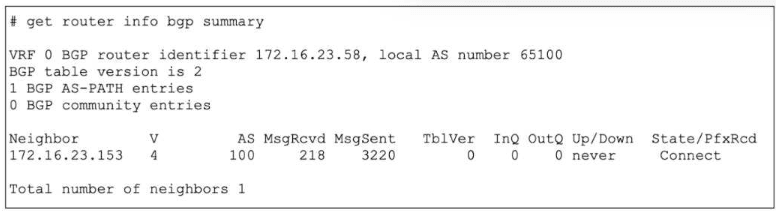
Refer to the exhibit.

The output of a BGP debug command is shown.

Why has the local router at 172.16.23.58 been unable to establish adjacency with its only neighbor?

Correct Answer: C. The local router has not received a SYN/ACK packet from the neighbor.
Explanation:

The correct answer is C.

The exhibit shows the neighbor state as Connect in the State/PfxRcd column. The study guide explains the BGP states exactly as follows:

''Connect: Waiting for a successful three-way TCP connection''

''OpenSent: Waiting for an OPEN message from the peer''

''Established: Peers have successfully exchanged OPEN and keepalive messages''

Because the router is still in Connect state, the TCP three-way handshake has not completed yet. In practical terms, the local router has sent the TCP SYN but has not successfully received the SYN/ACK needed to complete the handshake. That is why C is correct.

Why the other options are wrong:

A is wrong because the message counters alone do not prove that the neighbor is unreachable. The study guide says the State/PfxRcd field shows the BGP state when the session is not established, and here that state is specifically Connect

B is wrong because waiting for an OPEN message happens in OpenSent, not Connect

D is not the best answer for this output. The study guide ties the displayed state directly to the protocol phase: Connect means the device is still waiting for a successful TCP handshake

So the verified answer is: C.


Question 5

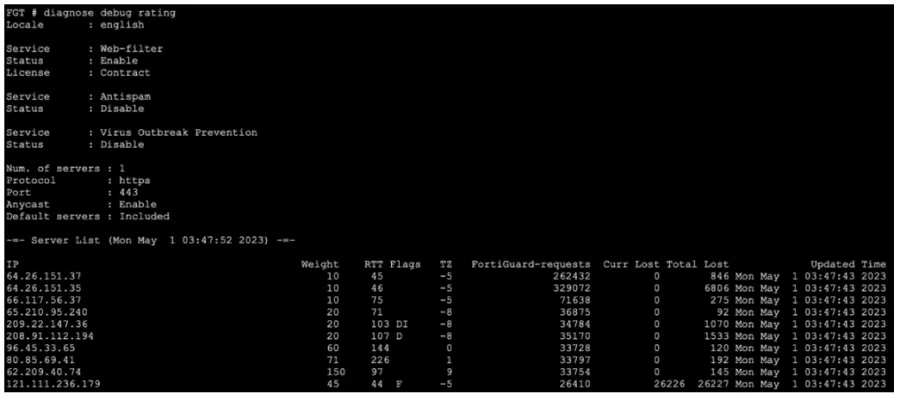
Refer to the exhibit, which shows the output of a diagnose command. What can you conclude from the RTT value?

Correct Answer: A. Its value represents the time it takes to receive a response after a rating request is sent to a particular server.
Explanation:

The correct answer is A.

The study guide explicitly explains the diagnose debug rating table and says that for each server IP, the output shows ''The round trip delay''

That means the RTT value represents the time it takes for FortiGate to send a request and receive the reply from that FortiGuard server.

The FortiOS administration guide also confirms this by stating:

''Each server is probed for Round Trip Time (RTT) every two minutes.''

Why the other options are wrong:

B is wrong because packet loss is shown separately by Curr Lost and Total Lost, while RTT is the round-trip delay

C is wrong because license-validation behavior is indicated by flags such as I = Initial, not by the RTT value itself

D is wrong because the documents do not say RTT starts at a fixed value of 10; it is measured dynamically as round-trip delay

So the verified answer is: A.


Question 6

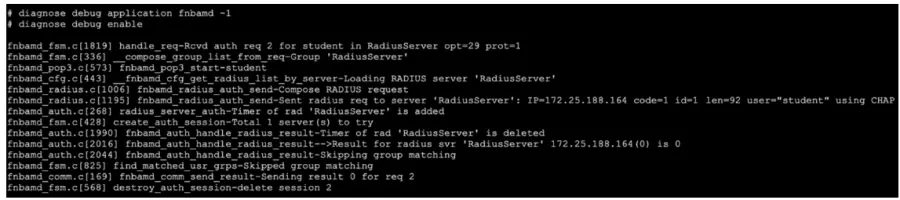
Refer to the exhibit, which shows a truncated output of a real-time RADIUS debug.

Which two statements are true? (Choose two answers)

Correct Answer: A. The RADIUS server queried for authentication is located at IP address 172.25.188.164.; D. Authentication was successful.
Explanation:

The correct answers are A and D.

The debug output shows:

Sent RADIUS req to server 'RadiusServer': IP=172.25.188.164 ... user='student' using CHAP

Result for radius svr 'RadiusServer' 172.25.188.164(0) is 0

Sending result 0 for req 2

The study guide explains that in RADIUS real-time debug, FortiGate shows the IP address of the RADIUS server it is querying. In the example, it says FortiGate ''creates an access request to the RADIUS server at IP address 10.0.13.130'' and shows the line Sent radius req to server ... IP=10.0.13.130

So in your exhibit, the queried server is clearly 172.25.188.164, which makes A correct.

The study guide also states:

''The message fnbamd_comm_send_result-Sending result 0 indicates that the authentication was successful and that FortiGate received the Access-Accept message.''

Since your exhibit also ends with Sending result 0, that makes D correct.

Why the other options are wrong:

B is wrong because result 0 means authentication successful, not failed

C is wrong because the debug explicitly shows using CHAP, and the study guide lists supported RADIUS schemes as CHAP, PAP, MS-CHAP, and MS-CHAPv2

E is wrong because the study guide says two-factor authentication would involve an Access-Challenge response: ''If two-factor authentication is enabled on the server, the response is an Access-Challenge message''Your exhibit shows successful result 0 / Access-Accept, not a challenge.

So the verified answers are: A, D.


Question 7

Refer to the exhibit.

The partial output of a session table entry is shown.

Which two statements about the output shown in the exhibit are correct? (Choose two.)

Correct Answer: B. The traffic matches Policy ID 1.; C. The session has been offloaded.
Explanation:

The correct answers are B and C. The session table output clearly shows policy_id=1, which means the traffic matched firewall Policy ID 1. That directly validates option B. The output also shows NPU-related offload indicators, including npu_state=... ips_offload and npu info: ... offload=8/8, ips_offload=1/1. These fields indicate that the session has been offloaded to hardware, so option C is correct. The study guide explains that FortiGate can offload sessions to network processors after session establishment, allowing subsequent packets to bypass normal CPU/kernel processing for improved performance. It also states that offloaded sessions are handled by the network processor rather than the CPU path.

Option A is too specific and is not proven by the exhibit. The output shows NPU offload, but it does not explicitly identify the hardware as NP7. Do not assume NP7 unless the platform or output confirms it. Option D is wrong because the VLAN-related fields show vlan=0x0000/0x0000 and vtag_in=0x0000/0x0000, which means the traffic is not VLAN-tagged.


Question 8

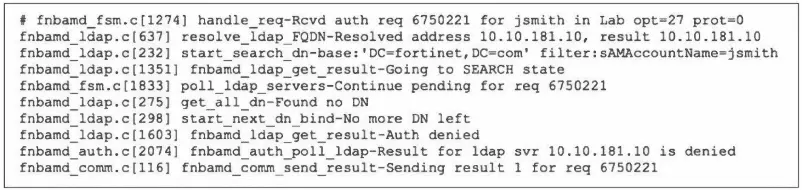
Refer to the exhibit, which shows a partial output of the real-time LDAP debug.

What two actions can the administrator take to resolve this issue? (Choose two.)

Correct Answer: B. Ensure the user is providing the correct user credentials.; D. Ensure the account is active.
Explanation:

The exhibit showing the real-time LDAP debug output is not visible. LDAP issues typically involve authentication failures, connectivity problems, or configuration mismatches. Two actions to resolve an LDAP issue might include: verifying LDAP server connectivity and port accessibility, checking LDAP bind credentials, confirming proper LDAP search base configuration, validating LDAP schema or user/group mappings, or adjusting timeout values.

Question 9

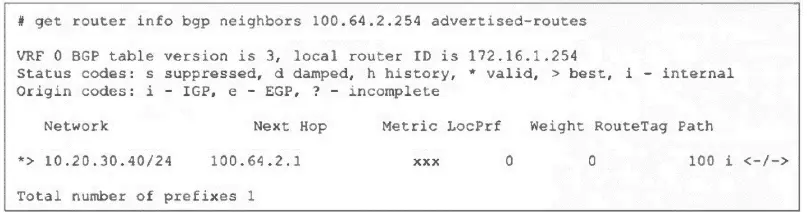
Refer to the exhibit, which shows the output of the command get router info bgp neighbors 100.64.2.254 advertised-routes.

What can you conclude from the output?

Correct Answer: D. The local router is advertising the 10.20.30.40/24 network to its BGP neighbor.

Question 10

Refer to the exhibits.

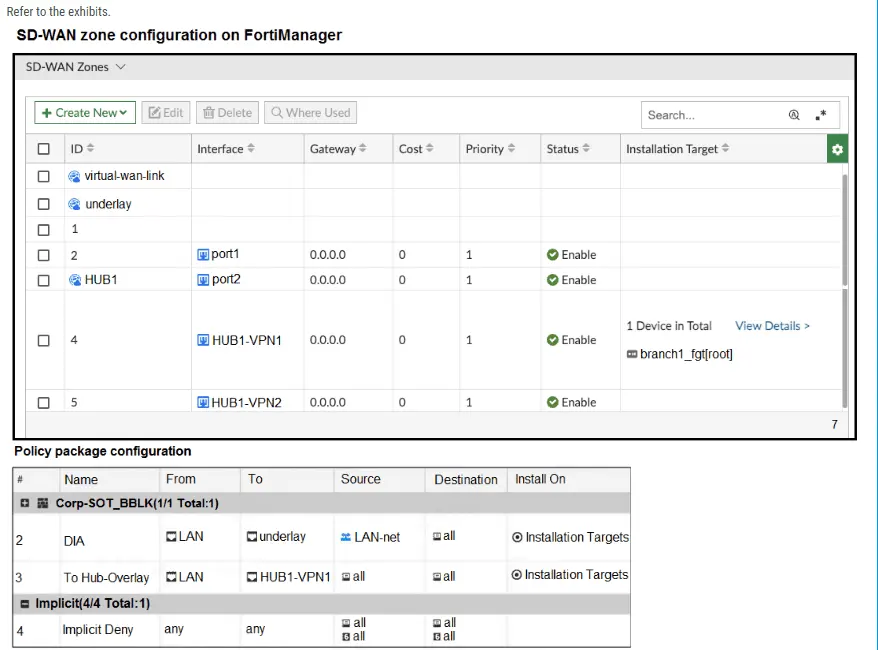
The exhibits show the SD-WAN zone configuration of an SD-WAN template prepared on FortiManager and the policy package configuration.

When the administrator tries to install the configuration changes, FortiManager fails to commit.

What should the administrator do to fix the issue?

Correct Answer: B. Configure HUB1 as the destination of policy 3.
Explanation:

The SD-WAN 7.6 Enterprise Administrator Study Guide explicitly states: ''Firewall policies for SD-WAN traffic must reference SD-WAN zones and not individual members.''

In the exhibit, HUB1-VPN1 is an individual member of the HUB1 SD-WAN zone. However, policy 3 incorrectly uses HUB1-VPN1 as its outgoing interface. FortiManager cannot compile and commit that policy because an SD-WAN member cannot be referenced directly by an SD-WAN firewall policy. The administrator must change the policy's To interface from HUB1-VPN1 to its parent zone, HUB1.

Option C is incorrect because the guide specifically explains that an IPsec interface does not require normalization when it is used as an SD-WAN member: ''SD-WAN members don't use normalized interfaces.'' The normalized LAN interface shown in the policy is appropriate because it maps the local interface for each managed FortiGate, but the overlay side must reference the HUB1 zone.

Option D remains invalid because it still references individual SD-WAN members. Option A does not correct the invalid outgoing-interface reference; policy 3 already uses the policy package installation targets.