Limited-Time Offer: Enjoy 50% Savings! Ends in 00h 00m 00s Coupon code: 50OFF
Skip to content

Free Fortinet NSE 7 - Security Operations 7.6 Architect NSE7_SOC_AR-7.6 Exam Questions

Page: 1 / 10 Total 91 questions

Want more questions? Get Premium Access.

Question 1

A customer wants FortiAnalyzer to run an automation stitch that executes a CLI command on FortiGate to block a predefined list of URLs, if a botnet command-and-control (C&C) server IP is detected.

Which FortiAnalyzer feature must you use to start this automation process?

Correct Answer: C. Event handler
Explanation:

Understanding Automation Processes in FortiAnalyzer:

FortiAnalyzer can automate responses to detected security events, such as running commands on FortiGate devices.

Analyzing the Customer Requirement:

The customer wants to run a CLI command on FortiGate to block predefined URLs when a botnet C&C server IP is detected.

This requires an automated response triggered by a specific event.

Evaluating the Options:

Option A: Playbooks orchestrate complex workflows but are not typically used for direct event-triggered automation processes.

Option B: Data selectors filter logs based on criteria but do not initiate automation processes.

Option C: Event handlers can be configured to detect specific events (such as detecting a botnet C&C server IP) and trigger automation stitches to execute predefined actions.

Option D: Connectors facilitate communication between FortiAnalyzer and other systems but are not the primary mechanism for initiating automation based on log events.

Conclusion:

To start the automation process when a botnet C&C server IP is detected, you must use an Event handler in FortiAnalyzer.


Fortinet Documentation on Event Handlers and Automation Stitches in FortiAnalyzer.

Best Practices for Configuring Automated Responses in FortiAnalyzer.
Question 2

You suspect your organization has been a victim of numerous incidents carried out by the same threat actor. Which option allows you to group the incidents and track them? Choose one answer.

Correct Answer: D. Create a campaign and link related records to it.
Explanation:

Exact Extract: ''Campaigns are an extra layer of abstraction used when multiple incidents are tied to a single threat actor. Seemingly unrelated incidents may all be part of the same campaign against an organization.''

Exact Extract: ''It can be difficult to determine if incidents are related and roll them into a campaign. Typically, the link between related incidents is based on uniquely identifiable information that ties a single, known threat actor to multiple incidents.''

The correct answer is D. In FortiSOAR, a campaign is the proper object for grouping multiple incidents that appear to be connected to the same threat actor. This lets the SOC track the broader adversary activity without collapsing separate incidents into one record. A tag may help with searching, but it is weak compared with a campaign record because it does not provide the same structured tracking layer. Merging incidents is also wrong because it combines records rather than preserving multiple related incidents under a higher-level campaign. Marking one incident as a parent and closing child incidents is operationally dangerous and does not represent the campaign concept.


Question 3

Refer to the exhibit.

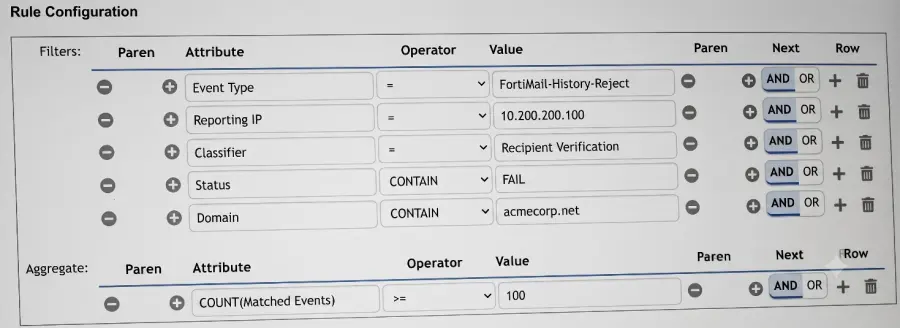
You want to configure a FortiSIEM rule that triggers when a FortiMail device reports at least 100 recipient verification failures for different email accounts in the domain acmecorp.net. What would you add or modify to accomplish this task? Choose one answer.

Correct Answer: A. Change the aggregate to COUNT(Distinct Mail Receiver) >= 100.
Explanation:

Exact Extract: ''The subpattern... consists of three components: Filter... Aggregate... Group By... Aggregate: The aggregate function stipulates that five or more events within the 600-second time window must be matched. Group By: If multiple VPN login failure events have the same source IP address, reporting device, reporting IP address, and user, they are grouped together in one row, and the count column tracks the number of events for each row.''

Exact Extract: ''FortiSIEM uses the analytics search filter conditions to create the rule subpattern Filter conditions and the search display conditions to create the rule Group by conditions. When creating rules from analytics searches, FortiSIEM always sets the Aggregate condition to COUNT(Matched Events) >= 1.''

The correct answer is A because the requirement is not simply ''100 failed events''; it is 100 failures for different email accounts. The existing aggregate COUNT(Matched Events) >= 100 only counts total matching FortiMail rejection events. That could trigger even if one recipient address failed 100 times. To detect failures across different recipients, the aggregate must count unique recipient values, so COUNT(Distinct Mail Receiver) >= 100 is the correct modification. Option B is invalid because Mail Receiver is a field containing an email recipient value, not a numeric counter. Option C incorrectly tries to push counting logic into the Status filter; Status should remain a filter such as CONTAIN FAIL. Option D may be useful only if the domain is not already filtered, but the exhibit already includes the domain condition for acmecorp.net, and it still would not solve the ''different email accounts'' requirement.


Question 4

Refer to the exhibit.

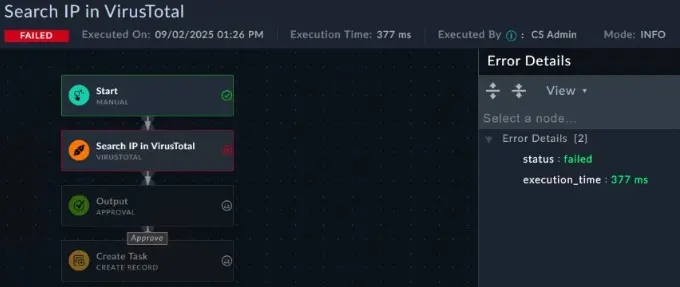
You created a new playbook and executed it as a test. However, it failed to run. You want to investigate, but you do not see details about the error. What is the reason for the lack of details?

Correct Answer: B. The playbook logging level must be debug.
Explanation:

Exact Extract: ''INFO verbosity is recommended for well-established playbooks. It contains only the final playbook execution status and individual playbook step status.'' The guide further states: ''DEBUG verbosity is recommended for newer playbooks or for active troubleshooting. It contains detailed logging that includes execution information, such as step input, output, configuration, and other details.''

The correct answer is B. In the exhibit, the executed playbook shows Mode: INFO. INFO mode gives only high-level execution status and step status, which explains why the error panel shows only minimal details such as status: failed and execution time. To see connector input, output, configuration, and more useful troubleshooting details, the playbook logging verbosity must be changed to DEBUG.

A may cause a connector step to fail, but it does not explain why error details are missing. C is wrong because Ignore Error would allow the workflow to continue rather than fail normally. D could cause permission-related failure, but again it does not explain the lack of diagnostic detail. The visible clue is the logging mode.


Question 5

When configuring an Ingest Bulk Feed playbook step, which two restrictions must you consider? Choose two answers.

Correct Answer: C. It will not trigger On Create triggers.; D. It will not trigger On Update triggers.
Explanation:

Exact Extract: ''Ingest Bulk Feed: Insert and update large volumes of records. Significantly faster than Create Record, but does not trigger On Create and On Update triggers. Only primary fields, tags, lookups, and picklists are supported.''

The correct answers are C and D. The Ingest Bulk Feed step is designed for high-volume ingestion, such as threat intelligence feeds, vulnerabilities, or asset imports. Its tradeoff is that it bypasses normal record-trigger behavior. Therefore, records inserted or updated through this step will not trigger playbooks configured with On Create or On Update triggers. That is a major design restriction because downstream automation that depends on those triggers will not run automatically.

A is wrong because the step can be driven by data prepared earlier in the playbook, including connector output transformed into the expected structure. B is the opposite of the guide: Ingest Bulk Feed is significantly faster than Create Record.


Question 6

You want to trigger an incident when multiple failed logins from the same host are followed by a successful login on that same host within 15 minutes. The rule must correlate all events by source IP address and user to ensure they belong to the same login sequence. Which three configurations achieve this goal? Choose three answers.

Correct Answer: C. Configure two subpatterns---one for failed logins and one for the successful login.; D. Apply sequential logic using a FOLLOWED_BY operator between the subpatterns.; E. Define the subpattern relationships and constraints.
Explanation:

Exact Extract: ''If there is more than one subpattern, you must specify the logic between the subpatterns and define the subpattern relationship and constraints.''

Exact Extract: ''FortiSIEM also supports rules with multiple subpatterns... Subpattern X was FOLLOWED BY subpattern Y within the time window.''

Exact Extract: ''This slide shows a multiple subpattern rule. The rule contains two subpatterns... with a FOLLOWED_BY operator... To ensure FortiSIEM is correlating the proper logs... [matching fields] must match. This is the relationship, also called a constraint, between the two subpatterns.''

The correct answers are C, D, and E. You need two subpatterns because the detection contains two different event patterns: repeated failed logins and a later successful login. You then need FOLLOWED_BY because the successful login must occur after the failed-login sequence, not merely within the same time range. Finally, you must define subpattern relationships and constraints, matching source IP address and user, so FortiSIEM does not correlate failed logins from one user or host with a successful login from a different user or host. A is wrong because failed-login and successful-login subpatterns normally require different filters and often different aggregate thresholds. B is not the best answer as written because the key requirement is the rule/subpattern relationship within the 15-minute correlation window, not simply assigning independent time windows to each subpattern.


Question 7

A large enterprise FortiSIEM deployment is experiencing delays in log correlation and analytics. Which architectural adjustment is most appropriate? Choose one answer.

Correct Answer: B. Add more workers.
Explanation:

Exact Extract: ''Workers: Correlation, real-time, and historical search.'' The guide also states: ''For larger environments that need greater event handling throughput, you can deploy FortiSIEM in a cluster of supervisor and worker VMs.''

The correct answer is B. FortiSIEM workers are responsible for correlation, real-time analytics, and historical searches. If a large enterprise deployment is experiencing delays specifically in log correlation and analytics, the correct architectural scaling action is to add more workers. Collectors help with distributed collection and discovery, but they do not solve analytics-processing bottlenecks. The Supervisor hosts the UI, CMDB, and reporting, so simply increasing supervisor resources is not the best targeted fix. A is a tuning option, not the appropriate architectural scale-out answer.


Question 8

Refer to the exhibit.

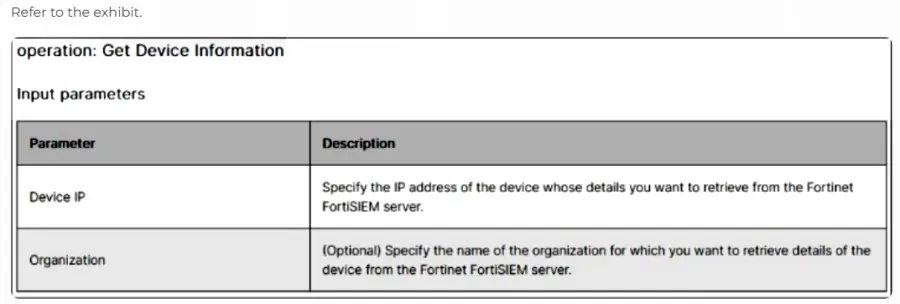
The input of a FortiSIEM connector action is shown.

You want to create a playbook on FortiSOAR that allows you to accomplish the following:

Manually input an IP address.

Use the connector action in the exhibit to retrieve a device from the FortiSIEM configuration management database (CMDB) with that IP address.

Ask the SOC manager to review the information pulled from FortiSIEM about that device.

If the manager approves, an asset record is created.

Which combination and order of step operations fulfills the requirements with the fewest required playbook steps?

Correct Answer: A. Manual trigger, 2) Connector action, 3) Approval, 4) Create Record
Explanation:

Exact Extract: ''This playbook also expects input from the user, specifically an IP address... you can manually type in an IP address. The trigger input is saved as ipAddress, which you can refer to later as a dynamic value.''

Exact Extract: ''The connector must first be configured... The selected action is Get IP Reputation... The Get IP Reputation action requires input. In the trigger step, you defined the ipAddress parameter from the trigger input, which you can dynamically map to this step.''

Exact Extract: ''After the Connector step is the Approval step. You can manually add a description, or you can use the Dynamic Values window to populate fields such as the Description field.''

The correct answer is A. The workflow requires analyst-supplied input, so it must begin with a Manual trigger where the IP address is entered. That IP address is passed directly into the FortiSIEM Get Device Information connector action. The output from that connector action is then shown to the SOC manager through an Approval step. If approved, the playbook proceeds to Create Record, creating the asset record from the FortiSIEM CMDB result.

Option B is bloated. Set Variable steps are not required because the manual trigger value and connector output can be referenced directly through Dynamic Values/Jinja. Option C is wrong because On Create is event-driven, not manual input, and Manual Task does not provide the same approve/reject workflow as an Approval step. Option D is wrong because it lacks the manual trigger and adds an unnecessary Update Record step.


Question 9

A very long FortiSOAR playbook failed at step 30 because of an intermittent networking issue, which has now been resolved. You want to finish executing the playbook without repeating earlier steps or losing prior context. Which action should you take? Choose one answer.

Correct Answer: C. Use the Rerun From Last Failed Step option from the executed playbook logs.
Explanation:

Exact Extract: ''Click a playbook step to display the input, output, and configuration for that step. You can click ENV to toggle between the environment in which the playbook was executed and the steps of the playbook.'' The guide also states that the ENV view contains ''the complete environmental context, including input, output, and variables across all steps.''

Exact Extract: ''Click Error Details to view the reason for a playbook failure. This helps you identify the root cause of the error and troubleshoot.''

The correct answer is C. The goal is to continue execution from the failed point while preserving the already-built runtime context from steps 1 through 29. Rerun From Last Failed Step is specifically designed for this situation. It avoids repeating prior successful steps and continues with the original environment, variables, inputs, and outputs already generated before the failure.

Option A is wrong because mock input is for testing or debugging and can override real step output. Option B is only useful for testing Jinja expressions against an environment JSON; it does not continue playbook execution. Option D is a bad design change: manually rewiring the playbook bypasses intended workflow logic and does not reliably preserve prior execution context.


Question 10

A partner organization recently suffered a distributed denial-of-service (DDoS) attack, but the adversary's identity and TTPs remain unknown. Your SOC has not received any relevant threat intelligence from the partner organization, but you are asked to determine whether similar activity could be happening in your environment. Which threat hunting action should you perform first? Choose one answer.

Correct Answer: C. Develop a hunting hypothesis based on how DDoS can be executed against your network.
Explanation:

Exact Extract: ''What are two characteristics of threat hunting? ... It looks for undetected threats... It requires a hypothesis and investigation.''

Exact Extract: ''By demonstrating competence in examining a simple threat hunting use case, you will be able to conduct threat hunting based on an easily verifiable hypothesis.''

The correct answer is C. This is a threat hunting scenario, not a normal alert-engineering scenario. You do not know the attacker identity, infrastructure, tools, or exact TTPs, so the first mature action is to form a hypothesis such as: ''If a similar DDoS campaign is targeting us, we may observe abnormal inbound request volume, source diversity, protocol concentration, SYN/UDP/HTTP flood patterns, or service degradation against exposed assets.'' That hypothesis then drives the FortiSIEM analytics search and evidence collection.

A is useful later, after the hunt identifies a reliable detection condition. B is too broad and operationally expensive as a first step. D is weak because no relevant threat intelligence has been received, and enriching every external IP is noisy and inefficient.