Limited-Time Offer: Enjoy 50% Savings! Ends in 00h 00m 00s Coupon code: 50OFF
Skip to content

Free Fortinet NSE I - OT Security 7.6 Architect NSEI_OTS_AR-7.6 Exam Questions

Page: 1 / 8 Total 46 questions

Want more questions? Get Premium Access.

Question 1

Refer to the exhibit.

Based on the information provided on the partial Event Monitor page shown in the exhibit, how was the attack detected? (Choose one answer)

Correct Answer: D. Automatically by an event handler
Explanation:

The correct answer is D. Automatically by an event handler. The study guide explicitly states that ''Event handlers generate events on FortiAnalyzer'' and ''FortiAnalyzer uses event handlers to filter all incoming logs. If the logs received match the conditions set in the event handlers, FortiAnalyzer generates an event.'' It also says ''You can view all generated events on the Event Monitor page.'' This directly matches the exhibit, which is showing entries on the Event Monitor page. Therefore, the attack shown there was detected automatically through an event handler.

The guide also explains the detection flow: ''FortiAnalyzer receives logs,'' ''FortiAnalyzer parses logs,'' and ''FortiAnalyzer generates an event if a rule is matched in an event handler.'' In addition, the Event Monitor view includes the Handler column, which identifies the event handler that generated the event. That is why the attack is not considered manually detected, and it is not primarily detected by a playbook or stitch. Playbooks and stitches are used for subsequent automation actions, but the event appearing in Event Monitor is created by the event handler mechanism.
Question 2

Refer to the exhibit.

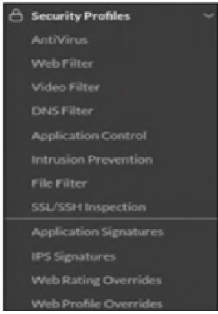
The OT devices behind the ruggedized FortiGate have vulnerabilities and you want to apply a virtual patching profile in the firewall policy. Why is Virtual Patching not available in the Security Profiles section? (Choose one answer)

Correct Answer: A. You must enable Virtual Patching in the Feature Visibility section.
Explanation:

The correct answer is A. You must enable Virtual Patching in the Feature Visibility section.

The study guide states clearly that ''By default, virtual patching profiles are hidden on the GUI, and you must enable them through System > Feature Visibility.'' That exactly matches the situation in the exhibit, where Virtual Patching does not appear under Security Profiles. So the issue is not that the feature is unsupported, but that it is simply hidden in the GUI until it is enabled.

The other options do not answer the question being asked. A valid OT security service license is required for virtual patching signatures and protection workflow, and OT signatures are relevant to IPS-based OT protection, but those do not explain why the menu item itself is missing from the Security Profiles section. The guide specifically identifies Feature Visibility as the reason the Virtual Patching profile is not shown in the GUI. Therefore, the required action is to enable Virtual Patching in System > Feature Visibility.


Question 3

Refer to the exhibit.

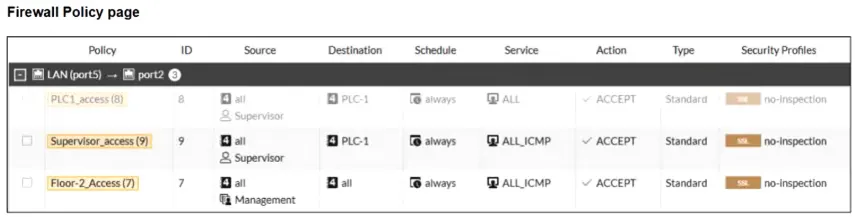
A firewall policy page is shown. To improve the security of your OT network, you have configured a Supervisor profile in the firewall policies, as shown in the exhibit. However, a supervisor is reporting that he cannot ping PLC-1. What are the two reasons? (Choose two answers)

Correct Answer: A. The supervisor must first authenticate using a protocol such as HTTPS or Telnet.; C. The firewall policy ID 8 is not enabled.
Explanation:

The correct answers are A and C.

Option A is correct because the study guide explains that with active authentication, FortiGate prompts the user only when they use ''an acceptable login protocol.'' It states: ''When you use only active authentication, if all possible policies that could match the source IP address have authentication enabled, then the user will receive a login prompt (assuming they use an acceptable login protocol).'' A direct ping to PLC-1 uses ICMP, which is not the kind of login protocol used to trigger user authentication. So the supervisor must first authenticate through a protocol such as HTTPS or Telnet, then the ICMP traffic can match the authenticated policy.

Option C is also correct because the exhibit shows policy ID 8 greyed out, meaning it is not enabled. That policy appears above the Supervisor_access (9) policy and allows broader access to PLC-1, whereas policy 9 is limited to ALL_ICMP. The study guide explains that ''Because the user has not yet authenticated, the user group aspect of the traffic does not match'' and FortiGate continues searching for another complete match. In this case, with policy 8 disabled, the supervisor is left with only the ICMP rule, which cannot be used to perform the initial login step needed for active authentication.

Option B is not supported by the exhibit. Option D is incorrect because auth-on-demand always would force authentication prompts more aggressively, but the core problem here is that the user is trying to start with ICMP and the broader policy that could permit the initial authenticated access is disabled.


Question 4

You would like to customize your current FortiAnalyzer report to provide a better risk assessment of your OT network. Which two options can you use to enhance your report? (Choose two answers)

Correct Answer: B. The Datasets library; D. The Chart library
Explanation:

The correct answers are B. The Datasets library and D. The Chart library.

The study guide explains that a FortiAnalyzer report is built from charts, and that charts consist of two elements: datasets and format. It states: ''A FortiAnalyzer report is a set of data organized in charts'' and ''Charts consist of two elements: Datasets ... and Format.'' It then goes further in the Customizing Reports section and explicitly says ''By default, the Chart Library contains more than 300 charts'' and ''By default, the Datasets library contains almost 400 datasets.'' It also states that you can clone and edit both charts and datasets, and create new ones, which is exactly how you enhance and customize an existing report.

The other options are not the best answers for this question. FortiView can export a chart into a report chart, and Log View can help build a custom dataset and chart from search results, but the question asks which options you can use to enhance the report itself. The study guide identifies the actual report-customization components as the Chart Library and Datasets library. Dashboard library is not presented as a FortiAnalyzer report customization library in this section.


Question 5

Refer to the exhibit.

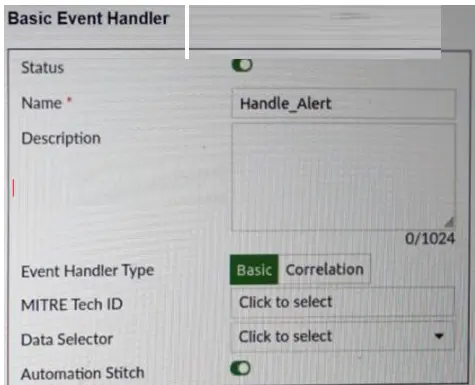
A basic event handler is shown. You have enabled Automation Stitch to automate the handling of an alert. Which two steps must you take to use this automation stitch? (Choose two answers)

Correct Answer: C. You must configure a FortiAnalyzer event handler trigger on FortiGate.; D. You must configure Rules on FortiAnalyzer.
Explanation:

The correct answers are C and D.

Option D is correct because the study guide states that the configuration of an event handler can include ''Rules'' and explains that ''Rules are granular conditions'' and ''Event handlers can have one or more rules.'' It further states that ''FortiAnalyzer uses event handlers to filter all incoming logs'' and ''If logs match the conditions configured in an event handler, FortiAnalyzer generates an event.'' Therefore, to use the automation stitch, you must define the rules on FortiAnalyzer so the event handler can actually generate the event that starts the automation flow.

Option C is also correct. The study guide explains that ''When a handler generates an event with the automation stitch option enabled, FortiAnalyzer sends a notification'' to the FortiGate side, and in the attack-detection example it says ''FortiAnalyzer parses the logs and notifies the root FortiGate'' and then ''The root FortiGate triggers the action.'' It also explicitly shows ''Stitches configured on root FortiGate.'' This means the FortiGate must have the corresponding automation trigger configured for the FortiAnalyzer event handler notification.

Option A is incorrect because the study guide does not describe configuring an Action on FortiAnalyzer as the required step for this FortiAnalyzer-to-FortiGate automation-stitch flow. Option B is also incorrect because playbooks are a different FortiAnalyzer automation mechanism; the question specifically refers to using the Automation Stitch option in the event handler.


Question 6

Refer to the exhibit.

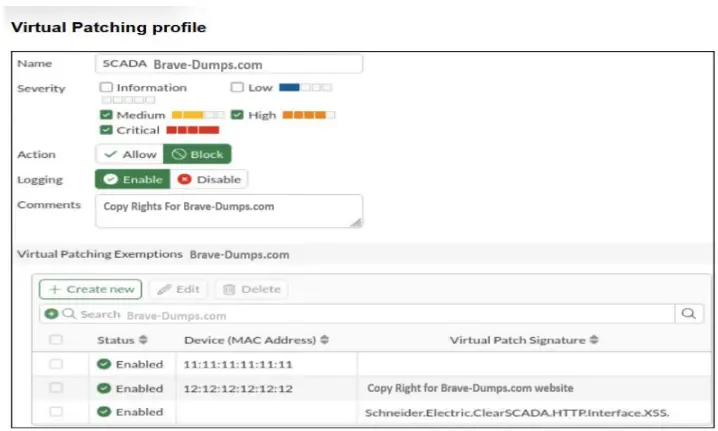
A Virtual Patching profile is shown. You have recently updated your SCADA system and would like to apply the SCADA virtual patching profile. Which two statements about this profile are correct? (Choose two answers)

Correct Answer: B. Low severity signatures are not blocked for the device with the MAC address 12:12:12:12:12.; D. The device with the MAC address 11:11:11:11:11 is considered to have no vulnerabilities.
Explanation:

The correct answers are B and D.

Option B is correct because the profile has Medium, High, and Critical selected, while Low severity is not selected. That means low-severity virtual patching signatures are not enforced by this profile. So for the device with MAC address 12:12:12:12:12, low-severity signatures are not blocked. The study guide explains virtual patching as device-specific protection where ''FortiGate caches the signatures and mitigation rules that apply to each device'' and applies them when the related traffic matches the firewall policy.

Option D is correct because the Virtual Patching Exemptions table shows a row with the MAC address 11:11:11:11:11 and no specific signature listed. The study guide states that in the Virtual Patching profile you can ''Exempt a specific device with the MAC address or a specific signature.'' A MAC-only exemption means that specific device is excluded from virtual patching enforcement, so in practical terms it is treated as having no applicable vulnerabilities in this profile.

Option C is incorrect because the profile does not block critical signatures for all devices. The exemptions list proves that at least one device can be excluded by MAC address, and a specific signature can also be exempted. Therefore, enforcement is not universal across all devices.

Option A is incorrect because the entry Schneider.Electric.ClearSCADA.HTTP.Interface.XSS appears as a specific signature exemption, not as the only remaining vulnerability. The profile display is showing exemptions, not a statement that only one vulnerability is still present.