
Limited-Time Offer: Enjoy 50% Savings! Ends in 00h 00m 00s Coupon code: 50OFF
Skip to content

Free Genesys Cloud CX: Scripting Certification GCX-SCR Exam Questions

Page: 1 / 6 Total 60 questions

Want more questions? Get Premium Access.

Question 1

You are working on a script and need to add new variables to it. Select the correct tab to add variables.
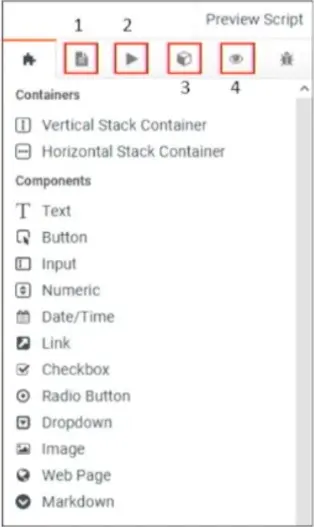
Correct Answer: C. 3
Explanation:

In the image provided, the correct tab to add variables to the script is labeled as number 3. This tab represents the 'Variables' section where you can define new variables that will be used in your script. Variables are crucial in scripts as they allow for dynamic content, enabling personalized interactions based on data such as customer names, account details, and other context-specific information.


Question 2

You are an outbound admin and required to configure a script to allow agents to create a contact in the contact list. Select the correct sequence.

1) Associate a contact list with the script.

2) Create a Script.

3) Invoke the "Outbound Create Contact" action with appropriate variables.

4) Enable Outbound features.

Correct Answer: A. 2,4,1,3
Explanation:

To configure a script that allows agents to create a contact in the contact list in Genesys Cloud CX, the following sequence should be followed:

Create a Script: Start by creating a new script that will serve as the framework for the agent's interaction.

Enable Outbound features: Before the script can interact with outbound services, outbound features must be enabled in the script settings.

Associate a contact list with the script: The script needs to be associated with a specific contact list to ensure that contacts can be added directly to the correct list.

Invoke the 'Outbound Create Contact' action with appropriate variables: Finally, add the 'Outbound Create Contact' action to the script and configure it with the appropriate variables to capture the necessary contact details from the agent.

This order ensures that the script is correctly set up to interact with the contact list and allows agents to add new contacts as needed.


Genesys Cloud CX Scripting Documentation.

Question 3

Devlin is assigned to create multiple scripts with many common sections, so he decides to create a script template from an existing script. To create a script template, help him to select the correct option in the image.

Correct Answer: D. 4
Explanation:

In the image provided, option 4 (D) represents the button used to manage script settings, which includes options for creating a script template. To create a script template from an existing script, the user must navigate to this menu and select the appropriate option to convert or save the script as a template for future use. This ensures that common sections can be reused across multiple scripts efficiently.


Question 4

Allen is creating a script to populate the customer's details. He needs to display the total due from the previous month's bill and the present month's bill to the agent. Both bill amounts are passed to the scripts as string values. Select the appropriate answer.

Correct Answer: B. Convert the string values to numbers and add them using a Dynamic Number variable.
Explanation:

When dealing with billing amounts passed as string values in a script, the correct approach is to convert the string values to numbers and then add them using a Dynamic Number variable. This ensures that the values are treated as numerical data, allowing for accurate addition and calculations.

Using a Dynamic Number variable after conversion from string to number is the best practice for handling and manipulating numerical data within a script.


Genesys Cloud CX Scripting Variables and Data Types Documentation.

Question 5

Using the ___ action in the call flow, you can transfer data to Scripts.

Correct Answer: C. Set Participant data
Explanation:

In Genesys Cloud CX, the Set Participant Data action is the correct choice for transferring data to scripts during a call flow. This action allows you to set specific data attributes for the participant (such as a customer or agent) that can then be accessed by scripts running during the interaction.

The Set Participant Data action is typically used to pass information gathered during an interaction, such as caller input or data fetched from external sources, so that it can be used in scripts to customize the experience further. This is crucial for dynamic and personalized script content based on the interaction context.

For more details, you can refer to the Genesys Cloud CX documentation on call flows and scripting, which explains how to use the Set Participant Data action effectively in various scenarios.


[Genesys Cloud CX Call Flow Documentation]

[Genesys Cloud CX Scripting Documentation]

Question 6

Select the built-in variables available in Scripts. (Choose three.)

Correct Answer: A. Agent Name; B. Queue Name; D. Language
Explanation:

In Genesys Cloud CX scripts, several built-in variables are available by default, providing essential data that can be used within the script. The built-in variables include:

Agent Name: This variable holds the name of the agent who is currently using the script. It is often used to personalize the interaction or for logging purposes.

Queue Name: This variable contains the name of the queue from which the interaction was routed. It helps in identifying the source of the interaction and can be used to tailor the script based on the queue's context.

Language: This variable stores the language preference of the customer or the interaction, allowing the script to present content in the appropriate language.

These variables are readily accessible within scripts and are integral to creating dynamic and context-aware interactions.


Genesys Cloud CX Scripting Documentation.

Question 7

By default, scripting doesn't have a separate data type for decimals.

Correct Answer: A. True
Explanation:

By default, Genesys Cloud CX scripting does not have a separate data type specifically for decimals. Instead, decimals are typically handled as numbers within the existing number data type. This means that decimal values can be used, but they are not explicitly differentiated from integers by a distinct data type in the scripting environment.


Genesys Cloud CX Scripting Data Types Documentation.

Question 8

Which of the following attributes ensure that the interactions are routed to the most qualified agent? (Choose two.)

Correct Answer: A. Languages; C. Skills
Explanation:

The attributes Languages and Skills are essential in ensuring that interactions are routed to the most qualified agent in Genesys Cloud CX.

Languages: This attribute ensures that interactions are routed to agents who can communicate in the customer's preferred language, enhancing the customer experience by providing language-appropriate service.

Skills: This attribute ensures that the interaction is handled by an agent who has the necessary skills to resolve the customer's issue effectively. Skills might include technical expertise, product knowledge, or specific customer service abilities.

These attributes are crucial in ACD (Automatic Call Distribution) configurations, where the goal is to match customers with agents who are best equipped to meet their needs.


Question 9

Identify the template that contains one or more visual components that you can insert into a script page.

Correct Answer: C. Component Template
Explanation:

In Genesys Cloud CX, a Component Template contains one or more visual components that can be inserted into a script page. These templates are designed to provide reusable UI elements that can be consistently applied across different scripts. Using component templates helps in maintaining uniformity and speeding up the script creation process by allowing script designers to easily drag and drop pre-defined components into their scripts.

Component templates can include items such as buttons, text fields, and other interactive elements that are commonly used within the scripts.


Question 10

In Genesys Cloud, what features or aspects classify scripts? (Choose three.)

Correct Answer: A. Labels based on interaction type; C. Utilization of visual controls; D. Integration of text and graphics
Explanation:

Scripts in Genesys Cloud CX are classified by several features that enhance their usability and flexibility:

A . Labels based on interaction type: Scripts can be categorized and labeled according to the interaction type (e.g., voice, chat, email), making it easier to identify and manage them.

C . Utilization of visual controls: Genesys Cloud CX allows the use of various visual controls (buttons, inputs, checkboxes) to enhance user interaction within scripts, enabling agents to interact seamlessly.

D . Integration of text and graphics: Scripts can integrate both text and graphical elements, allowing for a richer, more interactive experience for agents and customers alike. This can include images, links, and dynamic content.

Options B and E are not core classifications for Genesys Cloud CX scripts.