Limited-Time Offer: Enjoy 50% Savings! Ends in 00h 00m 00s Coupon code: 50OFF
Skip to content

Free Google Associate Cloud Engineer Associate-Cloud-Engineer Exam Questions

Page: 1 / 25 Total 363 questions

Want more questions? Get Premium Access.

Question 1

Your projects incurred more costs than you expected last month. Your research reveals that a development GKE container emitted a huge number of logs, which resulted in higher costs. You want to disable the logs quickly using the minimum number of steps. What should you do?

Correct Answer: A. 1. Go to the Logs ingestion window in Stackdriver Logging, and disable the log source for the GKE container resource.
Explanation:

https://cloud.google.com/logging/docs/api/v2/resource-list

GKE Containers have more log than GKE Cluster Operations:

-GKE Containe:

cluster_name: An immutable name for the cluster the container is running in.

namespace_id: Immutable ID of the cluster namespace the container is running in.

instance_id: Immutable ID of the GCE instance the container is running in.

pod_id: Immutable ID of the pod the container is running in.

container_name: Immutable name of the container.

zone: The GCE zone in which the instance is running.

VS

-GKE Cluster Operations

project_id: The identifier of the GCP project associated with this resource, such as 'my-project'.

cluster_name: The name of the GKE Cluster.

location: The location in which the GKE Cluster is running.


Question 2

Your team manages several petabytes of historical, structured transaction data stored in Apache Avro format on-premises. You are migrating this data to Google Cloud for a machine learning project. You must ensure that the data is accessible for large-scale analysis and model training using BigQuery. You must also minimize storage costs and avoid the overhead of loading data into BigQuery's managed storage. What should you do?

Correct Answer: C. Store the data in a Cloud Storage bucket, and define a BigQuery external table partitioned by a relevant column.
Explanation:

The correct answer is C because BigQuery external tables allow BigQuery to query data stored in Cloud Storage without loading it into BigQuery managed storage. This directly satisfies the requirement to minimize storage cost and avoid ingestion overhead. Apache Avro is a supported format for analytical workloads, and partitioning by a relevant column improves query performance and cost control when only subsets of the historical data are needed. Option A loads the data into native BigQuery storage, which increases managed storage usage. Option B is unsuitable because Cloud SQL is not designed for petabyte-scale analytical transaction history or machine learning workloads. Option D also loads data into BigQuery, which violates the requirement to avoid loading overhead.


Question 3

You are using Data Studio to visualize a table from your data warehouse that is built on top of BigQuery. Data is appended to the data warehouse during the day. At night, the daily summary is recalculated by overwriting the table. You just noticed that the charts in Data Studio are broken, and you want to analyze the problem. What should you do?

Correct Answer: D. Use the open source CLI tool. Snapshot Debugger, to find out why the data was not refreshed correctly.
Explanation:

Cloud Debugger helps inspect the state of an application, at any code location, without stopping or slowing down the running app //https://cloud.google.com/debugger/docs


Question 4

You recently received a new Google Cloud project with an attached billing account where you will work. You need to create instances, set firewalls, and store data in Cloud Storage. You want to follow Google-recommended practices. What should you do?

Correct Answer: B. Use the gcloud services enablecompute.googleapis.comcommand to enable Compute Engineand thegcloud services enablestorage-api.googleapis.comcommand to enable the Cloud Storage APIs.

Question 5

Your Dataproc cluster runs in a single Virtual Private Cloud (VPC) network in a single subnet with range 172.16.20.128/25. There are no private IP addresses available in the VPC network. You want to add new VMs to communicate with your cluster using the minimum number of steps. What should you do?

Correct Answer: A. Modify the existing subnet range to 172.16.20.0/24.
Explanation:

/25:

CIDR to IP Range

Result

CIDR Range 172.16.20.128/25

Netmask 255.255.255.128

Wildcard Bits 0.0.0.127

First IP 172.16.20.128

First IP (Decimal) 2886734976

Last IP 172.16.20.255

Last IP (Decimal) 2886735103

Total Host 128

CIDR

172.16.20.128/25

/24:

CIDR to IP Range

Result

CIDR Range 172.16.20.128/24

Netmask 255.255.255.0

Wildcard Bits 0.0.0.255

First IP 172.16.20.0

First IP (Decimal) 2886734848

Last IP 172.16.20.255

Last IP (Decimal) 2886735103

Total Host 256

CIDR

172.16.20.128/24


Question 6

Your company is moving from an on-premises environment to Google Cloud Platform (GCP). You have multiple development teams that use Cassandra environments as backend databases. They all need a development environment that is isolated from other Cassandra instances. You want to move to GCP quickly and with minimal support effort. What should you do?

Correct Answer: B. 1. Advise your developers to go to Cloud Marketplace.2. Ask the developers to launch a Cassandra image for their development work.
Explanation:

https://medium.com/google-cloud/how-to-deploy-cassandra-and-connect-on-google-cloud-platform-with-a-few-clicks-11ee3d7001d1

https://cloud.google.com/blog/products/databases/open-source-cassandra-now-managed-on-google-cloud

https://cloud.google.com/marketplace

You can deploy Cassandra as a Service, called Astra, on the Google Cloud Marketplace. Not only do you get a unified bill for all GCP services, your Developers can now create Cassandra clusters on Google Cloud in minutes and build applications with Cassandra as a database as a service without the operational overhead of managing Cassandra


Question 7

You want to configure 10 Compute Engine instances for availability when maintenance occurs. Your requirements state that these instances should attempt to automatically restart if they crash. Also, the instances should be highly available including during system maintenance. What should you do?

Correct Answer: A. Create an instance template for the instances. Set the 'Automatic Restart' to on. Set the 'On-host maintenance' to Migrate VM instance. Add the instance template to an instance group.
Explanation:

Create an instance template for the instances so VMs have same specs. Set the 'Automatic Restart' to on to VM automatically restarts upon crash. Set the 'On-host maintenance' to Migrate VM instance. This will take care of VM during maintenance window. It will migrate VM instance making it highly available Add the instance template to an instance group so instances can be managed.

* onHostMaintenance: Determines the behavior when a maintenance event occurs that might cause your instance to reboot.

* [Default] MIGRATE, which causes Compute Engine to live migrate an instance when there is a maintenance event.

* TERMINATE, which stops an instance instead of migrating it.

* automaticRestart: Determines the behavior when an instance crashes or is stopped by the system.

* [Default] true, so Compute Engine restarts an instance if the instance crashes or is stopped.

* false, so Compute Engine does not restart an instance if the instance crashes or is stopped.

Enabling automatic restart ensures that compute engine instances are automatically restarted when they crash. And Enabling Migrate VM Instance enables live migrates i.e. compute instances are migrated during system maintenance and remain running during the migration.

Automatic Restart If your instance is set to terminate when there is a maintenance event, or if your instance crashes because of an underlying hardware issue, you can set up Compute Engine to automatically restart the instance by setting the automaticRestart field to true. This setting does not apply if the instance is taken offline through a user action, such as calling sudo shutdown, or during a zone outage.

Ref:https://cloud.google.com/compute/docs/instances/setting-instance-scheduling-options#autorestart

Enabling the Migrate VM Instance option migrates your instance away from an infrastructure maintenance event, and your instance remains running during the migration.Your instance might experience a short period of decreased performance, although generally, most instances should not notice any difference. This is ideal for instances that require constant uptime and can tolerate a short period of decreased performance.

Ref:https://cloud.google.com/compute/docs/instances/setting-instance-scheduling-options#live_migrate

Question 8

Youare configuring Cloud DNS. You want !to create DNS records to pointhome.mydomain.com,mydomain.com. andwww.mydomain.comto the IP address of your Google Cloud load balancer. What should you do?

Correct Answer: C. Create one A record to point mydomain.com to the load balancer, and create two CNAME records to point WWW and HOME to mydomain.com respectively.

Question 9

You have a VM instance running in a VPC with single-stack subnets. You need to ensure that the VM instance has a fixed IP address so that other services hosted in the same VPC can communicate with the VM. You want to follow Google-recommended practices while minimizing cost. What should you do?

Correct Answer: B. Promote the existing IP address of the VM to become a static external IP address.

Question 10

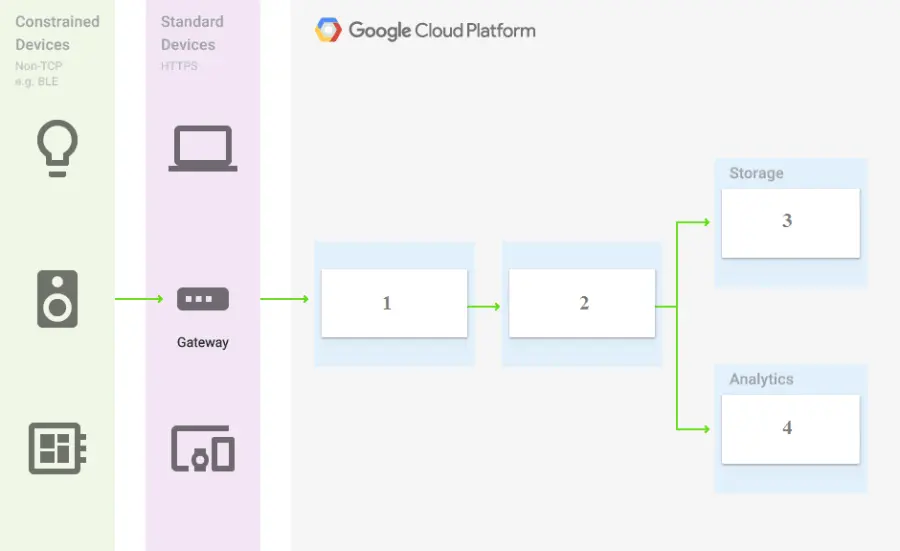
You are building a pipeline to process time-series data. Which Google Cloud Platform services should you put in boxes 1,2,3, and 4?

Correct Answer: D. Cloud Pub/Sub, Cloud Dataflow, Cloud Bigtable, BigQuery
Explanation:

https://cloud.google.com/blog/products/data-analytics/handling-duplicate-data-in-streaming-pipeline-using-pubsub-dataflow

https://cloud.google.com/bigtable/docs/schema-design-time-series

Question 11

Your organization has created hundreds of service accounts for different applications hosted on-premises and in other clouds that use Google Cloud APIs. You need to audit the service account keys that have been created and identify the keys that are older than 90 days. What should you do?

Correct Answer: C. Execute the gcloud asset search-all-resources --scope='organizations/[ORG_ID]' --query='createTime < [DATE_90_DAYS_AGO]' --asset-types='iam.googleapis.com/ServiceAccountKey' --order-by='createTime' command.
Explanation:

The correct answer is C because Cloud Asset Inventory can search resources across an organization and filter by asset type and creation time. The asset type iam.googleapis.com/ServiceAccountKey directly targets service account keys, which is exactly what must be audited. Using organization scope is important because the question says there are hundreds of service accounts across applications, likely distributed across projects. Cloud KMS keys are encryption keys, not service account keys, so option A searches the wrong resource type. Listing service accounts only identifies service accounts, not their individual keys or key ages. API keys are different credentials from service account keys, so option D also targets the wrong asset type. Cloud Asset Inventory is the most scalable audit method here.


Question 12

You are building a product on top of Google Kubernetes Engine (GKE). You have a single GKE cluster. For each of your customers, a Pod is running in that cluster, and your customers can run arbitrary code inside their Pod. You want to maximize the isolation between your customers' Pods. What should you do?

Correct Answer: C. Create a GKE node pool with a sandbox type configured to gvisor. Add the parameter runtimeClassName: gvisor to the specification of your customers' Pods.
Explanation:

GKE Sandbox provides an extra layer of security to prevent untrusted code from affecting the host kernel on your cluster nodes when containers in the Pod execute unknown or untrusted code. Multi-tenant clusters and clusters whose containers run untrusted workloads are more exposed to security vulnerabilities than other clusters. Examples include SaaS providers, web-hosting providers, or other organizations that allow their users to upload and run code. When you enable GKE Sandbox on a node pool, a sandbox is created for each Pod running on a node in that node pool. In addition, nodes running sandboxed Pods are prevented from accessing other Google Cloud services or cluster metadata. Each sandbox uses its own userspace kernel. With this in mind, you can make decisions about how to group your containers into Pods, based on the level of isolation you require and the characteristics of your applications.

Ref:https://cloud.google.com/kubernetes-engine/docs/concepts/sandbox-pods

Question 13

You are using Container Registry to centrally store your company's container images in a separate project. In another project, you want to create a Google Kubernetes Engine (GKE) cluster. You want to ensure that Kubernetes can download images from Container Registry. What should you do?

Correct Answer: A. In the project where the images are stored, grant the Storage Object Viewer IAM role to the service account used by the Kubernetes nodes.
Explanation:

Configure the ACLs on each image in Cloud Storage to give read-only access to the default Compute Engine service account. is not right.

As mentioned above, Container Registry ignores permissions set on individual objects within the storage bucket so this isnt going to work.

Ref:https://cloud.google.com/container-registry/docs/access-control


Question 14

You have several hundred microservice applications running in a Google Kubernetes Engine (GKE) cluster. Each microservice is a deployment with resource limits configured for each container in the deployment. You've observed that the resource limits for memory and CPU are not appropriately set for many of the microservices. You want to ensure that each microservice has right sized limits for memory and CPU. What should you do?

Correct Answer: C. Configure GKE cluster autoscaling.

Question 15

You are managing your company's archival records that are stored in a Cloud Storage bucket using the Multi-Regional storage class. These objects are rarely accessed after 90 days but must be retained indefinitely to meet regulatory compliance requirements. You need to implement a cost-effective process that automatically transitions these objects to the lowest-cost storage class suitable for long-term retention immediately after the 90-day period. What should you do?

Correct Answer: B. Create an Object Lifecycle Management rule on the bucket that specifies an age condition of 90 days and uses the SetStorageClass action to transition the objects to Archive storage.
Explanation:

The correct answer is B because Cloud Storage Object Lifecycle Management is designed to automate storage-class transitions based on object conditions such as object age. The requirement is not to delete the records, but to retain them indefinitely while reducing cost after 90 days. Archive storage is the lowest-cost class for long-term retained data that is rarely accessed. The SetStorageClass lifecycle action changes the storage class of an object when the rule conditions are met. Object Versioning and daysSinceNoncurrentTime apply to noncurrent object versions, which is not the scenario. A scheduled Cloud Run function would add unnecessary operational overhead. A Delete action would violate the retention requirement.