Limited-Time Offer: Enjoy 50% Savings! Ends in 00h 00m 00s Coupon code: 50OFF
Skip to content

Free Google Cloud Associate Data Practitioner Associate-Data-Practitioner Exam Questions

Page: 1 / 11 Total 106 questions

Want more questions? Get Premium Access.

Question 1

You want to build a model to predict the likelihood of a customer clicking on an online advertisement. You have historical data in BigQuery that includes features such as user demographics, ad placement, and previous click behavior. After training the model, you want to generate predictions on new dat

a. Which model type should you use in BigQuery ML?

Correct Answer: C. Logistic regression
Explanation:

Comprehensive and Detailed In-Depth

Predicting the likelihood of a click (binary outcome: click or no-click) requires a classification model. BigQuery ML supports this use case with logistic regression.

Option A: Linear regression predicts continuous values, not probabilities for binary outcomes.

Option B: Matrix factorization is for recommendation systems, not binary prediction.

Option C: Logistic regression predicts probabilities for binary classification (e.g., click likelihood), ideal for this scenario and supported in BigQuery ML.

Option D: K-means clustering is for unsupervised grouping, not predictive modeling. Extract from Google Documentation: From 'BigQuery ML: Logistic Regression' (https://cloud.google.com/bigquery-ml/docs/reference/standard-sql/bigqueryml-syntax-create#logistic_reg): 'Logistic regression models are used to predict the probability of a binary outcome, such as whether an event will occur, making them suitable for classification tasks like click prediction.' Reference: Google Cloud Documentation - 'BigQuery ML Model Types' (https://cloud.google.com/bigquery-ml/docs/introduction).
Extract from Google Documentation: From 'BigQuery ML: Logistic Regression' (https://cloud.google.com/bigquery-ml/docs/reference/standard-sql/bigqueryml-syntax-create#logistic_reg): 'Logistic regression models are used to predict the probability of a binary outcome, such as whether an event will occur, making them suitable for classification tasks like click prediction.'

Option D: K-means clustering is for unsupervised grouping, not predictive modeling. Extract from Google Documentation: From 'BigQuery ML: Logistic Regression' (https://cloud.google.com/bigquery-ml/docs/reference/standard-sql/bigqueryml-syntax-create#logistic_reg): 'Logistic regression models are used to predict the probability of a binary outcome, such as whether an event will occur, making them suitable for classification tasks like click prediction.' Reference: Google Cloud Documentation - 'BigQuery ML Model Types' (https://cloud.google.com/bigquery-ml/docs/introduction).


Question 2

Your company is migrating their batch transformation pipelines to Google Cloud. You need to choose a solution that supports programmatic transformations using only SQL. You also want the technology to support Git integration for version control of your pipelines. What should you do?

Correct Answer: B. Use Dataform workflows.
Explanation:

Dataform workflows are the ideal solution for migrating batch transformation pipelines to Google Cloud when you want to perform programmatic transformations using only SQL. Dataform allows you to define SQL-based workflows for data transformations and supports Git integration for version control, enabling collaboration and version tracking of your pipelines. This approach is purpose-built for SQL-driven data pipeline management and aligns perfectly with your requirements.

The solution must use SQL for transformations and integrate with Git for version control, focusing on batch pipelines. Let's evaluate:

Option A: Cloud Data Fusion uses a visual UI with plugins, not SQL-only transformations. It lacks native Git integration (requires external tools), missing a key requirement.

Option B: Dataform is a SQL-based workflow tool for BigQuery transformations, defining pipelines as SQLX scripts. It integrates natively with Git for version control, supporting batch ELT processes with minimal overhead.

Option C: Cloud Composer uses Python DAGs and operators, not SQL-only transformations. Git is possible but not intrinsic to its workflow design.

Option D: Dataflow uses Apache Beam (Python/Java), not SQL, and lacks built-in Git support for pipeline definitions. Why B is Best: Dataform is purpose-built for SQL-driven ELT in BigQuery, with Git integration baked in (e.g., GitHub sync). It's serverless, aligns with batch migration, and simplifies pipeline management. Extract from Google Documentation: From 'Dataform Overview' (https://cloud.google.com/dataform/docs): 'Dataform lets you define SQL-based transformation workflows for BigQuery, with native Git integration for version control, enabling teams to manage batch data pipelines programmatically and collaboratively.' Reference: Google Cloud Documentation - 'Dataform' (https://cloud.google.com/dataform).


Question 3

Your company is building a near real-time streaming pipeline to process JSON telemetry data from small appliances. You need to process messages arriving at a Pub/Sub topic, capitalize letters in the serial number field, and write results to BigQuery. You want to use a managed service and write a minimal amount of code for underlying transformations. What should you do?

Correct Answer: C. Use the ''Pub/Sub to BigQuery'' Dataflow template with a UDF, and write the results to BigQuery.
Explanation:

Using the 'Pub/Sub to BigQuery' Dataflow template with a UDF (User-Defined Function) is the optimal choice because it combines near real-time processing, minimal code for transformations, and scalability. The UDF allows for efficient implementation of custom transformations, such as capitalizing letters in the serial number field, while Dataflow handles the rest of the managed pipeline seamlessly.


Question 4

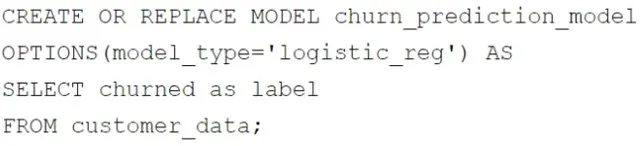
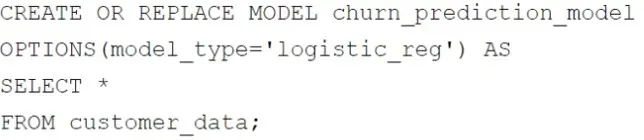
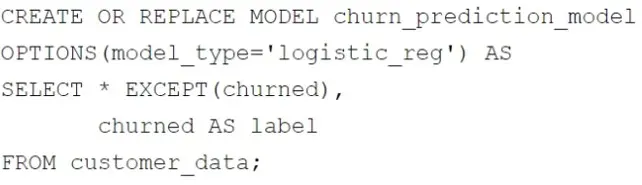
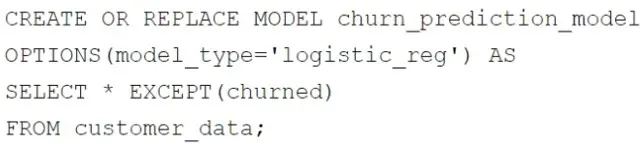
Your retail company wants to predict customer churn using historical purchase data stored in BigQuery. The dataset includes customer demographics, purchase history, and a label indicating whether the customer churned or not. You want to build a machine learning model to identify customers at risk of churning. You need to create and train a logistic regression model for predicting customer churn, using the customer_data table with the churned column as the target label. Which BigQuery ML query should you use?

A)

B)

C)

D)

Correct Answer: B. Option B
Explanation:

In BigQuery ML, when creating a logistic regression model to predict customer churn, the correct query should:

Exclude the target label column (in this case, churned) from the feature columns, as it is used for training and not as a feature input.

Rename the target label column to label, as BigQuery ML requires the target column to be named label.

The chosen query satisfies these requirements:

SELECT * EXCEPT(churned), churned AS label: Excludes churned from features and renames it to label.

The OPTIONS(model_type='logistic_reg') specifies that a logistic regression model is being trained.

This setup ensures the model is correctly trained using the features in the dataset while targeting the churned column for predictions.


Question 5

Your company is setting up an enterprise business intelligence platform. You need to limit data access between many different teams while following the Google-recommended approach. What should you do first?

Correct Answer: D. Create a Looker (Google Cloud core) instance, and configure different Looker groups for each team.
Explanation:

Comprehensive and Detailed In-Depth

For an enterprise BI platform with data access control across teams, Google recommends Looker (Google Cloud core) over Looker Studio for its robust access management. The 'first' step focuses on setting up the foundation.

Option A: Looker Studio reports are lightweight but lack granular access control beyond sharing. Creating separate reports per team is inefficient and unscalable.

Option B: One Looker Studio report with multiple pages and data sources doesn't enforce team-level access control natively---users could access all pages/data.

Option C: Creating a Looker instance with separate dashboards per team is a step forward but skips the foundational access control setup (groups), reducing scalability.

Option D: Setting up a Looker instance and configuring groups aligns with Google's recommendation for enterprise BI. Groups allow role-based access control (RBAC) at the model, Explore, or dashboard level, ensuring teams see only their data. This is the scalable, foundational step per Looker's 'Access Control' documentation. Reference: Looker Documentation - 'Managing Users and Groups' (https://cloud.google.com/looker/docs/admin-users-groups).

Option D: Setting up a Looker instance and configuring groups aligns with Google's recommendation for enterprise BI. Groups allow role-based access control (RBAC) at the model, Explore, or dashboard level, ensuring teams see only their data. This is the scalable, foundational step per Looker's 'Access Control' documentation. Reference: Looker Documentation - 'Managing Users and Groups' (https://cloud.google.com/looker/docs/admin-users-groups).


Question 6

Your retail company collects customer data from various sources:

You are designing a data pipeline to extract this dat

a. Which Google Cloud storage system(s) should you select for further analysis and ML model training?

Correct Answer: B. 1. Online transactions: BigQuery 2. Customer feedback: Cloud Storage 3. Social media activity: BigQuery
Explanation:

Online transactions: Storing the transactional data in BigQuery is ideal because BigQuery is a serverless data warehouse optimized for querying and analyzing structured data at scale. It supports SQL queries and is suitable for structured transactional data.

Customer feedback: Storing customer feedback in Cloud Storage is appropriate as it allows you to store unstructured text files reliably and at a low cost. Cloud Storage also integrates well with data processing and ML tools for further analysis.

Social media activity: Storing real-time social media activity in BigQuery is optimal because BigQuery supports streaming inserts, enabling real-time ingestion and analysis of data. This allows immediate analysis and integration into dashboards or ML pipelines.


Question 7

You need to create a data pipeline that streams event information from applications in multiple Google Cloud regions into BigQuery for near real-time analysis. The data requires transformation before loading. You want to create the pipeline using a visual interface. What should you do?

Correct Answer: A. Push event information to a Pub/Sub topic. Create a Dataflow job using the Dataflow job builder.
Explanation:

Pushing event information to a Pub/Sub topic and then creating a Dataflow job using the Dataflow job builder is the most suitable solution. The Dataflow job builder provides a visual interface to design pipelines, allowing you to define transformations and load data into BigQuery. This approach is ideal for streaming data pipelines that require near real-time transformations and analysis. It ensures scalability across multiple regions and integrates seamlessly with Pub/Sub for event ingestion and BigQuery for analysis.

The best solution for creating a data pipeline with a visual interface for streaming event information from multiple Google Cloud regions into BigQuery for near real-time analysis with transformations is A . Push event information to a Pub/Sub topic. Create a Dataflow job using the Dataflow job builder.

Here's why:

Pub/Sub and Dataflow:

Pub/Sub is ideal for real-time message ingestion, especially from multiple regions.

Dataflow, particularly with the Dataflow job builder, provides a visual interface for creating data pipelines that can perform real-time stream processing and transformations.

The Dataflow job builder allows creating pipelines with visual tools, fulfilling the requirement of a visual interface.

Dataflow is built for real time streaming and applying transformations.

Let's break down why the other options are less suitable:

B . Push event information to Cloud Storage, and create an external table in BigQuery. Create a BigQuery scheduled job that executes once each day to apply transformations:

This is a batch processing approach, not real-time.

Cloud Storage and scheduled jobs are not designed for near real-time analysis.

This does not meet the real time requirement of the question.

C . Push event information to a Pub/Sub topic. Create a Cloud Run function to subscribe to the Pub/Sub topic, apply transformations, and insert the data into BigQuery:

While Cloud Run can handle transformations, it requires more coding and is less scalable and manageable than Dataflow for complex streaming pipelines.

Cloud run does not provide a visual interface.

D . Push event information to a Pub/Sub topic. Create a BigQuery subscription in Pub/Sub:

BigQuery subscriptions in Pub/Sub are for direct loading of Pub/Sub messages into BigQuery, without the ability to perform transformations.

This option does not provide any transformation functionality.

Therefore, Pub/Sub for ingestion and Dataflow with its job builder for visual pipeline creation and transformations is the most appropriate solution.


Question 8

Your company has developed a website that allows users to upload and share video files. These files are most frequently accessed and shared when they are initially uploaded. Over time, the files are accessed and shared less frequently, although some old video files may remain very popular. You need to design a storage system that is simple and cost-effective. What should you do?

Correct Answer: B. Create a single-region bucket with Autoclass enabled.
Explanation:

The storage system must balance cost, simplicity, and access patterns: high initial access, decreasing over time, with some files remaining popular. Google Cloud Storage offers tailored options for this:

Option A: Custom Object Lifecycle Management (OLM) policies (e.g., transition to Nearline after 30 days, Archive after 90 days) are effective but static. They don't adapt to actual usage, so popular old files in Archive would incur high retrieval costs.

Option B: Autoclass automatically adjusts storage classes (Standard, Nearline, Coldline, Archive) based on object access patterns, not just age. It keeps frequently accessed files in Standard (low latency/cost for access) and moves inactive ones to cheaper classes, minimizing costs while preserving simplicity. This fits the ''some files remain popular'' nuance.

Option C: A Cloud Scheduler job to manually change classes daily is complex (requires scripting, monitoring), error-prone, and less cost-effective than automated solutions like Autoclass or OLM.

Option D: Defaulting to Archive is cheapest for storage but disastrous for access---retrieval costs and latency would skyrocket for initial high-access periods. Why B is Best: Autoclass simplifies management (no rules to define) and optimizes costs dynamically. For videos, where access varies unpredictably, it ensures popular files stay accessible without manual intervention, aligning with Google's cost-optimization guidance. Extract from Google Documentation: From 'Autoclass in Cloud Storage' (https://cloud.google.com/storage/docs/autoclass): 'Autoclass automatically transitions objects to the most cost-effective storage class based on access patterns, simplifying management and reducing costs for workloads with variable access, such as media files.' Reference: Google Cloud Documentation - 'Cloud Storage Autoclass' (https://cloud.google.com/storage/docs/autoclass).

Why B is Best: Autoclass simplifies management (no rules to define) and optimizes costs dynamically. For videos, where access varies unpredictably, it ensures popular files stay accessible without manual intervention, aligning with Google's cost-optimization guidance.

Extract from Google Documentation: From 'Autoclass in Cloud Storage' (https://cloud.google.com/storage/docs/autoclass): 'Autoclass automatically transitions objects to the most cost-effective storage class based on access patterns, simplifying management and reducing costs for workloads with variable access, such as media files.'

Option D: Defaulting to Archive is cheapest for storage but disastrous for access---retrieval costs and latency would skyrocket for initial high-access periods. Why B is Best: Autoclass simplifies management (no rules to define) and optimizes costs dynamically. For videos, where access varies unpredictably, it ensures popular files stay accessible without manual intervention, aligning with Google's cost-optimization guidance. Extract from Google Documentation: From 'Autoclass in Cloud Storage' (https://cloud.google.com/storage/docs/autoclass): 'Autoclass automatically transitions objects to the most cost-effective storage class based on access patterns, simplifying management and reducing costs for workloads with variable access, such as media files.' Reference: Google Cloud Documentation - 'Cloud Storage Autoclass' (https://cloud.google.com/storage/docs/autoclass).


Question 9

You have an existing weekly Storage Transfer Service transfer job from Amazon S3 to a Nearline Cloud Storage bucket in Google Cloud. Each week, the job moves a large number of relatively small files. As the number of files to be transferred each week has grown over time, you are at risk of no longer completing the transfer in the allocated time frame. You need to decrease the total transfer time by replacing the process. Your solution should minimize costs where possible. What should you do?

Correct Answer: B. Create parallel transfer jobs using include and exclude prefixes.
Explanation:

Comprehensive and Detailed in Depth

Why B is correct:Creating parallel transfer jobs by using include and exclude prefixes allows you to split the data into smaller chunks and transfer them in parallel.

This can significantly increase throughput and reduce the overall transfer time.

Why other options are incorrect:A: Changing the storage class to Standard will not improve transfer speed.

C: Dataflow is a complex solution for a simple file transfer task.

D: Agent-based transfer is suitable for large files or network limitations, but not for a large number of small files.


Question 10

Your company's ecommerce website collects product reviews from customers. The reviews are loaded as CSV files daily to a Cloud Storage bucket. The reviews are in multiple languages and need to be translated to Spanish. You need to configure a pipeline that is serverless, efficient, and requires minimal maintenance. What should you do?

Correct Answer: D. Load the data into BigQuery using a Cloud Run function. Create a BigQuery remote function that invokes the Cloud Translation API. Use a scheduled query to translate new reviews.
Explanation:

Loading the data into BigQuery using a Cloud Run function and creating a BigQuery remote function that invokes the Cloud Translation API is a serverless and efficient approach. With this setup, you can use a scheduled query in BigQuery to invoke the remote function and translate new product reviews on a regular basis. This solution requires minimal maintenance, as BigQuery handles storage and querying, and the Cloud Translation API provides accurate translations without the need for custom ML model development.