
Limited-Time Offer: Enjoy 50% Savings! Ends in 00h 00m 00s Coupon code: 50OFF
Skip to content

Free Google Professional Cloud Security Engineer Professional-Cloud-Security-Engineer Exam Questions

Page: 1 / 22 Total 318 questions

Want more questions? Get Premium Access.

Question 1

Your organization recently activated the Security Command Center {SCO standard tier. There are a few Cloud Storage buckets that were accidentally made accessible to the public. You need to investigate the impact of the incident and remediate it.

What should you do?

Correct Answer: B. * 1 Change bucket permissions to limit access* 2 Query the data access audit logs for any unauthorized access to the buckets* 3 After the misconfiguration is corrected mute the finding in the Security Command Center
Explanation:

To investigate and remediate the issue of public access to Cloud Storage buckets, you can follow these steps:

Change Bucket Permissions:

Navigate to the Cloud Storage section in the Google Cloud Console.

For each affected bucket, remove any public access permissions (e.g., removing allUsers or allAuthenticatedUsers from the IAM policy).

Ensure that only authorized users have the necessary permissions to access the buckets.

Query Data Access Audit Logs:

Go to the Logging section in the Google Cloud Console.

Query the audit logs for the affected buckets to identify any unauthorized access. You can use filters to search for access by unauthorized users.

Correct the Misconfiguration:

After correcting the permissions, mute the relevant findings in the Security Command Center to indicate that the issue has been resolved.

This helps in maintaining a clear view of ongoing security issues and ensures the findings are not flagged again unless there's a new occurrence.

By following these steps, you ensure that the buckets are no longer publicly accessible, investigate any potential unauthorized access, and update the Security Command Center status to reflect the resolution of the issue.

Cloud Storage IAM Permissions

Viewing Audit Logs

Security Command Center Documentation

Question 2

You want data on Compute Engine disks to be encrypted at rest with keys managed by Cloud Key Management Service (KMS). Cloud Identity and Access Management (IAM) permissions to these keys must be managed in a grouped way because the permissions should be the same for all keys.

What should you do?

Correct Answer: B. Create a single KeyRing for all persistent disks and all Keys in this KeyRing. Manage the IAM permissions at the KeyRing level.
Explanation:

Managing IAM permissions at the KeyRing level is more efficient and scalable compared to managing them at the individual Key level. By creating a single KeyRing and placing all encryption keys within it, you can apply uniform IAM permissions to the entire KeyRing, simplifying the management of permissions.

Steps:

Create a KeyRing: Set up a single KeyRing in Cloud KMS for all the encryption keys required for the persistent disks.

Create Encryption Keys: Generate the necessary encryption keys within this KeyRing.

Set IAM Permissions: Assign IAM roles and permissions to the KeyRing to manage access control at this level, ensuring that all keys within the KeyRing inherit these permissions.


Google Cloud: Cloud Key Management Service (KMS)

Managing access to resources

Question 3

You are a security engineer at a finance company. Your organization plans to store data on Google Cloud, but your leadership team is worried about the security of their highly sensitive data Specifically, your

company is concerned about internal Google employees' ability to access your company's data on Google Cloud. What solution should you propose?

Correct Answer: D. Enable Access Transparency logs with Access Approval requests for Google employees.
Explanation:

https://cloud.google.com/access-transparency Access approval Explicitly approve access to your data or configurations on Google Cloud. Access Approval requests, when combined with Access Transparency logs, can be used to audit an end-to-end chain from support ticket to access request to approval, to eventual access.


Question 4

A. Do not use Vertex AI for sensitive data. Use only public data with minimal privacy requirements.

Correct Answer: C. Do nothing. Vertex AI foundation models are frozen by default and do not use your data for model-tuning purposes.
Explanation:

When using Google Cloud's generative AI platforms like Vertex AI for model tuning, the contractual and technical safeguards are designed to protect customer data from being used for public model training.

Google's policy is that the content (data) uploaded for model tuning is used only for that specific, express purpose (tuning your model) and is not used to tune Google's foundational public models or shared with other customers.

Extracts:

'Google only uses content that you import or upload to our model tuning feature for that express purpose.' (Source 6.1)

'Tuning content may be retained in connection with your tuned models for purposes of re-tuning when supported models change. When you delete a tuned model, the related tuning content is also deleted.' (Source 6.1)

Therefore, based on the documented commitment for Vertex AI model tuning, no additional action is required (Do nothing) to prevent Google from using the data for general model tuning.


Question 5

Your company runs a website that will store PII on Google Cloud Platform. To comply with data privacy regulations, this data can only be stored for a specific amount of time and must be fully deleted after this specific period. Data that has not yet reached the time period should not be deleted. You want to automate the process of complying with this regulation.

What should you do?

Correct Answer: C. Store the data in a Cloud Storage bucket, and configure the bucket's Object Lifecycle Management feature.
Explanation:

'To support common use cases like setting a Time to Live (TTL) for objects, retaining noncurrent versions of objects, or 'downgrading' storage classes of objects to help manage costs, Cloud Storage offers the Object Lifecycle Management feature. This page describes the feature as well as the options available when using it. To learn how to enable Object Lifecycle Management, and for examples of lifecycle policies, see Managing Lifecycles.' https://cloud.google.com/storage/docs/lifecycle


Question 6

You manage your organization's Security Operations Center (SOC). You currently monitor and detect network traffic anomalies in your Google Cloud VPCs based on packet header information. However, you want the capability to explore network flows and their payload to aid investigations. Which Google Cloud product should you use?

Correct Answer: D. Packet Mirroring
Explanation:

Packet Mirroring clones the traffic of specified instances in your Virtual Private Cloud (VPC) network and forwards it for examination. Packet Mirroring captures all traffic and packet data, including payloads and headers. https://cloud.google.com/vpc/docs/packet-mirroring

Question 7

Your company requires the security and network engineering teams to identify all network anomalies and be able to capture payloads within VPCs. Which method should you use?

Correct Answer: B. Configure packet mirroring policies.
Explanation:

https://cloud.google.com/vpc/docs/packet-mirroring

Packet Mirroring clones the traffic of specified instances in your Virtual Private Cloud (VPC) network and forwards it for examination. Packet Mirroring captures all traffic and packet data, including payloads and headers.


Question 8

You are migrating an on-premises data warehouse to BigQuery Cloud SQL, and Cloud Storage. You need to configure security services in the data warehouse. Your company compliance policies mandate that the data warehouse must:

* Protect data at rest with full lifecycle management on cryptographic keys

* Implement a separate key management provider from data management

* Provide visibility into all encryption key requests

What services should be included in the data warehouse implementation?

Choose 2 answers

Correct Answer: A. Customer-managed encryption keys; E. Cloud External Key Manager
Explanation:

Customer-Managed Encryption Keys (CMEK):

CMEK allows you to manage encryption keys using Cloud Key Management Service (KMS). This gives you control over the lifecycle of the keys, including rotation, destruction, and auditing.

Set up a Cloud KMS key ring and create encryption keys that will be used to protect your data in BigQuery, Cloud SQL, and Cloud Storage.

Configure the services to use CMEK for encrypting data at rest, ensuring compliance with your organization's security policies.

Cloud External Key Manager (EKM):

Cloud EKM allows you to use keys managed by an external key management provider to encrypt data in Google Cloud services.

Integrate your external key management system with Google Cloud using supported protocols and APIs.

Configure your data warehouse services to use the external keys for encryption, ensuring that key management is handled outside of the Google Cloud environment.

Key Access Justifications:

Enable Key Access Justifications to provide visibility into why encryption keys are being accessed. This helps in monitoring and auditing key usage to ensure compliance and security.

Set up policies and logging to capture and review key access requests, providing insights into how and why keys are used.

Access Transparency and Approval:

Implement Access Transparency to gain visibility into Google's access to your data and encryption keys.

Configure Access Approval to require explicit approval for Google support or engineering access to your data, adding an additional layer of security and control.


Customer-Managed Encryption Keys (CMEK)

Cloud External Key Manager (EKM)

Key Access Justifications

Access Transparency

Access Approval

Question 9

Your security team wants to implement a defense-in-depth approach to protect sensitive data stored in a Cloud Storage bucket. Your team has the following requirements:

The Cloud Storage bucket in Project A can only be readable from Project B.

The Cloud Storage bucket in Project A cannot be accessed from outside the network.

Data in the Cloud Storage bucket cannot be copied to an external Cloud Storage bucket.

What should the security team do?

Correct Answer: B. Enable VPC Service Controls, create a perimeter around Projects A and B. and include the Cloud Storage API in the Service Perimeter configuration.
Explanation:

VPC Peering is between organizations not between Projects in an organization. That is Shared VPC. In this case, both projects are in same organization so having VPC Service Controls around both projects with necessary rules should be fine.

https://cloud.google.com/vpc-service-controls/docs/overview


Question 10

Your customer has an on-premises Public Key Infrastructure (PKI) with a certificate authority (CA). You need to issue certificates for many HTTP load balancer frontends. The on-premises PKI should be minimally affected due to many manual processes, and the solution needs to scale.

What should you do?

Correct Answer: C. Use a subordinate CA in the Google Certificate Authority Service from the on-premises PKI system to issue certificates for the load balancers.
Explanation:

This approach allows you to leverage your existing on-premises PKI infrastructure while minimizing its impact and manual processes. By creating a subordinate CA in Google's Certificate Authority Service, you can automate the process of issuing certificates for your HTTP load balancer frontends. This solution scales well as the number of load balancers increases.


Question 11

Your company is deploying a large number of containerized applications to GKE. The existing CI/CD pipeline uses Cloud Build to construct container images, transfers the images to Artifact Registry, and then deploys the images to GKE. You need to ensure that only images that have passed vulnerability scanning and meet specific corporate policies are allowed to be deployed. The process needs to be automated and integrated into the existing CI/CD pipeline. What should you do?

Correct Answer: C. Configure a policy in Binary Authorization to use Artifact Analysis vulnerability scanning to only allow images that pass the scan to deploy to your GKE clusters.
Explanation:

The problem requires ensuring that only images that have passed vulnerability scanning and meet corporate policies are allowed to be deployed to GKE, with the process being automated and integrated into the existing CI/CD pipeline.

Binary Authorization: This Google Cloud service is purpose-built to enforce deployment policies on images before they are run on Google Kubernetes Engine (GKE), Cloud Run, and other deployable platforms. It acts as a policy gate that prevents the deployment of non-compliant images.

Extract Reference: 'Binary Authorization is a deploy-time security control that ensures only trusted container images are deployed on Google Kubernetes Engine (GKE), Cloud Run, and Anthos clusters.' and 'With Binary Authorization, you can require images to be signed by trusted authorities and enforce validation policies during deployment.' (Google Cloud Documentation: 'Binary Authorization overview' - https://cloud.google.com/binary-authorization/docs/overview)

Artifact Analysis (part of Container Analysis): Artifact Analysis (which includes Container Analysis) provides vulnerability scanning capabilities for container images stored in Artifact Registry. It generates findings and metadata about vulnerabilities.

Extract Reference: 'Container Analysis is a service that scans your images for known vulnerabilities and provides metadata about them.' (Google Cloud Documentation: 'Overview | Container Analysis' - https://cloud.google.com/container-analysis/docs/overview)

Binary Authorization can be configured to integrate with Artifact Analysis (or other attestors) to check for vulnerability scan results as part of its deployment policy.

Integration and Automation: Binary Authorization policies can require attestations before deployment. An attestation confirms that an image meets specific criteria (e.g., it has passed a vulnerability scan, it was signed by an approved CI/CD process, it adheres to corporate policies). Cloud Build can be configured to generate these attestations after a successful vulnerability scan (using Artifact Analysis). This fully automates the process and integrates directly into the CI/CD pipeline.

Extract Reference: 'With Binary Authorization, you create a policy that enforces your requirements. The policy defines rules that govern deployment. For example, a policy can require all images to be signed by a trusted authority before deployment.' (Google Cloud Documentation: 'Binary Authorization overview' - https://cloud.google.com/binary-authorization/docs/overview)

Let's evaluate the other options:

A . Custom script in Cloud Build... Fail the build: While scanning during the build is good practice (shift-left security), failing the build only prevents the image from being pushed. It doesn't prevent a developer or an automated process from manually deploying an old or non-compliant image that might already exist in Artifact Registry, or from bypassing the build system. The enforcement needs to happen at deployment time.

B . Configure GKE to use only images from a specific... trusted Artifact Registry repository. Manually inspect all images: Manually inspecting images is not automated and does not scale for a 'large number of containerized applications.' It also doesn't programmatically enforce vulnerability scan results or corporate policies.

D . Enable Artifact Analysis vulnerability scanning and regularly scan images... Remove any images that do not meet... before deployment: This describes scanning and remediation, which are important. However, it's a reactive approach ('remove any images') rather than a proactive enforcement ('only images that... are allowed to be deployed'). There's still a window where a non-compliant image could be deployed before it's removed. Binary Authorization is the enforcement gate.

Therefore, configuring Binary Authorization with a policy that integrates with Artifact Analysis (or requires attestations based on its findings) is the most robust, automated, and Google-recommended solution for enforcing deployment policies based on vulnerability scanning and corporate compliance.


Question 12

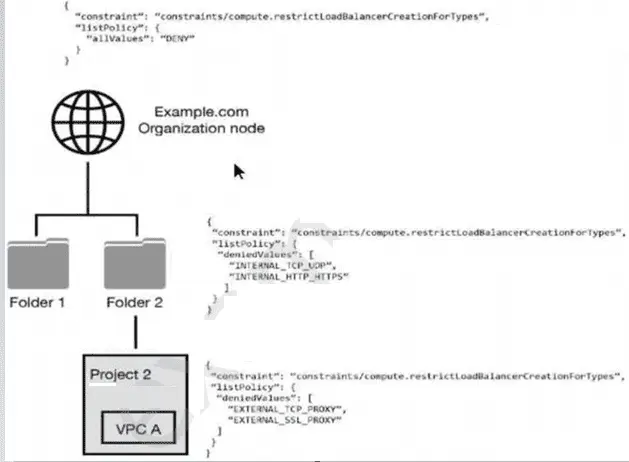
You have the following resource hierarchy. There is an organization policy at each node in the hierarchy as shown. Which load balancer types are denied in VPC A?

Correct Answer: D. EXTERNAL_TCP_PROXY, EXTERNAL_SSL_PROXY, INTERNAL_TCP_UDP, and INTERNAL_HTTP_HTTPS are denied in accordance with the folder and project's policies.
Explanation:

Understanding Organization Policies:

Organization policies are rules that can be set at different levels of the resource hierarchy in GCP to enforce governance and compliance.

These policies can be set at the organization node, folders, and projects, and they are inherited down the hierarchy unless explicitly overridden.

Hierarchy and Policy Inheritance:

The provided resource hierarchy has an organization node (Example.com), folders (Folder 1 and Folder 2), and a project (Project 2) under Folder 2 with a specific VPC (VPC A).

Each node in the hierarchy can have its own policies, and these policies are inherited by child nodes unless overridden.

Analyzing the Policies in the Hierarchy:

Organization Node Policy:

json

Copy code

{ 'constraint': 'constraints/compute.restrictLoadBalancerCreationForTypes', 'listPolicy': { 'allValues': 'DENY' } }

This policy at the organization node denies all load balancer types.

Folder 2 Policy:

json

Copy code

{ 'constraint': 'constraints/compute.restrictLoadBalancerCreationForTypes', 'listPolicy': { 'deniedValues': ['INTERNAL_TCP_UDP', 'INTERNAL_HTTP_HTTPS'] } }

This policy at Folder 2 denies the creation of INTERNAL_TCP_UDP and INTERNAL_HTTP_HTTPS load balancers.

Project 2 Policy:

json

Copy code

{ 'constraint': 'constraints/compute.restrictLoadBalancerCreationForTypes', 'listPolicy': { 'deniedValues': ['EXTERNAL_TCP_PROXY', 'EXTERNAL_SSL_PROXY'] } }

This policy at Project 2 denies the creation of EXTERNAL_TCP_PROXY and EXTERNAL_SSL_PROXY load balancers.

Policy Application to VPC A:

Since policies are inherited, VPC A (which is within Project 2 under Folder 2) will be affected by the policies of both Folder 2 and Project 2.

Combining the denied values from both Folder 2 and Project 2:

From Folder 2: INTERNAL_TCP_UDP, INTERNAL_HTTP_HTTPS

From Project 2: EXTERNAL_TCP_PROXY, EXTERNAL_SSL_PROXY

Conclusion:

VPC A will have the following load balancer types denied: INTERNAL_TCP_UDP, INTERNAL_HTTP_HTTPS, EXTERNAL_TCP_PROXY, EXTERNAL_SSL_PROXY.


GCP Documentation on Organization Policies

GCP Documentation on Constraints and List Policies

Question 13

How should a customer reliably deliver Stackdriver logs from GCP to their on-premises SIEM system?

Correct Answer: C. Configure Organizational Log Sinks to export logs to a Cloud Pub/Sub Topic, which will be sent to the SIEM via Dataflow.
Explanation:

Scenarios for exporting Cloud Logging data: Splunk This scenario shows how to export selected logs from Cloud Logging to Pub/Sub for ingestion into Splunk. Splunk is a security information and event management (SIEM) solution that supports several ways of ingesting data, such as receiving streaming data out of Google Cloud through Splunk HTTP Event Collector (HEC) or by fetching data from Google Cloud APIs through Splunk Add-on for Google Cloud. Using the Pub/Sub to Splunk Dataflow template, you can natively forward logs and events from a Pub/Sub topic into Splunk HEC. If Splunk HEC is not available in your Splunk deployment, you can use the Add-on to collect the logs and events from the Pub/Sub topic. https://cloud.google.com/solutions/exporting-stackdriver-logging-for-splunk


Question 14

You are a Security Administrator at your organization. You need to restrict service account creation capability within production environments. You want to accomplish this centrally across the organization. What should you do?

Correct Answer: D. Use organization policy constraints/iam.disableServiceAccountCreation boolean to disable the creation of new service accounts.
Explanation:

You can use the iam.disableServiceAccountCreation boolean constraint to disable the creation of new service accounts. This allows you to centralize management of service accounts while not restricting the other permissions your developers have on projects. https://cloud.google.com/resource-manager/docs/organization-policy/restricting-service-accounts#disable_service_account_creation

Question 15

A company is deploying their application on Google Cloud Platform. Company policy requires long-term data to be stored using a solution that can automatically replicate data over at least two geographic places.

Which Storage solution are they allowed to use?

Correct Answer: A. Cloud Bigtable
Explanation:

Cloud Bigtable is a fully managed NoSQL database service designed to handle large analytical and operational workloads. One of its key features is the ability to replicate data across multiple geographic locations automatically, ensuring high availability and resilience. Here's a detailed explanation:

Replication: Cloud Bigtable supports multi-cluster routing and replication across different geographic regions. This means that data can be replicated across multiple zones within a region or even across regions, providing geo-redundancy.

Automatic Handling: Once configured, Bigtable automatically manages replication without requiring manual intervention. This is in line with the company's policy for long-term data storage that necessitates automatic replication over at least two geographic places.

Use Case Suitability: Bigtable is ideal for applications that require low-latency access to large amounts of data, which makes it suitable for various use cases including analytical applications, IoT, and financial data processing.

Configuration: Setting up replication involves creating instances in multiple zones and configuring them to replicate data. Google Cloud's management interface and APIs make this straightforward to configure and monitor.

Google Cloud Bigtable Documentation

Google Cloud Storage Options