Limited-Time Offer: Enjoy 50% Savings! Ends in 00h 00m 00s Coupon code: 50OFF
Skip to content

Free Google Professional Machine Learning Engineer Professional-Machine-Learning-Engineer Exam Questions

Page: 1 / 19 Total 283 questions

Want more questions? Get Premium Access.

Question 1

You are working on a binary classification ML algorithm that detects whether an image of a classified scanned document contains a company's logo. In the dataset, 96% of examples don't have the logo, so the dataset is very skewed. Which metrics would give you the most confidence in your model?

Correct Answer: A. F-score where recall is weighed more than precision
Explanation:

Option A is correct because using F-score where recall is weighed more than precision is a suitable metric for binary classification with imbalanced data.F-score is a harmonic mean of precision and recall, which are two metrics that measure the accuracy and completeness of the positive class1.Precision is the fraction of true positives among all predicted positives, while recall is the fraction of true positives among all actual positives1. When the data is imbalanced, the positive class is the minority class, which is usually the class of interest. For example, in this case, the positive class is the images that contain the company's logo, which are rare but important to detect.By weighing recall more than precision, we can emphasize the importance of finding all the positive examples, even if some false positives are included2.

Option B is incorrect because using RMSE (root mean squared error) is not a valid metric for binary classification with imbalanced data.RMSE is a metric that measures the average magnitude of the errors between the predicted and actual values3.RMSE is suitable for regression problems, where the target variable is continuous, not for classification problems, where the target variable is discrete4.

Option C is incorrect because using F1 score is not the best metric for binary classification with imbalanced data.F1 score is a special case of F-score where precision and recall are equally weighted1.F1 score is suitable for balanced data, where the positive and negative classes are equally important and frequent5.However, for imbalanced data, the positive class is more important and less frequent than the negative class, so F1 score may not reflect the performance of the model well2.

Option D is incorrect because using F-score where precision is weighed more than recall is not a good metric for binary classification with imbalanced data.By weighing precision more than recall, we can emphasize the importance of minimizing the false positives, even if some true positives are missed2.However, for imbalanced data, the true positives are more important and less frequent than the false positives, so this metric may not reflect the performance of the model well2.


Precision, recall, and F-measure

F-score for imbalanced data

RMSE

Regression vs classification

F1 score

[Imbalanced classification]

[Binary classification]

Question 2

You work for a retail company. You have been asked to develop a model to predict whether a customer will purchase a product on a given day. Your team has processed the company's sales data, and created a table with the following rows:

* Customer_id

* Product_id

* Date

* Days_since_last_purchase (measured in days)

* Average_purchase_frequency (measured in 1/days)

* Purchase (binary class, if customer purchased product on the Date)

You need to interpret your models results for each individual prediction. What should you do?

Correct Answer: B. Create a Vertex Al tabular dataset Train an AutoML model to predict customer purchases Deploy the model to a Vertex Al endpoint and enable feature attributions Use the 'explain' method to get feature attribution values for each individual prediction.
Explanation:

According to the official exam guide1, one of the skills assessed in the exam is to ''explain the predictions of a trained model''.Vertex AI provides feature attributions using Shapley Values, a cooperative game theory algorithm that assigns credit to each feature in a model for a particular outcome2. Feature attributions can help you understand how the model calculates the predictions and debug or optimize the model accordingly.You can use AutoML for Tabular Data to generate and query local feature attributions3. The other options are not relevant or optimal for this scenario.Reference:

Professional ML Engineer Exam Guide

Feature attributions for classification and regression

AutoML for Tabular Data

Google Professional Machine Learning Certification Exam 2023

Latest Google Professional Machine Learning Engineer Actual Free Exam Questions


Question 3

Your team has been tasked with creating an ML solution in Google Cloud to classify support requests for one of your platforms. You analyzed the requirements and decided to use TensorFlow to build the classifier so that you have full control of the model's code, serving, and deployment. You will use Kubeflow pipelines for the ML platform. To save time, you want to build on existing resources and use managed services instead of building a completely new model. How should you build the classifier?

Correct Answer: C. Use an established text classification model on Al Platform to perform transfer learning
Explanation:

Transfer learning is a technique that leverages the knowledge and weights of a pre-trained model and adapts them to a new task or domain1.Transfer learning can save time and resources by avoiding training a model from scratch, and can also improve the performance and generalization of the model by using a larger and more diverse dataset2.AI Platform provides several established text classification models that can be used for transfer learning, such as BERT, ALBERT, or XLNet3.These models are based on state-of-the-art natural language processing techniques and can handle various text classification tasks, such as sentiment analysis, topic classification, or spam detection4. By using one of these models on AI Platform, you can customize the model's code, serving, and deployment, and use Kubeflow pipelines for the ML platform. Therefore, using an established text classification model on AI Platform to perform transfer learning is the best option for this use case.


Transfer Learning - Machine Learning's Next Frontier

A Comprehensive Hands-on Guide to Transfer Learning with Real-World Applications in Deep Learning

Text classification models

Text Classification with Pre-trained Models in TensorFlow

Question 4

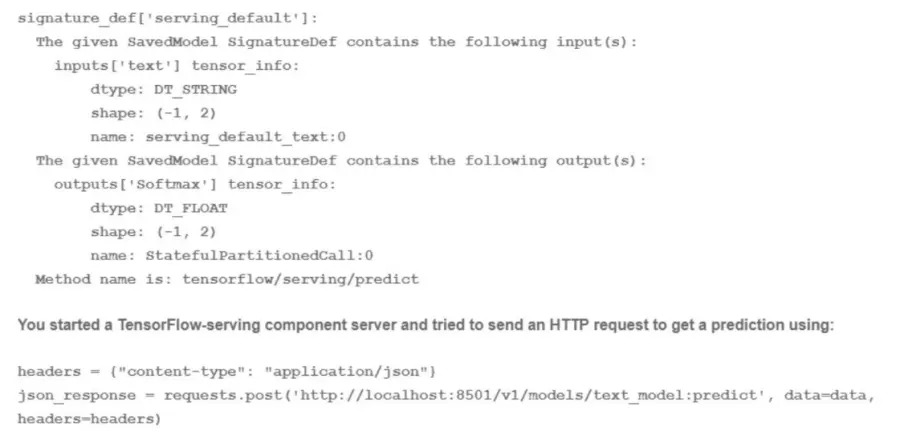
You trained a text classification model. You have the following SignatureDefs:

What is the correct way to write the predict request?

Correct Answer: D. data json dumps({'signature_name': f,serving_default', 'instances': [['a', 'b'], [c\ 'd'], ['e\ T]]})
Explanation:

A predict request is a way to send data to a trained model and get predictions in return. A predict request can be written in different formats, such as JSON, protobuf, or gRPC, depending on the service and the platform that are used to host and serve the model. A predict request usually contains the following information:

The signature name: This is the name of the signature that defines the inputs and outputs of the model. A signature is a way to specify the expected format, type, and shape of the data that the model can accept and produce. A signature can be specified when exporting or saving the model, or it can be automatically inferred by the service or the platform. A model can have multiple signatures, but only one can be used for each predict request.

The instances: This is the data that is sent to the model for prediction. The instances can be a single instance or a batch of instances, depending on the size and shape of the data. The instances should match the input specification of the signature, such as the number, name, and type of the input tensors.

For the use case of training a text classification model, the correct way to write the predict request is D. data json.dumps({''signature_name'': ''serving_default'', ''instances'': [['a', 'b'], ['c', 'd'], ['e', 'f']]})

This option involves writing the predict request in JSON format, which is a common and convenient format for sending and receiving data over the web. JSON stands for JavaScript Object Notation, and it is a way to represent data as a collection of name-value pairs or an ordered list of values. JSON can be easily converted to and from Python objects using the json module.

This option also involves using the signature name ''serving_default'', which is the default signature name that is assigned to the model when it is saved or exported without specifying a custom signature name. The serving_default signature defines the input and output tensors of the model based on the SignatureDef that is shown in the image. According to the SignatureDef, the model expects an input tensor called ''text'' that has a shape of (-1, 2) and a type of DT_STRING, and produces an output tensor called ''softmax'' that has a shape of (-1, 2) and a type of DT_FLOAT. The -1 in the shape indicates that the dimension can vary depending on the number of instances, and the 2 indicates that the dimension is fixed at 2. The DT_STRING and DT_FLOAT indicate that the data type is string and float, respectively.

This option also involves sending a batch of three instances to the model for prediction. Each instance is a list of two strings, such as ['a', 'b'], ['c', 'd'], or ['e', 'f']. These instances match the input specification of the signature, as they have a shape of (3, 2) and a type of string. The model will process these instances and produce a batch of three predictions, each with a softmax output that has a shape of (1, 2) and a type of float. The softmax output is a probability distribution over the two possible classes that the model can predict, such as positive or negative sentiment.

Therefore, writing the predict request as data json.dumps({''signature_name'': ''serving_default'', ''instances'': [['a', 'b'], ['c', 'd'], ['e', 'f']]}) is the correct and valid way to send data to the text classification model and get predictions in return.


[json --- JSON encoder and decoder]

Question 5

You are implementing a batch inference ML pipeline in Google Cloud. The model was developed using TensorFlow and is stored in SavedModel format in Cloud Storage You need to apply the model to a historical dataset containing 10 TB of data that is stored in a BigQuery table How should you perform the inference?

Correct Answer: D. Configure a Vertex Al batch prediction job to apply the model to the historical data in BigQuery
Explanation:

The best option for implementing a batch inference ML pipeline in Google Cloud, using a model that was developed using TensorFlow and is stored in SavedModel format in Cloud Storage, and a historical dataset containing 10 TB of data that is stored in a BigQuery table, is to configure a Vertex AI batch prediction job to apply the model to the historical data in BigQuery. This option allows you to leverage the power and simplicity of Vertex AI and BigQuery to perform large-scale batch inference with minimal code and configuration. Vertex AI is a unified platform for building and deploying machine learning solutions on Google Cloud. Vertex AI can run a batch prediction job, which can generate predictions for a large number of instances in batches. Vertex AI can also provide various tools and services for data analysis, model development, model deployment, model monitoring, and model governance. A batch prediction job is a resource that can run your model code on Vertex AI. A batch prediction job can help you generate predictions for a large number of instances in batches, and store the prediction results in a destination of your choice. A batch prediction job can accept various input formats, such as JSON, CSV, or TFRecord. A batch prediction job can also accept various input sources, such as Cloud Storage or BigQuery. A TensorFlow model is a resource that represents a machine learning model that is built using TensorFlow. TensorFlow is a framework that can perform large-scale data processing and machine learning. TensorFlow can help you build and train various types of models, such as linear regression, logistic regression, k-means clustering, matrix factorization, and deep neural networks. A SavedModel format is a type of format that can store a TensorFlow model and its associated assets. A SavedModel format can help you save and load your TensorFlow model, and serve it for prediction. A SavedModel format can be stored in Cloud Storage, which is a service that can store and access large-scale data on Google Cloud. A historical dataset is a collection of data that contains historical information about a certain domain. A historical dataset can help you analyze the past trends and patterns of the data, and make predictions for the future. A historical dataset can be stored in BigQuery, which is a service that can store and query large-scale data on Google Cloud. BigQuery can help you analyze your data by using SQL queries, and perform various tasks, such as data exploration, data transformation, or data visualization. By configuring a Vertex AI batch prediction job to apply the model to the historical data in BigQuery, you can implement a batch inference ML pipeline in Google Cloud with minimal code and configuration. You can use the Vertex AI API or the gcloud command-line tool to configure a batch prediction job, and provide the model name, the model version, the input source, the input format, the output destination, and the output format. Vertex AI will automatically run the batch prediction job, and apply the model to the historical data in BigQuery.Vertex AI will also store the prediction results in a destination of your choice, such as Cloud Storage or BigQuery1.

The other options are not as good as option D, for the following reasons:

Option A: Exporting the historical data to Cloud Storage in Avro format, configuring a Vertex AI batch prediction job to generate predictions for the exported data would require more skills and steps than configuring a Vertex AI batch prediction job to apply the model to the historical data in BigQuery, and could increase the complexity and cost of the batch inference process. Avro is a type of format that can store and serialize data in a binary format. Avro can help you compress and encode your data, and support schema evolution and compatibility. By exporting the historical data to Cloud Storage in Avro format, configuring a Vertex AI batch prediction job to generate predictions for the exported data, you can perform batch inference with minimal code and configuration. You can use the BigQuery API or the bq command-line tool to export the historical data to Cloud Storage in Avro format, and use the Vertex AI API or the gcloud command-line tool to configure a batch prediction job, and provide the model name, the model version, the input source, the input format, the output destination, and the output format. However, exporting the historical data to Cloud Storage in Avro format, configuring a Vertex AI batch prediction job to generate predictions for the exported data would require more skills and steps than configuring a Vertex AI batch prediction job to apply the model to the historical data in BigQuery, and could increase the complexity and cost of the batch inference process. You would need to write code, export the historical data to Cloud Storage, configure a batch prediction job, and generate predictions for the exported data.Moreover, this option would not use BigQuery as the input source for the batch prediction job, which can simplify the batch inference process, and provide various benefits, such as fast query performance, serverless scaling, and cost optimization2.

Option B: Importing the TensorFlow model by using the create model statement in BigQuery ML, applying the historical data to the TensorFlow model would not allow you to use Vertex AI to run the batch prediction job, and could increase the complexity and cost of the batch inference process. BigQuery ML is a feature of BigQuery that can create and execute machine learning models in BigQuery by using SQL queries. BigQuery ML can help you build and train various types of models, such as linear regression, logistic regression, k-means clustering, matrix factorization, and deep neural networks. A create model statement is a type of SQL statement that can create a machine learning model in BigQuery ML. A create model statement can help you specify the model name, the model type, the model options, and the model query. By importing the TensorFlow model by using the create model statement in BigQuery ML, applying the historical data to the TensorFlow model, you can perform batch inference with minimal code and configuration. You can use the BigQuery API or the bq command-line tool to import the TensorFlow model by using the create model statement in BigQuery ML, and provide the model name, the model type, the model options, and the model query. You can also use the BigQuery API or the bq command-line tool to apply the historical data to the TensorFlow model, and provide the model name, the input data, and the output destination. However, importing the TensorFlow model by using the create model statement in BigQuery ML, applying the historical data to the TensorFlow model would not allow you to use Vertex AI to run the batch prediction job, and could increase the complexity and cost of the batch inference process. You would need to write code, import the TensorFlow model, apply the historical data, and generate predictions.Moreover, this option would not use Vertex AI, which is a unified platform for building and deploying machine learning solutions on Google Cloud, and provide various tools and services for data analysis, model development, model deployment, model monitoring, and model governance3.

Option C: Exporting the historical data to Cloud Storage in CSV format, configuring a Vertex AI batch prediction job to generate predictions for the exported data would require more skills and steps than configuring a Vertex AI batch prediction job to apply the model to the historical data in BigQuery, and could increase the complexity and cost of the batch inference process. CSV is a type of format that can store and serialize data in a comma-separated values format. CSV can help you store and exchange your data, and support various data types and formats. By exporting the historical data to Cloud Storage in CSV format, configuring a Vertex AI batch prediction job to generate predictions for the exported data, you can perform batch inference with minimal code and configuration. You can use the BigQuery API or the bq command-line tool to export the historical data to Cloud Storage in CSV format, and use the Vertex AI API or the gcloud command-line tool to configure a batch prediction job, and provide the model name, the model version, the input source, the input format, the output destination, and the output format. However, exporting the historical data to Cloud Storage in CSV format, configuring a Vertex AI batch prediction job to generate predictions for the exported data would require more skills and steps than configuring a Vertex AI batch prediction job to apply the model to the historical data in BigQuery, and could increase the complexity and cost of the batch inference process. You would need to write code, export the historical data to Cloud Storage, configure a batch prediction job, and generate predictions for the exported data.Moreover, this option would not use BigQuery as the input source for the batch prediction job, which can simplify the batch inference process, and provide various benefits, such as fast query performance, serverless scaling, and cost optimization2.


Batch prediction | Vertex AI | Google Cloud

Exporting table data | BigQuery | Google Cloud

Creating and using models | BigQuery ML | Google Cloud

Question 6

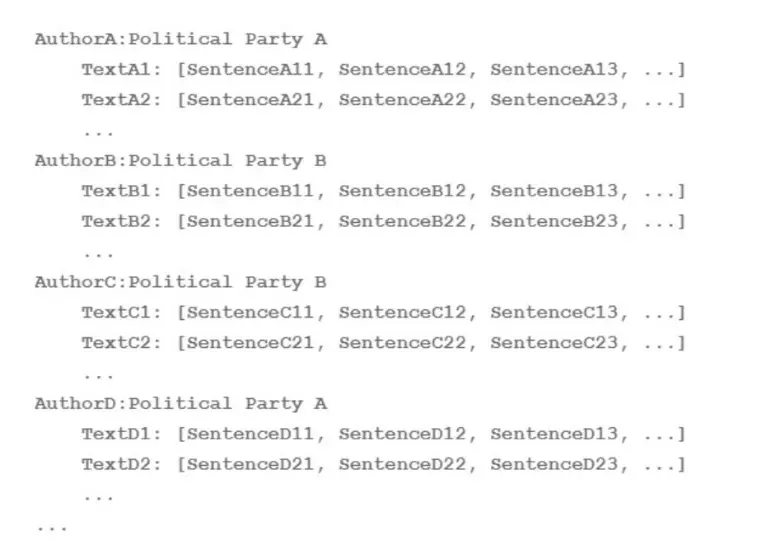
Your team is working on an NLP research project to predict political affiliation of authors based on articles they have written. You have a large training dataset that is structured like this:

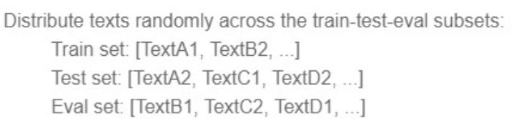
You followed the standard 80%-10%-10% data distribution across the training, testing, and evaluation subsets. How should you distribute the training examples across the train-test-eval subsets while maintaining the 80-10-10 proportion?

A)

B)

C)

D)

Correct Answer: C. Option C
Explanation:

The best way to distribute the training examples across the train-test-eval subsets while maintaining the 80-10-10 proportion is to use option C. This option ensures that each subset contains a balanced and representative sample of the different classes (Democrat and Republican) and the different authors. This way, the model can learn from a diverse and comprehensive set of articles and avoid overfitting or underfitting. Option C also avoids the problem of data leakage, which occurs when the same author appears in more than one subset, potentially biasing the model and inflating its performance. Therefore, option C is the most suitable technique for this use case.


Question 7

You recently deployed a scikit-learn model to a Vertex Al endpoint You are now testing the model on live production traffic While monitoring the endpoint. you discover twice as many requests per hour than expected throughout the day You want the endpoint to efficiently scale when the demand increases in the future to prevent users from experiencing high latency What should you do?

Correct Answer: B. Configure an appropriate minReplicaCount value based on expected baseline traffic.
Explanation:

The best option for scaling a Vertex AI endpoint efficiently when the demand increases in the future, using a scikit-learn model that is deployed to a Vertex AI endpoint and tested on live production traffic, is to configure an appropriate minReplicaCount value based on expected baseline traffic. This option allows you to leverage the power and simplicity of Vertex AI to automatically scale your endpoint resources according to the traffic patterns. Vertex AI is a unified platform for building and deploying machine learning solutions on Google Cloud. Vertex AI can deploy a trained model to an online prediction endpoint, which can provide low-latency predictions for individual instances. Vertex AI can also provide various tools and services for data analysis, model development, model deployment, model monitoring, and model governance. A minReplicaCount value is a parameter that specifies the minimum number of replicas that the endpoint must always have, regardless of the load. A minReplicaCount value can help you ensure that the endpoint has enough resources to handle the expected baseline traffic, and avoid high latency or errors. By configuring an appropriate minReplicaCount value based on expected baseline traffic, you can scale your endpoint efficiently when the demand increases in the future. You can set the minReplicaCount value when you deploy the model to the endpoint, or update it later.Vertex AI will automatically scale up or down the number of replicas within the range of the minReplicaCount and maxReplicaCount values, based on the target utilization percentage and the autoscaling metric1.

The other options are not as good as option B, for the following reasons:

Option A: Deploying two models to the same endpoint and distributing requests among them evenly would not allow you to scale your endpoint efficiently when the demand increases in the future, and could increase the complexity and cost of the deployment process. A model is a resource that represents a machine learning model that you can use for prediction. A model can have one or more versions, which are different implementations of the same model. A model version can help you experiment and iterate on your model, and improve the model performance and accuracy. An endpoint is a resource that provides the service endpoint (URL) you use to request the prediction. An endpoint can have one or more deployed models, which are instances of model versions that are associated with physical resources. A deployed model can help you serve online predictions with low latency, and scale up or down based on the traffic. By deploying two models to the same endpoint and distributing requests among them evenly, you can create a load balancing mechanism that can distribute the traffic across the models, and reduce the load on each model. However, deploying two models to the same endpoint and distributing requests among them evenly would not allow you to scale your endpoint efficiently when the demand increases in the future, and could increase the complexity and cost of the deployment process. You would need to write code, create and configure the two models, deploy the models to the same endpoint, and distribute the requests among them evenly.Moreover, this option would not use the autoscaling feature of Vertex AI, which can automatically adjust the number of replicas based on the traffic patterns, and provide various benefits, such as optimal resource utilization, cost savings, and performance improvement2.

Option C: Setting the target utilization percentage in the autoscalingMetricSpecs configuration to a higher value would not allow you to scale your endpoint efficiently when the demand increases in the future, and could cause errors or poor performance. A target utilization percentage is a parameter that specifies the desired utilization level of each replica. A target utilization percentage can affect the speed and accuracy of the autoscaling process. A higher target utilization percentage can help you reduce the number of replicas, but it can also cause high latency, low throughput, or resource exhaustion. By setting the target utilization percentage in the autoscalingMetricSpecs configuration to a higher value, you can increase the utilization level of each replica, and save some resources. However, setting the target utilization percentage in the autoscalingMetricSpecs configuration to a higher value would not allow you to scale your endpoint efficiently when the demand increases in the future, and could cause errors or poor performance. You would need to write code, create and configure the autoscalingMetricSpecs, and set the target utilization percentage to a higher value.Moreover, this option would not ensure that the endpoint has enough resources to handle the expected baseline traffic, which could cause high latency or errors1.

Option D: Changing the model's machine type to one that utilizes GPUs would not allow you to scale your endpoint efficiently when the demand increases in the future, and could increase the complexity and cost of the deployment process. A machine type is a parameter that specifies the type of virtual machine that the prediction service uses for the deployed model. A machine type can affect the speed and accuracy of the prediction process. A machine type that utilizes GPUs can help you accelerate the computation and processing of the prediction, and handle more prediction requests at the same time. By changing the model's machine type to one that utilizes GPUs, you can improve the prediction performance and efficiency of your model. However, changing the model's machine type to one that utilizes GPUs would not allow you to scale your endpoint efficiently when the demand increases in the future, and could increase the complexity and cost of the deployment process. You would need to write code, create and configure the model, deploy the model to the endpoint, and change the machine type to one that utilizes GPUs.Moreover, this option would not use the autoscaling feature of Vertex AI, which can automatically adjust the number of replicas based on the traffic patterns, and provide various benefits, such as optimal resource utilization, cost savings, and performance improvement2.


Configure compute resources for prediction | Vertex AI | Google Cloud

Deploy a model to an endpoint | Vertex AI | Google Cloud

Question 8

Your team frequently creates new ML models and runs experiments. Your team pushes code to a single repository hosted on Cloud Source Repositories. You want to create a continuous integration pipeline that automatically retrains the models whenever there is any modification of the code. What should be your first step to set up the CI pipeline?

Correct Answer: B. Configure a Cloud Build trigger with the event set as 'Push to a branch'
Explanation:

According to the web search results, Cloud Build1is a service that executes your builds on Google Cloud Platform infrastructure.Cloud Build can import source code from Cloud Source Repositories2, Cloud Storage, GitHub, Bitbucket, or any publicly hosted Git repository. Cloud Build allows you to create and manage build triggers, which are automated workflows that run whenever a code change is pushed to your source repository. You can use Cloud Build triggers to automatically retrain your ML models whenever there is any modification of the code. Therefore, option B is the best way to set up the CI pipeline for the given use case, as it allows you to configure a Cloud Build trigger with the event set as ''Push to a branch'', which means the trigger will run whenever a new commit is pushed to a specific branch of your source repository. The other options are not relevant or optimal for this scenario.Reference:

Cloud Build

Cloud Source Repositories

Google Professional Machine Learning Certification Exam 2023

Latest Google Professional Machine Learning Engineer Actual Free Exam Questions


Question 9

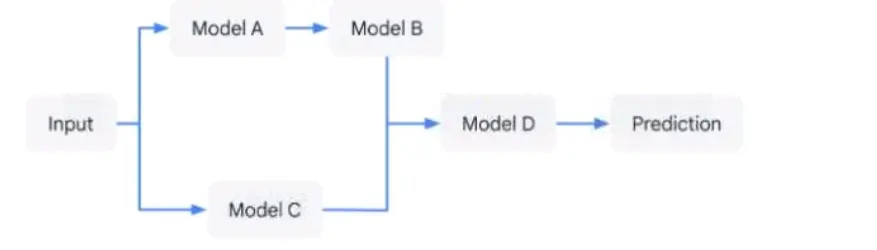
You have developed an application that uses a chain of multiple scikit-learn models to predict the optimal price for your company's products. The workflow logic is shown in the diagram Members of your team use the individual models in other solution workflows. You want to deploy this workflow while ensuring version control for each individual model and the overall workflow Your application needs to be able to scale down to zero. You want to minimize the compute resource utilization and the manual effort required to manage this solution. What should you do?

Correct Answer: C. Expose each individual model as an endpoint in Vertex Al Endpoints. Use Cloud Run to orchestrate the workflow.
Explanation:

The option C is the most efficient and scalable solution for deploying a machine learning workflow with multiple models while ensuring version control and minimizing compute resource utilization. By exposing each model as an endpoint in Vertex AI Endpoints, it allows for easy versioning and management of individual models. Using Cloud Run to orchestrate the workflow ensures that the application can scale down to zero, thus minimizing resource utilization when not in use. Cloud Run is a service that allows you to run stateless containers on a fully managed environment or on Google Kubernetes Engine. You can use Cloud Run to invoke the endpoints of each model in the workflow and pass the data between them. You can also use Cloud Run to handle the input and output of the workflow and provide an HTTP interface for the application.Reference:

Vertex AI Endpoints documentation

Cloud Run documentation

Preparing for Google Cloud Certification: Machine Learning Engineer Professional Certificate


Question 10

You work for an online retail company that is creating a visual search engine. You have set up an end-to-end ML pipeline on Google Cloud to classify whether an image contains your company's product. Expecting the release of new products in the near future, you configured a retraining functionality in the pipeline so that new data can be fed into your ML models. You also want to use Al Platform's continuous evaluation service to ensure that the models have high accuracy on your test data set. What should you do?

Correct Answer: B. Extend your test dataset with images of the newer products when they are introduced to retraining
Explanation:

The test dataset is used to evaluate the performance of the ML model on unseen data. It should reflect the distribution of the data that the model will encounter in production. Therefore, if the retraining data includes new products, the test dataset should also be extended with images of those products to ensure that the model can generalize well to them. Keeping the original test dataset unchanged or replacing it entirely with images of the new products would not capture the diversity of the data that the model needs to handle. Updating the test dataset only when the evaluation metrics drop below a threshold would be reactive rather than proactive, and might result in poor user experience if the model fails to recognize the new products.Reference:

Continuous evaluation documentation

Preparing and using test sets


Question 11

You are building a linear model with over 100 input features, all with values between -1 and 1. You suspect that many features are non-informative. You want to remove the non-informative features from your model while keeping the informative ones in their original form. Which technique should you use?

Correct Answer: B. Use L1 regularization to reduce the coefficients of uninformative features to 0.
Explanation:

L1 regularization, also known as Lasso regularization, adds the sum of the absolute values of the model's coefficients to the loss function1.It encourages sparsity in the model by shrinking some coefficients to precisely zero2. This way, L1 regularization can perform feature selection and remove the non-informative features from the model while keeping the informative ones in their original form. Therefore, using L1 regularization is the best technique for this use case.


Regularization in Machine Learning - GeeksforGeeks

Regularization in Machine Learning (with Code Examples) - Dataquest

L1 And L2 Regularization Explained & Practical How To Examples

L1 and L2 as Regularization for a Linear Model

Question 12

You work for a startup that has multiple data science workloads. Your compute infrastructure is currently on-premises. and the data science workloads are native to PySpark Your team plans to migrate their data science workloads to Google Cloud You need to build a proof of concept to migrate one data science job to Google Cloud You want to propose a migration process that requires minimal cost and effort. What should you do first?

Correct Answer: C. Create a Standard (1 master. 3 workers) Dataproc cluster, and run a Vertex Al Workbench notebook instance on it.
Explanation:

According to the official exam guide1, one of the skills assessed in the exam is to ''design, build, and productionalize ML models to solve business challenges using Google Cloud technologies''.Dataproc2is a fully managed, fast, and easy-to-use service for running Apache Spark and Apache Hadoop clusters on Google Cloud. Dataproc supports PySpark workloads and provides a simple way to migrate your existing Spark jobs to the cloud. You can create a Dataproc cluster with a few clicks or commands, and run your PySpark jobs on it.You can also use Vertex AI Workbench3, a managed notebook service, to create and run PySpark notebooks on Dataproc clusters. This way, you can interactively develop and test your PySpark code on the cloud. Therefore, option C is the best way to build a proof of concept to migrate one data science job to Google Cloud with minimal cost and effort. The other options are not relevant or optimal for this scenario.Reference:

Professional ML Engineer Exam Guide

Dataproc

Vertex AI Workbench

Google Professional Machine Learning Certification Exam 2023

Latest Google Professional Machine Learning Engineer Actual Free Exam Questions


Question 13

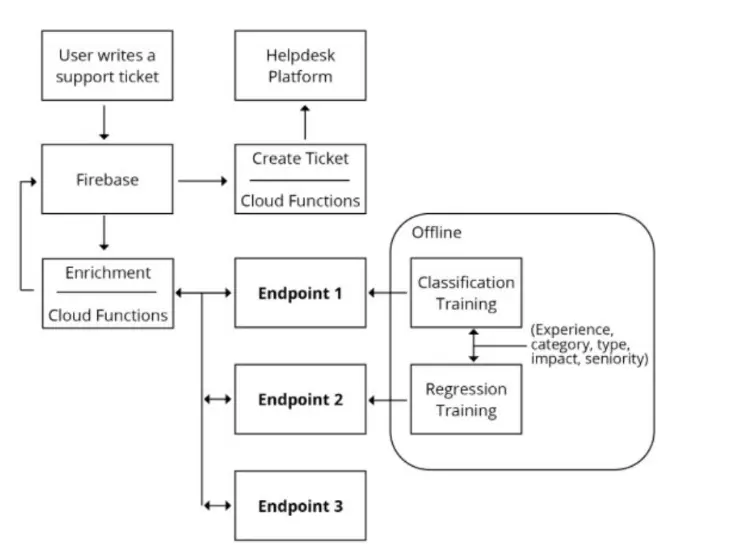
You are designing an architecture with a serverless ML system to enrich customer support tickets with informative metadata before they are routed to a support agent. You need a set of models to predict ticket priority, predict ticket resolution time, and perform sentiment analysis to help agents make strategic decisions when they process support requests. Tickets are not expected to have any domain-specific terms or jargon.

The proposed architecture has the following flow:

Which endpoints should the Enrichment Cloud Functions call?

Correct Answer: B. 1 Vertex Al. 2 Vertex Al. 3 Cloud Natural Language API
Explanation:

Vertex AI is a unified platform for building and deploying ML models on Google Cloud. It supports both custom and AutoML models, and provides various tools and services for ML development, such as Vertex Pipelines, Vertex Vizier, Vertex Explainable AI, and Vertex Feature Store. Vertex AI can be used to create models for predicting ticket priority and resolution time, as these are domain-specific tasks that require custom training data and evaluation metrics. Cloud Natural Language API is a pre-trained service that provides natural language understanding capabilities, such as sentiment analysis, entity analysis, syntax analysis, and content classification. Cloud Natural Language API can be used to perform sentiment analysis on the support tickets, as this is a general task that does not require domain-specific knowledge or jargon. The other options are not suitable for the given architecture. AutoML Natural Language and AutoML Vision are services that allow users to create custom natural language and vision models using their own data and labels. They are not needed for sentiment analysis, as Cloud Natural Language API already provides this functionality. Cloud Vision API is a pre-trained service that provides image analysis capabilities, such as object detection, face detection, text detection, and image labeling. It is not relevant for the support tickets, as they are not expected to have any images.Reference:

Vertex AI documentation

Cloud Natural Language API documentation


Question 14

You developed a Python module by using Keras to train a regression model. You developed two model architectures, linear regression and deep neural network (DNN). within the same module. You are using the -- raining_method argument to select one of the two methods, and you are using the Learning_rate-and num_hidden_layers arguments in the DNN. You plan to use Vertex Al's hypertuning service with a Budget to perform 100 trials. You want to identify the model architecture and hyperparameter values that minimize training loss and maximize model performance What should you do?

Correct Answer: C. Run one hypertuning job for 100 trials Set num_hidden_layers and learning_rate as conditional hyperparameters based on their parent hyperparameter training method.

Question 15

You need to build an ML model for a social media application to predict whether a user's submitted profile photo meets the requirements. The application will inform the user if the picture meets the requirements. How should you build a model to ensure that the application does not falsely accept a non-compliant picture?

Correct Answer: A. Use AutoML to optimize the model's recall in order to minimize false negatives.
Explanation:

Recall is the ratio of true positives to the sum of true positives and false negatives. It measures how well the model can identify all the relevant cases. In this scenario, the relevant cases are the pictures that do not meet the profile photo requirements. Therefore, minimizing false negatives means minimizing the cases where the model incorrectly predicts that a non-compliant picture meets the requirements. By using AutoML to optimize the model's recall, the model will be more likely to reject a non-compliant picture and inform the user accordingly.Reference:

[AutoML Vision] is a service that allows you to train custom ML models for image classification and object detection tasks. You can use AutoML to optimize your model for different metrics, such as recall, precision, or F1 score.

[Recall] is one of the evaluation metrics for ML models. It is defined as TP / (TP + FN), where TP is the number of true positives and FN is the number of false negatives. Recall measures how well the model can identify all the relevant cases. A high recall means that the model has a low rate of false negatives.