
Limited-Time Offer: Enjoy 50% Savings! Ends in 00h 00m 00s Coupon code: 50OFF
Skip to content

Free Guidewire Associate Certification - InsuranceSuite Developer - Proctored Exam InsuranceSuite-Developer Exam Questions

Page: 1 / 11 Total 154 questions

Want more questions? Get Premium Access.

Question 1

A query is known to return 500,000 rows. Which two are recommended to process all 500,000 rows efficiently? (Select two)

Correct Answer: B. Use setPageSize(); E. Chunk the results into page sets
Explanation:

Processing extremely large datasets---such as a result set containing 500,000 rows---presents a significant risk to application stability and performance. If a developer attempts to load all these records into the application server's memory simultaneously, it will likely trigger an OutOfMemoryError, as each entity instance consumes heap space. To mitigate this, Guidewire's Query API provides mechanisms for "lazy loading" and memory management.

The primary recommendation for handling massive result sets is to use setPageSize() (Option B). When setPageSize is configured on a query object, the system does not fetch all 500,000 rows at once. Instead, it retrieves data in smaller, manageable "chunks" or pages from the database. For example, if the page size is set to 100, the application only holds 100 entity instances in memory at any given time while iterating. As the iterator moves to the 101st record, the next page is transparently fetched. This process of chunking results into page sets (Option E) ensures that the memory footprint remains constant regardless of the total size of the result set.

While a batch process (Option C) is often used for long-running tasks, the question specifically asks how to process the query efficiently. Simply moving the code to a batch process without using setPageSize() would still result in a memory failure within that batch thread. Therefore, pagination is the underlying technical requirement for efficiency. Sorting (Option D) and external libraries like Google Iterables (Option A) do not address the fundamental memory consumption issues associated with large-scale database retrieval in the Guidewire platform.
Question 2

Which scenarios should database consistency checks be run in? (Select two)

Correct Answer: A. A customer created their own SQL script to populate empty columns in their production database.; B. A customer created a subtype of an entity that has a required column and imported data through the user interface.
Explanation:

:

Database Consistency Checks (DCCs) are designed to verify that the data in the physical database tables aligns perfectly with the metadata definitions in the Guidewire application.

The first critical scenario is when external SQL scripts are used (Option A). Guidewire's application layer usually handles all data validation and referential integrity. When a developer or DBA runs a SQL script directly against the database, they bypass these application-level checks. Running DCCs after such an operation is mandatory to ensure that the script didn't accidentally introduce null values into non-nullable columns or break foreign key constraints.

The second scenario involves data imports and subtype creation (Option B). When a new subtype is created with a "required" column, and data is imported---even through the UI or staging tables---there is a risk that existing records or improperly mapped import files might result in missing data for that required field. DCCs will identify these "logical" inconsistencies where the database contains a null value for a field that the application metadata now defines as mandatory.

Options C and D involve metadata changes (UI and Typelists) that do not typically risk corrupting existing table data in a way that DCCs are designed to catch. Option E is less critical because the column is "not required," so a null value is considered consistent with the data model.

Question 3

There is a requirement to add fields specific to Auto Rental Agencies. The additional fields required are; Auto Renta License, Offers Roadside Assistance, and Offers Insurance. Other fields will come from the existing ABCompanyVendor entity.

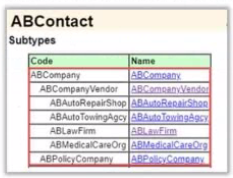
For reference, the diagram below shows the ABCompany subtype of the ABContact entity:

How should this requirement be configured following best practices?

Correct Answer: A. Create ABAutoRentalAgency.Ext as a subtype of A B Company Vendor and add the three fields to the subtype
Explanation:

In the Guidewire Data Model, managing entity relationships through Subtyping is a core principle for maintaining a clean, performant, and logically structured database. According to the InsuranceSuite Developer Fundamentals course, subtyping should be used when a specific group of entities shares a common base but requires additional, unique attributes.

1. Leveraging the Existing Hierarchy

The prompt specifies that "other fields will come from the existing ABCompanyVendor entity." In the Guidewire ContactManager (AB) data model, the hierarchy typically flows from ABContact ABCompany ABCompanyVendor. By creating ABAutoRentalAgency_Ext as a subtype of ABCompanyVendor (Option A), the new entity automatically inherits all properties from the vendor level (such as Tax ID or Vendor Number) and the company level (such as Name or Address). This maximizes code and metadata reuse.

2. Why Subtyping is Better than Extension

If a developer were to follow Option D and add these three fields directly to ABCompanyVendor, every vendor in the system---including Law Firms, Doctors, and Repair Shops---would have fields for "Auto Rental License." This is known as "data model pollution." It makes the database tables wider than necessary and complicates the UI, as you would need complex "visible" expressions to hide these irrelevant fields for other vendor types.

By creating a specific subtype, Guidewire's Table-per-Subtype or Table-per-Hierarchy (depending on version and configuration) storage strategy ensures that these three specific fields are only relevant to Auto Rental Agency records. This keeps the data model logically distinct and allows for the use of Modal PCFs, where the UI automatically switches to display the correct fields based on the subtype of the contact being viewed.

Best Practice Summary: Use the _Ext suffix for the new subtype to follow Cloud Delivery Standards and place it as deep in the existing hierarchy as possible to inherit the most relevant specialized fields.

Question 4

The sources describe different types of deployment strategies for InsuranceSuite applications. What are characteristics of a selective deployment?

Correct Answer: E. It allows deployment of only the selected InsuranceSuite applications.
Explanation:

In Guidewire Cloud Platform (GWCP), deployment flexibility is key to managing complex multi-application environments. A Selective Deployment (Option E) is a strategy where a developer or release manager chooses to deploy a subset of the available applications rather than the entire suite.

For example, if a developer has only made configuration changes to PolicyCenter and ContactManager, they can trigger a selective deployment for just those two applications while leaving ClaimCenter and BillingCenter at their current versions. This is particularly useful in non-production environments (like Dev or QA) to speed up the build-and-deploy cycle and minimize disruption to other teams working on different applications.

Key characteristics include:

Granular Control: You choose which specific components (e.g., PC, BC, CC, or Digital applications) are pushed.

Environment Stability: It reduces the risk of side effects on applications that haven't changed.

Pipeline Efficiency: Since fewer containers are being built and restarted, the overall deployment time is often shorter than a full suite deployment.

Option C describes the opposite (a Full Deployment). Option A is incorrect as production deployments typically follow a more rigid, all-inclusive "Release" structure to ensure synchronization. Option B is a data management task (masking/refreshing), which is distinct from the deployment of application code.

Question 5

An insurer imports information used to calculate replacement values for property claims on a monthly basis. The information is summarized in a non-editable list. A business analyst has presented a new requirement to support editing individual records when new information is received between scheduled imports. What location type will satisfy this requirement?

Correct Answer: B. A popup
Explanation:

In the Guidewire InsuranceSuite UI architecture, a Location is the fundamental building block used to define the user interface. When a requirement calls for a specific interaction---such as moving from a read-only list to an editable state for a single record---the developer must choose the correct location type based on the desired navigation behavior and user experience.

A Popup is a specific type of location that exists outside the standard navigation flow of the application's main tabs and sidebar. In Guidewire configuration, popups are frequently used for "drill-down" tasks where a user needs to view or edit the details of a specific object (like a property replacement record) without losing their place on the primary page. Because the business analyst requires the ability to edit individual records from a summarized, non-editable list, a popup is the ideal solution. It allows the developer to pass the specific record as a parameter, provide an editable DetailView within the popup, and then commit those changes back to the database. Once the user completes the edit, the popup closes, returning the user to the original list.

Contrastingly, a Location Group is merely a container for other locations (such as a set of tabs), and an Exit Point is used exclusively to redirect the user to an external URL outside of the Guidewire application. Furthermore, while Edit buttons are necessary components within a PCF, they are classified as widgets, not location types. Therefore, according to Guidewire's PCF Architecture standards, the popup is the only architectural location type listed that provides the necessary modal or semi-modal environment to facilitate record-level editing while maintaining the context of the parent list.

Question 6

What is a commit in Git?

Correct Answer: C. It is a snapshot of all of the files in an entire project at a specific point in time.
Explanation:

In the context of Developing in the Cloud and Source Control Management (SCM), understanding how Git operates is fundamental for a Guidewire developer. Unlike older version control systems that track "deltas" (individual file changes), Git thinks of its data more like a series of snapshots.

Every time a developer performs a Commit, Git takes a snapshot of what all the files in the project look like at that exact moment. To keep this efficient, if a file has not changed since the last commit, Git does not store the file again; it simply creates a link to the previous identical file it has already stored. This snapshot contains a unique SHA-1 hash (the commit ID), metadata about the author, the date, and a reference to the "parent" commit(s) that came before it.

This architectural design allows Guidewire developers to navigate through the history of the configuration (the modules and config folders) with high speed and reliability. Options A and B describe other Git concepts: a "floating pointer" is more descriptive of a Branch, and a "fixed pointer with a readable name" describes a Tag. Option D describes a simplified view of versioning that doesn't capture Git's holistic snapshot approach. By capturing the entire state of the project, commits ensure that the build chain in TeamCity can reliably reconstruct the application at any point in its history for testing or deployment to a Cloud Planet.

Question 7

A developer needs to create a new entity for renters that contains a field for the employment status. EmploymentStatusType is an existing typelist. How can the entity and new field be created to fulfill the requirement and follow best practices?

Correct Answer: A. Create Renter_Ext.eti under Extensions -> Entity with a typekey EmploymentStatus.
Explanation:

When adding a brand-new entity to the Guidewire data model, developers must use the Extensions directory. According to Data Model Architecture best practices, custom entities should be defined in an .eti (Entity Internal) file.

Option A is the correct implementation. Creating Renter_Ext.eti (or simply Renter.eti depending on specific project naming conventions, though _Ext is often used to denote custom work) allows the developer to define the new object from scratch. Because the EmploymentStatus field needs to reference an existing typelist (EmploymentStatusType), the field type must be a typekey, not a column. A column is used for primitive types like strings, integers, or decimals, whereas a typekey creates a relationship between the entity and the typelist metadata.

Option B is incorrect because .etx files are used for extending existing base entities (like adding a field to Claim), not for creating new ones. Option C is incorrect because it mistakenly identifies the field as a "column" and unnecessarily adds _Ext to a field on a custom entity (usually _Ext is reserved for extending base entities to avoid future collisions). Option D is completely irrelevant to entity creation as it attempts to add a code to a typelist instead of creating a data structure for a Renter. Following the structure in Option A ensures that the new Renter entity is properly indexed, supports localization via typelists, and is fully integrated into the InsuranceSuite persistence layer.

Question 8

A developer needs to prepare their local configuration changes for inclusion in the shared Bitbucket repository. According to the training, which actions, performed using Git-based commands in a GWCP context, are essential for this process? (Choose 3)

Correct Answer: A. Pulling the latest changes from the remote repository and rebasing the developer's commit(s).; B. Committing the changes locally.; E. Pushing the finished branch to the remote Bitbucket repository.
Explanation:

In the context of Developing in the Cloud and using the Guidewire Cloud Platform (GWCP), managing source code follows standard Git-based workflows integrated with Atlassian Bitbucket. For a developer to successfully share their local configuration changes with the rest of the team, they must follow a sequence that ensures code integrity and avoids "merge hell."

The first essential step is Committing the changes locally (Option B). This records the developer's progress in their local repository's history. However, because other developers may have pushed changes to the shared repository in the meantime, the developer must synchronize their local environment. This is achieved by Pulling the latest changes from the remote repository and rebasing (Option A). Rebasing is preferred in the Guidewire curriculum because it creates a clean, linear project history by moving the developer's custom commits to the "tip" of the updated master or feature branch. Finally, once the local branch is current and all conflicts are resolved, the developer must Push the finished branch to the remote Bitbucket repository (Option E). Only after the code is in Bitbucket can it be picked up by TeamCity for automated building and testing.

Deploying to a planet (Option C) and creating build schedules (Option D) are downstream activities that occur after the code has been successfully merged into the shared repository. Similarly, Quality Gates (Option F) are pre-configured environment standards rather than a step in the Git commit-and-push workflow. Adhering to the commit-rebase-push cycle is the verified best practice for collaborative cloud development.

Question 9

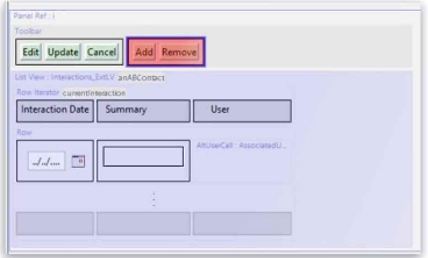
The Panel Ref in the screenshot below displays a List View with a toolbar. Add and Remove buttons have been added to the toolbar, but they appear in red, indicating an error. The Row Iterator has toAdd and toRemove buttons correctly defined.

What needs to be configured to fix the error?

Correct Answer: B. Set the iterator property of the Add and Remove buttons
Explanation:

In Guidewire InsuranceSuite PCF Configuration, maintaining the logical connection between UI widgets is fundamental to a functional interface. A common pattern in Guidewire applications involves a PanelRef that contains both a Toolbar and a ListView. When standard buttons such as Add or Remove are placed on a toolbar to manipulate the data within an associated list, they must be explicitly linked to the specific RowIterator that governs that list.

Even if the RowIterator itself has the necessary logic defined in its toAdd and toRemove properties (which specify the Gosu code to execute when an item is added or deleted), the Toolbar buttons remain "contextless" until their iterator property is configured. In Guidewire Studio, these buttons appear in red to indicate a validation error because the system does not know which collection of data the buttons are intended to act upon. By setting the iterator property of the Add and Remove buttons to match the ID of the RowIterator in the ListView, the developer establishes the required bridge.

This configuration is a core part of Container Widget Usage and PCF Architecture. Without this link, the system cannot determine which object should be passed to the toAdd logic or which selected row should be passed to the toRemove logic. Proper configuration ensures that the buttons are only active when the appropriate RowIterator is in scope and that the application maintains data integrity during UI-driven array modifications. Following this best practice allows the Studio compiler to validate the action and ensures a seamless user experience where toolbar actions correctly target the intended data set.