
Question 1
The Vault encryption key is stored in Vault's backend storage.
The Vault encryption key is stored in Vault's backend storage.
Which of the following vault lease operations uses a lease _ id as an argument? Choose two correct answers.
Security requirements demand that no secrets appear in the shell history. Which command does not meet this requirement?
The command that does not meet the security requirement of not having secrets appear in the shell history is B. vault kv put secret/password value-itsasecret. This command would store the secret value ''itsasecret'' in the key/value secrets engine at the path secret/password, but it would also expose the secret value in the shell history, which could be accessed by other users or malicious actors. This is not a secure way of storing secrets in Vault.
The other commands are more secure ways of storing secrets in Vault without revealing them in the shell history. A. generate-password | vault kv put secret/password value would use a pipe to pass the output of the generate-password command, which could be a script or a tool that generates a random password, to the vault kv put command, which would store the password in the key/value secrets engine at the path secret/password. The password would not be visible in the shell history, only the commands. C. vault kv put secret/password value=@data.txt would use the @ syntax to read the secret value from a file named data.txt, which could be encrypted or protected by file permissions, and store it in the key/value secrets engine at the path secret/password. The file name would be visible in the shell history, but not the secret value. D. vault kv put secret/password value-SSECRET_VALUE would use the -S syntax to read the secret value from the environment variable SECRET_VALUE, which could be set and unset in the shell session, and store it in the key/value secrets engine at the path secret/password. The environment variable name would be visible in the shell history, but not the secret value.
[Write Secrets | Vault | HashiCorp Developer]
How would you describe the value of using the Vault transit secrets engine?
Which Vault secret engine may be used to build your own internal certificate authority?
What command creates a secret with the key "my-password" and the value "53cr3t" at path "my-secrets" within the KV secrets engine mounted at "secret"?
The vault kv put command writes the data to the given path in the K/V secrets engine. The command requires the mount path of the K/V secrets engine, the secret path, and the key-value pair to store. The mount path can be specified with the -mount flag or as part of the secret path. The key-value pair can be given as an argument or read from a file or stdin. The correct syntax for the command is:
vault kv put -mount=secret my-secrets/my-password 53cr3t
or
vault kv put secret/my-secrets my-password=53cr3t
What environment variable overrides the CLI's default Vault server address?
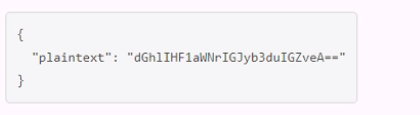
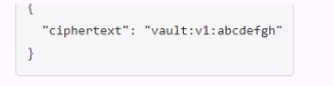
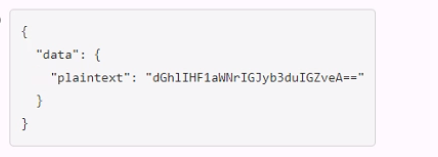
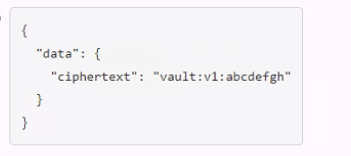
A user issues the following cURL command to encrypt data using the transit engine and the Vault AP:

Which payload.json file has the correct contents?
A.
B.
C.
D.
You are performing a high number of authentications in a short amount of time. You're experiencing slow throughput for token generation. How would you solve this problem?
You are using Vault's Transit secrets engine to encrypt your dat
a. You want to reduce the amount of content encrypted with a single key in case the key gets compromised. How would you do this?