Limited-Time Offer: Enjoy 50% Savings! Ends in 00h 00m 00s Coupon code: 50OFF
Skip to content

Free HP Aruba Certified Network Security Associate Exam HPE6-A78 Exam Questions

Page: 1 / 12 Total 168 questions

Want more questions? Get Premium Access.

Question 1

Device A is contacting https://arubapedia.arubanetworks.com. The web server sends a certificate chain. What does the browser do as part of validating the web server certificate?

Correct Answer: B. It makes sure the certificate has a DNS SAN that matches arubapedia.arubanetworks.com
Explanation:

When a device like Device A contacts a secure website and receives a certificate chain from the server, the browser's primary task is to validate the web server's certificate to ensure it is trustworthy. Part of this validation includes checking that the certificate contains a DNS Subject Alternative Name (SAN) that matches the domain name of the website being accessed---in this case, arubapedia.arubanetworks.com. This ensures that the certificate was indeed issued to the entity operating the domain and helps prevent man-in-the-middle attacks where an invalid certificate could be presented by an attacker. The DNS SAN check is critical because it directly ties the digital certificate to the domain it secures, confirming the authenticity of the website to the user's browser.


Question 2

You are deploying a new wireless solution with an Aruba Mobility Master (MM). Aruba Mobility Controllers (MCs), and campus APs (CAPs). The solution will include a WLAN that uses Tunnel for the forwarding mode and WPA3-Enterprise for the security option.

You have decided to assign the WLAN to VLAN 301, a new VLAN. A pair of core routing switches will act as the default router for wireless user traffic.

Which links need to carry VLAN 301?

Correct Answer: B. only links between MC ports and the core routing switches
Explanation:

In a wireless network deployment with Aruba Mobility Master (MM), Mobility Controllers (MCs), and Campus APs (CAPs), where a WLAN is configured to use Tunnel mode for forwarding, the user traffic is tunneled from the APs to the MCs. VLAN 301, which is assigned to the WLAN, must be present on the links from the MCs to the core routing switches because these switches act as the default router for the wireless user traffic. It is not necessary for the VLAN to be present on all campus LAN links or AP links, only between the MCs and the core routing switches where the routing for VLAN 301 will occur.


Question 3

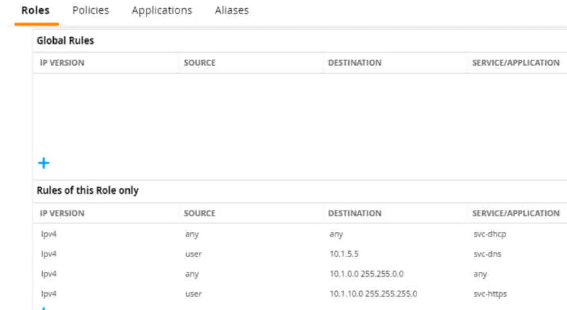
Refer to the exhibit.

A diem is connected to an ArubaOS Mobility Controller. The exhibit snows all Tour firewall rules that apply to this diem

What correctly describes how the controller treats HTTPS packets to these two IP addresses, both of which are on the other side of the firewall

10.1 10.10

203.0.13.5

Correct Answer: B. It permits the packet to 10.1.10.10 and drops the packet to 203 0.13.5
Explanation:

Referring to the exhibit, the ArubaOS Mobility Controller treats HTTPS packets based on the firewall rules applied to the client. The rule that allows svc-https service for destination IP range 10.1.0.0 255.255.0.0 would permit an HTTPS packet to 10.1.10.10 since this IP address falls within the specified range. There are no rules shown that would allow traffic to the IP address 203.0.13.5; hence, the packet to this address would be dropped.

:

ArubaOS firewall configuration guides detailing how firewall rules are interpreted and applied to traffic.

Network security textbooks explaining firewall rule processing and packet filtering based on source and destination IP addresses.


Question 4

A user attempts to connect to an SSID configured on an AOS-8 mobility architecture with Mobility Controllers (MCs) and APs. The SSID enforces WPA3-Enterprise security and uses HPE Aruba Networking ClearPass Policy Manager (CPPM) as the authentication server. The WLAN has initial role, logon, and 802.1X default role, guest.

A user attempts to connect to the SSID, and CPPM sends an Access-Accept with an Aruba-User-Role VSA of "contractor," which exists on the MC.

What does the MC do?

Correct Answer: B. Applies the rules in the contractor role
Explanation:

In an AOS-8 mobility architecture, the Mobility Controller (MC) manages user roles and policies for wireless clients connecting to SSIDs. When a user connects to an SSID with WPA3-Enterprise security, the MC uses 802.1X authentication to validate the user against an authentication server, in this case, HPE Aruba Networking ClearPass Policy Manager (CPPM). The SSID is configured with specific roles:

Initial role: Applied before authentication begins (not specified in the question, but typically used for pre-authentication access).

Logon role: Applied during the authentication process to allow access to authentication services (e.g., DNS, DHCP, or RADIUS traffic).

802.1X default role (guest): Applied if 802.1X authentication fails or if no specific role is assigned by the RADIUS server after successful authentication.

In this scenario, the user successfully authenticates, and CPPM sends an Access-Accept message with an Aruba-User-Role Vendor-Specific Attribute (VSA) set to 'contractor.' The 'contractor' role exists on the MC, meaning it is a predefined role in the MC's configuration.

When the MC receives the Aruba-User-Role VSA, it applies the specified role ('contractor') to the user session, overriding the default 802.1X role ('guest'). The MC does not combine the contractor role with other roles like logon or guest; it applies only the role specified by the RADIUS server (CPPM) in the Aruba-User-Role VSA. This is the standard behavior in AOS-8 for role assignment after successful authentication when a VSA specifies a role.

Option A, 'Applies the rules in the logon role, then guest role, and the contractor role,' is incorrect because the MC does not apply multiple roles in sequence. The logon role is used only during authentication, and the guest role (default 802.1X role) is overridden by the contractor role specified in the VSA.

Option C, 'Applies the rules in the contractor role and the logon role,' is incorrect because the logon role is no longer applied once authentication is complete; only the contractor role is applied.

Option D, 'Applies the rules in the contractor role and guest role,' is incorrect because the guest role (default 802.1X role) is not applied when a specific role is assigned via the Aruba-User-Role VSA.

The HPE Aruba Networking AOS-8 8.11 User Guide states:

'When a user authenticates successfully via 802.1X, the Mobility Controller applies the role specified in the Aruba-User-Role VSA returned by the RADIUS server in the Access-Accept message. If the role specified in the VSA exists on the controller, it is applied to the user session, overriding any default 802.1X role configured for the WLAN. The controller does not combine the VSA-specified role with other roles, such as the initial, logon, or default roles.' (Page 305, Role Assignment Section)

Additionally, the HPE Aruba Networking ClearPass Policy Manager 6.11 User Guide notes:

'ClearPass can send the Aruba-User-Role VSA in a RADIUS Access-Accept message to assign a specific role to the user on Aruba Mobility Controllers. The role specified in the VSA takes precedence over any default roles configured on the WLAN, ensuring that the user is placed in the intended role.' (Page 289, RADIUS Enforcement Section)

:

HPE Aruba Networking AOS-8 8.11 User Guide, Role Assignment Section, Page 305.

HPE Aruba Networking ClearPass Policy Manager 6.11 User Guide, RADIUS Enforcement Section, Page 289.


Question 5

What is a correct description of a stage in the Lockheed Martin kill chain?

Correct Answer: A. In the delivery stage, the hacker delivers malware to targeted users, often with spear phishing methods.
Explanation:

The Lockheed Martin Cyber Kill Chain is a framework that describes the stages of a cyber attack, from initial reconnaissance to achieving the attacker's objective. It is often referenced in HPE Aruba Networking security documentation to help organizations understand and mitigate threats.

Option A, 'In the delivery stage, the hacker delivers malware to targeted users, often with spear phishing methods,' is correct. The delivery stage in the Lockheed Martin kill chain involves the attacker transmitting the weaponized payload (e.g., malware) to the target. Spear phishing, where the attacker sends a targeted email with a malicious attachment or link, is a common delivery method. This stage follows reconnaissance (gathering information) and weaponization (creating the malware).

Option B, 'In the installation phase, hackers seek to install vulnerabilities in operating systems across the network,' is incorrect. The installation phase involves the attacker installing the malware on the target system to establish persistence (e.g., by creating a backdoor). It does not involve 'installing vulnerabilities'; vulnerabilities are pre-existing weaknesses that the attacker exploits in the exploitation phase.

Option C, 'In the weaponization stage, malware installed in the targeted network seeks to attack intrusion prevention systems (IPS),' is incorrect. The weaponization stage occurs before delivery and involves the attacker creating a deliverable payload (e.g., combining malware with an exploit). The malware is not yet installed in the target network during this stage, and attacking an IPS is not the purpose of weaponization.

Option D, 'In the exploitation phase, hackers conduct social engineering attacks to exploit weak algorithms and crack user accounts,' is incorrect. The exploitation phase involves the attacker exploiting a vulnerability (e.g., a software flaw) to execute the malware on the target system. Social engineering (e.g., phishing) is typically part of the delivery stage, not exploitation, and 'exploiting weak algorithms' is not a standard description of this phase.

The HPE Aruba Networking Security Guide states:

'The Lockheed Martin Cyber Kill Chain describes the stages of a cyber attack. In the delivery stage, the attacker delivers the weaponized payload to the target, often using methods like spear phishing emails with malicious attachments or links. This stage follows reconnaissance (gathering information about the target) and weaponization (creating the malware payload).' (Page 18, Cyber Kill Chain Overview Section)

Additionally, the HPE Aruba Networking AOS-8 8.11 User Guide notes:

'Understanding the Lockheed Martin kill chain helps in threat mitigation. The delivery stage involves the attacker sending malware to the target, commonly through spear phishing, where a targeted email tricks the user into downloading the malware or clicking a malicious link.' (Page 420, Threat Mitigation Section)

:

HPE Aruba Networking Security Guide, Cyber Kill Chain Overview Section, Page 18.

HPE Aruba Networking AOS-8 8.11 User Guide, Threat Mitigation Section, Page 420.


Question 6

Which correctly describes one of HPE Aruba Networking ClearPass Policy Manager's (CPPM's) device profiling methods?

Correct Answer: C. CPPM can analyze settings such as TTL and time window size in endpoints' TCP traffic in order to fingerprint the OS.
Explanation:

HPE Aruba Networking ClearPass Policy Manager (CPPM) uses device profiling to identify and classify endpoints on the network, enabling granular access control based on device type, OS, or other attributes. CPPM supports both passive and active profiling methods.

Option C, 'CPPM can analyze settings such as TTL and time window size in endpoints' TCP traffic in order to fingerprint the OS,' is correct. TCP fingerprinting is a passive profiling method used by CPPM. It involves analyzing TCP packet headers, such as the Time To Live (TTL) value and TCP window size, which vary between operating systems (e.g., Windows, Linux, macOS). CPPM captures this traffic (e.g., via mirrored traffic from a switch or controller) and matches the TCP attributes against its fingerprint database to identify the OS of the endpoint.

Option A, 'CPPM can use Wireshark to actively probe devices, analyze their traffic patterns, and construct an endpoint profile,' is incorrect. CPPM does not use Wireshark for profiling; Wireshark is a third-party packet analysis tool. CPPM has its own built-in profiling engine and does not rely on external tools like Wireshark for active probing.

Option B, 'CPPM can use SNMP to configure Aruba switches and mobility devices to mirror client traffic to CPPM for analysis,' is incorrect. While CPPM can receive mirrored traffic for profiling (e.g., via SPAN or mirror ports), it does not use SNMP to configure the mirroring. The configuration of traffic mirroring is typically done manually on the switch or controller (e.g., using a datapath mirror on an MC), not via SNMP by CPPM.

Option D, 'CPPM can analyze settings such as TCP/UDP ports used for HTTP, DHCP, and DNS in endpoints' traffic to fingerprint the OS,' is incorrect. While CPPM does analyze HTTP, DHCP, and DNS traffic for profiling, it does not fingerprint the OS based on TCP/UDP ports. Instead, it uses attributes like DHCP Option 55 (for DHCP fingerprinting) or HTTP User-Agent strings (for HTTP fingerprinting) to identify devices, not the ports themselves.

The HPE Aruba Networking ClearPass Policy Manager 6.11 User Guide states:

'ClearPass supports TCP fingerprinting as a passive profiling method to identify the operating system of endpoints. By analyzing TCP packet headers, such as the Time To Live (TTL) value and TCP window size, ClearPass can fingerprint the OS of a device. For example, Windows devices typically have a TTL of 128, while Linux devices often have a TTL of 64. These attributes are matched against ClearPass's fingerprint database to classify the device.' (Page 248, TCP Fingerprinting Section)

Additionally, the ClearPass Device Insight Data Sheet notes:

'ClearPass uses passive profiling techniques like TCP fingerprinting to identify device operating systems. By examining TCP attributes such as TTL and window size, ClearPass can accurately determine whether a device is running Windows, Linux, macOS, or another OS, enabling precise policy enforcement.' (Page 3, Profiling Methods Section)

:

HPE Aruba Networking ClearPass Policy Manager 6.11 User Guide, TCP Fingerprinting Section, Page 248.

ClearPass Device Insight Data Sheet, Profiling Methods Section, Page 3.


Question 7

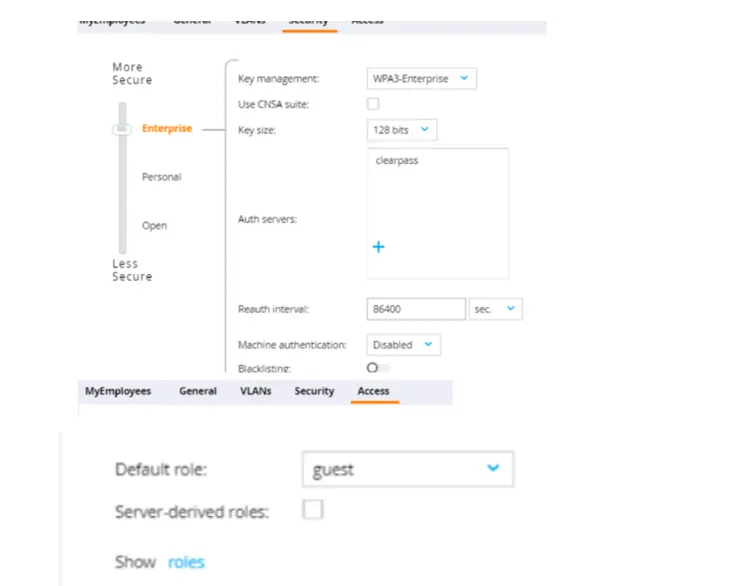
The first exhibit shows roles on the MC, listed in alphabetic order. The second and third exhibits show the configuration for a WLAN to which a client connects. Which description of the role assigned to a user under various circumstances is correct?

Correct Answer: D. A user authenticates successfully with 802.1X, and the RADIUS Access-Accept includes an Aruba-User-Role VSA set to 'employeel.' The client's role is 'employeel.'
Explanation:

In a WLAN setup that uses 802.1X for authentication, the role assigned to a user is determined by the result of the authentication process. When a user successfully authenticates via 802.1X, the RADIUS server may include a Vendor-Specific Attribute (VSA), such as the Aruba-User-Role, in the Access-Accept message. This attribute specifies the role that should be assigned to the user. If the RADIUS Access-Accept message includes an Aruba-User-Role VSA set to 'employee1', the client should be assigned the 'employee1' role, as per the VSA, and not the default 'guest' role. The 'guest' role would typically be a fallback if no other role is specified or if the authentication fails.


Question 8

A company is deploying ArubaOS-CX switches to support 135 employees, which will tunnel client traffic to an Aruba Mobility Controller (MC) for the MC to apply firewall policies and deep packet inspection (DPI). This MC will be dedicated to receiving traffic from the ArubaOS-CX switches.

What are the licensing requirements for the MC?

Correct Answer: B. one PEF license per-switch
Explanation:

When deploying ArubaOS-CX switches that tunnel client traffic to an Aruba Mobility Controller (MC), the licensing requirements typically involve Policy Enforcement Firewall (PEF) licenses. These licenses enable the MC to enforce firewall policies and perform deep packet inspection (DPI). Therefore, for each switch tunneling traffic to the MC, a PEF license would be necessary.


Question 9

What is a benefit of deploying HPE Aruba Networking ClearPass Device Insight?

Correct Answer: A. Highly accurate endpoint classification for environments with many device types, including Internet of Things (IoT)
Explanation:

HPE Aruba Networking ClearPass Device Insight is an advanced profiling solution integrated with ClearPass Policy Manager (CPPM) to enhance endpoint classification. It uses a combination of passive and active profiling techniques, along with machine learning, to identify and categorize devices on the network.

Option A, 'Highly accurate endpoint classification for environments with many device types, including Internet of Things (IoT),' is correct. ClearPass Device Insight is designed to provide precise device profiling, especially in complex environments with diverse device types, such as IoT devices (e.g., smart cameras, thermostats). It leverages deep packet inspection (DPI), behavioral analysis, and a vast fingerprint database to accurately classify devices, enabling granular policy enforcement based on device type.

Option B, 'Simpler troubleshooting of ClearPass solutions across an environment with multiple ClearPass Policy Managers,' is incorrect. ClearPass Device Insight focuses on device profiling, not on troubleshooting ClearPass deployments. Troubleshooting across multiple CPPM instances would involve tools like the Event Viewer or Access Tracker, not Device Insight.

Option C, 'Visibility into devices' 802.1X supplicant settings and automated certificate deployment,' is incorrect. ClearPass Device Insight does not provide visibility into 802.1X supplicant settings or automate certificate deployment. Those functions are handled by ClearPass Onboard (for certificate deployment) or Access Tracker (for authentication details).

Option D, 'Agent-based analysis of devices' security settings and health status, with the ability to implement quarantining,' is incorrect. ClearPass Device Insight does not use agents for analysis; it relies on network traffic and active/passive profiling. Agent-based analysis and health status checks are features of ClearPass OnGuard, not Device Insight. Quarantining can be implemented by CPPM policies, but it's not a direct benefit of Device Insight.

The ClearPass Device Insight Data Sheet states:

'ClearPass Device Insight provides highly accurate endpoint classification for environments with many device types, including Internet of Things (IoT) devices. It uses a combination of passive and active profiling techniques, deep packet inspection (DPI), and machine learning to identify and categorize devices with precision, enabling organizations to enforce granular access policies in complex networks.' (Page 2, Benefits Section)

Additionally, the HPE Aruba Networking ClearPass Policy Manager 6.11 User Guide notes:

'ClearPass Device Insight enhances device profiling by offering highly accurate classification, especially for IoT and other non-traditional devices. It leverages a vast fingerprint database and advanced analytics to identify device types, making it ideal for environments with diverse endpoints.' (Page 252, Device Insight Overview Section)

:

ClearPass Device Insight Data Sheet, Benefits Section, Page 2.

HPE Aruba Networking ClearPass Policy Manager 6.11 User Guide, Device Insight Overview Section, Page 252.


Question 10

What is a difference between radius and TACACS+?

Correct Answer: A. RADIUS combines the authentication and authorization process while TACACS+ separates them.
Explanation:

RADIUS and TACACS+ are both protocols used for networking authentication, but they handle the processes of authentication and authorization differently. RADIUS (Remote Authentication Dial-In User Service) combines authentication and authorization into a single process, whereas TACACS+ (Terminal Access Controller Access-Control System Plus) separates these processes. This separation in TACACS+ allows more flexible policy enforcement and better control over commands a user can execute. This difference is well-documented in various network security resources, including Cisco's technical documentation and security protocol manuals.


Question 11

You have deployed a new HPE Aruba Networking Mobility Controller (MC) and campus APs (CAPs). One of the WLANs enforces 802.1X authentication to HPE Aruba Networking ClearPass Policy Manager (CPPM). When you test connecting the client to the WLAN, the test fails. You check ClearPass Access Tracker and cannot find a record of the authentication attempt. You ping from the MC to CPPM, and the ping is successful.

What is a good next step for troubleshooting?

Correct Answer: C. Check CPPM Event Viewer.
Explanation:

In this scenario, a new HPE Aruba Networking Mobility Controller (MC) and campus APs (CAPs) are deployed, with a WLAN configured for 802.1X authentication using HPE Aruba Networking ClearPass Policy Manager (CPPM) as the RADIUS server. A client test fails, and no record of the authentication attempt appears in ClearPass Access Tracker. However, a ping from the MC to CPPM is successful, confirming basic network connectivity between the MC and CPPM.

The absence of a record in Access Tracker indicates that CPPM did not receive the RADIUS authentication request from the MC, or the request was rejected at a low level before being logged in Access Tracker. Access Tracker typically logs all RADIUS authentication attempts (successful or failed), so the lack of a record suggests a configuration or connectivity issue at the RADIUS level.

Option C, 'Check CPPM Event Viewer,' is correct. The CPPM Event Viewer logs system-level events, including RADIUS-related errors that might not appear in Access Tracker. For example, if the MC's IP address is not configured as a Network Access Device (NAD) in CPPM, or if the shared secret between the MC and CPPM does not match, CPPM may reject the RADIUS request before it reaches Access Tracker. The Event Viewer will log such errors (e.g., 'RADIUS authentication attempt from unknown NAD'), providing insight into why the request was not processed.

Option A, 'Renew CPPM's RADIUS/EAP certificate,' is incorrect because the issue is that CPPM did not receive or process the authentication request (no record in Access Tracker). If there were a certificate issue (e.g., an expired or untrusted certificate), the request would still reach CPPM, and Access Tracker would log a failure with a certificate-related error.

Option B, 'Check connectivity between CPPM and a backend directory server,' is incorrect because the issue occurs before CPPM processes the authentication request. If CPPM cannot contact a backend directory server (e.g., Active Directory), the authentication attempt would still be logged in Access Tracker with a failure reason related to the directory server.

Option D, 'Reset the user credentials,' is incorrect because the issue is not related to the user's credentials. The authentication request never reached CPPM, so the credentials were not evaluated.

The HPE Aruba Networking ClearPass Policy Manager 6.11 User Guide states:

'If an authentication attempt does not appear in Access Tracker, it indicates that the RADIUS request was not received by ClearPass or was rejected at a low level before being logged. The Event Viewer (Monitoring > Event Viewer) should be checked for system-level errors, such as 'RADIUS authentication attempt from unknown NAD' or shared secret mismatches. For example, if the Network Access Device (NAD) IP address of the Mobility Controller is not configured in ClearPass, or if the shared secret does not match, the request will be dropped, and an error will be logged in the Event Viewer.' (Page 301, Troubleshooting RADIUS Issues Section)

Additionally, the HPE Aruba Networking AOS-8 8.11 User Guide notes:

'When troubleshooting 802.1X authentication issues, verify that the Mobility Controller can communicate with the RADIUS server. If a ping is successful but no authentication records appear in the RADIUS server's logs (e.g., ClearPass Access Tracker), check the RADIUS server's system logs (e.g., ClearPass Event Viewer) for errors related to NAD configuration or shared secret mismatches.' (Page 498, Troubleshooting 802.1X Authentication Section)

:

HPE Aruba Networking ClearPass Policy Manager 6.11 User Guide, Troubleshooting RADIUS Issues Section, Page 301.

HPE Aruba Networking AOS-8 8.11 User Guide, Troubleshooting 802.1X Authentication Section, Page 498.


Question 12

What is a use case for tunneling traffic between an Aruba switch and an AruDa Mobility Controller (MC)?

Correct Answer: C. securing the network infrastructure control plane by creating a virtual out-of-band-management network
Explanation:

Tunneling traffic between an Aruba switch and an Aruba Mobility Controller (MC) allows for the centralized application of firewall policies and deep packet inspection to wired clients. By directing traffic through the MC, network administrators can implement a consistent set of security policies across both wired and wireless segments of the network, enhancing overall network security posture.


Question 13

What is one thing can you determine from the exhibits?

Correct Answer: A. CPPM originally assigned the client to a role for non-profiled devices. It sent a CoA to the authenticator after it categorized the device.
Explanation:

Based on the exhibits which seem to show RADIUS authentication and CoA logs, one can determine that CPPM (ClearPass Policy Manager) initially assigned the client to a role meant for non-profiled devices and then sent a CoA to the network access device (authenticator) once the device was categorized. This is a common workflow in network access control, where a device is first given limited access until it can be properly identified, after which appropriate access policies are applied.


Question 14

What is a vulnerability of an unauthenticated Dime-Heliman exchange?

Correct Answer: A. A hacker can replace the public values exchanged by the legitimate peers and launch an MITM attack.
Explanation:

The vulnerability of an unauthenticated Diffie-Hellman exchange, particularly when it comes to the risk of a man-in-the-middle (MITM) attack, is a significant concern. In this scenario, a hacker can intercept the public values exchanged between two legitimate parties and substitute them with their own. This allows the attacker to decrypt or manipulate the messages passing between the two original parties without them knowing. This answer is based on the fundamental principles of how Diffie-Hellman key exchange works and its vulnerabilities without authentication mechanisms. Reference materials from cryptographic textbooks and security protocols detail these vulnerabilities, such as those found in standards and publications by organizations like NIST.


Question 15

A company has an AOS controller-based solution with a WPA3-Enterprise WLAN, which authenticates wireless clients to HPE Aruba Networking ClearPass Policy Manager (CPPM). The company has decided to use digital certificates for authentication. A user's Windows domain computer has had certificates installed on it. However, the Networks and Connections window shows that authentication has failed for the user. The Mobility Controller's (MC's) RADIUS events show that it is receiving Access-Rejects for the authentication attempt.

What is one place that you can look for deeper insight into why this authentication attempt is failing?

Correct Answer: C. The Alerts tab in the authentication record in CPPM Access Tracker
Explanation:

The scenario involves an AOS-8 controller-based solution with a WPA3-Enterprise WLAN using HPE Aruba Networking ClearPass Policy Manager (CPPM) for authentication. The company is using digital certificates for authentication (likely EAP-TLS, as it's the most common certificate-based method for WPA3-Enterprise). A user's Windows domain computer has certificates installed, but authentication fails. The Mobility Controller (MC) logs show Access-Rejects from CPPM, indicating that CPPM rejected the authentication attempt.

Access-Reject: An Access-Reject message from CPPM means that the authentication failed due to a policy violation, certificate issue, or other configuration mismatch. To troubleshoot, we need to find detailed information about why CPPM rejected the request.

Option C, 'The Alerts tab in the authentication record in CPPM Access Tracker,' is correct. Access Tracker in CPPM logs all authentication attempts, including successful and failed ones. For a failed attempt (Access-Reject), the authentication record in Access Tracker will include an Alerts tab that provides detailed reasons for the failure. For example, if the client's certificate is invalid (e.g., expired, not trusted, or missing a required attribute), or if the user does not match a policy in CPPM, the Alerts tab will specify the exact issue (e.g., 'Certificate not trusted,' 'User not found in directory').

Option A, 'The reports generated by HPE Aruba Networking ClearPass Insight,' is incorrect. ClearPass Insight is used for generating reports and analytics (e.g., trends, usage patterns), not for real-time troubleshooting of specific authentication failures.

Option B, 'The RADIUS events within the CPPM Event Viewer,' is incorrect. The Event Viewer logs system-level events (e.g., service crashes, NAD mismatches), not detailed authentication failure reasons. While it might log that an Access-Reject was sent, it won't provide the specific reason for the rejection.

Option D, 'The packets captured on the MC control plane destined to UDP 1812,' is incorrect. Capturing packets on the MC control plane for UDP 1812 (RADIUS authentication port) can show the RADIUS exchange, but it won't provide the detailed reason for the Access-Reject. The MC logs already show the Access-Reject, so the issue lies on the CPPM side, and Access Tracker provides more insight.

The HPE Aruba Networking ClearPass Policy Manager 6.11 User Guide states:

'Access Tracker (Monitoring > Live Monitoring > Access Tracker) logs all authentication attempts, including failed ones. For an Access-Reject, the authentication record in Access Tracker includes an Alerts tab that provides detailed reasons for the failure. For example, in a certificate-based authentication (e.g., EAP-TLS), the Alerts tab might show 'Certificate not trusted' if the client's certificate is not trusted by ClearPass, or 'User not found' if the user does not match a policy. This is the primary place to look for deeper insight into authentication failures.' (Page 299, Access Tracker Troubleshooting Section)

Additionally, the HPE Aruba Networking AOS-8 8.11 User Guide notes:

'If the Mobility Controller logs show an Access-Reject from the RADIUS server (e.g., ClearPass), check the RADIUS server's authentication logs for details. In ClearPass, the Access Tracker provides detailed failure reasons in the Alerts tab of the authentication record, such as certificate issues or policy mismatches.' (Page 500, Troubleshooting 802.1X Authentication Section)

:

HPE Aruba Networking ClearPass Policy Manager 6.11 User Guide, Access Tracker Troubleshooting Section, Page 299.

HPE Aruba Networking AOS-8 8.11 User Guide, Troubleshooting 802.1X Authentication Section, Page 500.