Limited-Time Offer: Enjoy 50% Savings! Ends in 00h 00m 00s Coupon code: 50OFF
Skip to content

Free HP Aruba Certified Network Security Professional Exam HPE7-A02 Exam Questions

Page: 1 / 11 Total 156 questions

Want more questions? Get Premium Access.

Question 1

HPE Aruba Networking Central displays an alert about an Infrastructure Attack that was detected. You go to the Security > RAPIDS events and see that the attack

was "Detect adhoc using Valid SSID."

What is one possible next step?

Correct Answer: A. Use HPE Aruba Networking Central floorplans or the detecting AP identities to locate the general area for the threat.
Explanation:

When HPE Aruba Networking Central detects an Infrastructure Attack, such as 'Detect adhoc using Valid SSID,' the next step is to locate the general area of the threat. You can use HPE Aruba Networking Central floorplans or the identities of the detecting APs to pinpoint the approximate location of the adhoc network. This allows you to physically investigate and address the source of the threat, ensuring that unauthorized or rogue networks are quickly identified and mitigated.


Question 2

A company has AOS-CX switches managed by HPE Aruba Networking Central. The network infrastructure devices authenticate clients to HPE Aruba Networking ClearPass Policy Manager (CPPM), which is integrated with HPE Aruba Networking ClearPass Device Insight (CPDI). You have seen suspicious activity on a client connected to one of the switches. To investigate the client's activity further, you need to know all of the IP addresses that it has used in the past two weeks.

Where can you find this information collected together?

Correct Answer: D. In CPDI's History tab for the client
Explanation:

ClearPass Device Insight is the correct source for endpoint history and behavioral investigation. CPDI collects device identity, profiling, address, and activity information over time. The History tab for a client is designed to show historical information about that endpoint, including IP addresses used during previous observations. CPPM's Device Profiler dashboard focuses mainly on classification and endpoint attributes, not a consolidated two-week IP history. Aruba Central's Audit Trail records administrative and infrastructure changes, not full endpoint address history. Local switch logs might contain fragments of information, but they are not a centralized endpoint-investigation view. For suspicious client investigation and historical IP-address tracking, CPDI's History tab is the correct location.


Question 3

A company has a variety of HPE Aruba Networking solutions, including an HPE Aruba Networking infrastructure and HPE Aruba Networking ClearPass Policy

Manager (CPPM). The company passes traffic from the corporate LAN destined to the data center through a third-party SRX firewall. The company would like to

further protect itself from internal threats.

What is one solution that you can recommend?

Correct Answer: A. Have the third-party firewall send Syslogs to CPPM, which can work with network devices to lock internal attackers out of the network.
Explanation:

To further protect the company from internal threats, you can recommend having the third-party SRX firewall send Syslogs to HPE Aruba Networking ClearPass Policy Manager (CPPM). ClearPass can analyze these logs to detect potential security incidents and coordinate with network devices to respond to threats. By integrating Syslog data from the firewall, CPPM can identify malicious activities and take actions such as locking internal attackers out of the network or triggering specific security policies. This approach enhances the company's internal threat detection and response capabilities.


Question 4

A company has HPE Aruba Networking APs, which authenticate users to HPE Aruba Networking ClearPass Policy Manager (CPPM).

What does HPE Aruba Networking recommend as the preferred method for assigning clients to a role on the AOS firewall?

Correct Answer: B. Configure CPPM to assign the role using a RADIUS enforcement profile with an Aruba-User-Role VSA.
Explanation:

The preferred method for assigning clients to a role on the AOS firewall is to configure HPE Aruba Networking ClearPass Policy Manager (CPPM) to assign the role using a RADIUS enforcement profile with an Aruba-User-Role VSA (Vendor-Specific Attribute). This method allows ClearPass to dynamically assign the appropriate user roles to clients during the authentication process, ensuring that role-based access policies are consistently enforced across the network.


Question 5

A company has HPE Aruba Networking APs running AOS-10 that connect to AOS-CX switches. The APs will:

. Authenticate as 802.1X supplicants to HPE Aruba Networking ClearPass Policy Manager (CPPM)

. Be assigned to the "APs" role on the switches

. Have their traffic forwarded locally

What information do you need to help you determine the VLAN settings for the "APs" role?

Correct Answer: D. Whether the APs bridge or tunnel traffic on their SSIDs
Explanation:

To determine the VLAN settings for the 'APs' role on AOS-CX switches, it is crucial to know whether the APs bridge or tunnel traffic on their SSIDs. If the APs are bridging traffic, the VLAN settings on the switch need to align with the VLANs used by the SSIDs. If the APs are tunneling traffic to a controller or gateway, the VLAN settings might differ as the traffic is encapsulated and forwarded through the tunnel. Understanding this aspect ensures that the VLAN configuration on the switches correctly supports the traffic forwarding method employed by the APs.


Question 6

HPE Aruba Networking Central displays a Gateway Threat Count alert in the alert list. How can you gather more information about what caused the alert to trigger?

Correct Answer: C. Check the threat list for the gateway associated with the alert. Access threat details and download packet info.
Explanation:

Gateway Threat Count Alert

This alert indicates that the gateway has detected threats in traffic passing through it. HPE Aruba Networking Central provides tools to investigate and analyze these threats in detail.

Analysis of Each Option

A . Use HPE Aruba Networking Central tools to run a Network Check on the gateway with which the alert is associated:

Incorrect:

Network Check tools in Central are primarily used for connectivity and performance diagnostics, not for analyzing detected threats.

This does not provide insight into the specific threats triggering the Gateway Threat Count alert.

B . Use Live Monitoring on the gateway to download a packet capture of recent traffic flowing through the gateway:

Incorrect:

Live Monitoring and packet capture can provide raw traffic data, but interpreting this requires significant manual analysis.

The Gateway Threat Count alert already provides summarized threat insights that are easier to access via the threat list.

C . Check the threat list for the gateway associated with the alert. Access threat details and download packet info:

Correct:

The threat list is specifically designed to display detailed information about detected threats, such as their type, severity, and source/destination.

Administrators can access this list in Central for the affected gateway, view granular details, and even download associated packet data for deeper inspection.

D . Check the gateway's Audit Trail in HPE Aruba Networking Central for more details about the threats that triggered the alert:

Incorrect:

The Audit Trail tracks configuration changes and administrative actions, not the details of detected threats.

It is not relevant for investigating the Gateway Threat Count alert.

Final Recommendation

To gather more information about what caused the Gateway Threat Count alert to trigger, check the threat list for the associated gateway. This provides detailed threat information and the option to download packet data for further analysis.

Reference

HPE Aruba Networking Central Threat Management Guide.

Understanding Gateway IDS/IPS Alerts in Aruba Central Documentation.

Best Practices for Threat Investigation Using Aruba Central.


Question 7

A company uses HPE Aruba Networking ClearPass Device Insight (CPDI) as the standalone application.

How does CPDI handle devices that it cannot classify with user rules, system rules, or MAC range classifiers?

Correct Answer: A. It uses a machine learning method to cluster similar devices together.
Explanation:

When CPDI cannot classify devices using configured user rules, system rules, or MAC range classifiers, it can use machine learning to group similar devices into clusters. This clustering helps administrators manage unknown or generic endpoints more efficiently. Instead of leaving every unknown endpoint as an isolated device, CPDI compares behavior and attributes across devices to identify similarities and recommend possible classifications. HPE Aruba Networking's device-intelligence approach is built around improving visibility for difficult-to-identify IoT and unmanaged devices. CPDI does not automatically send every unknown device to Aruba experts, and it does not rely only on manual classification. API integrations can enrich device data, but the specific fallback behavior described here is machine-learning clustering.


Question 8

A company wants you to create a custom device fingerprint on CPPM with rules for profiling a group of specialized devices. What is one requirement?

Correct Answer: A. Connecting a known device of this type and getting it discovered in CPPM's Endpoints Repository.
Explanation:

Custom Device Fingerprinting on CPPM:

To create a custom fingerprint, you first need to connect a known device of that type to the network.

CPPM will discover the device in its Endpoints Repository, allowing you to analyze its attributes (e.g., MAC OUI, DHCP options) and create custom profiling rules.

Option Analysis:

Option A: Correct. Discovering a known device in the Endpoints Repository is a prerequisite for creating accurate custom fingerprint rules.

Option B: Incorrect. CPDI integration is not required for custom fingerprints on CPPM.

Option C: Incorrect. XML rules are not pre-defined; they are created dynamically based on observed attributes.

Option D: Incorrect. The 'Automatically download Endpoint Profiler Fingerprints' setting is unrelated to custom profiling.


Question 9

A company wants to use HPE Aruba Networking ClearPass Onboard to issue certificates to BYOD devices. These certificates should be valid only for authenticating the company's ClearPass cluster.

What type of Onboard CA should you set up?

Correct Answer: C. Root CA
Explanation:

ClearPass Onboard can operate as a certificate authority for BYOD provisioning. When the goal is to issue device certificates that are trusted for authentication to the company's own ClearPass cluster, using the Onboard CA as a root CA creates a self-contained trust chain controlled by the organization. HPE Aruba documentation explains that Onboard can operate directly as a root CA or as an intermediate CA, and that a common root CA is required in a ClearPass cluster so provisioned devices can authenticate through any node. EST is used for enrollment workflows and does not define the desired trust boundary. A registration authority validates and forwards requests but is not the CA that issues the certificates.


Question 10

A company has HPE Aruba Networking Central-managed APs. The company wants to block all clients connected through the APs from using YouTube.

Which steps should you take?

Correct Answer: D. Enable DPI. Then, create application rules to deny YouTube on the firewall roles.
Explanation:

To block all clients connected through HPE Aruba Networking Central-managed APs from accessing YouTube, you should enable DPI (Deep Packet Inspection) and then create application rules to deny YouTube on the firewall roles. DPI allows the network to inspect and classify traffic based on application signatures, making it possible to enforce application-specific policies. By creating rules that specifically block YouTube traffic, you can effectively prevent clients from accessing the service.


Question 11

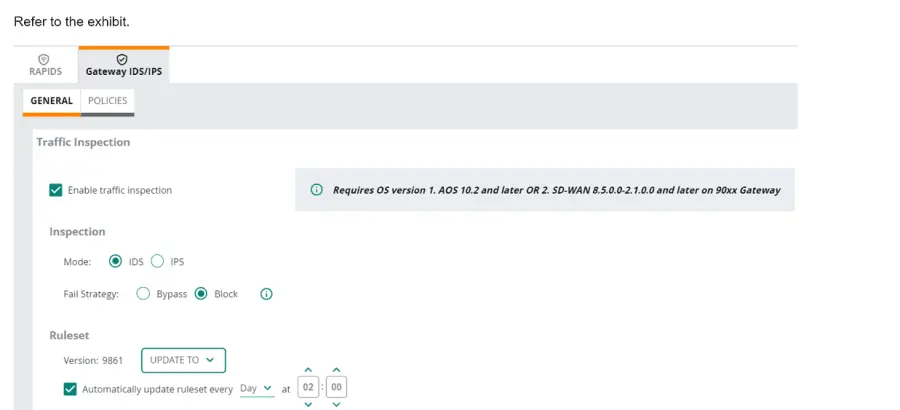
Refer to Exhibit.

(Note that the HPE Aruba Networking Central interface shown here might look slightly different from what you see in your HPE Aruba Networking Central

interface as versions change; however, similar concepts continue to apply.)

An HPE Aruba Networking 9x00 gateway is part of an HPE Aruba Networking Central group that has the settings shown in the exhibit. What would cause the

gateway to drop traffic as part of its IDPS settings?

Correct Answer: B. Traffic matching a rule in the active ruleset
Explanation:

In the exhibit, the HPE Aruba Networking Central settings for the 9x00 gateway show that traffic inspection is enabled, and the gateway is set to operate in IDS (Intrusion Detection System) mode with the fail strategy set to 'Block'. This configuration means that the gateway will drop traffic if it matches a rule in the active ruleset.

1.Active Ruleset: The ruleset version 9861 is active, and the gateway is configured to automatically update the ruleset daily.

2.Traffic Matching Rules: When traffic matches a rule in the active ruleset, it is flagged as suspicious or malicious.

3.Block Mode: Since the fail strategy is set to 'Block', any traffic that matches a rule in the active ruleset will be dropped to prevent potential threats.


Question 12

What can help justify the extra cost of air monitors (AMs) to a company?

Correct Answer: D. AMs can detect wireless threats much faster than hybrid APs, reducing the company's vulnerability surface.
Explanation:

Dedicated air monitors are justified when a company wants faster and more complete wireless threat detection. Hybrid APs must divide radio time between serving clients and scanning the RF environment. Dedicated AMs focus on monitoring, which allows them to detect rogue APs, evil-twin behavior, unauthorized SSID use, ad hoc networks, and other wireless threats more quickly. Faster detection reduces the time an attacker can operate unnoticed and lowers wireless exposure. AMs do not provide endpoint malware or Trojan detection in the same way an endpoint or gateway security engine does. They also do not serve wireless clients while operating as dedicated monitors. The clearest security justification is faster wireless threat detection compared with hybrid scanning.


Question 13

You are setting up HPE Aruba Networking SSE. Which use case requires you to apply a non-default device posture in a rule?

Correct Answer: B. Checking whether a client has antivirus software as a condition for receiving access to resources
Explanation:

Comprehensive Detailed Explanation

A non-default device posture is applied in scenarios where specific checks on a device's compliance or security state (posture) are required to grant or deny access. The correct answer is:

B . Checking whether a client has antivirus software as a condition for receiving access to resources.

This use case explicitly requires device posture assessment, which involves evaluating the device for attributes like antivirus software, patch levels, or other compliance criteria.

Non-default device posture rules are configured to assess these conditions and enforce the appropriate policy based on the device's state.

Other Options:

A . Applying threat inspection: Threat inspection rules operate independently of device posture and apply based on traffic content, not device compliance.

C . Redirecting compromised clients: This action is typically triggered based on a security event or threat detection, not directly related to device posture evaluation.

D . Integrating with ClearPass OnGuard: While OnGuard can contribute to posture assessment, it does not require a non-default device posture in the SSE rule directly.

Reference

HPE Aruba SSE Posture-Based Access Control documentation.

Aruba ClearPass and SSE Integration Deployment Guide.


Question 14

What role can Internet Key Exchange (IKE)/IKEv2 play in an HPE Aruba Networking client-to-site VPN?

Correct Answer: C. It helps to negotiate the IPsec SA automatically and securely.
Explanation:

Internet Key Exchange (IKE)/IKEv2 plays a crucial role in an HPE Aruba Networking client-to-site VPN by helping to negotiate the IPsec Security Association (SA) automatically and securely. IKE/IKEv2 handles the authentication and key exchange processes, ensuring that both the client and the VPN gateway can establish a secure IPsec tunnel.

1.SA Negotiation: IKE/IKEv2 automates the negotiation of the Security Association, which defines the parameters for the secure IPsec tunnel.

2.Secure Authentication: It provides a secure method for authenticating the communicating parties and exchanging cryptographic keys.

3.Efficiency: Using IKE/IKEv2 simplifies the setup and maintenance of secure VPN connections, enhancing the overall security and reliability of the VPN.


Question 15

You have created a Web-based Health Check Service that references a posture policy. You want the service to trigger a RADIUS change of authorization (CoA) when a client receives a Healthy or Quarantine posture. Where do you configure those rules?

Correct Answer: A. In a RADIUS enforcement policy
Explanation:

RADIUS Change of Authorization (CoA):

CoA is triggered when ClearPass determines that a client's posture status has changed (e.g., Healthy, Quarantine).

The RADIUS enforcement policy is where you configure actions and enforcement profiles that respond to these posture changes.

Option Analysis:

Option A: Correct. RADIUS enforcement policies are used to configure actions, including triggering CoA.

Option B: Incorrect. OnGuard settings configure posture agent behavior, not enforcement rules.

Option C: Incorrect. The posture policy evaluates compliance but does not trigger CoA.

Option D: Incorrect. WEBAUTH enforcement policies are for web-based authentication, not posture-related CoA.