Limited-Time Offer: Enjoy 50% Savings! Ends in 00h 00m 00s Coupon code: 50OFF
Skip to content

Free HP HPE Network Switching Professional Exam HPE7-A08 Exam Questions

Page: 1 / 11 Total 162 questions

Want more questions? Get Premium Access.

Question 1

You would like to receive a monthly report tracking your available HPE Aruba Networking Central licenses and their expiration dates. Which report should you schedule?

Correct Answer: D. Infra Inventory
Explanation:

To receive a monthly report tracking available licenses and their expiration dates in Aruba Central, the Infra Inventory report should be scheduled. It provides detailed information about device inventories, including licenses and expiration.

Switch Capacity Planning focuses on resource utilization.

Resource Utilization monitors system performance.

Network report focuses on topology and health.


Aruba Central Reports and Analytics Documentation

HPE Aruba Central User Guide

Aruba Licensing Management Best Practices

Question 2

How does an HPE Aruba Networking CX VSX solution make the hardware replacement of a single switch a non-disruptive operation for Layer 2 configurations?

Correct Answer: D. By allowing the system MAC in the ServiceOS to be changed to the original system MAC.
Explanation:

In HPE Aruba CX VSX, the hardware replacement of a single switch is non-disruptive for Layer 2 configurations because the system MAC address in the ServiceOS can be changed to the original system MAC address. This ensures consistent MAC address usage, avoiding disruptions in Layer 2 forwarding and preventing MAC flapping in the network.

Options involving VSX-sync or reserved system MAC ranges do not specifically address hardware replacement scenarios as effectively.

Changing the ServiceOS system MAC to match the original maintains Layer 2 stability during switch replacement.


Aruba VSX Hardware Replacement Best Practices

HPE Aruba CX VSX Technical Reference Guide

ArubaOS-CX ServiceOS and System MAC Documentation

Question 3

A customer is evaluating device profiles on a CX 6300 switch. The test device has the following attribute:

MAC address = 81:cd:93:13:ab:31

The test device needs to be assigned the "iot-prod" role. In addition, the "iot-default" role must be applied for any other device connected to interface 1/1/1.

This is a lab environment with no configuration of any external authentication server for the test.

Given the configuration example, what is required to meet this testing requirement?

Correct Answer: C. Enter the command port-access fallback-role iot-default globally

Question 4

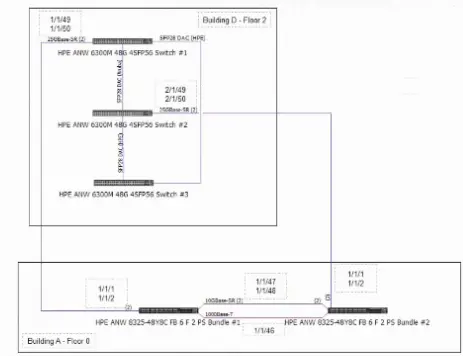
Refer to the exhibit:

According to the HPE Aruba Networking VSX best practices, what would need to be changed in the configuration?

Correct Answer: B. Replace the CX8325 1/1/47 and 1/1/48 ports with SFP28 connectivity.
Explanation:

In the exhibit, the CX8325 switch ports 1/1/47 and 1/1/48 are connected in a VSX setup. According to Aruba VSX best practices, ports on the CX8325 switch that serve as ISL or VSX interconnects should use SFP28 optics for 25Gbps links. If SFP56 optics are used, it would be incorrect because CX8325 ports are designed to support SFP28 modules for these speeds.

CX6300 ports use SFP56 or QSFP28 depending on model and link speed.

CX8300 series ports designed for QSFP28 for higher speeds.

Hence, the best practice is to use SFP28 on CX8325 for the interconnect links.


Aruba VSX Configuration and Best Practices Guide

Aruba CX 8325 Hardware and Optics Documentation

Aruba Networking Recommended Transceiver Matrix

Question 5

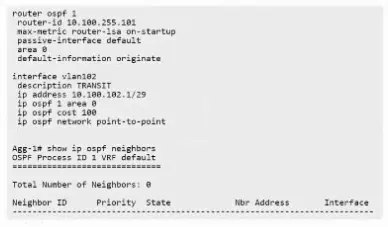
You are configuring OSPF between two CX switches but cannot see any neighbors. Based on the output, how would you fix the problem?

Correct Answer: D. Configure no passive-interface vlan182 on the switch.
Explanation:

OSPF neighbors not forming adjacency and stuck in the 2WAY state typically indicates that the interface is set to passive mode, preventing OSPF Hello packets from being sent or received on that interface.

Removing passive mode on VLAN 182 allows OSPF Hello messages to be exchanged and adjacency to form.

Options involving network type or costs do not affect adjacency states related to passive interfaces.

The max-metric router-lsa on-startup affects LSA advertisements, not adjacency formation.

Therefore, the fix is to configure no passive-interface vlan182.


ArubaOS-CX OSPF Troubleshooting Guide

OSPF Protocol RFC 2328

HPE Aruba Networking Configuration Guides

Question 6

You need to configure BGP on an HPE Aruba Networking switch using AS 65010. What is required when establishing peering with neighboring devices using eBGP that are not directly connected?

Correct Answer: B. Use of ebgp-multihop
Explanation:

When establishing eBGP peering between devices that are not directly connected, the TTL (Time To Live) value of the BGP packets must be increased to allow them to traverse multiple hops. This is achieved by configuring ebgp-multihop, which increases the TTL beyond the default value of 1.

next-hop-self changes the BGP next-hop attribute but is not required for multihop eBGP.

route-reflector is a BGP design feature unrelated to multihop.

address-family ipv4 external is not a standard command on Aruba CX switches.

Therefore, to successfully peer eBGP sessions across multiple hops, ebgp-multihop must be configured.


ArubaOS-CX BGP Configuration Guide

RFC 4271 (BGP-4)

HPE Aruba Networking Best Practices for BGP

Question 7

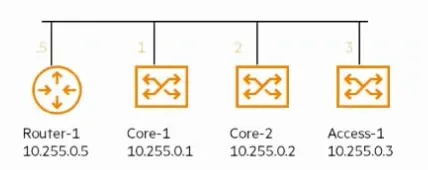
You are configuring OSPF on each of the devices shown. After verifying the OSPF neighbor table on each, you notice that Router-1 and Access-1 have neighbors in the 2WAY state. What is the reason for this?

Correct Answer: C. This is normal behavior for OSPF neighbors on a broadcast network.
Explanation:

OSPF neighbors on broadcast networks typically reach the 2WAY state during the DR/BDR election process. It is normal behavior for OSPF neighbors on a broadcast network to be in the 2WAY state until a Designated Router (DR) and Backup DR (BDR) are elected.

The tie in DR election explains why multiple neighbors can be in 2WAY.

No OSPF networks advertised would not cause 2WAY.

IGMP snooping does not affect OSPF adjacency states.


OSPF RFC 2328

ArubaOS-CX OSPF Configuration and Operation Guide

Network Protocol Behavior Reference Manuals

Question 8

When configuring a multicast solution on HPE Aruba Networking CX switches, what needs to be configured on the access switch to enable efficient traffic flow?

Correct Answer: B. IGMP-snooping on VLAN
Explanation:

For multicast to function efficiently on Aruba CX access switches, IGMP snooping needs to be enabled on the VLAN interfaces. IGMP snooping listens to IGMP join and leave messages between multicast clients and routers to allow the switch to forward multicast traffic only to interested ports, reducing unnecessary multicast flooding.

PIM is a multicast routing protocol and usually configured on routing devices, not access switches.

IGMP (without snooping) enables hosts to signal interest but does not control traffic forwarding at the switch layer.

Enabling IGMP snooping on SVI alone may not be sufficient; it should be enabled on VLANs that carry multicast clients.

Hence, enabling IGMP snooping on VLAN is necessary for efficient multicast traffic flow.


ArubaOS-CX Multicast Configuration Guide

HPE Aruba CX Multicast Best Practices

Question 9

An ACME company employee complained about a recent poor-quality VoIP call while moving around their office environment. HPE Aruba Networking Central reported a fair UCC score for this call while your VoIP engineer reported that their systems reported a MOS of 2.3. The VoIP devices are operating over the 5GHz frequency band.

What are the possible contributing factors? (Select two)

Correct Answer: A. Recent renovations have changed the floor plan; D. The client does not support U-NII-2 or U-NII-2-Extended channels

Question 10

You are attempting to configure an interface, but you are seeing the error message below. What could explain this?

Access-1(config)# interface 1/1/1

Invalid input: interface

Correct Answer: C. The switch is being managed by HPE Aruba Networking Central
Explanation:

The error message 'Invalid input: interface' typically appears if the switch is managed by HPE Aruba Central, which restricts CLI interface configuration to prevent configuration drift. When managed externally, certain commands are disabled or locked.

Password recovery mode or authorization enabled would not cause this error.

Manager context is not a concept in Aruba CX CLI.


Aruba Central Management Mode Documentation

HPE Aruba Switch CLI Behavior When Centrally Managed

ArubaOS-CX CLI Access Control Guide

Question 11

What is the recommended configuration to ensure link aggregation is consistent in a campus topology using VSX with two aggregation switches and downlinks to access switches?

Correct Answer: D. Use the command 'vsx-sync mclag-interfaces' under the VSX context.

Question 12

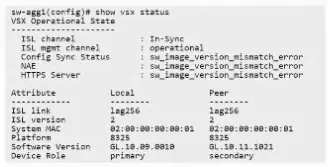
You've rebooted s-agg2 in a VSX configuration in an attempt to live-upgrade the cluster, and then you see this condition:

What would be the correct way to live-upgrade the VSX cluster?

Correct Answer: C. Use vsx update-software option.
Explanation:

Comprehensive Detailed Explanation:

For live upgrading a VSX cluster, the correct procedure is to use the vsx update-software option, which allows in-service software upgrade (ISSU) with minimal disruption by upgrading switches one at a time while maintaining synchronization.

issu update-software is not a recognized command in Aruba CX.

Reloading the primary first risks service disruption.

Compatibility mode is not required prior to reboot.


Aruba VSX Upgrade Procedures Guide

HPE Aruba VSX Best Practices for Software Upgrades

ArubaOS-CX VSX Documentation

Question 13

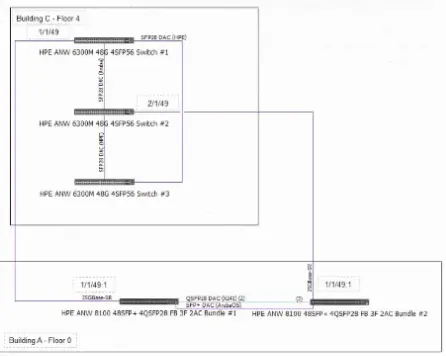
Refer to the exhibit:

A senior network architect has created the configuration above. You are implementing the setup in Building A and C. The actual fiber distance between the building locations is 200m / 656ft utilizing OM4 cabling.

What needs to be changed in the configuration based on the actual environmental conditions to complete the installation and 7 other CX 6300 VSF stack connections in the future?

Correct Answer: D. Replace the 25GR optics with 25SR
Explanation:

The configuration involves connecting two buildings over fiber using OM4 cabling with a distance of 200 meters. The current optics in use are 25GR (25 Gigabit Rate) optics.

For multimode fiber such as OM4, SR (Short Reach) optics are suitable for distances up to 300 meters. In contrast, LR (Long Reach) optics are typically designed for single-mode fiber and longer distances.

Therefore, to properly support the 200m OM4 fiber link, 25SR optics should be used instead of 25GR (which are often long-reach optics).

10SR and 10LR refer to 10Gbps optics, which do not meet the 25Gbps requirement.

25LR optics are for single-mode fiber and longer distances, not multimode.


Aruba CX Optics Compatibility Matrix

HPE Aruba Fiber Optic Cabling Guidelines

OM4 Fiber Specification and Supported Transceiver Types

Question 14

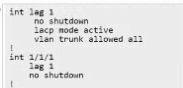
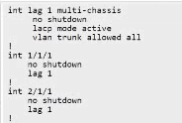
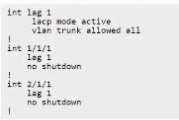
For the aggregation layer, you must configure two new HPE Aruba Networking CX 6200M (VSF) switches. LACP link aggregations to downstream access switches using redundant ports from both switches are required.

Which configuration example would create the required lag setup on both switches utilizing HPE Aruba Networking clustering and stacking technologies?

A.

B.

C.

D.

Correct Answer: C. Option C
Explanation:

Configuring LACP link aggregation on two Aruba CX 6200M VSF switches requires configuring matching LAG settings on both switches, including LACP mode, LAG ID, and interfaces involved. Option C represents a correct configuration example using Aruba's stacking/clustering technologies to create LAGs that utilize redundant ports from both switches.

The other options either have incorrect syntax, missing LACP parameters, or do not align with VSF cluster best practices for LAG.

The correct LAG setup ensures link redundancy, load balancing, and failover between aggregation and access switches.


Aruba CX VSF and LACP Configuration Guide

ArubaOS-CX Stacking and Clustering Best Practices

HPE Aruba Networking Aggregation Layer Design Document

Question 15

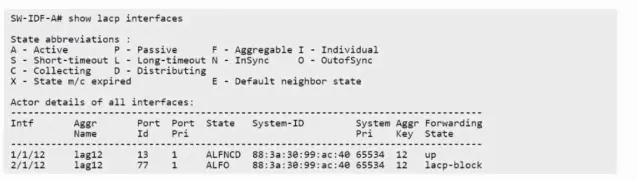
The output of the show LACP interfaces shows the following:

What is causing this issue?

Correct Answer: A. The AP is configured with LACP active.