
Limited-Time Offer: Enjoy 50% Savings! Coupon code: 50OFF Use it at checkout
Skip to content

Free IBM WebSphere Application Server Network Deployment v9.0.5 Administrator C1000-174 Exam Questions

Page: 1 / 12 Total 111 questions

Want more questions? Get Premium Access.

Question 1

Within a migration report, under which category are deprecated APIs that do not affect most applications labeled?

Correct Answer: C. Recommendations
Explanation:

Application migration reports in the administrative console classify each finding by severity, and the categories are shown with distinct icons on the enterprise application collection page. Severe issues identify APIs that are unavailable on the target runtime, or behavioural changes that can break the application. Warning issues identify behavioural changes that might break the application and that deserve evaluation. Recommendations are informational findings: they cover deprecated APIs or minor behavioural changes that do not affect most applications. Option C is therefore correct. Option A, Fatal, is not a category used by the migration report, so it can be dismissed on terminology alone. Option B, Severe, is the opposite end of the scale and is reserved for items that must be resolved before the application can run correctly on the target. Option D, Warnings, applies to changes that could break an application depending on how it uses the affected behaviour; those findings call for review rather than being merely advisory. In practice, a reviewer should work through Severe items first, assess each Warning against actual application usage, and treat Recommendations as optional clean-up that reduces future migration effort. Recommendations alone should not block a move to the target environment, which is why they are labelled informational rather than as a defect.
Question 2

An administrator needs to create a WebSphere Application Server ND cell with the deployment manager on system A and a single node on system B. The server on system B must not include the default server or default applications. Which steps are required?

Correct Answer: D. Create a Management profile with a deployment manager server on system A and a custom profile on system B
Explanation:

The requirement has three parts: the deployment manager must sit on system A, a single node must sit on system B, and that node must not contain a default server or the default applications. Each profile type answers a different need. A management profile with the deployment manager server type provides the administrative hub for the cell on system A. For system B, a custom profile creates a node with no servers and no applications, ready to be federated into the cell, which satisfies the final condition. After creation, the node is added with the addNode command, and servers are then defined through the deployment manager. Option C proposes an application server profile on system B. That profile type creates server1 and installs the default applications, so it breaks the stated condition. A cell profile, referred to in options A and B, creates a deployment manager and one federated application server node together on a single machine; it cannot place the two parts on separate systems by specifying a target, and copying configuration folders between machines followed by syncNode is not a supported way of building a cell. The recommended topology for a distributed cell is therefore a management profile on one machine and custom profiles on each machine that will host application servers, making D the correct answer.

Question 3

Which option can be used to remove an incorrect profile?

Correct Answer: B. manageprofiles command
Explanation:

A profile is a set of files that defines the runtime environment for a deployment manager, node, or stand-alone server, and the manageprofiles command is the product's supported interface for its lifecycle. The command accepts the -create, -delete, -augment, -backupProfile, -restoreProfile, -listProfiles, and -validateAndUpdateRegistry options. Running it with -delete unregisters the named profile from the profile registry and removes its configuration, which is exactly what is required when a profile was created with incorrect settings. Option B is correct. A typical sequence is to stop every process that belongs to the profile, run manageprofiles -delete -profileName with the profile name, and then remove any directory that remains on disk, since deletion can leave residual files when the profile had been used. The other tools do not perform this task. Installation Manager installs, updates, modifies, and uninstalls product packages; it does not manage individual profiles within an installed package. The administrative console manages the cell configuration of servers, applications, and resources, and a profile's existence on a machine falls outside its scope. The Profile Management Tool is a graphical front end that can create and augment profiles, but it does not offer a delete function, which is why administrators fall back on the command line when a profile has to be removed. After deletion, -listProfiles confirms that the registry no longer shows the entry.

Question 4

Which statement is correct about upgrading a WebSphere Application Server cell, installed by using a VSI tile in IBM Cloud, to the newest fix pack level?

Correct Answer: D. The administrator has to manage and upgrade the installation on their own.
Explanation:

IBM's offering for running WebSphere Application Server on IBM Cloud virtual server instances is delivered as a catalog tile that provisions virtual machines with the product installed. The tile automates the initial deployment, creating the instances and installing the software at the version it offers. After that point, the environment behaves as an ordinary installation on virtual servers that the customer owns and operates. The service is not a managed platform that patches itself, so operations such as applying fix packs, updating the operating system, and managing the cell remain the customer's duty. This corresponds to option D. Option A is incorrect because fix packs are not applied automatically. Option B is incorrect because no support ticket is needed, and IBM support does not apply fixes on the customer's behalf. Option C is incorrect because the tile is used for provisioning and is not an update mechanism for an existing installation. The administrator therefore patches the cell with the usual tools, using Installation Manager to apply the fix pack to the product installation on each virtual server, taking care to follow the supported order for the deployment manager and nodes, and backing up the configuration beforehand. The documentation for the offering describes the shared responsibility between the platform and the customer.

Question 5

An administrator has configured High Performance Extensible Logging (HPEL) in a WebSphere cell. Which option lets them access logs throughout the cell?

Correct Answer: D. HPELControlService and HPEL API
Explanation:

High Performance Extensible Logging stores log and trace records in a binary repository, and it exposes that content through services and an API. Two management interfaces matter. The HPELControlService is the MBean used to configure the logging service, for example to change repository settings, and the HPEL API, which provides programmatic access for reading and filtering repository data. Where logs must be reached across the whole cell, the control service lets the administrator manage HPEL behaviour for servers in every node, and the API lets a program read records from multiple servers' repositories. This pairing is what option D lists. The other options mix the services in ways that fall short. HPELLogDataService is a service for retrieving log records from a single server, which makes it narrower than the cell-wide requirement. HPELTraceDataService concerns trace records and, with the same limitation, offers retrieval for a particular server and not cell-wide access. For day-to-day work, the LogViewer command line tool, which reads HPEL repositories, is the most common method of seeing the content in a readable form, and it can be used with filters on time, thread, logger, or message level. Administrators can also view logs from the administrative console's log viewer when HPEL is the active log framework.

Question 6

When PMI data is collected to reduce monitoring overhead, updates to CountStatistic, AverageStatistic, and TimeStatistic are not synchronized. If necessary, how can updates to every statistic type be synchronized?

Correct Answer: C. By selecting the 'Use sequential update' check box.
Explanation:

The Performance Monitoring Infrastructure collects counters from server components, and it is designed to cause as little overhead as possible. To that end, updates to the three basic statistic types, CountStatistic, AverageStatistic, and TimeStatistic, are not synchronised by default. Without synchronisation, two threads that update the same counter at once might overwrite each other, so the reported values can be slightly inaccurate, but the cost of locking is avoided. Where accuracy matters more than overhead, the administrator can turn on synchronisation for every statistic type. In the administrative console, this is done in the PMI settings for the server by selecting the Use sequential update check box. Option C is correct. The other approaches do not alter how counters are updated. Writing a JMX client, option A, changes how the data is retrieved and leaves the collection untouched. The Custom option, option B, selects which counters are enabled, and the All option, option D, enables every counter in the set; both govern the volume of data and are unrelated to update synchronisation. Enabling all counters would, in fact, increase the overhead. Because sequential update increases the cost of monitoring, it should be applied only when slight inaccuracies are unacceptable. In most tuning exercises the default's accuracy is adequate, since trends rather than exact values drive decisions.

Question 7

Which options can be chosen as Bus members when you create a Service Integration Bus through the Integrated Solutions Console?

Correct Answer: C. Application Server or Clusters
Explanation:

A service integration bus has members, which are the servers or clusters that host the bus's messaging engines and thus supply its messaging resources. When an administrator creates a bus or adds a member in the administrative console, which is the Integrated Solutions Console, the choices of member type are an application server, a cluster, a WebSphere MQ server, or a web service gateway. Among the options provided, an application server or a cluster is what can be selected, so option C is correct. Adding a cluster allows the engine to fail over or be scaled across members. The other pairs name process types that cannot host a messaging engine. The deployment manager and node agent are management processes, and they do not run applications or messaging engines, so they are not valid members. The on demand router and virtual enterprise server are Intelligent Management components, where the router handles request routing and the term virtual enterprise server does not denote a bus member type. The administrative agent is the management process for unfederated nodes, and IBM Integration Bus is a separate integration product, so neither can be added as members. After selecting the member, the console prompts for the message store type, either a file store or a data store, which determines where the messaging engine persists messages. The choice should reflect the availability and performance needs of the messaging workload.

Question 8

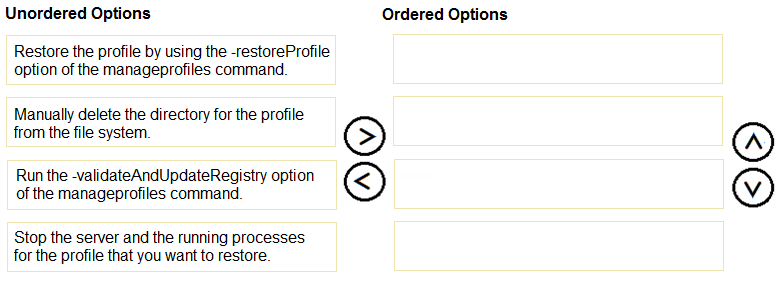
What is the correct order of steps for restoring a WebSphere Application Server profile?

Arrange these items in the correct order

  • Stop the server and the running processes for the profile that you want to restore.
  • Manually delete the directory for the profile from the file system.
  • Run the -validateAndUpdateRegistry option of the manageprofiles command.
  • Restore the profile by using the -restoreProfile option of the manageprofiles command.
Correct Answer:
Explanation:

Correct order

  1. Stop the server and the running processes for the profile that you want to restore.
  2. Manually delete the directory for the profile from the file system.
  3. Run the -validateAndUpdateRegistry option of the manageprofiles command.
  4. Restore the profile by using the -restoreProfile option of the manageprofiles command.

Question 9

Which enterprise module may be installed in WebSphere Application Server ND?

Correct Answer: D. JAR
Explanation:

An enterprise application is packaged as an enterprise archive, or EAR, which contains modules of several types. The module types the product recognises are web modules, packaged as WAR files, enterprise bean modules, packaged as JAR files, application client modules, also JAR files, and resource adapter modules, packaged as RAR files. Of the four extensions offered, only JAR corresponds to a module type that can be installed, since it is used for EJB modules and client modules. Option D is correct. The other extensions do not correspond to enterprise modules. SAR, option A, is a name used by some other application servers for service archives, and it is not an enterprise module type in this product. CAR, option C, is not an enterprise module type either; the term client archive does appear in some other contexts, but the product's application client module uses the JAR extension. BAR, option B, is likewise not a module type in this product. When an application is installed, the console or wsadmin reads the modules from the EAR and presents each one for mapping to servers and for binding of references. A standalone WAR or JAR may also be installed, in which case the product wraps it in an enterprise application, so the same module types apply. Understanding the module types helps in planning the mapping of modules to targets.

Question 10

An administrator has created and configured a managed node for a non-IBM web server. Which two statements are true about this configuration?

Choose two

Correct Answer: A. The administrator can propagate the web server plugin-cfg.xml using the administrator console.; C. The administrator can generate plug-in configurations using the administrator console.
Explanation:

When a non-IBM web server is represented in the cell as a managed node, a node agent for the web server is set up, which gives the deployment manager a route for managing certain aspects of it. Two capabilities hold for such a node. The administrator can generate the plug-in configuration with the console, and can propagate the resulting plugin-cfg.xml file to the web server through the node. Options A and C are correct. Managed web server nodes are the means by which the console keeps the plug-in configuration current as applications and clusters change. The other capabilities are not available for non-IBM web servers. Viewing the web server's logs through the console, enabling the plug-in trace, and starting or stopping the server rely on the IBM HTTP Server administration server, which is provided for IBM HTTP Server and is not available for other web servers. For a non-IBM server, these actions would have to be done directly on the web server host with its own tools. This explains why options B, D, and E are incorrect. The administrator should therefore treat the console as responsible for plug-in generation and propagation, and manage the lifecycle, logging, and tracing of a non-IBM web server with the vendor's own mechanisms. The plug-in's own log, whose location is set in the plug-in configuration, can be read directly on the host.