
Limited-Time Offer: Enjoy 50% Savings! Ends in 00h 00m 00s Coupon code: 50OFF
Skip to content

Free Juniper Junos, Associate (OS 21.2) JN0-106 Exam Questions

Page: 1 / 10 Total 95 questions

Want more questions? Get Premium Access.

Question 1

Refer to the exhibit.
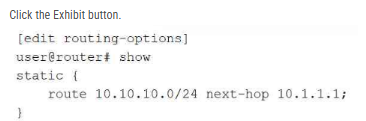
Referring to the exhibit, you are configuring a Junos router to provide connectivity to a building across town on the network 10.10.10.0/24. The next-hop router is at 10.10.1.1, which is reachable using interface ge-0/0/1. After committing the configuration in the exhibit, users report they still cannot reach the 10.10.10.0/24 network, and the route does not appear as active in the routing table. In this scenario, which statement is correct?

Correct Answer: A. The next-hop address 10.1.1.1 is not directly connected or reachable through another route.
Explanation:

In Junos OS, the Routing Engine (RE) performs a validation check on every entry in the Routing Information Base (RIB). For a static route to be considered valid and transition to an active state in the inet.0 table, its designated next hop must be resolvable. A next-hop address is resolvable only if the router has an existing route (typically a directly connected route) to that specific IP address.

According to the exhibit, the static route for 10.10.10.0/24 has been configured with a next hop of 10.1.1.1. However, the scenario states that the actual gateway router is located at 10.10.1.1. If the local interface (ge-0/0/1) is configured with an IP in the 10.10.1.0/x subnet, the router will have a direct route to 10.10.1.1, but it will likely have no path to the 10.1.1.1 address provided in the exhibit.

Because the router cannot resolve the next hop 10.1.1.1, the static route is placed in an 'inactive' or 'hidden' state. It will not be installed in the forwarding table pushed to the Packet Forwarding Engine (PFE), and standard show route commands will not display it unless specific flags like hidden or all are used. This logic ensures that the router does not attempt to forward packets into a 'black hole' where the gateway is logically unreachable. To fix this, the administrator must modify the configuration to point to the correct, reachable next-hop address of 10.10.1.1.

Question 2

Which two tasks should be performed when creating a new user account on a Junos device? (Choose two.)

Correct Answer: A. Assign the user to a login class.; C. Configure a password for the user.
Explanation:

Creating a new user account in Junos OS involves several specific steps within the [edit system login] configuration hierarchy. To establish a functional and secure user account, an administrator must first define the username and assign that user to a login class. Login classes are essential because they define the permissions and access levels for the user, such as super-user, read-only, or operator. Without a login class, a user would have no permissions to perform tasks within the CLI.

The second mandatory task is to configure an authentication method for the user, most commonly a password. This is typically done using the authentication plain-text-password command, which prompts the administrator to enter and confirm the secret string that the system then hashes and stores. While Junos also supports public-key authentication for SSH, a local password remains the standard for basic access control. It is important to note that SSH access is generally controlled at the system level under [edit system services] and does not need to be enabled on a per-user basis individually. Furthermore, allowing a user to bypass authentication is contrary to the Junos security model and is not a standard task in user account creation. Reference: User Interfaces, User Management, Login Classes.


Question 3

Exhibit:

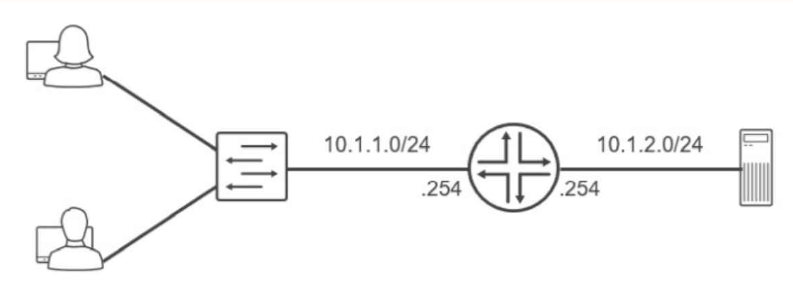
Referring to the exhibit, which routing configuration is required for these two users to access the remote server?

Correct Answer: A. Users and the server require a default gateway.
Explanation:

The network topology illustrates two distinct IP subnets, 10.1.1.0/24 and 10.1.2.0/24, separated by a Layer 3 router. For hosts on the first subnet to communicate with the server on the second subnet, an intermediary device must perform inter-subnet routing. The router acts as the exit point for each local segment, utilizing its interfaces assigned with the .254 host address as the logical path to external networks.

The fundamental requirement for this communication is the configuration of a default gateway on all end-nodes. When the users (on 10.1.1.0/24) attempt to send data to the server (on 10.1.2.0/24), their local TCP/IP stack recognizes the destination is not on the local wire. Without a defined default gateway, the hosts would simply drop the traffic as unroutable. By setting the default gateway to 10.1.1.254 for users and 10.1.2.254 for the server, the hosts are instructed to forward all off-net traffic to the router. The router then consults its routing table---which contains these directly connected routes---and forwards the packets to the appropriate egress interface. While VLAN tagging or routing protocols could exist in more complex environments, the primary necessity for basic reachability between these two specific segments is a correctly configured gateway on the terminal devices. Reference: Networking Fundamentals, IP Routing Basics, Default Gateway Configuration.


Question 4

Which statement is correct when Router R1 receives a packet from User A destined for User B as shown in the exhibit?

Correct Answer: C. Router R1 replaces the destination MAC address in the packet with the MAC address of Router R2.
Explanation:

Comprehensive and Detailed 150 to 250 words of Explanation From: In a routed environment like the one shown in the exhibit, traffic forwarding involves a constant interaction between Layer 3 (Network) and Layer 2 (Data Link) addressing. When User A generates a packet destined for User B, the source and destination IP addresses remain static throughout the entire journey across the network (assuming no Network Address Translation is performed). However, the Layer 2 Ethernet headers must be rewritten at every hop because MAC addresses have only local significance on a physical segment.

As Router R1 receives the packet from User A, it performs a lookup in its Forwarding Information Base (FIB) and identifies that the path to User B requires forwarding the packet to Router R2. R1 decapsulates the incoming frame, stripping away the original Ethernet header that contained User A's source MAC and R1's own destination MAC. To forward the packet to the next hop, R1 creates a new Ethernet header. The source MAC address becomes the MAC address of R1's egress interface, and the destination MAC address is replaced with the MAC address of Router R2. R1 cannot use User B's MAC address at this point because User B is not on a directly connected segment. This hop-by-hop MAC address replacement is essential for the Packet Forwarding Engine to successfully deliver the frame to the next Layer 3 device in the path. Reference: Networking Fundamentals, Packet Forwarding, Layer 2 and Layer 3 Addressing.


Question 5

You are creating a new user account on your Junos device. The user must be able to validate the routing table and interface statistics but should not be able to make any configuration changes. In this scenario, which permission flag would satisfy this requirement?

Correct Answer: C. view
Explanation:

User access control in Junos OS is managed through the application of permission flags within login classes. When an architect needs to define a role that allows for robust monitoring and troubleshooting without granting authority to alter the device's operational state, the view permission flag is the appropriate selection. This flag grants the user the ability to execute the majority of show commands in operational mode, which includes viewing the routing table, inspecting interface statistics, and checking hardware status.

The view permission is specifically designed for 'read-only' access. It ensures that the user can observe all necessary telemetry data to validate network health---satisfying the requirement to check routing and interface stats---while strictly prohibiting access to configuration mode or any set commands. This contrasts with the configure flag, which allows modification of the candidate configuration, or the network flag, which provides specific permissions related to network-level operational tasks. By assigning a user to a class restricted with the view flag, an administrator maintains a secure environment where support personnel can diagnose issues without the risk of accidental or unauthorized configuration changes. This principle of least privilege is a cornerstone of Junos security management. Reference: User Interfaces, User Management and Access Control.


Question 6

What is the purpose of an ARP packet?

Correct Answer: C. to determine the MAC address of a given IP address
Explanation:

The Address Resolution Protocol (ARP) is a fundamental Layer 2 utility used within the IPv4 suite to resolve a known network-layer (Layer 3) address to its corresponding physical media access control (MAC) or hardware address (Layer 2). In a typical Ethernet environment, when a Junos device needs to forward a packet to a next-hop on a local subnet, the Packet Forwarding Engine (PFE) requires the destination MAC address to properly encapsulate the frame.

The process begins with an ARP Request, which is broadcast to all hosts on the segment asking, 'Who owns this IP address?' The host assigned that specific IP responds with an ARP Reply containing its MAC address. The Junos device then stores this mapping in its ARP cache (viewable via the show arp command) to avoid repeated broadcasts for subsequent packets. This resolution is essential because while IP addresses facilitate end-to-end logical routing, the actual delivery of data across a physical wire or switch fabric relies entirely on hardware addresses. Without successful ARP resolution, the device cannot complete the Layer 2 header, and the traffic will be dropped as 'encapsulation failed.'


Question 7

Which IPv4 address and subnet mask combination represents a point-to-point link with only two usable host addresses?

Correct Answer: A. 192.168.1.0/30
Explanation:

In networking architecture, point-to-point (P2P) links are used to interconnect two Layer 3 devices, such as a pair of Juniper MX series routers. Because these links only involve two endpoints, using a large subnet mask would result in wasted IP addresses. The standard historical prefix for a P2P link that provides exactly two usable host addresses is /30.

A /30 subnet mask (255.255.255.252) reserves 2 bits for the host portion. Applying the usable host formula ($2^2 - 2$) results in 2 usable addresses. In the case of 192.168.1.0/30:

192.168.1.0 is the Network Address.

192.168.1.1 is the first usable host address (assigned to Router A).

192.168.1.2 is the second usable host address (assigned to Router B).

192.168.1.3 is the Broadcast Address.

While modern Junos OS versions also support /31 masks for point-to-point links (which eliminate the network and broadcast address overhead to provide two hosts), the /30 mask remains the classic and most widely recognized answer for providing 'only two usable host addresses' within the standard subnetting framework. Using /30 ensures compatibility across all legacy and multi-vendor environments while precisely meeting the connectivity requirements of a dedicated link between two interfaces.


Question 8

What does the user@router> clear log ospf-trace command accomplish?

Correct Answer: D. Data in the ospf-trace file is removed and logging continues.
Explanation:

The clear log command is a vital operational utility within the Junos OS used to manage the size and relevance of log files without interrupting the system's logging processes. When a Senior Architect executes the clear log ospf-trace command, the Junos kernel truncates the specified file, effectively removing all existing text and resetting the file size to zero bytes. Crucially, the file itself is not deleted from the /var/log directory, nor is the underlying traceoptions configuration modified in any way.

Because tracing is often used for real-time debugging of protocol behaviors like OSPF, trace files can rapidly grow to several megabytes, making it difficult to find specific events. By clearing the log, the administrator ensures that any subsequent OSPF events---such as adjacency changes, LSA flooding, or SPF calculations---are recorded at the very beginning of the file, free from historical clutter. The OSPF process (rpd) continues to write to the file immediately after the truncation occurs. This operational behavior distinguishes the clear command from the file delete command, which would remove the file entirely, or the set protocols ospf traceoptions configuration command, which defines which specific events the device should record. Utilizing clear log is a standard best practice during intensive troubleshooting sessions to maintain a clean and chronologically relevant diagnostic environment.


Question 9

You are configuring a new router and want to ensure that you can recover from future misconfigurations. In this scenario, what should you do after completing the initial configuration?

Correct Answer: C. Create a rescue configuration.
Explanation:

In the Junos OS architecture, maintaining a reliable recovery point is a critical post-installation task. While the system automatically archives previous configurations as 'rollback' files every time a commit is performed, these files are transient and can eventually be rotated out of the default 50-file history as new changes are made. To ensure a permanent and reliable recovery state, a Senior Architect should manually create a rescue configuration.

The rescue configuration is a specifically designated file used to restore a device to a known-working state if it becomes unreachable or the configuration becomes corrupted. Unlike standard rollbacks, the rescue configuration is only created or updated when an administrator explicitly issues the operational mode command request system configuration rescue save. This ensures that even if several subsequent commits flush the desired initial state from the standard rollback archive, the 'safe harbor' configuration remains intact on the storage media. This state can then be re-activated via the rollback rescue command in configuration mode followed by a commit. Setting a rescue configuration after the initial setup is a foundational best practice for disaster recovery and operational stability, providing a 'last resort' configuration that is immune to the automated rotation of the commit history.


Question 10

Which interface type prefix represents a 10-Gigabit Ethernet interface?

Correct Answer: B. xe
Explanation:

In Junos OS, the naming convention for physical interfaces is highly structured, providing immediate information regarding the media type, hardware location, and port number. The prefix of an interface name is a two-letter or three-letter code that identifies the speed and physical transmission characteristics of the interface. For 10-Gigabit Ethernet (GbE) interfaces, the correct prefix is xe. This prefix is a standard identifier across Junos platforms, regardless of whether the interface is fixed or modular.

Understanding these prefixes is essential for navigating the Junos configuration hierarchy and performing operational monitoring. For comparison, other common prefixes include fe for Fast Ethernet (10/100 Mbps), ge for Gigabit Ethernet (1 Gbps), and et for higher-speed interfaces such as 40-GbE or 100-GbE. When an administrator views the output of commands like show interfaces terse, identifying the xe prefix allows for the quick verification of high-bandwidth links within the network fabric. This standardized nomenclature ensures consistency across different hardware families, such as the EX, MX, and QFX series, facilitating easier management and troubleshooting for network architects. This concludes the provided set of questions from the Junos Associate (JNCIA-Junos) curriculum. Reference: Junos OS Fundamentals, Interface Naming Conventions.