Limited-Time Offer: Enjoy 50% Savings! Ends in 00h 00m 00s Coupon code: 50OFF
Skip to content

Free Juniper Automation and DevOps, Associate JN0-224 Exam Questions

Page: 1 / 7 Total 66 questions

Want more questions? Get Premium Access.

Question 1

What are two Junos PyEZ configuration object methods? (Choose two.)

Correct Answer: C. lockO; D. config ()
Explanation:

In Junos PyEZ, the Config object provides various methods for interacting with device configurations. Two of the key methods are:

lock(): This method locks the candidate configuration database to prevent other users or processes from making changes while you are modifying the configuration.

config(): This method is used to create a Config object that represents the configuration database, allowing you to load, modify, and commit configuration changes.

Option C (lock) and Option D (config) are correct because they are valid methods provided by the PyEZ Config object.

Option A (commie) and Option B (device) are incorrect as they are not methods of the Config object.

Supporting Reference:

Junos PyEZ Documentation: Details the methods available in the Config object, including lock() and config().


Question 2

Which two statements about Junos automation are correct? (Choose two.)

Correct Answer: A. The Junos REST API client is on-box.; C. Junos automation allows for device provisioning through the console port.
Explanation:

A. The Junos REST API client is on-box: The Junos REST API is on-box, meaning it is hosted directly on the Junos OS device. This allows you to interact with the device through RESTful API calls without needing an external client to act as an intermediary. With the on-box REST API, users can manage and automate configuration and operational tasks directly from the Junos device itself using HTTP/HTTPS protocols. This simplifies automation and remote management since the API server is embedded within the device.

Key Automation Capabilities of On-box REST API:

Supports configuration, monitoring, and operational commands.

Allows for direct device interaction via tools like curl, or through custom-built automation scripts.


C . Junos automation allows for device provisioning through the console port: Junos automation does indeed allow for device provisioning through the console port, especially in the context of Zero Touch Provisioning (ZTP). When network interfaces are not initially configured, or when remote access is not possible, devices can be provisioned via the console port. This method is commonly used during the initial setup process, enabling administrators to deploy configurations even without network access. ZTP automates initial configurations, including system setup and software installation, which can be triggered via the console.

Key Advantages of Console-based Provisioning:

Useful in environments where network interfaces are unavailable or not yet configured.

Essential for the initial bootstrapping of devices in remote locations.

Why the Other Options Are Incorrect:

B . Junos automation does not allow for device provisioning through the console port: This statement is incorrect because Junos automation does allow for provisioning via the console port, particularly during initial device setups.

D . The Junos REST API client is off-box: This is incorrect because the REST API client can be directly on the Junos device, providing local API functionality (on-box).

Juniper Automation in DevOps Context: Junos automation, especially with on-box REST API and console-based provisioning, enhances the flexibility and accessibility of device management in DevOps environments. These capabilities simplify remote configuration, monitoring, and device setup even in cases where direct network access is unavailable.

Question 3

You must use Junos PyEZ to configure unique IP addresses on individual machines.

Which two features will permit this requirement? (Choose). Ian SCP module

Correct Answer: C. a YAML data file; D. a Jinja2 template
Explanation:

To configure unique IP addresses on individual machines using Junos PyEZ, you can use the following features:

YAML Data File (C): YAML files are used to store configuration data in a human-readable format. They are often used in combination with Jinja2 templates to provide the data necessary for template rendering.

Jinja2 Template (D): Jinja2 is a templating engine for Python that allows you to create dynamic templates. When used with Junos PyEZ, a Jinja2 template can be filled with data (such as IP addresses from a YAML file) to generate configuration snippets that are applied to different devices.

Options A (SCP module) and B (BSON data file) are not typically used with Junos PyEZ for this purpose.


Junos PyEZ Documentation: Discusses the use of YAML files and Jinja2 templates for generating configurations.

Jinja2 Templating Documentation: Provides details on how to create and use templates in Python scripts.

Question 4

Which two programming languages are used for Junos on-box scripting? (Choose two.)

Correct Answer: C. SLAX; D. XSLT
Explanation:

Junos on-box scripting supports the following programming languages:

SLAX (C): SLAX (Structured Language for XML) is a scripting language designed specifically for Junos devices. It allows for easy manipulation of XML data, making it ideal for creating Junos scripts that interact with device configurations.

XSLT (D): XSLT (Extensible Stylesheet Language Transformations) is another language used for transforming XML documents into other formats. It is commonly used in Junos for transforming XML data into different views or outputs.

Options A (Perl) and B (Ruby) are not used for Junos on-box scripting. While these languages are popular in other contexts, Junos scripting relies heavily on XML-based languages like SLAX and XSLT.


Junos XML API and Scripting Guide: Describes the use of SLAX and XSLT for on-box scripting.

Juniper Networks Automation Documentation: Provides examples and best practices for using SLAX and XSLT in Junos scripting.

Question 5

Which two statements are correct about the Junos REST API Explorer? (Choose two.)

Correct Answer: C. The REST API Explorer supports both GET and POST calls.; D. The REST API Explorer supports multiple RPC calls.
Explanation:

The Junos REST API Explorer provides an interactive environment to explore and execute REST API calls. The correct statements are:

Supports GET and POST Calls (C): The REST API Explorer allows users to make both GET and POST requests, enabling retrieval and submission of data to the Junos device.

Supports Multiple RPC Calls (D): The REST API Explorer can execute multiple RPC (Remote Procedure Call) commands, allowing a wide range of operations to be performed directly through the interface.

Option A is incorrect because the REST API Explorer is not enabled by default; it must be enabled manually. Option B is incorrect because the REST API Explorer returns data in both XML and JSON formats, not just XML.


Junos REST API Explorer Documentation: Provides details on the supported operations and how to use the Explorer for different types of requests.

Juniper Networks Documentation: Covers the setup and usage of the REST API Explorer.

Question 6

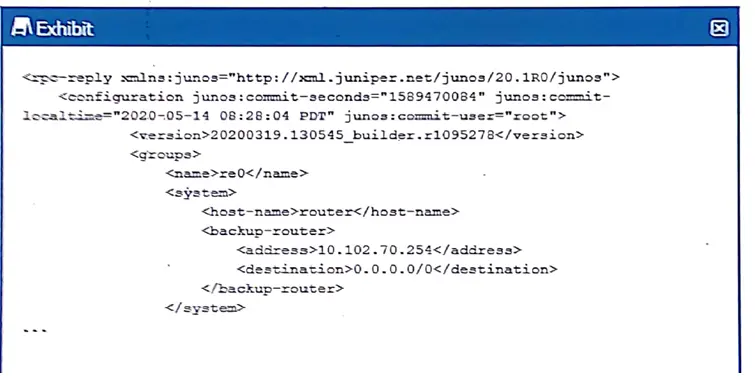
Exhibit.

Referring to the exhibit, which XPath statement would retrieve the commit-user attribute in the candidate configuration?

Correct Answer: B. configuration:@ junos: commit-user
Explanation:

.


Question 7

Using the set rest control configuration command, what are two ways to control access to the REST API running on a Junos device? (Choose two.)

Correct Answer: C. Limit the number of simultaneous connections.; D. Limit access to only certain source IP addresses
Explanation:

When using the set rest control configuration command on a Junos device, you have several options to control access to the REST API. Two effective methods include:

Limiting the number of simultaneous connections: This ensures that the REST API is not overwhelmed by too many concurrent requests, which could potentially lead to performance issues or denial of service.

Limiting access to certain source IP addresses: This method restricts API access to specific IP addresses, enhancing security by ensuring that only trusted sources can interact with the REST API.

Option A (Limit management access to only SSH) is unrelated to controlling REST API access specifically.

Option B (Limit management access to specific users) might be relevant in a different context, but it is not directly tied to REST API control via the specific command mentioned.

Supporting Reference:

Juniper Networks REST API Documentation: This documentation explains how to configure and control access to the REST API on Junos devices, including connection limits and IP-based access control.


Question 9

Which two statements are correct about using the Junos REST API? (Choose two.)

Correct Answer: A. It supports data In CSV format.; D. It is a simple configuration.
Explanation:

A. It supports data in CSV format: The Junos REST API supports multiple data formats for transferring information between systems, including XML, JSON, and CSV (Comma Separated Values). This flexibility allows for easier data parsing, especially in environments where structured data (like CSV) is a standard. CSV is often used for bulk data export or import and reporting purposes, making it an essential format for automation tasks involving external systems or large datasets.

Example Usage in REST API: When using the Junos REST API, a user can request configuration or operational data and specify the response format (XML, JSON, or CSV). CSV is particularly useful when integrating Junos devices with systems that require easily readable, tabular formats.


D. It is a simple configuration: The Junos REST API is designed to be relatively simple to configure. Once the REST API service is enabled on the Junos device, it can be accessed via HTTP or HTTPS, making it an easy entry point for automation and management tasks. Unlike more complex protocols (such as NETCONF), the REST API is lightweight and easier to use for simple configuration changes and retrieving operational data.

Configuration Example:

To enable the REST API, you can add the following configuration:

set system services rest http

set system services rest https

After enabling the service, API requests can be made to interact with the device for automation tasks, without needing the complexity of SSH or NETCONF configuration.

Why the Other Options Are Incorrect:

B . It must use SSH for a connection: This is incorrect. The Junos REST API uses HTTP or HTTPS for communication, not SSH. While SSH is commonly used for NETCONF, it is not required for REST API connections. REST APIs operate over standard web protocols.

C . NETCONF is not supported: This is incorrect. Junos supports both REST API and NETCONF for automation and configuration management. NETCONF is an XML-based protocol used for device configuration, which operates over SSH. The REST API and NETCONF can coexist on the same device, offering multiple avenues for automation.

Juniper Automation in DevOps Context: The simplicity and flexibility of the Junos REST API make it ideal for DevOps automation tasks. It allows teams to easily interact with Junos devices using lightweight RESTful methods, integrating with external systems through formats like CSV. The ease of configuration supports rapid deployment and scaling of automated management tasks.

Reference from Juniper Documentation:

Junos REST API Documentation

Question 10

Which two statements are correct about a Python dictionary data type? (Choose two.)

Correct Answer: C. The data contained in a dictionary data type is a key/value pair.; D. The data stored in a dictionary data type is not sequenced or indexed.
Explanation:

A Python dictionary is a data type that stores data in the form of key/value pairs. It has the following characteristics:

Key/Value Pair (C): Each entry in a dictionary is a pair consisting of a unique key and a value. The key is used to access the corresponding value.

Not Sequenced or Indexed (D): Unlike lists or tuples, dictionaries do not maintain order for their entries (in versions prior to Python 3.7). Even though Python 3.7+ maintains insertion order, dictionaries are not considered indexed or sequenced in the traditional sense like lists, where elements are accessed via positional index.

Option A is incorrect because dictionary entries can be added, modified, or removed after the dictionary is created. Option B is incorrect because dictionaries are not accessed by a numeric index but rather by their keys.


Python Official Documentation: Details the nature of dictionaries, including their mutability and key/value structure.

Python Data Structures Guide: Explains dictionary operations and characteristics.