
Limited-Time Offer: Enjoy 50% Savings! Ends in 00h 00m 00s Coupon code: 50OFF
Skip to content

Free Juniper Mist AI, Associate JN0-253 Exam Questions

Page: 1 / 11 Total 102 questions

Want more questions? Get Premium Access.

Question 1

In Juniper Mist, which three devices send data to the Juniper Mist Cloud? (Choose three.)

Correct Answer: B. Access Point; C. Session Smart Router; D. Juniper Mist Edge
Explanation:

In the Juniper Mist Cloud architecture, data is collected and streamed from various edge devices to the Mist Cloud platform, where AI-driven analytics, automation, and telemetry correlation occur. Only Mist-managed devices that are cloud-connected contribute operational telemetry data to Mist AI for analysis.

According to the Juniper Mist Cloud Architecture and Operations Guide:

''Access Points, Juniper Mist Edge devices, and Session Smart Routers (SSR) communicate directly with the Mist Cloud, sending telemetry, configuration, and analytics data in real time.''

Access Points (B): Provide wireless client telemetry, RF statistics, and user SLE (Service Level Expectation) data.

Session Smart Routers (C): Supply WAN Assurance and routing analytics, including path and session health data.

Juniper Mist Edge (D): Acts as an on-premises gateway that forwards data and enables local breakout for Mist Cloud services.

Syslog Servers and RADIUS Servers are external systems and do not send native telemetry to the Mist Cloud---they only interact through authentication or logging integrations.


-- Juniper Mist Cloud Architecture and Operations Guide

-- Juniper Mist WAN and Wired Assurance Documentation

-- Juniper Mist Edge and Session Smart Router Integration Guide
Question 2

Your company hosts its own enterprise-wide monitoring solution. You want to receive events from Juniper Mist.

How would you accomplish this task?

Correct Answer: C. Using a webhook
Explanation:

In the Juniper Mist Cloud, webhooks are used to send real-time event notifications from Mist Cloud to external systems such as third-party monitoring or automation platforms. This integration mechanism allows administrators to collect alerts, status changes, and analytics data directly from Mist Cloud without the need for constant API polling.

According to the Juniper Mist API and Webhook Integration Guide, webhooks are defined as:

''A push-based communication method that enables Juniper Mist Cloud to send event data to a customer-defined HTTP endpoint when specific network events occur.''

This capability allows seamless integration with enterprise monitoring solutions such as ServiceNow, Splunk, or Datadog, enabling organizations to centralize event management.

The other options are not suitable:

A (API): APIs are pull-based and require polling for updates, not push notifications.

B (Email): Not supported for automated system-to-system event delivery.

D (WebSocket): Used for live telemetry and streaming data (e.g., client updates), not event alerts.

Therefore, the correct method is C. Using a webhook.


-- Juniper Mist API and Webhook Developer Documentation

-- Juniper Mist Cloud Automation and Integration Guide

-- Juniper Mist Cloud Operations Overview

Question 3

Which Juniper Mist feature provides visibility into BGP operations for MX Series routers?

Correct Answer: B. Routing Assurance
Explanation:

The feature that provides deep visibility into BGP operations for MX Series routers is Routing Assurance. According to official Juniper documentation: 'Juniper Mist Routing Assurance provides insights about... routing, including routing events, routing protocol states, peer status analysis, routes, and more' for supported routers such as Juniper MX and ACX series. Routing Assurance extends Mist AI observability and analytics into the routing fabric, offering real-time visibility and telemetry for BGP peering session health, routing tables, events, path changes, and other core routing metrics. This empowers network operators with actionable insights and root cause analysis capabilities to maintain optimal WAN and core routing performance from the Mist cloud. Wired Assurance focuses on switch and port health and is not designed for routing protocol visibility.


Juniper Mist Routing Assurance Datasheet; Product Description

Question 4

Your existing environment has Cisco wireless access points (APs) that use preshared keys to authenticate wireless users. You are asked to enable Juniper Mist Access Assurance for 802.1X (RADIUS) user authentication on these Cisco APs.

How would you accomplish this task?

Correct Answer: C. Configure a new 802.1X SSID on the Cisco AP that references your Juniper Mist Edge as the RADIUS server. Add an authentication rule to permit user access in Access Assurance.
Explanation:

To enable Juniper Mist Access Assurance for 802.1X (RADIUS) authentication with Cisco APs, the correct approach is to configure a new 802.1X SSID on the Cisco AP referencing your Juniper Mist Edge as the RADIUS server (option C). According to Juniper Mist's official documentation and architecture guides: ''Mist Access Assurance supports end-client authentication on third-party infrastructure by leveraging the Mist Auth Proxy application running on a Mist Edge platform. Third-party devices, such as Cisco APs, are added as RADIUS clients at Mist Edge. The Mist Edge proxy handles all RADIUS authentication traffic from the APs, wraps these authentication requests into a secure RadSec tunnel, and relays them to the Mist Access Assurance cloud for validation against configured authentication rules.''

This deployment does not require direct RADSEC tunneling from Cisco APs to Mist Access Assurance (since Cisco APs are not natively RADSEC capable) but uses Mist Edge as an intermediary RADIUS server and authentication proxy. 'Add an authentication rule in Access Assurance to permit user access,' enabling centralized management and policy enforcement in the Mist Cloud.


Juniper Mist Access Assurance Guide; Authentication Proxy: Third-Party Device Support; Access Assurance Getting Started Guide

Question 5

What are Audit Logs used for in Juniper Mist?

Correct Answer: A. to view a complete record of logins
Explanation:

Audit Logs in Juniper Mist are used to view a complete record of logins. The documentation states: 'On the Audit Logs page, you can see who logged in to the Juniper Mist portal, when they logged in, and what they did.' Audit Logs also record configuration and administrative actions by users on all sites within the organization, enabling administrators to track activity for compliance, troubleshooting, and security. This comprehensive record assists with accountability and change tracking, but they do not manage subscriptions, organization setup, or error logs for all devices. Filtering options allow for activity analysis over selectable time periods, by users, and by site to provide detailed insights into administrative behavior and user access history.


Juniper Mist Audit Logs | Monitor Administrator Activities | Mist Management

Question 6

Which parameter is beyond the scope of the Connectivity category when troubleshooting with Marvis Actions?

Correct Answer: B. duplex mismatch
Explanation:

The duplex mismatch parameter is beyond the scope of Marvis Actions' Connectivity category. According to the official Juniper Mist documentation, Marvis Actions within the Connectivity category are designed to troubleshoot common network connectivity issues for wireless clients, including DHCP failure, DNS failure, authentication failure, and ARP failure. These actions automatically detect and provide detailed insights about failures most likely to impact client onboarding, IP addressing, and network services. Duplex mismatch, on the other hand, is a wired networking issue where there is a disagreement between network devices (such as switches and end hosts) regarding duplex settings (half-duplex or full-duplex), and it typically causes performance problems like collisions and slow speeds. Marvis's focus for the Connectivity troubleshooting category is wireless protocol-level connectivity and service reachability, so duplex mismatch falls outside its direct scope of detection and automatic remediation.


Juniper Mist Documentation --- Troubleshooting Connectivity Issues with Marvis; Connectivity Actions Overview

Question 7

Marvis has notified you that you have a bad cable.

What additional information does the Marvis Actions dashboard provide to help you solve the issue?

Correct Answer: A. If the port or cable is at fault.
Explanation:

The Marvis Virtual Network Assistant (VNA) in Juniper Mist AI uses real-time telemetry and AI-driven correlation to identify hardware and connectivity issues, including bad cable conditions. When a ''Bad Cable'' alert is raised, Marvis analyzes physical link metrics from the switch and AP---such as CRC errors, FCS drops, and link flaps---to isolate the root cause.

According to the Juniper Mist AI Operations Guide, the Marvis Actions dashboard provides contextual insights into the issue, showing whether the fault lies in the physical cable itself or the switch port it is connected to. Specifically, the dashboard highlights:

The affected device and port.

Whether the degradation originates from the port hardware or the cabling.

Suggested corrective action (e.g., replace the cable or check switch hardware).

Marvis uses its AI-driven root cause analysis engine to distinguish between cable integrity problems and port failures by examining electrical signature anomalies and historical telemetry.

Options B, C, and D are incorrect because Marvis does not display cable category ratings or identify individual broken Ethernet pairs---it focuses on identifying and isolating the fault domain.

Therefore, the correct answer is A. If the port or cable is at fault.


-- Juniper Mist Marvis Virtual Network Assistant User Guide

-- Juniper Mist AI Operations and Troubleshooting Documentation

-- Juniper Mist Actions and Insights Dashboard Overview

Question 8

What are two ways that Juniper Mist Access Assurance enforces network access control? (Choose two.)

Correct Answer: C. It assigns specific roles to users.; D. It groups users into network segments.
Explanation:

Juniper Mist Access Assurance is a cloud-based network access control service that provides secure wired and wireless access through identity- and policy-based mechanisms. According to the official Juniper Mist AI documentation, Access Assurance uses user and device identity to determine network access privileges dynamically.

The service enforces access policies primarily in two ways:

Assigning Specific Roles to Users:

Access Assurance dynamically assigns roles to users and devices after successful authentication. These roles are used to apply specific network policies and permissions, defining what level of access or network resources a user or device is allowed. Roles can be leveraged in wireless SSID configurations or switch access policies to ensure consistent enforcement across the infrastructure.

Grouping Users into Network Segments:

Access Assurance also allows grouping of users and devices into network segments using VLANs or Group-Based Policy (GBP) technology. This segmentation isolates users or devices into logical groups, ensuring security and optimized traffic handling. Policies are then applied to these groups to control communication between segments, thereby maintaining a zero-trust framework.

Options A and B are incorrect because Access Assurance does not establish VPN tunnels or passively monitor traffic as its primary method of access control. It relies instead on identity-based role assignment and segmentation to enforce network security.


-- Juniper Mist Access Assurance Data Sheet

-- Juniper Mist Access Assurance Getting Started Guide

-- Juniper Mist AI Cloud Documentation

Question 9

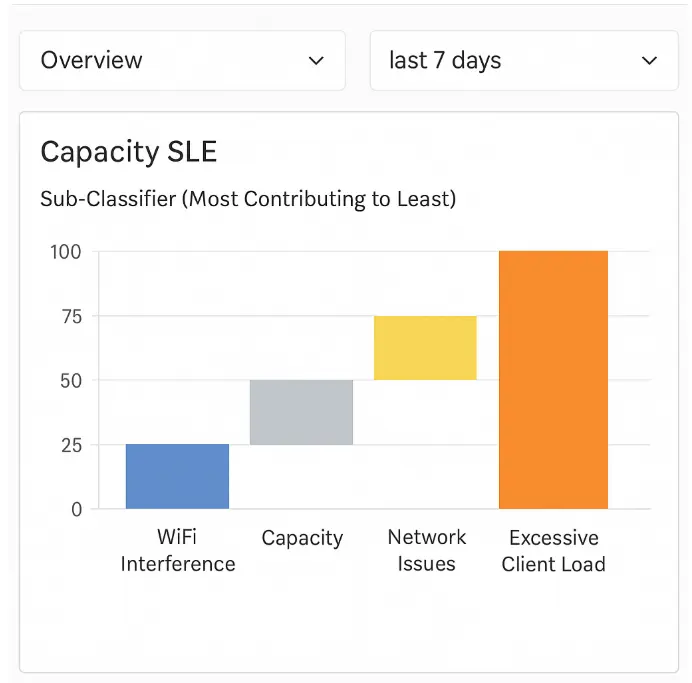
Exhibit:

Referring to the exhibit, which sub-classifier contributed the most to capacity issues?

Correct Answer: D. Excessive Client Load
Explanation:

In the Juniper Mist Wireless Assurance dashboard, each Service Level Expectation (SLE) is broken down into sub-classifiers to identify the specific causes of degraded user experience. For the Capacity SLE, Mist AI analyzes performance indicators related to access point utilization, airtime availability, client density, and radio congestion.

According to the Juniper Mist Wireless Assurance Analytics Guide, sub-classifiers within the Capacity SLE may include:

WiFi Interference -- measures co-channel and adjacent-channel interference.

Capacity -- monitors total bandwidth and airtime utilization.

Network Issues -- highlights backend transport or switching congestion.

Excessive Client Load -- indicates when too many clients are associated with a single access point or radio, leading to reduced throughput and contention.

In the exhibit, the Excessive Client Load bar clearly shows the highest contribution to the Capacity SLE degradation. This means that the majority of capacity issues were caused by an overloaded access point or radio channel handling more clients than optimal.

Therefore, the correct answer is D. Excessive Client Load.


-- Juniper Mist Wireless Assurance SLE and Classifier Documentation

-- Juniper Mist AI Operations and Analytics Guide

-- Juniper Mist Cloud Dashboard Metrics Overview

Question 10

What happens to the captured data after a packet capture is stopped or completed?

Correct Answer: A. It is saved as a downloadable capture file for offline inspection.
Explanation:

The packet capture feature in Juniper Mist Cloud allows administrators to remotely capture live network traffic from managed devices such as Access Points (APs) or switches for detailed troubleshooting.

According to the Juniper Mist Network Troubleshooting and Diagnostics Guide:

''Once a packet capture session is stopped or completed, the captured data is saved as a downloadable .pcap file that can be analyzed offline using tools such as Wireshark.''

This ensures administrators can inspect packet-level details for issues such as authentication failures, DHCP errors, or connectivity drops. The data is stored temporarily and made available through the Mist UI for download before automatic cleanup.

Options B, C, and D are incorrect because captured data is not stored permanently in the cloud, does not trigger automated alerts, and is not discarded immediately. The purpose is to make the data accessible for offline inspection and analysis.

Therefore, the correct answer is A. It is saved as a downloadable capture file for offline inspection.


-- Juniper Mist Network Troubleshooting and Diagnostics Guide

-- Juniper Mist Cloud Administration and Operations Documentation

-- Juniper Mist AI Operations and Support Tools Overview