Limited-Time Offer: Enjoy 50% Savings! Ends in 00h 00m 00s Coupon code: 50OFF
Skip to content

Free Juniper Enterprise Routing and Switching, Specialist JN0-352 Exam Questions

Page: 1 / 7 Total 65 questions

Want more questions? Get Premium Access.

Question 1

What are three valid OSPF adjacency states? (Choose three.)

Correct Answer: B. loading; C. down; E. init
Explanation:

OSPF neighbor state progression, as defined in RFC 2328 and displayed by Junos through show ospf neighbor, moves through a well-defined set of named states: Down, Attempt, Init, 2-Way, ExStart, Exchange, Loading, and Full. Down is the initial state, indicating no Hello packets have been recently received from a potential neighbor on that interface; it is a genuine, valid OSPF state and is correctly included here. Init indicates that a Hello packet has been received from the neighbor, but that neighbor has not yet listed the local router's own router ID within its Hello packet, so bidirectional communication has not yet been confirmed; this too is a standard, valid state. Loading occurs after the Exchange state, during which Database Description packets have been fully exchanged and the router is now actively requesting the specific, more-detailed LSAs it identified as missing or outdated from its neighbor via Link State Request packets; it is likewise a standard, valid OSPF neighbor state. 'Established' is not an OSPF state at all --- that terminology belongs to BGP's finite state machine, where Established represents the fully operational session state; the OSPF equivalent concept is instead called Full. 'Reject' is not a recognized OSPF neighbor state under any circumstance and does not appear anywhere in the RFC 2328 state machine, making it an invalid distractor as well. Reference topics: Junos Enterprise Routing -- OSPF, The OSPF Neighbor State Machine.
Question 2

What determines the preferred route to a destination in an IS-IS network?

Correct Answer: B. the path that has the lowest accumulated metric value
Explanation:

IS-IS is a link-state protocol that, like OSPF, runs Dijkstra's Shortest Path First algorithm independently on each router against its own copy of the synchronized link-state database to compute the best path toward every reachable destination. Each link within the topology carries an administrator-assigned or default metric, and as the SPF algorithm walks the topology graph from the local router outward, it sums the metrics of every link traversed along a candidate path to produce that path's total accumulated cost. Among all possible paths to a given destination prefix, IS-IS always selects and installs the path (or, in the case of equal-cost multipath, the set of paths) with the numerically lowest total accumulated metric, exactly mirroring the 'lowest cost wins' principle shared by essentially all link-state IGPs. A higher accumulated metric value is by definition a less preferred, more costly path, making that option the direct inverse of correct IS-IS behavior. Level 2 proximity to the destination has no independent bearing on path selection beyond however it happens to be reflected in the accumulated metric itself --- IS-IS does not apply a separate rule preferring paths merely for passing near a Level 2 router. Likewise, LSP recency (sequence number or freshness) governs which version of a given LSP is trusted and flooded during database synchronization, ensuring the topology database itself is accurate and loop-free, but it plays no role in the SPF cost comparison once the database is synchronized and consistent. Reference topics: Junos Enterprise Routing -- IS-IS, SPF Calculation and Metric-Based Path Selection.


Question 3

You have traffic for a video streaming application traversing a GRE tunnel in your network and users are reporting poor performance. Both ends of the tunnel are using the default settings for a gigabit Ethernet interface, but you observe excessive packet drops due to exceeding the MTU.

Which two steps would you take to improve connectivity for this application? (Choose two.)

Correct Answer: A. Increase the MTU for the member interfaces to 1524 bytes.; C. Configure the clear-dont-fragment option on the member interfaces.

Question 4

How does BGP prevent routing loops between internal peers?

Correct Answer: D. It uses a logical full mesh.
Explanation:

BGP employs two distinct loop-prevention mechanisms depending on whether peers are external or internal to the same autonomous system. Between external peers (EBGP), loop prevention relies on the AS path attribute: every time a route crosses an AS boundary, the local AS number is prepended to the path, and a router rejects any incoming route whose AS path already contains its own AS number, since that would indicate the route has looped back around. Between internal peers (IBGP) within the same AS, however, the AS path attribute never changes, because IBGP does not add AS numbers as routes are readvertised internally --- meaning AS path alone cannot detect an internal loop. Instead, IBGP enforces a strict split-horizon-style rule: a router that learns a route via IBGP must never readvertise that route to another IBGP peer. This rule guarantees that every IBGP speaker within the AS must be directly peered with every other IBGP speaker (a logical full mesh) in order for all routers to receive all routes, since no IBGP router will relay IBGP-learned routes onward on another router's behalf. This full-mesh requirement is precisely why techniques such as route reflection and confederations were later developed --- they preserve the same loop-prevention guarantee while relaxing the physical full-mesh peering burden. VRRP and BFD serve entirely unrelated purposes (gateway redundancy and fast failure detection, respectively) and play no role in BGP loop prevention. Reference topics: Junos Enterprise Routing -- BGP, IBGP Split-Horizon and the Full-Mesh Requirement.


Question 5

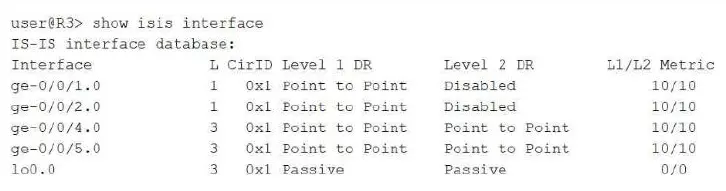
Refer to Exhibit:

Click the Exhibit button.

Which two statements about the output shown in the exhibit are correct? (Choose two.)

Correct Answer: B. R3 cannot establish an L2 adjacency on the ge-0/0/2.0 interface.; D. R3 advertises its loopback interface IP address.
Explanation:

The L column in this output identifies which IS-IS levels are active on each interface, using the standard bitmask where 1 represents Level 1 only and 3 represents both Level 1 and Level 2 combined. Interface ge-0/0/2.0 shows an L value of 1 and its Level 2 DR field explicitly reads Disabled, meaning Level 2 has not been enabled on that circuit at all; consequently no Level 2 adjacency can ever form there, regardless of what the neighboring router advertises, which confirms that statement as correct. The lo0.0 loopback interface shows Passive under both the Level 1 DR and Level 2 DR columns. A passive IS-IS interface is deliberately excluded from adjacency formation --- no IIH PDUs are sent or expected on it --- but its associated prefix is still injected into the router's own LSP and flooded throughout the area, which is precisely why loopbacks are configured as passive: to guarantee the router ID/loopback prefix is reachable network-wide without wasting adjacency overhead on an interface with no real neighbor. This confirms that R3 advertises its loopback address, while ruling out the claim that the loopback is used to form an adjacency. Regarding designated routers, all circuits shown here report 'Point to Point' rather than an actual DR system ID, because DR election in IS-IS is a construct exclusive to broadcast (LAN) circuits; point-to-point circuits never elect a DR, so the first statement is false. Reference topics: Junos Enterprise Routing -- IS-IS, Interface Levels and Passive Interfaces.


Question 6

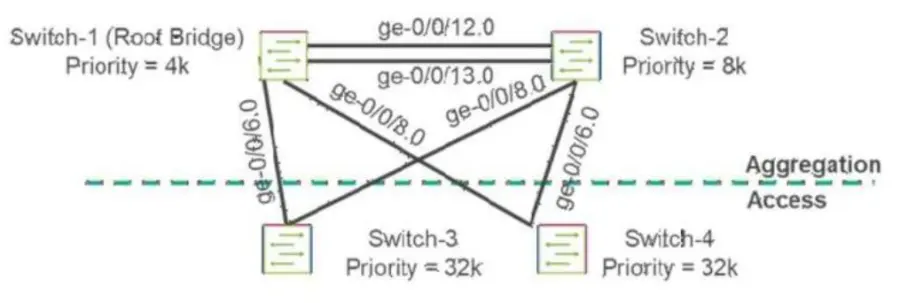
[Exhibit]

Click the Exhibit button.

You are asked to ensure that there will not be any unwanted STP topology changes affecting your root bridge placement because a rogue switch was introduced into the network at the access layer.

Referring to the exhibit, which interfaces will need to have root protection applied to accomplish this task?

Correct Answer: C. Place root protection on ge-0/0/6 and ge-0/0/8 on Switch-1 and Switch-2.
Explanation:

Root protection (root guard) must always be applied on the ports of the switches you trust to remain root-bridge-eligible, specifically on the interfaces facing away from the legitimate root and toward parts of the network where an untrusted or rogue device could plausibly appear and begin transmitting superior BPDUs. In this topology, Switch-1 is the intended, permanent root bridge (lowest priority, 4k), and Switch-2 is its aggregation-layer peer; both sit above the access layer, where Switch-3 and Switch-4 connect downstream toward end-user-facing infrastructure and where an accidental or malicious rogue switch is realistically most likely to be introduced. The ge-0/0/6 and ge-0/0/8 interfaces on Switch-1 and Switch-2 are precisely the downlink ports facing that access layer, meaning they are the exact points at which a rogue switch's superior BPDU (one advertising a lower priority than the legitimate root) would first be received if such a device appeared beneath Switch-3 or Switch-4. Applying root protection on those specific interfaces causes Junos to immediately block (move to a root-inconsistent, discarding state) any port that receives a superior BPDU, preventing the rogue device from ever being accepted as root, while normal, non-superior BPDUs continue to be processed without disruption. Applying root guard on Switch-1 and Switch-2's peer link (ge-0/0/12/13) would be inappropriate, since that link legitimately connects two trusted, root-eligible switches. Reference topics: Junos Enterprise Switching -- Spanning Tree Protocols, Root Protection Placement Strategy.


Question 7

You are verifying a new BGP peering session with an ISP. You issue the show bgp summary command, but the output shows the peer in the Active state.

Which statement is correct in this scenario?

Correct Answer: C. The session is actively trying to establish a TCP connection.
Explanation:

The BGP finite state machine defined in RFC 4271 progresses through Idle, Connect, Active, OpenSent, OpenConfirm, and finally Established. The Active state is entered either directly after Idle, when the local router begins retrying a TCP connection setup toward the configured peer, or after a previous Connect attempt has failed and the ConnectRetry timer has expired, prompting the router to keep trying to complete the underlying TCP three-way handshake. Seeing a peer parked in Active therefore means the local device has a fully valid neighbor configuration and is persistently attempting to reach the remote address on TCP port 179, but the handshake is not succeeding --- common root causes include a firewall or ACL blocking TCP 179 between the two endpoints, an unreachable or incorrect peer IP address, the remote BGP process not running or not listening, or an asymmetric routing path preventing the SYN/ACK from returning. It does not indicate a misconfiguration on the local box in the sense of a missing statement (that would typically leave the session as Idle), nor does it indicate an established, functioning session exchanging UPDATE messages (that state is Established), and it is not a deliberately idle/disabled condition, which Junos reports plainly as Idle. Recognizing Active as 'trying to connect' rather than 'connected' is essential for correct BGP troubleshooting sequencing. Reference topics: Junos Enterprise Routing -- BGP Fundamentals, BGP Finite State Machine and Session Verification.


Question 8

Which two statements are correct about BGP local preference? (Choose two.)

Correct Answer: A. A local preference of 100 is the Junos default.; C. Local preference is used to direct outbound traffic within an AS to a specific peer.
Explanation:

Local preference is a well-known, discretionary BGP path attribute carried exclusively in IBGP UPDATE messages, and Junos assigns every route a local preference value of 100 by default whenever a route is received without an explicit LOCAL_PREF value already attached, or when the attribute has not been otherwise modified through routing policy. This default of 100 becomes the implicit baseline against which any administrator-configured local preference adjustments are compared. Because higher local preference values are always preferred over lower ones during BGP best-path selection --- and this evaluation happens before AS path length, origin, or MED are ever considered --- network engineers commonly use local preference specifically to steer outbound traffic leaving the autonomous system toward a preferred exit peer or upstream provider, by assigning a higher local preference to routes learned from that preferred peer relative to routes learned from alternative peers, making the third statement correct as well. Local preference is explicitly excluded from advertisement to EBGP peers under the BGP specification; it is meaningful only within the boundaries of a single AS and is stripped before a route crosses an AS boundary outward, since a neighboring AS has no reason to trust or honor another organization's internal preference values. A local preference of 0 does not have any special 'drop' semantics in BGP --- it is simply the lowest possible numeric preference value and is treated like any other value during comparison, not as a discard instruction. Reference topics: Junos Enterprise Routing -- BGP, Local Preference Defaults and Outbound Traffic Engineering.


Question 9

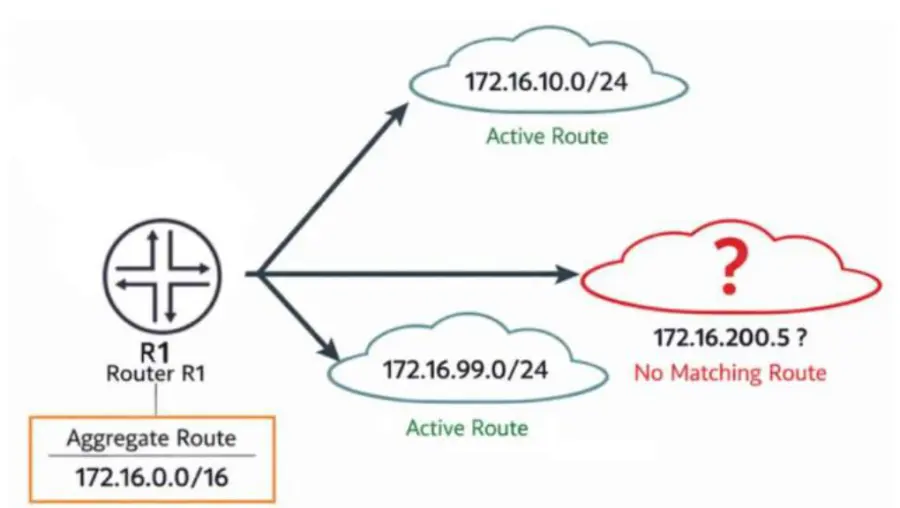
[Exhibit]

Click the Exhibit button.

You configure the aggregate route 172.16.0.0/16 on router R1. The routing table currently contains active routes for 172.16.10.0/24 and 172.16.99.0/24. No other more-specific routes exist.

Referring to the exhibit, which statement describes what R1 would do with traffic destined to 172.16.200.5?

Correct Answer: C. R1 drops the packet and sends an ICMP unreachable message.
Explanation:

The destination address 172.16.200.5 falls within the 172.16.0.0/16 aggregate's summarized range but does not fall within either of the two active, more-specific contributing routes actually present in the table --- 172.16.10.0/24 and 172.16.99.0/24 --- meaning no route more specific than the /16 itself exists to cover it. Under Junos's longest-match forwarding logic, the lookup for 172.16.200.5 therefore resolves to the aggregate route itself, and since aggregate routes are installed by default with a reject next hop rather than any real forwarding path, the router drops the packet and simultaneously generates an ICMP destination-unreachable message back to the originating source, explicitly signaling that no valid path exists for that specific destination even though a covering summary is being advertised. This reject behavior is precisely why aggregate routes are valuable for reducing the number of routes advertised upstream while still providing clear, immediate feedback for traffic aimed at address space within the summary that has no genuine underlying route, rather than silently black-holing it or misdirecting it toward an unrelated contributing route's next hop. The aggregate route itself remains active and installed throughout this process --- a gap in contributing coverage does not deactivate the aggregate, since the aggregate's activation depends only on at least one contributing route being active, which is satisfied here by both existing /24 blocks. There is also no default route present in this scenario to fall back upon. Reference topics: Junos Enterprise Routing -- Protocol Independent Routing, Aggregate Route Reject Behavior for Uncovered Address Space.


Question 10

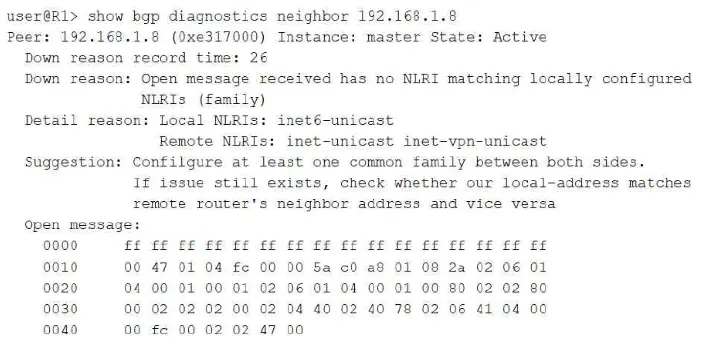
[Exhibit]

Click the Exhibit button.

You have two routers on your network that are not able to establish BGP sessions.

Which two statements are correct in this scenario? (Choose two.)

Correct Answer: A. The routers do not have matching address families configured.; B. The BGP neighbors may have duplicate IP addresses.
Explanation:

The diagnostic output explicitly states the root cause: the local router has only the inet6-unicast address family configured for this peer, while the remote router advertised inet-unicast and inet-vpn-unicast in its OPEN message, and BGP requires at least one common negotiated address family (NLRI type) between two peers for a session to remain established; with zero overlap between the two sides' configured families, the session is torn down immediately after the OPEN exchange, which is precisely why the peer state shows Active rather than Established. This confirms the mismatched-address-family statement directly and unambiguously from the exhibit's own Down reason and Detail reason fields. The diagnostic tool's own embedded Suggestion text goes further, explicitly advising the administrator to additionally verify that the local-address configured for the peer matches the remote router's configured neighbor address and vice versa --- a secondary, commonly encountered condition in which mismatched or effectively duplicated/incorrect address bindings between the two sides' neighbor statements can independently prevent a session from completing correctly, even once the family mismatch is resolved. This is why address-configuration consistency between the peers is flagged as a second concern worth checking in this scenario. Nothing in the exhibit references NTP or time synchronization at all, nor does anything in the output reference authentication, an MD5 mismatch, or any related failure signature; both of those conditions would present through entirely different diagnostic messages than the one shown here. Reference topics: Junos Enterprise Routing -- BGP, Address Family Negotiation and the show bgp diagnostics neighbor Command.