
Limited-Time Offer: Enjoy 50% Savings! Ends in 00h 00m 00s Coupon code: 50OFF
Skip to content

Free Juniper Mist AI Wireless, Specialist JN0-452 Exam Questions

Page: 1 / 12 Total 118 questions

Want more questions? Get Premium Access.

Question 1

Which two statuses are displayed on the Juniper Mist subscription page? (Choose two.)

Correct Answer: B. Exceed; D. Active
Explanation:

In the Juniper Mist dashboard, managing licenses is handled through the Subscriptions page at the Organization level. This page is critical for ensuring that all deployed hardware (Access Points, Switches, and Gateways) has the necessary cloud services---such as Wi-Fi Assurance, Wired Assurance, or Marvis VNA---to function correctly. The subscription page provides a real-time overview of the organization's licensing health using specific status indicators.

The status Active (D) indicates that the subscription is currently within its valid date range and is being utilized by the hardware in the organization. When a subscription is marked as Active, it means the features associated with that license are fully operational, and the Mist Cloud is actively processing telemetry from the associated devices. This is the primary state for all correctly provisioned licenses.

The status Exceed (B) (often displayed as 'Exceeded') is a unique and important state in the Mist ecosystem. Unlike many legacy controllers that might shut down services if a license count is surpassed, Mist uses an 'honor-based' system combined with clear visual alerting. The Exceed status appears when the number of physical devices claimed and assigned to a site exceeds the total number of available license seats for a specific service. For example, if an organization has 100 'Wi-Fi Assurance' subscription seats but has deployed 110 Access Points, the status will show as Exceeded.

Mist provides a grace period and persistent notifications to administrators to rectify this by either purchasing more subscriptions or removing excess devices. It is important to note that while terms like 'Valid' or 'Demo' might be used in general conversation, the specific operational statuses tracked in the subscription table to manage license compliance and expiration are Active, Exceeded, and Expired. These statuses allow IT teams to proactively manage their operational expenditures and ensure uninterrupted service for their wireless users.

Question 2

All the access points (APs) on the site will obtain an IP address for the Management VLAN. You notice an additional IP address for each configured VLAN on the AP.

Which statement is correct in this scenario?

Correct Answer: C. The Local Status Page has been enabled in the AP setting under the Site configuration.
Explanation:

According to the Mist documentation1, a Mist AP will pull a management IP address from the Native VLAN by default. However, if the Local Status Page is configured for the Site, all the site APs will pull their own IP address from the Management VLAN, but also addresses for each of the VLANs configured on the AP. This is because each AP creates a Switch Virtual Interface (SVI) for each VLAN on its eth0 interface.

The Local Status Page is a feature that allows you to access information about an AP's status and configuration through a web browser by connecting to its IP address2. This feature can be enabled or disabled at the site level under Site Settings > Access Points > Advanced Settings.


Question 3

You are deploying multiple Mist APs across many sites in your network. You must ensure that you apply consistent WxLAN and WLAN policies across all sites within the same organization.

Which configuration object should be used to accomplish this behavior?

Correct Answer: D. a config template
Explanation:

According to the Cisco Catalyst 9800 Series Wireless Controller Software Configuration Guide1, a config template is a configuration object that can be used to apply consistent WxLAN and WLAN policies across all sites within the same organization. A config template can be applied to a site group, which is a collection of sites that share common attributes.


Question 4

Which signal modulation scheme provides the highest data rate level for 802.11ax devices?

Correct Answer: C. 1024 QAM
Explanation:

In Juniper Networks Mist AI Wireless, understanding modulation schemes is essential for designing and operating high-performance Wi-Fi 6 (802.11ax) networks. Modulation directly affects how much data can be transmitted per symbol, and therefore determines the maximum achievable data rates under optimal RF conditions.

802.11ax introduces 1024-QAM (Quadrature Amplitude Modulation) as its highest supported modulation scheme. With 1024-QAM, each symbol encodes 10 bits of data, which represents a significant increase compared to earlier standards. For reference:

64-QAM (used in earlier standards) carries 6 bits per symbol

256-QAM (introduced in 802.11ac) carries 8 bits per symbol

1024-QAM increases this to 10 bits per symbol

This higher bit density allows Wi-Fi 6 devices to achieve higher peak throughput, especially in environments with excellent signal quality. However, 1024-QAM requires very high Signal-to-Noise Ratio (SNR) and low interference to function reliably. As a result, it is typically achieved only when clients are close to the access point and RF conditions are clean.

Mist AI Wireless continuously monitors client RSSI, SNR, retransmissions, and modulation rates through advanced telemetry. Using this data, Mist can determine whether clients are successfully operating at higher modulation levels like 1024-QAM or are falling back to lower schemes due to RF impairments. This insight directly feeds into SLEs and AI-driven recommendations for RF tuning, AP placement, and channel planning.

The incorrect options are explained as follows:

64-QAM and 256-QAM are valid modulation schemes but do not provide the highest data rates in 802.11ax.

4096-QAM is not supported by the 802.11ax standard and is therefore invalid.

Thus, 1024-QAM is the modulation scheme that provides the highest data rate level for 802.11ax devices.


Question 5

Mist WLAN objects are configurable at which two levels? (Choose two.)

Correct Answer: A. site group; C. site
Explanation:

According to the Mist documentation1, WLANs are wireless networks that can be configured with different settings such as SSID, security, encryption, authentication, etc. WLANs can be created and managed at different levels of hierarchy in the Mist cloud.

The site group level allows you to create and apply WLANs to a group of sites that share common characteristics or requirements2. This helps you to simplify and standardize your WLAN configuration across multiple sites.

The site level allows you to create and manage WLANs for a specific site that may have unique needs or preferences1. This gives you more flexibility and granularity for your WLAN configuration at each site.


Question 6

Site A is configured with a WLAN and a policy. The administrator creates a configuration template at the organization level with additional policies for the same WLAN and mentions Site A in this template.

In this scenario, which statement is correct?

Correct Answer: D. There is no option to mention the site in the config template at the organization level.
Explanation:

According to the Juniper Mist Wireless Deployment Service Datasheet1, a configuration template at the organization level can be applied to a site group, not to an individual site. Therefore, there is no option to mention the site in the config template at the organization level.


Question 7

You are troubleshooting a client that has had intermittent connectivity problems. Using Marvis to troubleshoot, you see that AP uptime is negatively affecting the client. When inspecting Marvis' troubleshooting response, which category should you select to see when the AP went offline?

Correct Answer: B. Correlation
Explanation:

According to the Marvis - Mist document, Correlation is a category in Marvis' troubleshooting response that shows when the AP went offline. Correlation shows the correlation between events and SLEs for a given client or AP.


Question 8

You want to verify that DHCP is working as expected on a WLAN that currently has no clients. In this scenario, which Marvis feature would you use to accomplish this task?

Correct Answer: B. Marvis Minis
Explanation:

In a traditional wireless environment, verifying the functionality of network services like DHCP, DNS, or captive portals requires a physical presence at the site or an active client to report telemetry. However, the Marvis Minis feature within the Juniper Mist AI ecosystem is specifically designed to solve the problem of 'empty site' verification. Marvis Minis act as Digital Twins---virtualized client agents that reside directly on the Mist Access Points (APs).

Because they are integrated into the AP firmware, Marvis Minis can simulate client behavior without requiring any actual user devices to be connected to the WLAN. When an administrator wants to verify that DHCP is working on a specific SSID, Marvis Minis perform automated 'synthetic testing.' The virtual client will attempt to associate with the WLAN, complete the 802.11 authentication/association process, and then request an IP address via DHCP. If the DHCP server is unreachable, the pool is exhausted, or the response is too slow, Marvis Minis will detect this failure and report it to the Mist Cloud.

This proactive validation is part of Mist's 'Always-On' network testing strategy. While Marvis Actions (D) would eventually report a DHCP failure once real clients started failing, and Marvis Query Language (C) could be used to search for historical failures, only Marvis Minis (B) can actively test and verify the service in a scenario where there are currently no clients. This allows engineers to identify and fix 'sleeping' issues---such as a misconfigured VLAN on a switch port or a downed DHCP server---before the first user even walks into the building, ensuring a 'validated' network state at all times.


Question 9

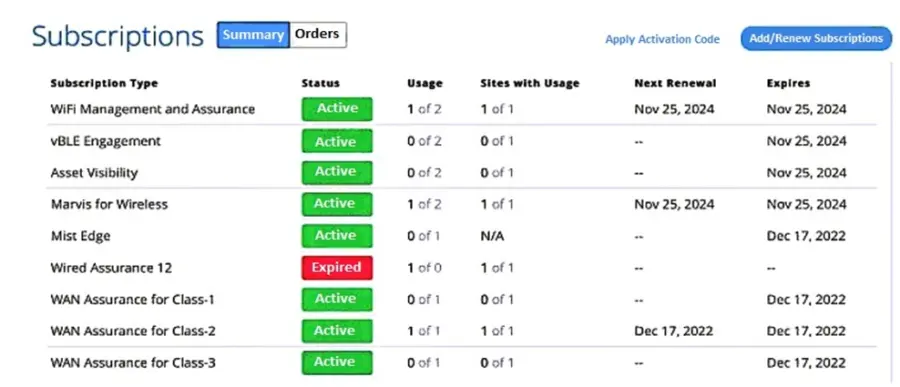
Click the Exhibit button.

Referring to the exhibit, which two statements are correct? (Choose two.)

Correct Answer: A. The organization has one available license for Marvis wireless.; C. The organization is using one license for Marvis wireless.
Explanation:

According to the exhibit, the organization has a total of two licenses for Marvis wireless, and one of them is in use. Therefore, the organization has one available license and one used license for Marvis wireless.


Question 10

Which Wireless Assurance SLE has classifiers of Association, Authorization, DHCP, and Internet Services?

Correct Answer: C. Time to Connect
Explanation:

According to the Virtual Network Assistant | Juniper Networks US document2, Time to Connect is a Wireless Assurance SLE that has classifiers of Association, Authorization, DHCP, and Internet Services. This SLE measures how long it takes for a client device to connect to the network and access internet services.