
Limited-Time Offer: Enjoy 50% Savings! Ends in 00h 00m 00s Coupon code: 50OFF
Skip to content

Free Juniper Security, Professional JN0-637 Exam Questions

Page: 1 / 12 Total 115 questions

Want more questions? Get Premium Access.

Question 1

How does an SRX Series device examine exception traffic?

Correct Answer: A. The device examines the host-inbound traffic for the ingress interface and zone.
Explanation:

Exception traffic, including management and control plane traffic, is handled by examining host-inbound traffic configurations at the ingress interface and zone. It ensures traffic reaches necessary services like SSH and IKE securely. See Juniper Host Inbound Traffic Documentation for more.

SRX Series devices handle exception traffic (such as management traffic like SSH, Telnet, DNS queries, etc.) differently than regular transit traffic. Exception traffic is examined based on host-inbound traffic for the ingress interface and zone. If traffic is destined for the device itself (e.g., management traffic or routing protocol messages), it must be allowed as host-inbound traffic on both the ingress interface and zone.

Example Command:

bash

set security zones security-zone trust host-inbound-traffic system-services ssh

This ensures that traffic destined to the SRX device is inspected based on the ingress interface and zone.
Question 2

Exhibit:

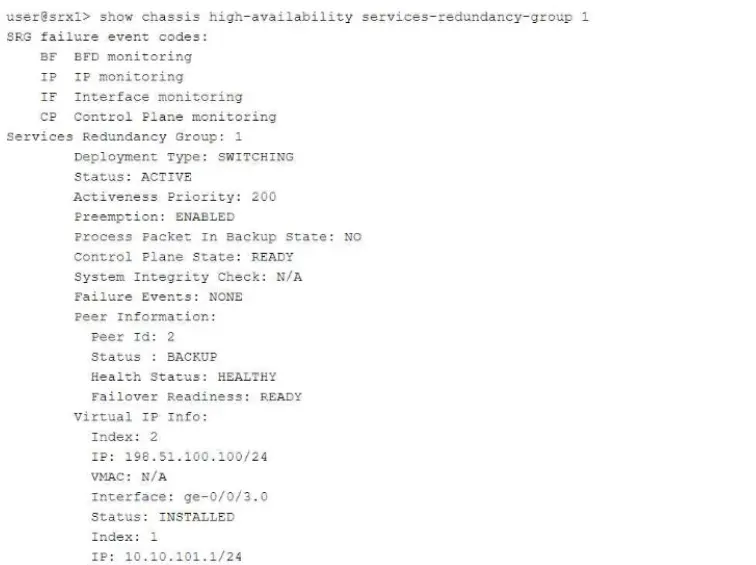
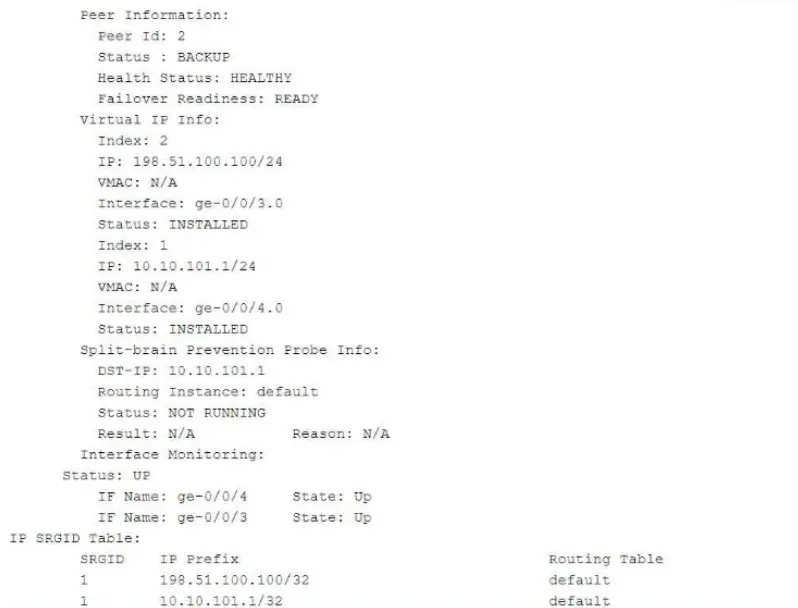
Referring to the exhibit, which two statements are correct? (Choose two.)

Correct Answer: A. The ge-0/0/3.0 and ge-0/0/4.0 interfaces are not active and will not respond to ARP requests to the virtual IP MAC address.; B. This device is the backup node for SRG1.
Explanation:

The interfaces are active and respond to ARP for virtual IP as long as the node is the primary or active node in the SRG group. This ensures high availability and proper traffic forwarding. For information, refer to Juniper SRX HA Documentation.

The exhibit shows information about a chassis cluster and its services redundancy group (SRG1). Let's analyze the relevant details:

Explanation of Answer B (Backup Node for SRG1):

The exhibit indicates that this SRX device is in the backup role for SRG1. The status: BACKUP field confirms that this device is currently in a standby role and is not the active node for the services redundancy group.

Explanation of Answer A (Interfaces Not Active):

Since the device is in the backup role, the interfaces ge-0/0/3.0 and ge-0/0/4.0 will not respond to ARP requests for the virtual IP's MAC address. Only the active node's interfaces respond to ARP requests in a chassis cluster configuration.

Juniper Security Reference:

Chassis Cluster Redundancy Overview: In a chassis cluster, the backup node does not respond to ARP requests for the virtual IP. Only the active node handles such requests to ensure seamless traffic forwarding. Reference: Juniper Chassis Cluster Documentation.


Question 3

You configure two Ethernet interfaces on your SRX Series device as Layer 2 interfaces and add them to the same VLAN. The SRX is using the default L2-learning setting. You do not add the interfaces to a security zone.

Which two statements are true in this scenario? (Choose two.)

Correct Answer: A. You are unable to apply stateful security features to traffic that is switched between the two interfaces.; C. The interfaces will not forward traffic by default.
Explanation:

When Ethernet interfaces are configured as Layer 2 and added to the same VLAN without being assigned to a security zone, they will not forward traffic by default. Additionally, because they are operating in a pure Layer 2 switching mode, they lack the capability to enforce stateful security policies. For further details, refer to Juniper Ethernet Switching Layer 2 Documentation.

Explanation of Answer A (Unable to Apply Stateful Security Features):

When two interfaces are configured as Layer 2 interfaces and belong to the same VLAN but are not assigned to any security zone, traffic switched between them is handled purely at Layer 2. Stateful security features, such as firewall policies, are applied at Layer 3, so traffic between these interfaces will not undergo any stateful inspection or firewalling by default.

Explanation of Answer C (Interfaces Will Not Forward Traffic):

In Junos, Layer 2 interfaces must be added to a security zone to allow traffic forwarding. Since the interfaces in this scenario are not part of a security zone, they will not forward traffic by default until assigned to a zone. This is a security measure to prevent unintended forwarding of traffic.

Juniper Security Reference:

Layer 2 Interface Configuration: Layer 2 interfaces must be properly assigned to security zones to enable traffic forwarding and apply security policies. Reference: Juniper Networks Layer 2 Interface Documentation.


Question 4

You have a multinode HA default mode deployment and the ICL is down.

In this scenario, what are two ways that the SRX Series devices verify the activeness of their peers? (Choose two.)

Correct Answer: A. Custom IP addresses may be configured for the activeness probe.; D. Each peer sends a probe with the virtual IP address as the source IP address and the upstream router as the destination IP address.
Explanation:

Comprehensive Detailed Step-by-Step Explanation with All Juniper Security Reference

Understanding the Scenario:

Multinode HA Default Mode Deployment:

In a chassis cluster, two SRX devices operate together to provide high availability.

ICL (Inter-Cluster Link) is Down:

The control and fabric links between the nodes are not operational.

Objective:

Determine how the SRX devices verify each other's activeness without the ICL.

Option A: Custom IP addresses may be configured for the activeness probe.

When the control link is down, SRX devices use an ICMP ping-based activeness probe to check the peer's status.

Custom IP addresses can be configured as probe targets to verify the peer's activeness.


'You can configure the SRX Series device to send activeness probes to a configured IP address to verify the peer's state when the control link is down.'

Source: Juniper Networks Documentation - Control Link Failure Detection

Option D: Each peer sends a probe with the virtual IP address as the source IP address and the upstream router as the destination IP address.

The SRX devices send ICMP probes to an upstream device using the redundancy group's virtual IP address as the source.

This helps determine if the peer node is still active by verifying network reachability.

'When the control link fails, each node sends ICMP pings to the configured probe addresses using the redundancy group's virtual IP address as the source.'

Source: Juniper Networks Documentation - Chassis Cluster Control Link Failure

Why Options B and C are Incorrect:

Option B: Fabric link heartbeats cannot be used because the ICL (which includes the fabric link) is down.

Option C: Probes are sent to upstream devices, not using the virtual IP address as the destination.

Conclusion:

The correct options are A and D because they accurately describe how SRX devices verify activeness without the ICL.

Question 5

What are three configurable monitor components for a service redundancy group? (Choose two)

Correct Answer: A. Interface; D. IP; E. ARP

Question 6

You are asked to set up advanced policy-based routing.

Which type of routing instance is designed to support this scenario?

Correct Answer: A. forwarding
Explanation:

Comprehensive Detailed Step-by-Step Explanation with All Juniper Security Reference

Understanding Advanced Policy-Based Routing (APBR):

APBR: Allows routing decisions based on application-level information and policies.

Objective: Direct specific application traffic through different paths based on policies.

Routing Instances in Junos OS:

Forwarding Instance:

Used for features like filter-based forwarding (FBF) and APBR.

Provides a separate forwarding table but shares the global routing table.

Supports APBR.

Virtual Router:

Provides a separate routing table and forwarding table.

Used for logical separation of routing domains.

Does not support APBR directly.

Virtual Switch:

Operates at Layer 2.

Used for VLAN separation and Layer 2 switching.

Not applicable to routing or APBR.

Non-Forwarding Instance:

Used for management purposes.

Does not forward transit traffic.

Not suitable for APBR.

Option A: forwarding

Correct.

A forwarding routing instance is specifically designed to support advanced policy-based routing.

It allows the SRX device to direct traffic based on policies to different forwarding instances.

Rationale:

A forwarding routing instance is the appropriate type to support advanced policy-based routing.


Juniper Networks Documentation:

'To configure advanced policy-based routing, you must create a forwarding-type routing instance.'

Source: Configuring Advanced Policy-Based Routing

Why Other Options Are Incorrect:

Option B: virtual switch

Incorrect.

Virtual switch instances are for Layer 2 switching and VLAN separation.

They do not support routing or APBR.

Option C: virtual router

Incorrect.

Virtual router instances are used for isolating routing tables.

While they support routing, they are not designed for APBR.

Option D: non-forwarding

Incorrect.

Non-forwarding instances do not handle transit traffic.

They are used for management routing tables and cannot be used for APBR.

Conclusion:

Correct Answer: A. forwarding

Question 7

You are configuring an interconnect logical system that is configured as a VPLS switch to allow two logical systems to communicate.

Which two parameters are required when configuring the logical tunnel interfaces? (Choose two.)

Correct Answer: C. The logical tunnel interfaces should be configured with two logical unit pairs per logical system interconnect.; D. Encapsulation ethernet-vpls must be used.

Question 8

What are three attributes that APBR queries from the application system cache module. (Choose Three)

Correct Answer: B. destination port; C. service; E. protocol type

Question 9

What is the advantage of using separate st0 logical units for each spoke connection?

Correct Answer: D. It enables assignments of different settings to each logical unit.

Question 10

You want to create a connection for communication between tenant systems without using physical revenue ports on the SRX Series device.

What are two ways to accomplish this task? (Choose two.)

Correct Answer: B. Use an interconnect VPLS switch.; D. Use a point-to-point logical tunnel.