Limited-Time Offer: Enjoy 50% Savings! Ends in 00h 00m 00s Coupon code: 50OFF
Skip to content

Free Juniper Service Provider Routing and Switching, Professional Exam JN0-664 Exam Questions

Page: 1 / 10 Total 96 questions

Want more questions? Get Premium Access.

Question 1

Refer to the Exhibit:

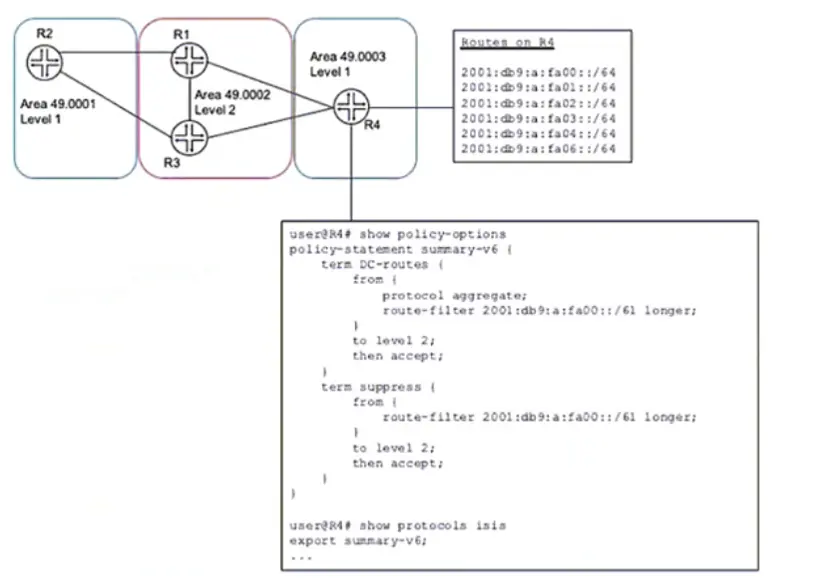
A network designer would like to advertise a single summary route from R4 to IS-IS level 2 neighbors as shown in the exhibit, but the configuration is not working.

Which three configuration changes will accomplish this task? (Choose three.)

Correct Answer: C. delete policy-options policy-statement summary-v6 term DC-routes from route-filter 2001:db5:a:fa00::/61 longer; D. set policy-options policy-statement summary-v6 term DC-routes from route-filter 2001:dbS:a:fa00::/6l exact; E. set policy-options policy-statement summary-v6 term suppress then reject

Question 2

Exhibit

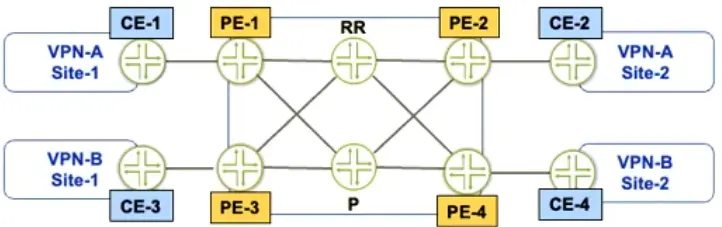
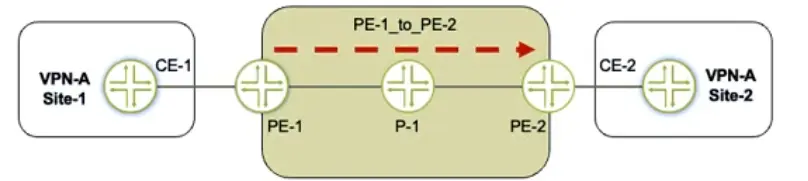
Referring to the exhibit, a working L3VPN exists that connects VPN-A sites CoS is configured correctly to match on the MPLS EXP bits of the LSP, but when traffic is sent from Site-1 to Site-2, PE-2 is not classifying the traffic correctly

What should you do to solve the problem?

Correct Answer: B. Configure the explicit-null statement on PE-2
Explanation:

Understanding the Problem in MPLS CoS Classification

How EXP Bits Are Used for CoS in MPLS

Traffic is sent from VPN-A Site-1 CE-1 PE-1 P-1 PE-2 CE-2.

The MPLS LSP (Label Switched Path) from PE-1 to PE-2 is expected to carry MPLS EXP bits, which are used for Class of Service (CoS) classification.

PE-2 should classify traffic based on EXP bits received in the MPLS label.

What Happens with PHP (Penultimate Hop Popping)?

By default, the penultimate router (P-1) pops the top MPLS label before sending the packet to PE-2.

Since the EXP bits are in the top MPLS label, they get removed along with the label.

This means that PE-2 no longer sees the correct EXP bits, leading to incorrect traffic classification.

Solution: Configure Explicit-Null on PE-2

Explicit Null (explicit-null) must be configured on PE-2 to ensure that P-1 does NOT remove the MPLS label.

Instead of removing the label, P-1 will send a label of 0 (for IPv4) or 2 (for IPv6) to PE-2.

This preserves the MPLS EXP bits, allowing PE-2 to classify the traffic correctly.

Evaluating the Answer Choices Again

B. Configure the explicit-null statement on PE-2.

Correct, because:

PE-2 is the egress LSR, where Ultimate Hop Popping (UHP) must be enabled.

Configuring explicit-null ensures that P-1 does not remove the label, preserving the EXP bits for CoS classification at PE-2.

Configuration on PE-2:

set protocols mpls explicit-null

Juniper Documentation Reference:

'Explicit-null must be configured on the egress LSR to prevent PHP from removing the top MPLS label, thereby preserving the EXP bits.'

A. Configure the explicit-null statement on PE-1.

Incorrect, because:

Explicit-null must be configured on the egress LSR (PE-2), not the ingress LSR (PE-1).

PE-1 only labels the traffic but does not control PHP behavior on P-1.

C. Configure VPN prefix mapping for the PE-1_to_PE-2 LSP.

Incorrect, because:

VPN prefix mapping is used for mapping VPN routes to LSPs but does not solve the EXP bit issue.

The problem here is label removal (PHP), not route mapping.

D. Set a static CoS value for the PE-1_to-PE-2 LSP.

Incorrect, because:

This does not preserve the original EXP bits, it only applies a static CoS value.

It's a workaround, not a fix.

Final Answer: B. Configure the explicit-null statement on PE-2.

Key Takeaways

Penultimate Hop Popping (PHP) removes the outer MPLS label at P-1, which also removes the EXP bits used for CoS classification.

To keep EXP bits intact, configure explicit-null on the egress PE (PE-2).

This forces P-1 to send a label (0 for IPv4, 2 for IPv6) to PE-2, preserving the EXP bits for CoS classification.

Official Juniper Documentation Reference

Juniper MPLS CoS and PHP Behavior Guide

'To retain CoS EXP bits at the egress LSR, configure explicit-null on the egress PE. This prevents PHP from stripping the MPLS label before reaching the final PE router.'

Question 3

Refer to the exhibit.

Click the Exhibit button.

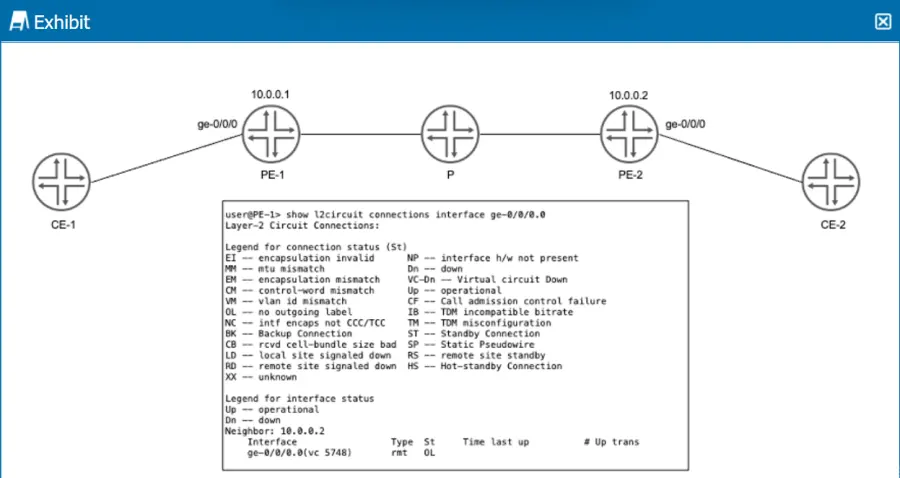
PE-1 and PE-2 are configured with LDP-signaled pseudowires to provide connectivity between CE-1 and CE-2. You notice no connectivity exists between CE-1 and CE-2.

Referring to the exhibit, which two statements describe potential causes for this fault? (Choose two.)

Correct Answer: A. The VC IDs are mismatched.; D. There is no LSP configured from PE-2 to PE-1.

Question 4

Question 5

Which two statements describe PIM-SM? (Choose two)

Correct Answer: A. Routers with receivers send join messages to their upstream neighbors.; D. Traffic is only forwarded to routers that request to join the distribution tree.
Explanation:

PIM sparse mode (PIM-SM) is a multicast routing protocol that uses a pull model to deliver multicast traffic. In PIM-SM, routers with receivers send join messages to their upstream neighbors toward a rendezvous point (RP) or a source-specific tree (SPT). The RP or SPT acts as the root of a shared distribution tree for a multicast group. Traffic is only forwarded to routers that request to join the distribution tree by sending join messages. PIM-SM does not flood traffic to all routers or prune routers without receivers, as PIM dense mode does.


Question 6

Exhibit

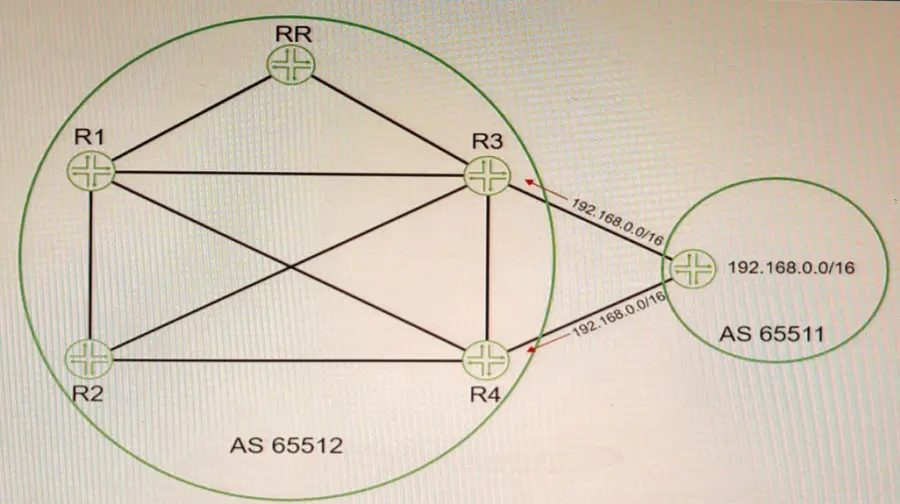
Referring to the exhibit, PE-1 and PE-2 are getting route updates for VPN-B when neither of them service that VPN

Which two actions would optimize this process? (Choose two.)

Correct Answer: B. Configure the family route-target statement on the RR.; C. Configure the resolution rib bgp.l3vpn.0 resolution-ribs inet.0 statement on the RR.
Explanation:

BGP route target filtering can be configured on PE devices or on route reflectors (RRs). Configuring BGP route target filtering on RRs is more efficient and scalable, as it reduces the number of BGP sessions and updates between PE devices. To configure BGP route target filtering on RRs, the following steps are required:

Configure the family route-target statement under the BGP group or neighbor configuration on the RRs. This enables the exchange of the route-target address family between the RRs and their clients (PE devices). Configure the resolution rib bgp.l3vpn.0 resolution-ribs inet.0 statement under the routing-options configuration on the RRs. This enables the RRs to resolve next hops for VPN routes using the inet.0 routing table.


Question 7

Exhibit

user@Rl show configuration interpolated-profile { interpolate {

fill-level [ 50 75 drop---probability [ > }

class-of-service drop-profiles

];

20 60 ];

Which two statements are correct about the class-of-service configuration shown in the exhibit? (Choose two.)

Correct Answer: B. The drop probability gradually increases from 20% to 60% as the queue level increases from 50% full to 75% full; C. To use this drop profile, you reference it in a scheduler.
Explanation:

class-of-service (CoS) is a feature that allows you to prioritize and manage network traffic based on various criteria, such as application type, user group, or packet loss priority. CoS uses different components to classify, mark, queue, schedule, shape, and drop traffic according to the configured policies.

One of the components of CoS is drop profiles, which define how packets are dropped when a queue is congested. Drop profiles use random early detection (RED) algorithm to drop packets randomly before the queue is full, which helps to avoid global synchronization and improve network performance. Drop profiles can be discrete or interpolated. A discrete drop profile maps a specific fill level of a queue to a specific drop probability. An interpolated drop profile maps a range of fill levels of a queue to a range of drop probabilities and interpolates the values in between.

In the exhibit, we can see that the class-of-service configuration shows an interpolated drop profile with two fill levels (50 and 75) and two drop probabilities (20 and 60). Based on this configuration, we can infer the following statements:

The drop probability jumps immediately from 20% to 60% when the queue level reaches 75% full. This is not correct because the drop profile is interpolated, not discrete. This means that the drop probability gradually increases from 20% to 60% as the queue level increases from 50% full to 75% full. The drop probability for any fill level between 50% and 75% can be calculated by using linear interpolation formula.

The drop probability gradually increases from 20% to 60% as the queue level increases from 50% full to 75% full. This is correct because the drop profile is interpolated and uses linear interpolation formula to calculate the drop probability for any fill level between 50% and 75%. For example, if the fill level is 60%, the drop probability is 28%, which is calculated by using the formula: (60 - 50) / (75 - 50) * (60 - 20) + 20 = 28.

To use this drop profile, you reference it in a scheduler. This is correct because a scheduler is a component of CoS that determines how packets are dequeued from different queues and transmitted on an interface. A scheduler can reference a drop profile by using the random-detect statement under the [edit class-of-service schedulers] hierarchy level. For example: scheduler test { transmit-rate percent 10; buffer-size percent 10; random-detect test-profile; }

To use this drop profile, you apply it directly to an interface. This is not correct because a drop profile cannot be applied directly to an interface. A drop profile can only be referenced by a scheduler, which can be applied to an interface by using the scheduler-map statement under the [edit class-of-service interfaces] hierarchy level. For example: interfaces ge-0/0/0 { unit 0 { scheduler-map test-map; } }


Question 8

Exhibit

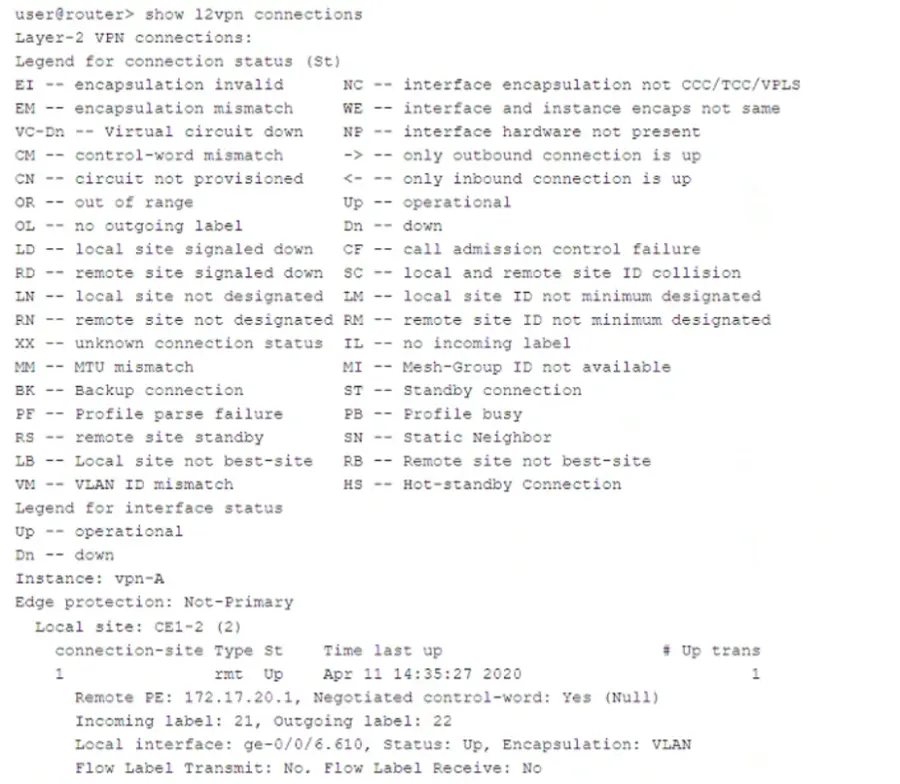
Which two statements about the output shown in the exhibit are correct? (Choose two.)

Correct Answer: A. The PE is attached to a single local site.; B. The connection has not flapped since it was initiated.
Explanation:

The output is from the show l2vpn connections command on a Juniper router. This command is used to verify the status of Layer 2 VPN (L2VPN) pseudowires between Provider Edge (PE) routers.

Breakdown of Key Information:

Instance: vpn-A

This is the L2VPN instance being monitored.

Connection Status (St)

The connection status is 'Up', meaning the pseudowire is operational.

Local Site: CE1-2 (2)

The PE router is attached to a single local site (CE1-2).

Uptime & Connection Flaps

The output shows the last time the connection was up:

Time last up: Apr 11 14:35:27 2020

The '# Up trans' value is 1, meaning this connection has been established once and has not flapped since it was initiated.

VLAN ID Mismatch Check

The legend includes 'VM -- VLAN ID mismatch', but this status is not present in the connection output.

This means there is NO VLAN ID mismatch.

Flow Labels

The Flow Label Transmit is No, and the Flow Label Receive is No.

This means the PE router does NOT have the capability to pop flow labels.


Question 9

When building an interprovider VPN, you notice on the PE router that you have hidden routes which are received from your BGP peer with family inet labeled-unica3t configured.

Which parameter must you configure to solve this problem?

Correct Answer: C. Under the family inet labeled-unicast hierarchy, add the resolve-vpn parameter.
Explanation:

The resolve-vpn parameter is a BGP option that allows a router to resolve labeled VPN-IPv4 routes using unlabeled IPv4 routes received from another BGP peer with family inet labeled-unicast configured. This option enables interprovider VPNs without requiring MPLS labels between ASBRs or using VRF tables on ASBRs. In this scenario, you need to configure the resolve-vpn parameter under [edit protocols bgp group external family inet labeled-unicast] hierarchy level on both ASBRs.


Question 10