Limited-Time Offer: Enjoy 50% Savings! Ends in 00h 00m 00s Coupon code: 50OFF
Skip to content

Free Microsoft Azure Administrator Exam AZ-104 Exam Questions

Page: 1 / 32 Total 479 questions

Want more questions? Get Premium Access.

Question 1

You have an Azure App Service app named App1 that contains two running instances.

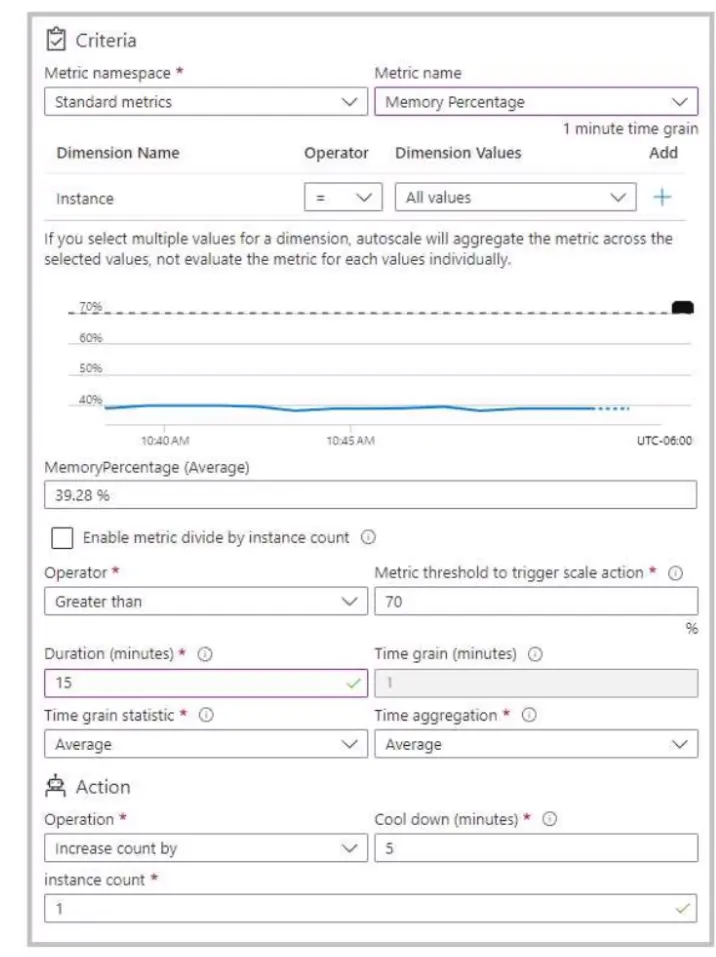
You have an autoscale rule configured as shown in the following exhibit.

For the Instance limits scale condition setting, you set Maximum to 5.

During a 30-minute period, App1 uses 80 percent of the available memory.

What is the maximum number of instances for App1 during the 30-minute period?

Correct Answer: D. 5
Explanation:

In Azure App Service, autoscale rules automatically adjust the number of running instances based on performance metrics such as CPU, memory, or custom metrics. The configuration shown uses the Memory Percentage metric with a threshold of 70%, meaning that if average memory utilization exceeds 70% for 15 minutes, Azure will trigger a scale-out action.

From the exhibit, the rule specifies:

Metric threshold: Greater than 70%

Duration: 15 minutes

Action: Increase count by 1 instance

Cool down: 5 minutes

Maximum instance limit: 5

App1 currently has 2 running instances. If App1 maintains 80% memory utilization for 30 minutes, the autoscale mechanism will trigger the scale-out action after each qualifying 15-minute window, adding 1 instance every 5-minute cooldown period until the maximum instance limit (5) is reached.

Therefore, the progression would be:

Start: 2 instances

After first 15 minutes: +1 instance 3 total

After next 5-minute cooldown and continuing high memory +1 instance 4 total

After another cycle +1 instance 5 total

Since the rule continues to trigger until the maximum (5) is reached, and the memory usage remains above the threshold, the maximum number of instances that App1 will scale to during the 30-minute period is 5.


Question 2

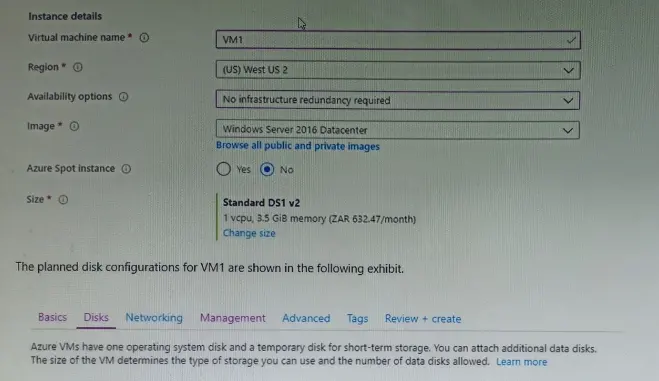
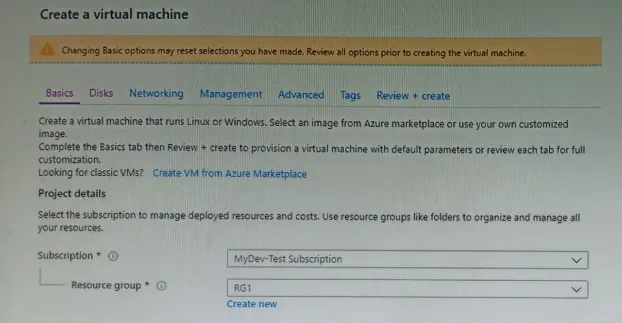
You plan to create an Azure virtual machine named VM1 that will be configured as shown in the following exhibit.

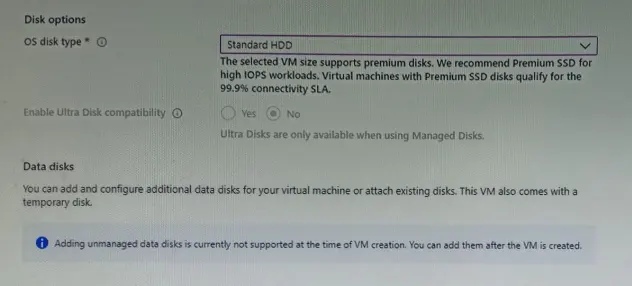
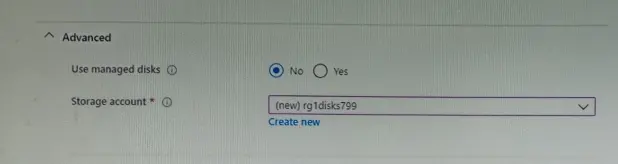
The planned disk configurations for VM1 are shown in the following exhibit.

You need to ensure that VM1 can be created in an Availability Zone.

Which two settings should you modify? Each correct answer presents part of the solution.

NOTE: Each correct selection is worth one point.

Correct Answer: A. Use managed disks; B. Availability options
Explanation:

https://docs.microsoft.com/en-us/azure/site-recovery/move-azure-vms-avset-azone https://docs.microsoft.com/en-us/azure/virtual-machines/windows/create-portal-availability-zone https://docs.microsoft.com/en-us/azure/virtual-machines/manage-availability https://docs.microsoft.com/en-us/azure/availability-zones/az-overview#availability-zones


Question 3

After you answer a question in this section, you will NOT be able to return to it. As a result, these questions will not appear in the review screen.

You have an app named App1 that is installed on two Azure virtual machines named VM1 and VM2. Connections to Appl are managed by using an Azure Load Balancer.

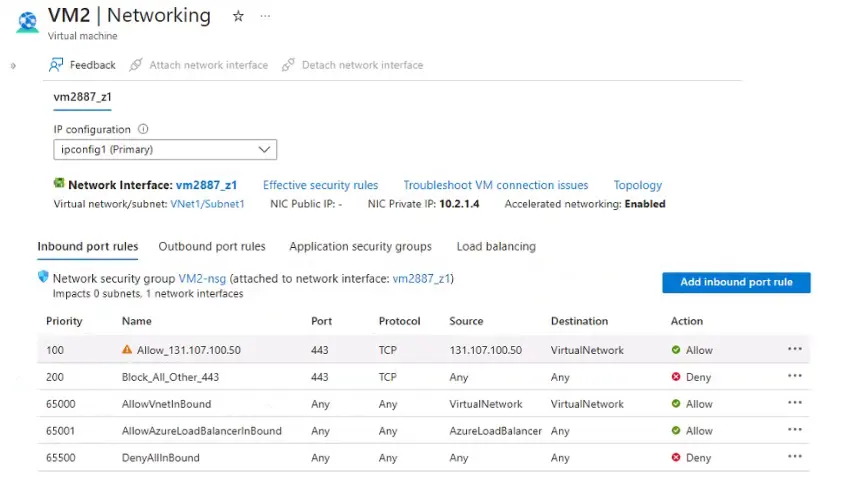
The effective network security configurations for VM2 are shown in the following exhibit.

You discover that connections 10 Appl from 131.107.100.50 over TCP port 443 fail.

You verity that the Load Balancer rules are configured correctly.

You need to ensure that connections to Appl can be established successfully from 131.107.100.50 over TCP port 443.

Solution: You create an inbound security rule that allows any traffic from the Azureload Balancer source and has a priority of 150.

Does this meet the goal?

Correct Answer: B. No
Explanation:

In this scenario, the problem involves a Network Security Group (NSG) configuration that determines inbound traffic rules for a virtual machine. The NSG rules for VM2 are evaluated in order of priority, from the lowest number (highest priority) to the highest number (lowest priority).

According to the exhibit, the effective NSG inbound rules for VM2 are:

Priority

Name

Port

Protocol

Source

Destination

Action

100

Allow_131.107.100.50

443

TCP

131.107.100.50

VirtualNetwork

Allow

200

Block_All_Other_443

443

TCP

Any

Any

Deny

65000

AllowVNetInBound

Any

Any

VirtualNetwork

VirtualNetwork

Allow

65001

AllowAzureLoadBalancerInBound

Any

Any

AzureLoadBalancer

Any

Allow

65500

DenyAllInBound

Any

Any

Any

Any

Deny

Root Cause Analysis:

You discovered that connections to App1 from 131.107.100.50 over TCP port 443 fail, even though the Load Balancer and backend pool are configured correctly.

From the rules shown, rule 100 (Allow_131.107.100.50) should theoretically allow that specific IP to connect on port 443. However, note that the Destination for the rule is VirtualNetwork, meaning that the traffic from 131.107.100.50 must be within the same virtual network address space to be permitted.

Since 131.107.100.50 is a public IP address (external source) and not part of the Virtual Network (VNet) address space, the rule does not apply, and the connection fails.

Additionally, the next rule (200 - Block_All_Other_443) explicitly denies any other inbound traffic on TCP 443 from any source. Therefore, the inbound traffic from 131.107.100.50 is blocked.

Evaluation of the Proposed Solution:

The proposed solution suggests creating an inbound security rule:

''Allow any traffic from the AzureLoadBalancer source and set priority to 150.''

However, the existing NSG already includes a built-in rule (65001 - AllowAzureLoadBalancerInBound) that allows inbound traffic from the Azure Load Balancer. That means traffic originating from the Azure Load Balancer front-end is already allowed by default.

Since the failed connection is coming from an external client (131.107.100.50) --- not from the Load Balancer source itself --- adding another rule allowing AzureLoadBalancer traffic does not resolve the issue. The correct action would be to modify or create a new rule that:

Allows inbound traffic on port 443

From source 131.107.100.50

With destination = Any

Priority lower than 200 (i.e., higher precedence than the deny rule)

Verified Microsoft Azure Administrator Reference:

From Microsoft Docs -- Network security group overview and priority order:

''Azure processes the security rules in priority order, starting from the lowest number. Once a rule matches the traffic, processing stops. Lower-numbered priority rules override higher-numbered ones.''

''The built-in rule AllowAzureLoadBalancerInBound allows traffic from Azure Load Balancer but not from external public IPs directly accessing the virtual machine.''

Correct Resolution:

You need to create a new inbound rule allowing TCP 443 from 131.107.100.50 with Destination: Any, Priority: <200, for example:

Priority: 150

Source: IP address (131.107.100.50)

Destination: Any

Protocol: TCP

Port: 443

Action: Allow

This will ensure the traffic is allowed before the deny rule at 200 takes effect.

Final Verified Answe r: B. No

The proposed rule allowing traffic from AzureLoadBalancer does not help, because traffic from 131.107.100.50 originates externally, not from the Load Balancer. You must instead create a rule that explicitly allows that IP on port 443 with a higher priority than the existing deny rule.

Question 4

You have a Microsoft Entra tenant that contains 5,000 user accounts.

You create a new user account named AdminUser1.

You need to assign the User Administrator administrative role to AdminUser1.

What should you do from the user account properties?

Correct Answer: B. From the Directory role blade, modify the directory role.
Explanation:

In Microsoft Entra ID (formerly Azure Active Directory), roles are assigned to users to delegate administrative permissions in a least-privilege manner. The User Administrator role allows a user to manage other users and groups --- for example, creating and managing user accounts, resetting passwords for non-administrators, and managing user group memberships.

To assign a role such as User Administrator, you must use the Directory role blade within the user's account properties in the Azure portal.

Step-by-step according to Microsoft documentation:

Sign in to the Azure Portal using an account that has one of the following roles:

Global Administrator

Privileged Role Administrator

Navigate to Azure Active Directory Users select AdminUser1.

Under Manage, select Directory role. This blade shows all current role assignments for the selected user.

Click Add assignment (or Modify role).

Select the User Administrator role from the list of available directory roles, then click Add.

Once this is completed, AdminUser1 will have administrative permissions limited to user management activities within the tenant.

Why other options are incorrect:

A. From the Groups blade, invite the user account to a new group: Group membership does not grant directory-level administrative permissions. Roles must be assigned at the directory role level, not via groups (unless using role-assignable groups configured for PIM).

C. From the Licenses blade, assign a new license: Licenses determine service usage (e.g., Microsoft 365, Intune) and do not provide administrative privileges in Entra ID.

Extract from Microsoft Azure Administrator Documentation (Official Guide):

''To assign a role to a user, in the Azure portal, select the user, then under Manage select Directory role, and choose the role you want to assign.'' (Source: Microsoft Learn -- Assign roles to users in Azure Active Directory)


Question 5

Note: This question is part of a series of questions that present the same scenario. Each question in the series contains a unique solution that might meet the stated goals. Some question sets might have more than one correct solution, while others might not have a correct solution.

After you answer a question in this section, you will NOT be able to return to it. As a result, these questions will not appear in the review screen.

You have an Azure subscription that contains the virtual machines shown in the following table.

You deploy a load balancer that has the following configurations:

*Name: LB1

*Type: Internal

*SKU: Standard

*Virtual network: VNET1

You need to ensure that you can add VM1 and VM2 to the backend pool of LB1.

Solution: You create a Standard SKU public IP address, associate the address to the network interface of VM1, and then stop VM2.

Does this meet the goal?

Correct Answer: B. No
Explanation:

In Azure, when using a Standard SKU Load Balancer, all virtual machines (VMs) that are members of the backend pool must meet specific configuration requirements defined by Microsoft.

According to the Azure Load Balancer documentation (Microsoft Learn: ''Standard Load Balancer overview'' and ''Backend pool management''), the following rules apply:

1 All VMs in the backend pool must be in the same virtual network (VNet) as the load balancer. 2 All network interfaces (NICs) attached to backend pool members must use Standard SKU public or private IP configurations---you cannot mix Basic and Standard SKUs. 3 You cannot associate public IPs directly with VM NICs for internal load balancers. Internal load balancers use private IPs to route traffic within a VNet.

In the proposed solution, you are associating a Standard SKU public IP address to VM1's NIC. However, since LB1 is an internal load balancer, it operates only within a private network scope---public IP associations are not applicable. Also, stopping VM2 does not affect its ability to be added to the backend pool; what matters is its network configuration.

The correct solution would be to ensure that both VM1 and VM2 have network interfaces connected to the same VNet (VNET1) and configured with Standard SKU IP configurations (not public).


Question 6

You need to resolve the Active Directory issue.

What should you do?

Correct Answer: B. Run idfix.exe, and then use the Edit action.
Explanation:

IdFix is used to perform discovery and remediation of identity objects and their attributes in an on-premises Active Directory environment in preparation for migration to Azure Active Directory. IdFix is intended for the Active Directory administrators responsible for directory synchronization with Azure Active Directory.

Scenario: Active Directory Issue

Several users in humongousinsurance.com have UPNs that contain special characters.

You suspect that some of the characters are unsupported in Azure AD.


Question 7

You have an Azure subscription.

You create an Azure container registry and a container image

You need to push the container image to the container registry by using the Azure Command-Line Interface (CU).

You sign in to the container registry.

Which action should you perform next?

Correct Answer: A. lag a container image with the name of the container registry's login server.
Explanation:

To push a container image to Azure Container Registry (ACR) using the Azure CLI, the image must first be tagged with the registry's login server name name. This is a mandatory step in the Docker workflow.

After signing in to the registry using az acr login, the local container image must be tagged in the following format:

<registry-name>.azurecr.io/:<tag>

Azure documentation specifies that Docker determines the target registry based on the image tag. If the image is not tagged with the registry's login server name, Docker will not know where to push the image.

Listing images, deploying container groups, or configuring YAML files are optional or later steps and are not required to push an image to ACR.

Final Answer: A. Tag a container image with the name of the container registry's login server


Question 8

You have an Azure subscription. The subscription contains virtual machines that run Windows Server.

You have a data collection rule (DCR) named Rule1

You plan to use the Azure Monitor Agent to collect events from Windows System event logs.

You only need to collect system events that have an ID of 1001.

Which type of query should you use for the data source in Rulel?

Correct Answer: C. XPath
Explanation:

When collecting Windows Event Logs using the Azure Monitor Agent (AMA) with a Data Collection Rule (DCR), filtering is done at the source using XPath queries. XPath is specifically designed for querying XML-based event log entries, including filtering by Event ID, Event Level, and Event Source.

According to Azure Monitor documentation, Windows Event Log data sources require XPath expressions, not SQL or KQL. KQL is used after ingestion for querying data in Log Analytics, while XPath determines which events are collected in the first place.

Since the requirement is to collect only system events with Event ID 1001, the correct query type for the DCR data source is XPath.

Final Answer: C. XPath


Question 9

Note: This question is part of a series of questions that present the same scenario. Each question in the series contains a unique solution that might meet the stated goals. Some question sets might have more than one correct solution, while others might not have a correct solution.

After you answer a question in this section, you will NOT be able to return to it. As a result, these questions will not appear in the review screen.

You have an Azure virtual machine named VM1. VM1 was deployed by using a custom Azure Resource Manager template named ARM1.json.

You receive a notification that VM1 will be affected by maintenance.

You need to move VM1 to a different host immediately.

Solution: From the Overview blade, you move the virtual machine to a different resource group.

Does this meet the goal?

Correct Answer: B. No
Explanation:

Moving the virtual machine to a different resource group does not change the host that the virtual machine runs on. It only changes the logical grouping of the resources. To move the virtual machine to a different host, you need to redeploy it or use Azure Site Recovery. Then, Reference: [Move resources to new resource group or subscription] [Redeploy Windows VM to new Azure node] [Use Azure Site Recovery to migrate Azure VMs between Azure regions]


Question 10

You have an on-premises network.

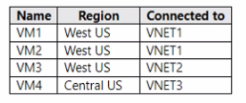
You have an Azure subscription that contains three virtual networks named VNET1, VNET2, and VNET3. The virtual networks are peered and connected to the on-premises network. The subscription contains the virtual machines shown in the following table.

You need to monitor connectivity between the virtual machines and the on-premises network by using Connection Monitor. What is the minimum number of connection monitors you should deploy?

Correct Answer: A. 1
Explanation:

Azure Connection Monitor (a feature within Network Watcher) provides a unified, end-to-end monitoring experience across Azure, on-premises, and hybrid environments. It enables administrators to monitor connectivity between virtual machines, endpoints, and on-premises networks without needing separate monitors per region when all resources can be accessed through peering or connected networks.

According to the Microsoft Azure Network Watcher documentation,

''Connection Monitor enables you to monitor network communication between a virtual machine (VM) or virtual machine scale set and any endpoint. These endpoints can be in Azure, on-premises, or any external environment. A single Connection Monitor can track connectivity across peered VNets and hybrid connections.''

In this case:

VNET1, VNET2, and VNET3 are all peered and connected to the on-premises network.

Peered VNets provide full IP-level connectivity between all VMs as if they were on the same network, subject to NSG and routing rules.

The on-premises network connection allows visibility for hybrid monitoring.

Therefore, from any region or network where Network Watcher is enabled, you can create a single Connection Monitor that includes:

Source endpoints (VM1, VM2, VM3, and VM4) from any VNet (since they are peered and reachable).

Destination endpoint (the on-premises network or any IP/FQDN).

Connection Monitor can use Test Groups to define multiple source-destination pairs within a single monitor. This eliminates the need to deploy multiple Connection Monitors per region as long as the sources are discoverable through VNet peering or hybrid connections.

Microsoft Official Documentation Extract (Azure Network Watcher -- Connection Monitor Overview):

''Connection Monitor provides unified end-to-end monitoring between Azure and on-premises resources. It supports monitoring across virtual networks, peered virtual networks, and hybrid environments using a single monitor instance.'' (Microsoft Learn: Azure Network Watcher - Connection Monitor Overview, ''Unified Connection Monitoring'' section)


Question 11

You have an Azure subscription that contains a resource group named RG26.

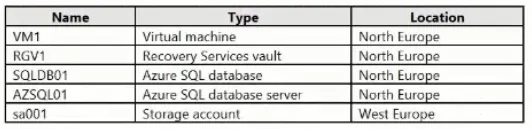
RG26 is sot to the West Europe location and is used to create temporary resources for a project. RG26 contains the resources shown in the following table.

SQLD01 is backed up to RGV1.

When the project is complete, you attempt to delete RG26 from the Azure portal. The deletion fails.

You need to delete RG26.

What should you do first?

Correct Answer: A. Stop the backup of SQLDB01.
Explanation:

You can't delete a vault that contains backup data. So in this case at first you have to delete the backup of 'SQLD01' before you attempt to delete the vault.


https://docs.microsoft.com/en-us/azure/backup/backup-azure-delete-vault

Question 12

You have an Azure subscription. The subscription contains 10 virtual machines that run Windows Server. Each virtual machine hosts a website in IIS and has the Azure Monitor Agent installed.

You need to collect the IIS logs from each virtual machine and store them in a Log Analytics workspace.

What should you configure first?

Correct Answer: A. a data collection endpoint
Explanation:

The correct answer is a data collection endpoint. IIS logs are guest workload logs generated inside the Windows Server operating system, so they are collected through the Azure Monitor Agent collection pipeline rather than through platform diagnostic settings. Microsoft states that IIS logs can be collected by Azure Monitor Agent by using a data collection rule (DCR) with an IIS Logs data source, and the data is sent to a Log Analytics workspace where it is stored in the W3CIISLog table.

Among the listed choices, the endpoint component is the required first configuration element for the Azure Monitor Agent data ingestion path. Microsoft describes a data collection endpoint as including the components required to ingest data into Azure Monitor and send configuration files to Azure Monitor Agent. After the endpoint/DCR collection path is established, the IIS Logs data source and Log Analytics destination are configured.


Question 13

Note: This question is part of a series of questions that present the same scenario. Each question in the series contains a unique solution that might meet the stated goals. Some question sets might have more than one correct solution, while others might not have a correct solution.

After you answer a question in this section, you will NOT be able to return to it. As a result, these questions will not appear in the review screen.

You have an Azure subscription that contains 10 virtual networks. The virtual networks are hosted in separate resource groups.

Another administrator plans to create several network security groups (NSGs) in the subscription.

You need to ensure that when an NSG is created, it automatically blocks TCP port 8080 between the virtual networks.

Solution: You configure a custom policy definition, and then you assign the policy to the subscription.

Does this meet the goal?

Correct Answer: B. No
Explanation:

A custom policy definition is a way to define your own rules for using Azure resources. You can use custom policies to enforce compliance, security, cost management, or organization-specific requirements. However, a custom policy definition alone is not enough to meet the goal of automatically blocking TCP port 8080 between the virtual networks. You also need to create a policy assignment that applies the custom policy definition to the scope of the subscription. A policy assignment is the link between a policy definition and an Azure resource. Without a policy assignment, the custom policy definition will not take effect. Therefore, the solution does not meet the goal.


Tutorial: Create a custom policy definition

Create and manage policies to enforce compliance

Question 14

You have an Azure subscription that contains a storage account named storage1.

You plan to create a blob container named contained.

You need to use customer-managed key encryption for contained.

Which key should you use?

Correct Answer: E. an RSA key type with a key size of 2048, 3072. or 4096 only
Explanation:

When configuring customer-managed keys (CMK) for Azure Storage encryption, Microsoft requires the use of Azure Key Vault--managed keys that meet specific cryptographic standards. According to the Azure Storage security and encryption documentation, only RSA keys are supported for customer-managed encryption keys. Elliptic Curve (EC) keys, regardless of curve type (P-384 or P-521), are not supported for Azure Storage CMK scenarios.

Azure Storage supports RSA keys with the following key sizes:

2048-bit

3072-bit

4096-bit

These key sizes align with Microsoft's encryption compliance and security baseline requirements. When a storage account is configured to use CMK, all supported services---including Blob containers---inherit encryption using the specified RSA key from Azure Key Vault.

Because the requirement is to encrypt the blob container contained using customer-managed keys, the only valid and supported choice is an RSA key with one of the supported key sizes listed above.

Final Answer: E. an RSA key type with a key size of 2048, 3072, or 4096 only


Question 15

You have an Azure subscription mat contains a virtual machine named VM1 and an Azure function named App1. You need to create an alert rule that will run App1 if VM1 stops. What should you create for the alert rule?

Correct Answer: B. an action group
Explanation:

https://learn.microsoft.com/en-us/azure/azure-monitor/alerts/alerts-create-new-alert-rule

You create an alert rule by combining:

- The resources to be monitored.

- The signal or telemetry from the resource.

- Conditions.

Then you define these elements for the resulting alert actions by using:

- Alert processing rules

- Action groups