Free Microsoft Configuring and Operating Microsoft Azure Virtual Desktop AZ-140 Exam Questions
Page: 1 / 20Total 299 questions
Want more questions? Get Premium Access.
Question 1
You have an Azure Virtual Desktop deployment that contains a host pool named Pool1.
Pool1 contains a session host named Host1 that is Azure AD-joined.
You need to verify whether a Windows license is assigned to Host1.
What should you do?
Correct Answer:C. From the Azure portal, view the properties of Host1.
Question 2
Your company has 60,000 users.
You plan to deploy Azure Virtual Desktop.
You need to recommend a storage solution for the FSLogix profile containers. The solution must provide the highest possible lOPS and the lowest latency desktop experience
Note: This question is part of a series of questions that present the same scenario. Each question in the series contains a unique solution that might meet the stated goals. Some question sets might have more than one correct solution, while others might not have a correct solution.
After you answer a question in this section, you will NOT be able to return to it. As a result, these questions will not appear in the review screen.
You have the following:
A Microsoft 365 E5 tenant
An on-premises Active Directory domain
A hybrid Azure Active Directory (Azure AD) tenant
An Azure Active Directory Domain Services (Azure AD DS) managed domain
An Azure Virtual Desktop deployment
The Azure Virtual Desktop deployment contains personal desktops that are hybrid joined to the on-premises domain and enrolled in Microsoft Intune.
You need to configure the security settings for the Microsoft Edge browsers on the personal desktops.
Solution: You configure a configuration profile in Intune.
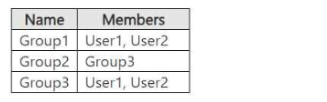
You have an Azure subscription that contains two users named User1 and User2 and the Microsoft Entra groups shown in the following table.
You have an Azure Virtual Desktop host pool named Pool! that contains two session hosts named Host1 and Host2. The session hosts use FSLogix user profiles.
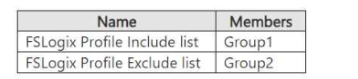
Host1 contains the local groups shown in the following table.
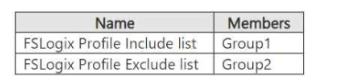
Host2 contains the local groups shown in the following table.
User1 connects to Pool1 and modifies his desktop.
User1 reports that when he reconnects to Pool1, the desktop modifications fail to appear.
You need to ensure that User1 sees the modified desktop when he connects to Pool1. The solution must minimize the impact on other user profiles.
What should you do?
Correct Answer:B. Remove Group3 from Group2.
Question 5
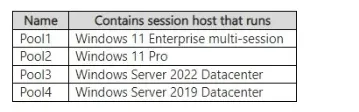
You have an Azure subscription that contains a resource group named RG1. RG1 contains the resources shown in the following table.
Your on-premises network has an IP address range of 192.168.10.0/24. Users on Host1 can successfully connect to the resources on the network.
You add a new on-premises network that has an IP address range of 192.168.11.0/24 and contains a subnet. The subnet contains an application server named App1.
Users report that Host1 cannot connect to App1.
You need to ensure that the users on Host1 can access App1.
What should you modify?
Correct Answer:E. Pool1, Pool2, Pool3, and Pool4
Question 6
Note: This question is part of a series of questions that present the same scenario. Each question in the series contains a unique solution that might meet the stated goals. Some question sets might have more than one correct solution, while others might not have a correct solution.
After you answer a question in this section, you will NOT be able to return to it. As a result, these questions will not appear in the review screen.
You have the following:
A Microsoft 365 E5 tenant
An on-premises Active Directory domain
A hybrid Azure Active Directory (Azure AD) tenant
An Azure Active Directory Domain Services (Azure AD DS) managed domain
An Azure Virtual Desktop deployment
The Azure Virtual Desktop deployment contains personal desktops that are hybrid joined to the on-premises domain and enrolled in Microsoft Intune.
You need to configure the security settings for the Microsoft Edge browsers on the personal desktops.
Solution: You configure a Group Policy Object (GPO) in the Azure AD DS managed domain.
You have a Azure Virtual Desktop deployment that uses Microsoft 355 cloud services including Microsoft Teams.
Users use the Remote Desktop client to connect to the deployment from computers that run Windows 10
You need to support audio and video in Azure Virtual Desktop and provide the users with access to Microsoft Teams calling and meeting features.
Which three actions should you perform? Each correct answer presents part of the solution.
NOTE: Each correct selection is worth one point.
Correct Answer:B. Configure the IsVWDEnvironment registry key on the Windows 10 computers; D. Install the Microsoft Teams desktop app on the Windows 10 computers; E. Install the Microsoft Teams WebSocket Service on the virtual machines
Your network contains an on-premises Active Directory domain that syncs to an Azure Active Directory (Azure AD) tenant. The domain contains the domain controllers shown in the following table.
The DNS servers are configured to forward requests to an external DNS service.
You create a new virtual network named VNET2 that is peered to VNET1 and has gateway transit enabled.
You plan to implement an Azure Virtual Desktop host pool in VNET2. The session hosts will be joined to the Active Directory domain.
You need to configure DNS to meet the following requirements:
Ensure that Azure Virtual Desktop users can resolve on-premises servers and Azure resources.
Ensure that azure Virtual Desktop remains operational if a DNS server fails.
Minimize administrative effort.
What should you configure?
Correct Answer:C. the DNS settings of the virtual machines to use Server2 and Server1