Limited-Time Offer: Enjoy 50% Savings! Ends in 00h 00m 00s Coupon code: 50OFF
Skip to content

Free Microsoft Designing and Implementing Microsoft DevOps Solutions AZ-400 Exam Questions

Page: 1 / 45 Total 661 questions

Want more questions? Get Premium Access.

Question 1

SIMULATION

You need to ensure that the https://contoso.com/statushook webhook is called every time a repository named az40010480345acr1 receives a new version of an image named dotnetapp.

To complete this task, sign in to the Microsoft Azure portal.

Correct Answer: A. See explanation below
Explanation:

Sign in to the Azure portal.

Navigate to the container registry az40010480345acr1.

Under Services, select Webhooks.

Select the existing webhook https://contoso.com/statushook, and double-click on itto get its properties.

For Trigger actions select image push

Example web hook:


https://docs.microsoft.com/en-us/azure/container-registry/container-registry-webhook

Question 2

Note: This question is part of a series of questions that present the same scenario. Each question in the series contains a unique solution that might meet the stated goals. Some question sets might have more than one correct solution, while others might not have a correct solution.

After you answer a question in this section, you will NOT be able to return to it. As a result, these questions will not appear in the review screen.

You manage a project in Azure DevOps.

You need to prevent the configuration of the project from changing over time.

Solution: Implement Continuous Assurance for the project.

Does this meet the goal?

Correct Answer: A. Yes
Explanation:

The basic idea behind Continuous Assurance (CA) is to setup the ability to check for 'drift' from what is considered a secure snapshot of a system. Support for Continuous Assurance lets us treat security truly as a 'state' as opposed to a 'point in time' achievement. This is particularly important in today's context when 'continuous change' has become a norm.

There can be two types of drift:

Drift involving 'baseline' configuration: This involves settings that have a fixed number of possible states (often pre-defined/statically determined ones). For instance, a SQL DB can have TDE encryption turned ON or OFF...or a Storage Account may have auditing turned ON however the log retention period may be less than 365 days.

Drift involving 'stateful' configuration: There are settings which cannot be constrained within a finite set of well-known states. For instance, the IP addresses configured to have access to a SQL DB can be any (arbitrary) set of IP addresses. In such scenarios, usually human judgment is initially required to determine whether a particular configuration should be considered 'secure' or not. However, once that is done, it is important to ensure that there is no 'stateful drift' from the attested configuration. (E.g., if, in a troubleshooting session, someone adds the IP address of a developer machine to the list, the Continuous Assurance feature should be able to identify the drift and generate notifications/alerts or even trigger 'auto-remediation' depending on the severity of the change).


https://azsk.azurewebsites.net/04-Continous-Assurance/Readme.html

Question 3

SIMULATION

Task 7

You need to create a pipeline to deploy a Docker image. The commit must be created in a new branch named azure-pipelines.

The pipeline must be created by using the predefined Docker template.

Correct Answer: A. See explanation below
Explanation:

Task 7: Create a Pipeline to Deploy a Docker Image in a New Branch

Step 1: Create a New Branch

In your Azure DevOps Project (Project1), navigate to Repos.

In the left menu, click on Branches.

Click New branch.

Enter:

Branch name: azure-pipelines

Based on: main (or your default branch)

Click Create.

This creates a new branch named azure-pipelines.

Step 2: Switch to the New Branch

In Repos, click on Files.

In the top-left branch selector, choose azure-pipelines.

Step 3: Use the Predefined Docker Pipeline Template

Azure Pipelines has predefined YAML templates for common tasks, including Docker.

Here's how to add it:

In the azure-pipelines branch, click New file.

Name the file: azure-pipelines.yml.

Click the Show templates button in the YAML editor (if available).

Search for the Docker template in the list of predefined templates.

Select the Docker template to auto-populate the YAML file.

If the editor doesn't show the template picker, you can manually add the following basic Docker pipeline template:

yaml

Copy

# Predefined Docker pipeline template

trigger:

- main

resources:

- repo: self

variables:

imageName: 'mydockerimage'

stages:

- stage: Build

displayName: Build and push stage

jobs:

- job: Build

pool:

vmImage: 'ubuntu-latest'

steps:

- task: Docker@2

displayName: Build and push an image to container registry

inputs:

command: buildAndPush

repository: $(imageName)

dockerfile: '**/Dockerfile'

containerRegistry: '<your-container-registry-service-connection>'

tags: |

latest

Replace <your-container-registry-service-connection> with your actual Azure Container Registry (ACR) or DockerHub service connection name.

Step 4: Commit the Pipeline to the New Branch

In the YAML editor, review and adjust if needed (like setting the correct container registry service connection).

In the bottom commit message box:

Message: e.g., Add Docker deployment pipeline

Ensure the branch is set to azure-pipelines.

Click Commit (not commit to main).

This creates the pipeline YAML file in the new azure-pipelines branch.

Step 5: Create the Pipeline in Azure DevOps

In the left menu, click Pipelines.

Click New pipeline.

Choose:

Azure Repos Git.

Select your repo.

Select Existing Azure Pipelines YAML file.

In the branch selector, choose the azure-pipelines branch.

Select the YAML file path (azure-pipelines.yml).

Click Continue and then Run to validate the pipeline.


Question 4

You have an Azure subscription that contains four Azure virtual machines

You need to configure the virtual machines to use a single identity. The solution must meet the following requirements:

* Ensure that the credentials for the identity are managed automatically.

* Support granting privileges to the identity.

Which type of identity should you use?

Question 5

You have a project m Azure DevOps that has a release pipeline.

You need to integrate work item tracking and an Agile project management system to meet the following requirements:

* Ensure that developers can track whether their commits are deployed to production.

* Report the deployment status.

* Minimize integration effort.

Which system should you use?

Correct Answer: B. Jira
Explanation:

Jira Software is a development tool used by agile teams to plan, track, and manage software releases. Using Azure Pipelines, teams can configure CI/CD pipelines for applications of any language, deploying to any platform or any cloud.

Note: Microsoft and Atlassian have partnered together to build an integration between Azure Pipelines and Jira Software.

This integration connects the two products, providing full tracking of how and when the value envisioned with an issue is delivered to end users. This enables teams to setup a tight development cycle from issue creation through release. Key development milestones like builds and deployments associated to a Jira issue can then be tracked from within Jira Software.


https://devblogs.microsoft.com/devops/azure-pipelines-integration-with-jira-software/

Question 6

You are designing a strategy to monitor the baseline metrics of Azure virtual machines that run Windows Server. You need to collect detailed data about the processes running in the guest operating system. Which two agents should you deploy? Each correct answer presents part of the solution. NOTE: Each correct selection is worth one point.

Correct Answer: A. the Dependency agent; D. the Azure Log Analytics agent
Explanation:

The following table provide a quick comparison of the Azure Monitor agents for Windows.


https://docs.microsoft.com/en-us/azure/azure-monitor/platform/agents-overview

Question 7

You plan to provision a self-hosted Linux agent

Which authentication mechanism should you use to register the self-hosted agent?

Correct Answer: B. personal access token (PAT)
Explanation:

Note: PAT Supported only on Azure Pipelines and TFS 2017 and newer. After you choose PAT, paste the PAT token you created into the command prompt window. Use a personal access token (PAT) if your Azure DevOps Server or TFS instance and the agent machine are not in a trusted domain. PAT authentication is handled by your Azure DevOps Server or TFS instance instead of the domain controller.


https://docs.microsoft.com/en-us/azure/devops/pipelines/agents/v2-linux

https://docs.microsoft.com/en-us/azure/devops/pipelines/agents/v2-linux?view=azure-devops

Question 8

SIMULATION

Task 3

You need to create a new team dashboard named Dashboard1 for the default project team of Project1. The dashboard must display the members of the team

Correct Answer: A. See the solution below in explanation
Explanation:

Step1: Create a New Team Dashboard

Navigate to Azure DevOps:

Go toAzure DevOpsand sign in with your credentials.

Select Your Project:

ChooseProject1from your list of projects.

Access Dashboards:

In the left-hand menu, selectDashboards.

Create a New Dashboard:

Click onNew Dashboard.

Enter the nameDashboard1.

Ensure the dashboard type is set toTeam Dashboard.

ClickCreate.

Step 2: Add the Team Members Widget

Open the Widget Catalog:

After creating the dashboard, thewidget catalog will open automatically. If it doesn't, click onAdd Widget.

Search for Team Members Widget:

In the widget catalog, search forTeam Members.

Add the Widget:

Click on theTeam Memberswidget and then clickAddto place it on your dashboard.

Configure the Widget:

Once added, you can resize and move the widget to your preferred location on the dashboard.

Step 3: Save and Share the Dashboard

Save the Dashboard:

Click onSaveto save your changes.

Share the Dashboard:

You can share the dashboardURL with your team members or set permissions to control who can view or edit the dashboard.

By following these steps, you will have a new team dashboard namedDashboard1that displays the members of the default project team forProject1


Question 9

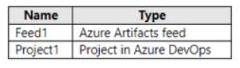
You have an Azure subscription that contains the resources shown in the following table.

Project1 produces 9pm packages that are published to Feed1. Feed1 is consumed by multiple projects.

You need to ensure that only tested packages are available for consumption. The solution must minimize development effort.

What should you do?

Correct Answer: C. Create a feed view named @release and set @release as the default view After the 9pm packages test successfully, configure a release pipeline that promotes a package to the @release view.
Explanation:

By creating a feed view named 'release' and setting it as the default view, packages that are published to the feed will not be immediately available for consumption. After the 9pm packages are tested successfully, you can configure a release pipeline that promotes a package to the @release view. This ensures that only tested packages are available for consumption and minimizes development effort as it doesn't require any additional steps to be taken by the consumer of the feed.


Azure DevOps Docs: Create a feed and views https://docs.microsoft.com/en-us/azure/devops/artifacts/feeds/create-feed?view=azure-devops

Azure DevOps Docs: Promote a package https://docs.microsoft.com/en-us/azure/devops/artifacts/feeds/promote-package?view=azure-devops

Question 10

Your company plans to use an agile approach to software development.

You need to recommend an application to provide communication between members of the development team who work in locations around the world. The applications must meet the following requirements:

Provide the ability to isolate the members of different project teams into separate communication channels and to keep a history of the chats within those channels.

Be available on Windows 10, Mac OS, iOS, and Android operating systems.

Provide the ability to add external contractors and suppliers to projects.

Integrate directly with Azure DevOps.

What should you recommend?

Correct Answer: D. Microsoft Teams
Explanation:

Within each team, users can create different channels to organize their communications by topic. Each channel can include a couple of users or scale to thousands of users.

Microsoft Teams works on Android, iOS, Mac and Windows systems and devices. It also works in Chrome, Firefox, Internet Explorer 11 and Microsoft Edge web browsers.

The guest-access feature in Microsoft Teams allows users to invite people outside their organizations to join internal channels for messaging, meetings and file sharing. This capability helps to facilitate business-to-business project management.

Teams integrates with Azure DevOps.


Question 11

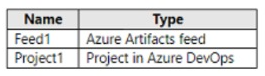
You have an Azure subscription that contains the resources shown in the following table.

Project1 produces 9pm packages that are published to Feed 1. Feed1 is consumed by multiple projects.

You need to ensure that only tested packages are available for consumption. The solution must minimize development effort.

What should you do?

Correct Answer: C. Create a feed view named @release and set @release as the default view. After the 9pm packages test successfully, configure a release pipeline that tags the packages as release.
Explanation:

To ensure only tested packages are available for consumption while minimizing development effort, you should configure views in Feed1. Azure Artifacts feeds support multiple views (Local, Prerelease, Release) that allow you to control which package versions are visible to consumers. By configuring a Release or Prerelease view and promoting only tested packages to that view, you ensure consumers only access verified packages without requiring significant additional development.

Question 12

SIMULATION

You manage a website that uses an Azure SQL Database named db1 in a resource group named RG1lod11566895.

You need tomodify the SQL database to protect against SQL injection.

To complete this task, sign in to the Microsoft Azure portal.

Correct Answer: A. See explanation below
Explanation:

Set up Advanced Threat Protection in the Azure portal

1. Sign into the Azure portal.

2.Navigate to the configuration page of the server you want to protect. In the security settings, select Advanced Data Security.

3. On the Advanced Data Security configuration page:

4. Enable Advanced Data Security on the server.

Note: Advanced Threat Protection for Azure SQL Database detects anomalous activities indicating unusual and potentially harmful attempts to access or exploit databases. Advanced Threat Protection can identify Potential SQL injection, Access from unusual location or data center,Access from unfamiliar principal or potentially harmful application, and Brute force SQL credentials


https://docs.microsoft.com/en-us/azure/storage/common/storage-account-create

https://docs.microsoft.com/en-us/azure/azure-sql/database/threat-detection-configure

Question 13

Note: This question is part of a series of questions that present the same scenario. Each question in the series contains a unique solution that might meet the stated goals. Some question sets might have more than one correct solution, while others might not have a correct solution.

After you answer a question in this section, you will NOT be able to return to it. As a result, these questions will not appear in the review screen.

You use Azure Pipelines to build and test a React.js application.

You have a pipeline that has a single job.

You discover that installing JavaScript packages from 9pm takes approximately five minutes each time you run the pipeline.

You need to recommend a solution to reduce the pipeline execution time.

Solution: You recommend using pipeline artifacts.

Does this meet the goal?

Correct Answer: B. No
Explanation:

Pipeline artifacts are a way to persist build outputs, test results, and other files generated during a pipeline run. They allow you to share data between stages, jobs, and pipelines, and to persist data for longer than the lifetime of a pipeline run. While artifacts can be useful for sharing data between pipeline runs and reducing the time required to download dependencies, they are not a solution for reducing the time required to install JavaScript packages from 9pm during a pipeline run.

The solution of reducing the pipeline execution time could be achieved by using package caching, which allows you to store and reuse 9pm packages from previous pipeline runs. There are several package caching options available for Azure Pipelines, including the 9pm task, the 9pm cache task, and the 9pm ci task. All of these options allow you to configure caching for your 9pm packages, which can significantly reduce the time required to install packages during subsequent pipeline runs.

Another solution could be using a dedicated agent that has those packages already installed, this way the pipeline doesn't have to install them again.

You can find more information on package caching by following this link https://docs.microsoft.com/en-us/azure/devops/pipelines/tasks/package/npm-cache?view=azure-devops


Question 14

Your company is building a new solution in Java.

The company currently uses a SonarQube server to analyze the code of .NET solutions.

You need to analyze and monitor the code quality of the Java solution.

Which task types should you add to the build pipeline?

Correct Answer: B. Gradle
Explanation:

SonarQube is a set of static analyzers that can be used to identify areas of improvement in your code. It allows you to analyze the technical debt in your project and keep track of it in the future. With Maven and Gradle build tasks, you can run SonarQube analysis with minimal setup in a new or existing Azure DevOps Services build task.


https://docs.microsoft.com/en-us/azure/devops/java/sonarqube?view=azure-devops

Question 15

You have a private distribution group that contains provisioned and unprovisioned devices.

You need to distribute a new iOS application to the distribution group by using Microsoft Visual Studio App Center.

What should you do?

Correct Answer: B. Register the devices on the Apple Developer portal.
Explanation:

When releasing an iOS app signed with an ad-hoc or development provisioning profile, you must obtain tester's device IDs (UDIDs), and add them to the provisioning profile before compiling a release. When you enable the distribution group's Automatically manage devices setting, App Center automates the before mentioned operations and removes the constraint for you to perform any manual tasks. As part of automating the workflow, you must provide the user name and password for your Apple ID and your production certificate in a .p12 format.

App Center starts the automated tasks when you distribute a new release or one of your testers registers a new device. First, all devices from the target distribution group will be registered, using your Apple ID, in your developer portal and all provisioning profiles used in the app will be generated with both new and existing device ID. Afterward, the newly generated provisioning profiles are downloaded to App Center servers.


https://docs.microsoft.com/en-us/appcenter/distribution/groups