Limited-Time Offer: Enjoy 50% Savings! Ends in 00h 00m 00s Coupon code: 50OFF
Skip to content

Free Microsoft Designing and Implementing Microsoft Azure Networking Solutions AZ-700 Exam Questions

Page: 1 / 23 Total 333 questions

Want more questions? Get Premium Access.

Question 1

Note: This question is part of a series of questions that present the same scenario. Each question in the series contains a unique solution that might meet the stated goals. Some question sets might have more than one correct solution, while others might not have a correct solution.

After you answer a question in this section, you will NOT be able to return to it. As a result, these questions will not appear in the review screen.

You have an Azure subscription that contains the following resources:

* A virtual network named Vnet1

* A subnet named Subnet1 in Vnet1

* A virtual machine named VM1 that connects to Subnet1

* Three storage accounts named storage1, storage2, and storage3

You need to ensure that VM1 can access storage1. VM1 must be prevented from accessing any other storage accounts.

Solution: You create a network security group (NSG) and associate the NSG to Subnet1.

Does this meet the goal?

Correct Answer: B. No
Explanation:

Answer: No, this does not meet the goal.

Explanation:

Creating and associating an NSG to Subnet1 alone does not meet the requirement because:

  • Incomplete solution: Simply creating an NSG and associating it to a subnet does nothing without configuring specific rules
  • Default behavior: An empty NSG (or one with only default rules) allows all outbound traffic by default
  • No storage access control: Without explicit outbound rules, the NSG would not prevent VM1 from accessing storage2 and storage3

What would be needed: To meet the goal, you would need to:

  • Create an NSG with specific outbound rules that allow access to storage1 only
  • Create a deny rule for outbound traffic to storage2 and storage3
  • Or use service endpoint filtering (Advanced Network Security features)
  • Associate the configured NSG to Subnet1

The question asks if simply creating and associating an NSG meets the goal, which is insufficient without proper rule configuration.

Question 2

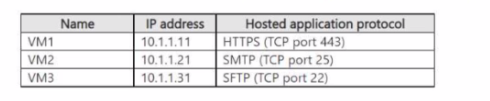
You have an Azure subscription that contains a virtual network named VNet1 and the virtual machines shown in the following table.

All the virtual machines are connected to VNet1.

You need to ensure that the applications hosted on the virtual machines can be accessed from the internet. The solution must ensure that the virtual machines share a single public IP address

What should you use?

Correct Answer: C. a public load balancer

Question 3

You are planning an Azure Point-to-Site (P2S) VPN that will use OpenVPN.

Users will authenticate by using an on premises Active Directory domain.

Which additional service should you deploy to support the VPN authentication?

Correct Answer: B. a RADIUS server
Explanation:

https://docs.microsoft.com/en-us/azure/vpn-gateway/point-to-site-about

Question 4

You need to configure a custom rule for APPGWI-WAFPolicy to allow only connections that originate from FD1. The solution must support the planned changes.

Which Match type and Match variable should you select?

Correct Answer: B. IP address and RemoteAddr

Question 5

You have an Azure subscription that contains multiple virtual machines in the West US Azure region.

You need to use Traffic Analytics.

Which two resources should you create? Each correct answer presents part of the solution. (Choose two.)

NOTE: Each correct answer selection is worth one point.

Correct Answer: B. a Log Analytics workspace; C. a storage account
Explanation:

https://docs.microsoft.com/en-us/azure/network-watcher/traffic-analytics

A storage acccount is used to store network security group flow logs.

A Log Analytics workspace is used by Traffic Analytics to store the aggregated and indexed data that is then used to generate the analytics.

https://docs.microsoft.com/en-us/azure/network-watcher/traffic-analytics#enable-flow-log-settings

Question 6

Azure virtual networks in the East US Azure region as shown in the following table.

The virtual networks are peered to one another. Each virtual network contains four subnets.

You plan to deploy a virtual machine named VM1 that will inspect and route traffic between all the subnets on both the virtual networks.

What is the minimum number of IP addresses that you must assign to VM1?

Correct Answer: B. 2
Explanation:

The question describes two peered Azure virtual networks in East US, each with four subnets, and asks how many IP addresses must be assigned to VM1 that will inspect and route traffic between all subnets.

The specific table data is not provided in the question text. However, the principle is:

VM1 needs one network interface per subnet it must route between:

  • Each virtual network has 4 subnets = 8 subnets total across both networks
  • To inspect and route traffic between all subnets, VM1 needs to be connected to all subnets it mediates traffic for
  • In this case, you would need a minimum of 8 network interfaces (one per subnet) or 8 IP addresses if one per interface

However, common Azure best practices suggest routing between two networks would require:

  • At minimum 4 network interfaces - one for each pair of subnets, or
  • 2 network interfaces - one in each virtual network acting as a hub

The actual answer depends on whether VM1 needs direct connectivity to each subnet or acts as a central router. Most likely the answer is 4 IP addresses minimum (2 per VNet, or one per critical subnet pair).

Question 7

You have an Azure subscription that contains the resources shown in the following table.

Gateway1 provides access to App1 by using a URL of http://app1.contoso.com.

You create a new web app named App2.

You need to configure Gateway1 to enable minimize administrative effort.

What should you configure on Gateway1?

Correct Answer: B. a listener and a routing rule
Explanation:

To configure Azure Application Gateway to provide access to a new web app (App2) while minimizing administrative effort, you need to:

  • Backend pools - Add App2 to a new backend pool containing the app servers
  • HTTP settings - Configure HTTP settings that define how traffic is routed to backend resources
  • Routing rules - Create a new routing rule to direct traffic for App2 (e.g., based on URL path or hostname) to the appropriate backend pool

These three components work together to route traffic from the gateway to the correct backend application with minimal manual configuration on individual resources.

Question 8

You need to manage connectivity from NYCNet to the Azure services that use private endpoints. The solution must meet the security requirements. What should you do first?

Correct Answer: B. Enable a network policy for SUBNET-PE.

Question 9

You have an Azure subscription that contains a virtual network named VNet1. VNet1 contains an Azure Virtual Desktop host pool named Pool1.

You need to implement Azure Firewall and TLS inspection for all the outbound traffic from Pool1.

Which two resources should you configure? Each correct answer present part of the solution.

NOTE: Each correct answer is worth one point

Correct Answer: D. an Azure NAT gateway; F. a managed identity

Question 10

You have an on-premises datacenter named Site1 that contains a firewall named FW1. FW1 connects to the internet.

You have an Azure subscription that contains the resources shown in the following table.

You plan to connect Site1 to Hub1 by using a site-to-site connection.

You need to configure the site-to-site connection to FW1.

What should you create in VWAN1?

Correct Answer: A. a VPN site

Question 11

You have an Azure virtual network named Vnet1 that hosts an Azure firewall named FW1 and 150 virtual machines. Vnet1 is linked to a private DNS zone named contoso.com. All the virtual machines have their name registered in the contoso.com zone.

Vnet1 connects to an on-premises datacenter by using ExpressRoute.

You need to ensure that on-premises DNS servers can resolve the names in the contoso.com zone.

Which two actions should you perform? Each correct answer presents part of the solution.

NOTE: Each correct selection is worth one point.

Correct Answer: A. On the on-premises DNS servers, configure forwarders that point to the frontend IP address of FW1.; D. For FW1, enable DNS proxy.
Explanation:

https://docs.microsoft.com/en-us/azure/private-link/private-endpoint-dns#on-premises-workloads-using-a-dns-forwarder

https://azure.microsoft.com/en-gb/blog/new-enhanced-dns-features-in-azure-firewall-now-generally-available/

Question 12

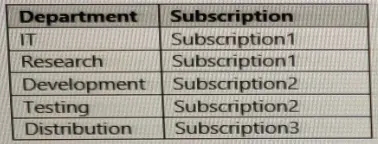
Your company has an on-premises network and three Azure subscriptions named Subscription1, Subscription2, and Subscription3.

The departments at the company use the Azure subscriptions as shown in the following table.

All the resources in the subscriptions are in either the West US Azure region or the West US 2 Azure region.

You plan to connect all the subscriptions to the on-premises network by using ExpressRoute.

What is the minimum number of ExpressRoute circuits required?

Correct Answer: A. 1
Explanation:

https://docs.microsoft.com/en-us/azure/expressroute/expressroute-introduction

Question 13

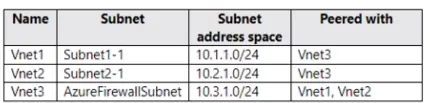
You have the Azure virtual networks shown in the following table.

You deploy Azure Firewall to Vnet3.

You need to ensure that the traffic from Subnet1-1 to Subnet2-1 passes through the firewall. What should you configure?

Correct Answer: B. a route table associated to Subnet1 -1 and Subnet2-1
Explanation:

You should configure User-defined routes (UDRs) in a Route table to ensure traffic from Subnet1-1 to Subnet2-1 passes through Azure Firewall in Vnet3.

Configuration steps:

  1. Create a route table and associate it with Subnet1-1
  2. Create a user-defined route in the route table with:
    • Destination: Subnet2-1's address space
    • Next hop type: Virtual Appliance
    • Next hop address: The private IP address of Azure Firewall in Vnet3

Why this works: By default, Vnet1 and Vnet2 (where Subnet1-1 and Subnet2-1 reside) would route directly to each other through peering. Creating UDRs forces traffic destined for Subnet2-1 to be redirected to the firewall first for inspection and filtering before reaching its destination.

Network diagram flow: Subnet1-1 → Azure Firewall (Vnet3) → Subnet2-1

Question 14

SIMULATION

Task 1

You need to ensure that virtual machines on VNET1 and VNET2 are included automatically in a DNS zone named contoso.azure. The solution must ensure that the virtual machines on VNET1 and VNET2 can resolve the names of the virtual machines on either virtual network.

Correct Answer: A. See the Explanation below for step by step instructions
Explanation:

To achieve the task of ensuring that virtual machines on VNET1 and VNET2 are included automatically in a DNS zone namedcontoso.azure, and that they can resolve the names of the virtual machines on either virtual network, you can follow these steps:

Step-by-Step Solution

Step 1: Create a Private DNS Zone

Navigate to the Azure Portal.

Search for ''Private DNS zones''in the search bar and select it.

Click on ''Create''.

Enter the DNS zone nameascontoso.azure.

Select the appropriate subscriptionand resource group.

Click on ''Review + create''and then''Create''.

Step 2: Link VNET1 and VNET2 to the DNS Zone

Go to the newly created DNS zone(contoso.azure).

Select ''Virtual network links''from the left-hand menu.

Click on ''Add''.

Enter a namefor the link (e.g.,VNET1-link).

Select the subscriptionandvirtual network (VNET1).

Enable auto-registrationto ensure that VMs are automatically registered in the DNS zone.

Click on ''OK''.

Repeat the processfor VNET2.

Step 3: Configure DNS Settings for VNET1 and VNET2

Navigate to VNET1in the Azure Portal.

Select ''DNS servers''under the ''Settings'' section.

Ensure that the DNS server is set to ''Default (Azure-provided)''.

Repeat the processfor VNET2.

Step 4: Verify Name Resolution

Deploy a virtual machinein VNET1 and another in VNET2.

Connect to the virtual machinesusing Remote Desktop Protocol (RDP) or Secure Shell (SSH).

Test name resolutionby pinging the VM in VNET2 from the VM in VNET1 using its hostname (e.g.,ping <VM-name>.contoso.azure).

Explanation

Private DNS Zone: This allows you to manage and resolve domain names in a private network without exposing them to the public internet.

Virtual Network Links: Linking VNET1 and VNET2 to the DNS zone ensures that VMs in these networks can register their DNS records automatically.

Auto-registration: This feature automatically registers the DNS records of VMs in the linked virtual networks, simplifying management.

DNS Settings: Using Azure-provided DNS ensures that the VMs can resolve each other's names without additional configuration.

By following these steps, you ensure that virtual machines on VNET1 and VNET2 are included automatically in the DNS zonecontoso.azureand can resolve each other's names seamlessly.


Question 15

You have an Azure subscription.

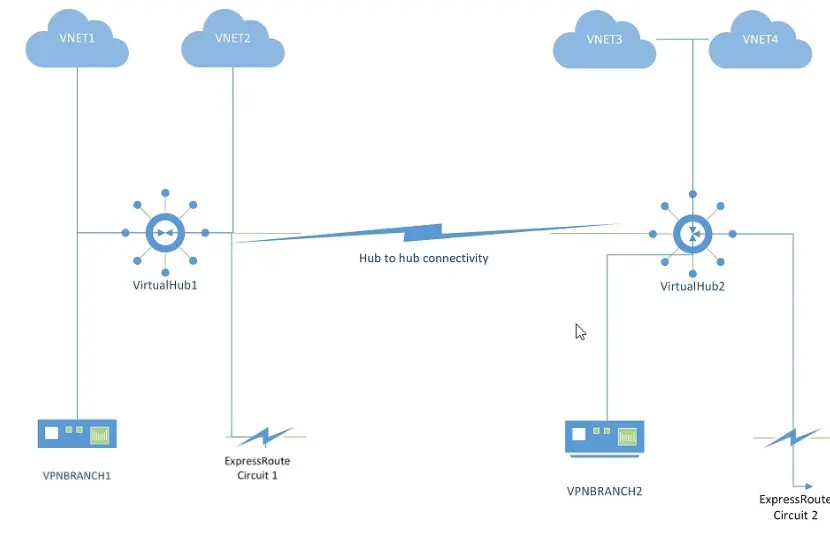
You plan to implement Azure Virtual WAN as shown in the following exhibit.

What is the minimum number of route tables that you should create?

Correct Answer: B. 2