
Limited-Time Offer: Enjoy 50% Savings! Ends in 00h 00m 00s Coupon code: 50OFF
Skip to content

Free Microsoft Administering Windows Server AZ-802 Exam Questions

Page: 1 / 34 Total 510 questions

Want more questions? Get Premium Access.

Question 1

You have an on-premises server named Server1 that runs Windows Server 2022 Standard. You have an Azure subscription that contains the virtual machines shown in the following table. The subscription contains a Microsoft Sentinel instance named Sentinel1 in the Central US Azure region. You need to implement the Windows Firewall connector. Which servers can send Windows Firewall logs to Sentinel1?

Azure virtual machines table

Correct Answer: D. VM1, VM2, and VM3 only
Explanation:

The Windows Firewall data connector for Microsoft Sentinel streams events using the Azure Monitor Agent together with a data collection rule that targets the Windows Firewall event log source. The Azure Monitor Agent officially supports Windows Server 2016, Windows Server 2019, and Windows Server 2022, including the Azure Edition, so VM1, running Windows Server 2022 Datacenter: Azure Edition, VM2, running Windows Server 2019 Datacenter, and VM3, running Windows Server 2016 Datacenter, are all eligible on the operating-system front. Because all three are already Azure virtual machines, the Azure Monitor Agent extension can be deployed to each of them directly as a native Azure VM extension, with no additional onboarding required. Server1, in contrast, is an on-premises, non-Azure server, and the Azure Monitor Agent can only be deployed to a non-Azure machine once it has been onboarded as an Azure Arc-enabled server; since Server1 has not been connected to Azure Arc in this scenario, there is no supported path for it to run the agent or be targeted by a data collection rule, so it cannot forward Windows Firewall logs to Sentinel1 yet. This makes VM1, VM2, and VM3 only the correct set of servers that can currently send Windows Firewall logs to Sentinel1.
Question 2

Your network contains an Active Directory Domain Services (AD DS) domain named contoso.com. The domain contains two servers named Server1 and Server2. Server1 contains a disk named Disk2. Disk2 contains a folder named UserDat

a. UserData is shared to the Domain Users group. Disk2 is configured for deduplication. Server1 is protected by using Azure Backup. Server1 fails. You connect Disk2 to Server2. You need to ensure that you can access all the files on Disk2 as quickly as possible. What should you do?

Correct Answer: D. Install the Data Deduplication server role.
Explanation:

When a volume has Data Deduplication enabled, the files it contains are not stored as ordinary contiguous data; unique data chunks are stored once in a chunk store and files are represented as reparse points that reference those chunks, with a filter driver reconstructing the original file content on the fly whenever it is opened. That reconstruction only works on a server where the Data Deduplication feature (and its filter driver) is installed; without it, the operating system cannot correctly interpret the deduplicated reparse points, and files can appear zero-byte, corrupted, or simply inaccessible even though the underlying chunk data is intact on the disk. Because Disk2 was deduplicated on Server1 and has now been physically connected to Server2, the fastest path to full, correct access to every file on Disk2 is to install the Data Deduplication server role/feature on Server2, after which Windows recognizes and properly serves the deduplicated volume exactly as it did on Server1 --- no data movement or restore is required, since the data itself already arrived with the disk. Creating a storage pool is unrelated to reading an existing, already-provisioned basic or dynamic disk's deduplicated content. Restoring files from Azure Backup would work eventually but is far slower than simply reading the disk that is already physically attached and intact. Installing the File Server Resource Manager role manages quotas and file classification and has no bearing on the ability to read deduplicated data.


Question 3

Note: This question is part of a series of questions that present the same scenario. Each question in the series contains a unique solution that might meet the stated goals. Some question sets might have more than one correct solution, while others might not have a correct solution. After you answer a question in this section, you will NOT be able to return to it. As a result, these questions will not appear in the review screen. Your network contains a single-domain Active Directory Domain Services (AD DS) forest named contoso.com. The functional level of the forest is Windows Server 2012 R2. All domain controllers run Windows Server 2012 R2. Sysvol replicates by using the File Replication Service (FRS). You plan to replace the existing domain controllers with new domain controllers that will run Windows Server 2022. You need to ensure that you can add the first domain controller that runs Windows Server 2022. Solution: You migrate sysvol from FRS to Distributed File System (DFS) Replication. Does this meet the goal?

Correct Answer: A. Yes
Explanation:

Beginning with Windows Server 2016, the File Replication Service binaries are no longer included in the operating system at all, so a domain controller running Windows Server 2016 or later -- including Windows Server 2022 -- cannot be promoted into a domain whose SYSVOL is still replicated using FRS; the promotion process itself checks for and blocks on this condition. Migrating SYSVOL replication from FRS to DFS Replication removes this exact blocker and is the documented, required prerequisite before introducing any Windows Server 2016, 2019, 2022, or 2025 domain controller into an environment that originally started on FRS-based SYSVOL replication. The migration itself progresses through a defined set of states -- Start, Prepared, Redirected, and finally Eliminated -- and once it reaches the Eliminated state, SYSVOL is fully served by DFS Replication and the FRS dependency is gone. At that point, the first Windows Server 2022 domain controller can be added to the forest successfully, so migrating SYSVOL to DFS Replication does meet the stated goal.


Question 4

You have a Windows Server failover cluster (WSFC) named Cluster1 that has two nodes and uses Storage Spaces Direct. The nodes contain a non-primordial storage pool named Pool1. Pool1 is read-only and contains no virtual disks. You delete Cluster1 and redeploy the cluster by using the same nodes. During the redeployment, Windows Admin Center reports a storage error. You need to remove the stale storage configuration so that the disks can be reused for the redeployment. Which two actions should you perform? Each correct answer presents part of the solution.

Correct Answer: B. Remove Pool1.; E. Reset the physical disks in Pool1.
Explanation:

When a Storage Spaces Direct cluster is deleted and the underlying physical disks still carry a leftover, now-orphaned storage pool from the previous deployment, Windows Admin Center and Server Manager reports a storage error because the redeployment process expects to find raw, unclaimed disks rather than disks that already belong to a read-only, non-primordial pool with no valid virtual disks in it. Removing Pool1 clears out that stale pool object and its metadata so the disks are no longer associated with a defunct storage pool. Resetting the physical disks in Pool1 goes a step further by wiping the disk-level Storage Spaces Direct metadata (partition tables, pool membership records, and cache/journal reservations) directly from each physical disk, which is necessary because simply removing the pool object does not always clear every low-level artifact that the new S2D deployment's disk-eligibility checks scan for. Together, removing the pool and resetting the physical disks fully clear the stale configuration so the disks present as clean, eligible candidates for the new deployment. Making Pool1 writable would only allow administrative changes to a pool that needs to be removed entirely, not repaired. Creating a new storage pool from the same disks while the stale pool and its metadata still exist would fail or simply recreate the same conflict. Clearing the cluster configuration from each node addresses cluster membership, not the disk-level storage metadata causing the reported storage error.


Question 5

Note: This question is part of a series of questions that present the same scenario. Each question in the series contains a unique solution that might meet the stated goals. After you answer a question in this section, you will NOT be able to return to it. Your network contains an Active Directory Domain Services (AD DS) domain named contoso.com. You need to identify which server is the PDC emulator for the domain. Solution: From Active Directory Domains and Trusts, you right-click Active Directory Domains and Trusts in the console tree, and then select Operations Master. Does this meet the goal?

Correct Answer: B. No
Explanation:

Each Active Directory MMC snap-in only exposes the specific FSMO role or roles that fall within its area of responsibility. Active Directory Domains and Trusts manages forest-level trust relationships and domain/forest functional levels, and the single Operations Master dialog it provides --- reached by right-clicking the root node of the console --- shows only the Domain Naming Master, which is a forest-wide role responsible for adding or removing domains from the forest. It does not show the PDC Emulator, the RID Master, or the Infrastructure Master, all of which are domain-wide roles surfaced instead through Active Directory Users and Computers by right-clicking the domain object and selecting Operations Masters, then viewing the PDC tab specifically. Because the proposed action opens the Operations Master dialog from Active Directory Domains and Trusts rather than from Active Directory Users and Computers, it will report only the Domain Naming Master and gives no information about who holds the PDC Emulator role. Since the stated goal is specifically to identify the PDC Emulator, and this console cannot show that role under any circumstance, the solution does not meet the goal.


Question 6

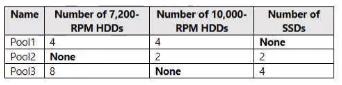
You have a server named Server1 that runs Windows Server. Server1 has the storage pools shown in the following table. You plan to create a virtual disk named VDisk1 that will use storage tiers. Which pools can you use to create VDisk1?

Storage pools on Server1

Correct Answer: A. Pool2 and Pool3 only
Explanation:

Storage tiers require a storage pool to contain physical disks of at least two distinct media types, typically SSD and HDD, because a tiered virtual disk places frequently accessed data on the faster tier (SSD) and less-active data on the slower tier (HDD); Storage Spaces classifies disks by MediaType as HDD, SSD, or SCM, and rotational speed alone (such as 7,200 RPM versus 10,000 RPM) does not create a separate media type --- both speeds are still classified simply as HDD. Pool1 contains only 7,200 RPM and 10,000 RPM HDDs and no SSDs at all, so despite having two different physical disk speeds, it has only one media type present and cannot support storage tiers. Pool2 contains 10,000 RPM HDDs together with SSDs, giving it the two distinct media types (HDD and SSD) that tiering requires, so it qualifies. Pool3 contains 7,200 RPM HDDs together with SSDs, which likewise gives it both an HDD and an SSD tier, so it also qualifies. Because tiered virtual disks need both a performance tier and a capacity tier represented by different media types, only Pool2 and Pool3 meet the requirement, and Pool1 does not, making option A correct.


Question 7

You have an on-premises Active Directory Domain Services (AD DS) domain that syncs with a Microsoft Entra ID tenant. Group writeback is enabled in Microsoft Entra Connect. The AD DS domain contains a server named Server1. Server1 contains a shared folder named share1. You have an Azure Storage account named storage2 that uses Microsoft Entra ID-based access control. The storage2 account contains a share named share2. You need to create a security group that meets the following requirements: can contain users from the AD DS domain; can be used to authorize user access to share1 and share2. What should you do?

Correct Answer: B. In the Microsoft Entra tenant, create a security group that has assigned membership.
Explanation:

Azure Files' Microsoft Entra ID Kerberos authentication for a storage account share currently requires that the security group placed on the share's access control list be a Microsoft Entra security group with assigned membership; groups with dynamic membership rules are not supported for this purpose, and a Microsoft 365 group is a different kind of object that is likewise not a supported security principal for this access-control scenario. Creating the group in the Microsoft Entra tenant as a standard security group with assigned membership therefore satisfies the share2 requirement directly. Because Group writeback is already enabled in Microsoft Entra Connect, a cloud-created Microsoft Entra security group (with assigned, not dynamic, membership --- writeback also does not support dynamic groups) is written back down into the on-premises AD DS domain as a corresponding group object, which is what allows it to be used in an NTFS or share permission entry on share1 and to contain (or be evaluated against) users whose accounts live in the on-premises AD DS domain. Creating the group directly in the on-premises AD DS domain (option A) would satisfy share1 but would not automatically exist as a Microsoft Entra security group usable for storage2's Entra-ID-based access control unless synced up, which is not how writeback operates (writeback is one-directional, cloud to on-premises). Creating the group in the Entra tenant with assigned membership is therefore the single action that satisfies both requirements.


Question 8

Your network contains an Active Directory Domain Services (AD DS) domain. The domain contains a server named Server1 that runs Windows Server 2025. All domain controllers run Windows Server 2019. The domain contains a user named User1. You need to ensure that User1 can promote Server1 to a domain controller. The solution must follow the principle of least privilege. Which groups should User1 be a member of?

Correct Answer: D. Domain Admins, Enterprise Admins, and Schema Admins
Explanation:

Because Server1 runs Windows Server 2025 and every existing domain controller runs Windows Server 2019, promoting Server1 requires the AD DS schema to be extended to the Windows Server 2025 version --- a step (adprep /forestprep) that the Active Directory Domain Services Configuration Wizard runs automatically on your behalf, but only if the account performing the promotion has sufficient rights to do so. Microsoft documents that running adprep /forestprep requires membership in Schema Admins, Enterprise Admins, and Domain Admins of the domain that hosts the schema master, while adprep /domainprep needs only Domain Admins. Since the forest-wide schema extension is unavoidable in this scenario, User1 needs all three group memberships --- Domain Admins, Enterprise Admins, and Schema Admins --- to be able to promote Server1, which represents the least-privilege set of rights that still allows the promotion to succeed without a separate administrator pre-running adprep manually before User1's promotion attempt.


Question 9

Your network contains an Active Directory Domain Services (AD DS) domain that has a Windows Server 2016 forest functional level. The domain contains a domain controller named DC1. You are troubleshooting SYSVOL replication issues on DC1. You need to stop the service responsible for SYSVOL replication. Which service should you stop?

Correct Answer: A. DFS Replication
Explanation:

Once a domain has moved beyond the legacy File Replication Service, which is mandatory well before a domain can reach a Windows Server 2016 forest functional level, since FRS-based SYSVOL replication was deprecated and migration to DFSR-based SYSVOL is required at much lower functional levels, SYSVOL contents such as Group Policy Objects and logon scripts are kept synchronized across domain controllers by the DFS Replication service instead. Stopping the DFS Replication service specifically on DC1 halts SYSVOL replication on that domain controller, so GPOs and logon scripts stored there stop pulling updates from, or pushing updates to, its replication partners, which is exactly the intended and reversible action for isolating or troubleshooting a suspected SYSVOL replication problem without shutting the domain controller down entirely. DS Role Server is not an actual Windows service name relevant here, and the Background Intelligent Transfer Service handles unrelated background download throttling for things like Windows Update, so neither one plays any part in SYSVOL replication. The File Replication Service itself is also not the correct answer, since it is no longer the service used once the domain has already been migrated to DFSR-based SYSVOL replication at this functional level.


Question 10

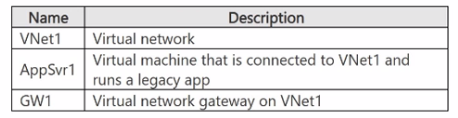
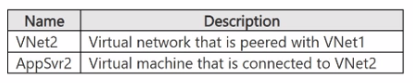
You have a user named User1 and the resources shown in the following table. User1 has a computer named Computer1 that runs Windows 11. User1 works from home and establishes a Point-to-Site (P2S) connection to GW1 to access AppSvr1. You deploy the resources shown in the following table. User1 cannot access AppSvr2. You need to ensure that User1 can access AppSvr2. What should you do? (Exhibits: resource tables for VNet1/AppSvr1/GW1 and the peered VNet2/AppSvr2.)

VNet1, AppSvr1, and GW1

VNet2 (peered) and AppSvr2

Correct Answer: C. On Computer1, download and reinstall the VPN client.
Explanation:

A point-to-site VPN client profile embeds the address-space routes that existed in Azure at the moment the profile was generated and downloaded onto Computer1. When VNet2, hosting AppSvr2, is peered with VNet1 after User1's VPN client profile was already configured and downloaded, the previously issued profile has no route entry for VNet2's address space baked into it, so traffic aimed at AppSvr2 never gets forwarded across the existing tunnel even though the VNet peering itself is fully established and healthy on the Azure side. Microsoft's documented point-to-site troubleshooting guidance for exactly this symptom is to, if needed, reset the gateway and then download and reinstall the VPN client on the affected computer so it picks up a refreshed profile that includes routes for the newly peered network, which restores connectivity to AppSvr2 without requiring any changes to the peering configuration itself, to network security groups, or to Computer1's local Windows Defender Firewall settings. Creating a route table on GatewaySubnet or adding a service endpoint to VNet2 would not address a client-side profile that is simply missing the newly peered address space, since the routing problem in this case lives in the already-downloaded client configuration rather than in Azure's own routing tables.


Question 11

Your network contains an Active Directory Domain Services (AD DS) domain. The domain contains a server named Server1. On Server1, you install Windows Admin Center and use Windows Admin Center to remove BUILTIN\Users from the allowed groups. You discover that all users can still sign in to Windows Admin Center. You need to prevent unauthorized users from signing in to Windows Admin Center. What should you do in Windows Admin Center?

Correct Answer: D. Add a security group to the allowed groups.
Explanation:

Windows Admin Center's gateway access control (the 'allowed groups'/gateway users list) only actively restricts sign-in once it contains at least one entry; when that list is left empty -- as happens here after BUILTIN\Users was removed without anything being added in its place -- Windows Admin Center falls back to allowing any authenticated user to sign in, rather than denying everyone. This is a well-documented behavior and the reason removing the sole existing entry does not lock anyone out: with no groups configured, no restriction is actually enforced. The fix is to add a specific security group (containing only the intended administrators) to the allowed groups list, which populates it with at least one entry and causes Windows Admin Center to begin enforcing that only members of the listed group(s) can sign in. Setting Performance Profile to On only affects Windows Admin Center's resource-usage/monitoring behavior and has no bearing on sign-in authorization. 'Require re-authentication for manage-as sessions' only affects how often a user must re-enter alternate credentials when using the manage-as feature for a connection, not who can sign in to the gateway itself. Configuring a proxy bypass list only affects how Windows Admin Center reaches external endpoints through an outbound proxy and is unrelated to gateway sign-in authorization. Therefore, adding a security group to the allowed groups is the correct action to actually enforce access restriction.


Question 12

You have two Azure virtual networks named Vnet1 and Vnet2. You have a Windows 10 device named Client1 that connects to Vnet1 by using a Point-to-Site (P2S) IKEv2 VPN. You implement virtual network peering between Vnet1 and Vnet2. Vnet1 allows gateway transit; Vnet2 uses the remote gateway. You discover that Client1 cannot communicate with Vnet2. You need to ensure that Client1 can communicate with Vnet2. Solution: You enable BGP on the gateway of Vnet1. Does this meet the goal?

Correct Answer: B. No
Explanation:

Enabling BGP on the Vnet1 gateway does not address why Client1 cannot reach Vnet2. Route propagation to a P2S client over a peered virtual network with gateway transit already occurs once the peering and gateway-transit settings are configured; BGP is only needed for more advanced dynamic-routing scenarios, such as multi-hop transitive routing or exchanging routes with an on-premises network, not for a basic P2S client to learn routes into a peered virtual network. The actual missing step in this scenario is that Client1's VPN client configuration package must be re-downloaded and reinstalled so that the client picks up the new routes that became available once the peering and gateway transit were configured. Because Client1 was already connected before the peering was established, its existing configuration package does not contain the routing information needed to reach Vnet2, and no amount of gateway-side BGP configuration changes that fact for an already-provisioned client package. Since enabling BGP does not resolve the underlying cause of the connectivity failure, this solution does not meet the stated goal.


Question 13

You have an on-premises Active Directory Domain Services (AD DS) domain named contoso.com that syncs with Microsoft Entra ID by using Microsoft Entra Connect. You enable password protection for contoso.com. You need to prevent users from including the word Contoso as part of their password. What should you use?

Correct Answer: A. the Microsoft Entra admin center
Explanation:

Microsoft Entra Password Protection lets an organization extend the global banned-password list with a custom banned-password list containing organization-specific terms, such as a company name, product names, or local landmarks. For an on-premises AD DS domain, the custom banned-password list itself is still authored and managed centrally in the cloud, in the Microsoft Entra admin center, under Protect & Secure > Authentication methods > Password protection. Once configured there, the list is downloaded and cached by the Microsoft Entra Password Protection DC agents running on the domain's writable domain controllers, which enforce the policy locally against password set and change operations, even though the domain itself is on-premises. Active Directory Users and Computers has no interface for managing banned-password lists; it only manages AD objects such as users, groups, and OUs. Synchronization Service Manager is the on-premises troubleshooting console for the Microsoft Entra Connect sync engine and has no role in password policy configuration. Windows Admin Center is a management gateway for Windows Server infrastructure (roles, features, storage, and so on) and likewise does not expose password-protection policy settings. Therefore, to add 'Contoso' to the custom banned-password list and have it enforced across the domain, an administrator must sign in to the Microsoft Entra admin center and configure the custom banned-password list there, letting the on-premises DC agents pick up and apply the updated list.


Question 14

Your network contains an Active Directory Domain Services (AD DS) domain. The domain contains two servers named Server1 and Server2 that run Windows Server. You need to ensure that you can use the Computer Management console to manage Server2. The solution must use the principle of least privilege. Which two Windows Defender Firewall with Advanced Security rules should you enable on Server2? Each correct answer presents part of the solution. NOTE: Each correct selection is worth one point.

Correct Answer: A. the COM+ Network Access (DCOM-In) rule; B. all the rules in the Remote Event Log Management group
Explanation:

Establishing a remote Computer Management console session relies on DCOM to make the initial connection to the target computer, so the COM+ Network Access (DCOM-In) firewall rule must be enabled on Server2 to allow that initial DCOM connection through. Separately, enabling the full Remote Event Log Management rule group -- which opens the RPC endpoint mapper port, a fixed RPC port, and the associated named pipe -- is documented by Microsoft as sufficient to let most of the Computer Management console's sub-snap-ins (Shared Folders, Local Users and Groups, Device Manager, and others) connect successfully even though they lack a dedicated firewall rule group of their own. Enabling only these two rule groups therefore lets the console connect end-to-end while opening the fewest possible firewall rules, consistent with least privilege, rather than enabling broader rule groups such as the full Windows Management Instrumentation (WMI) group or the full COM+ Remote Administration group, both of which open considerably more surface area than is actually needed for this task. Therefore, the COM+ Network Access (DCOM-In) rule and the Remote Event Log Management rule group are the two correct answers.


Question 15

Your on-premises network contains an Active Directory domain named contoso.com. You have a Microsoft Entra ID tenant. You plan to sync contoso.com with the Microsoft Entra ID tenant by using Microsoft Entra Connect cloud sync. You need to create an account that will be used by Microsoft Entra Connect cloud sync. Which type of account should you create?

Correct Answer: B. group managed service account (gMSA)
Explanation:

Microsoft Entra Connect cloud sync uses a lightweight, on-premises provisioning agent to read directory data from AD DS and send it to the cloud provisioning service, rather than running the full, stateful sync engine that classic Microsoft Entra Connect (Connect Sync) uses. To authenticate and run its scheduled synchronization tasks without an administrator having to manage or periodically reset a password, the cloud provisioning agent is designed to run as a group managed service account, which Microsoft's setup process creates and configures automatically (or which can be pre-created for delegated/least-privilege scenarios) as part of enabling cloud sync. A group managed service account provides the automatic, periodically rotated password management that makes it suitable for a scheduled, unattended service like the provisioning agent, without exposing a static credential. A standard user account would require ongoing password management and does not offer the same automatic credential rotation or protection against interactive misuse. A system-assigned managed identity is an Azure resource identity mechanism used by Azure services calling other Azure services and has no role in an on-premises Windows agent authenticating to on-premises AD DS. An InetOrgPerson object is an alternate user-object class mainly used for compatibility with non-Windows LDAP directories and is not what the cloud sync provisioning agent uses. A group managed service account is therefore the correct account type.